总的
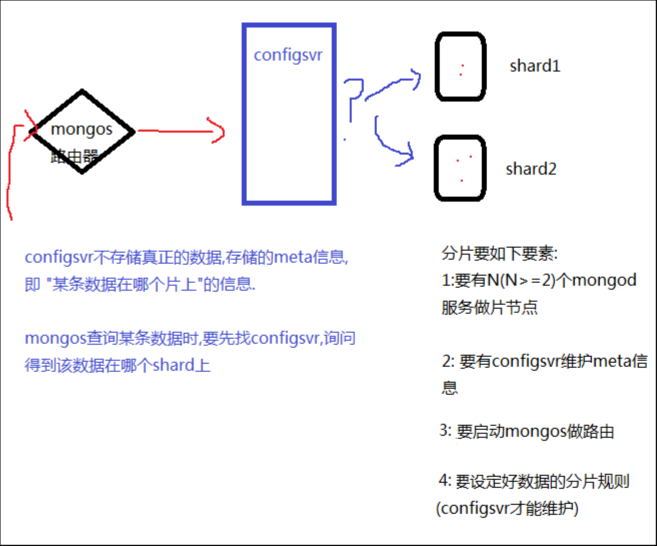
1:在3台独立服务器上,分别运行 27017,27018,27019实例, 互为副本集,形成3套repl set2: 在3台服务器上,各配置config server, 运行27020端口上3: 配置mongos./bin/mongos --port 30000 \ --dbconfig 192.168.1.201:27020,192.168.1.202:27020,192.168.1.203:270204:连接路由器./bin/mongo --port 300005: 添加repl set为片>sh.addShard(‘192.168.1.201:27017’);>sh.addShard(‘192.168.1.203:27017’);>sh.addShard(‘192.168.1.203:27017’);6: 添加待分片的库>sh.enableSharding(databaseName);7: 添加待分片的表>sh.shardCollection(‘dbName.collectionName’,{field:1});Field是collection的一个字段,系统将会利用filed的值,来计算应该分到哪一个片上.这个filed叫”片键”, shard keymongodb不是从单篇文档的级别,绝对平均的散落在各个片上, 而是N篇文档,形成一个块"chunk",优先放在某个片上, 当这片上的chunk,比另一个片的chunk,区别比较大时, (>=3) ,会把本片上的chunk,移到另一个片上, 以chunk为单位,维护片之间的数据均衡问: 为什么插入了10万条数据,才2个chunk?答: 说明chunk比较大(默认是64M)在config数据库中,修改chunksize的值.问: 既然优先往某个片上插入,当chunk失衡时,再移动chunk,自然,随着数据的增多,shard的实例之间,有chunk来回移动的现象,这将带来什么问题?答: 服务器之间IO的增加, 接上问: 能否我定义一个规则, 某N条数据形成1个块,预告分配M个chunk,M个chunk预告分配在不同片上. 以后的数据直接入各自预分配好的chunk,不再来回移动?答: 能, 手动预先分片!以shop.user表为例1: sh.shardCollection(‘shop.user’,{userid:1}); //user表用userid做shard key2: for(var i=1;i<=40;i++) { sh.splitAt('shop.user',{userid:i*1000}) } // 预先在1K 2K...40K这样的界限切好chunk(虽然chunk是空的), 这些chunk将会均匀移动到各片上.3: 通过mongos添加user数据. 数据会添加到预先分配好的chunk上, chunk就不会来回移动了.分片
部署使用分片的mongodb集群
var rsconf = { _id:'rs2', members: [ {_id:0, host:'10.0.0.11:27017' }, {_id:1, host:'10.0.0.11:27018' }, {_id:2, host:'10.0.0.11:27020' } ] }mongod --dbpath /mongodb/m17 --logpath /mongodb/mlog/m17.log --fork --port 27017 --smallfilesmongod --dbpath /mongodb/m18 --logpath /mongodb/mlog/m18.log --fork --port 27018 --smallfilesmongod --dbpath /mongodb/m20 --logpath /mongodb/mlog/m20.log --fork --port 27020 --configsvr需要有一个配置数据库服务,存储元数据用,使用参数--configsvrmongos --logpath /mongodb/mlog/m30.log --port 30000 --configdb 10.0.0.11:27020 --forkmongos需要指定配置数据库,[mongod@mcw01 ~]$ mongod --dbpath /mongodb/m17 --logpath /mongodb/mlog/m17.log --fork --port 27017 --smallfilesabout to fork child process, waiting until server is ready for connections.forked process: 18608child process started successfully, parent exiting[mongod@mcw01 ~]$ mongod --dbpath /mongodb/m18 --logpath /mongodb/mlog/m18.log --fork --port 27018 --smallfilesabout to fork child process, waiting until server is ready for connections.forked process: 18627child process started successfully, parent exiting[mongod@mcw01 ~]$ mongod --dbpath /mongodb/m20 --logpath /mongodb/mlog/m20.log --fork --port 27020 --configsvrabout to fork child process, waiting until server is ready for connections.forked process: 18646child process started successfully, parent exiting[mongod@mcw01 ~]$ mongos --logpath /mongodb/mlog/m30.log --port 30000 --configdb 10.0.0.11:27020 --fork2022-03-05T00:26:41.452+0800 W SHARDING [main] Running a sharded cluster with fewer than 3 config servers should only be done for testing purposes and is not recommended for production.about to fork child process, waiting until server is ready for connections.forked process: 18667child process started successfully, parent exiting[mongod@mcw01 ~]$ ps -ef|grep -v grep |grep mongoroot 16595 16566 0 Mar04 pts/0 00:00:00 su - mongodmongod 16596 16595 0 Mar04 pts/0 00:00:03 -bashroot 17669 17593 0 Mar04 pts/1 00:00:00 su - mongodmongod 17670 17669 0 Mar04 pts/1 00:00:00 -bashroot 17735 17715 0 Mar04 pts/2 00:00:00 su - mongodmongod 17736 17735 0 Mar04 pts/2 00:00:00 -bashmongod 18608 1 0 00:26 ? 00:00:03 mongod --dbpath /mongodb/m17 --logpath /mongodb/mlog/m17.log --fork --port 27017 --smallfilesmongod 18627 1 0 00:26 ? 00:00:03 mongod --dbpath /mongodb/m18 --logpath /mongodb/mlog/m18.log --fork --port 27018 --smallfilesmongod 18646 1 0 00:26 ? 00:00:04 mongod --dbpath /mongodb/m20 --logpath /mongodb/mlog/m20.log --fork --port 27020 --configsvrmongod 18667 1 0 00:26 ? 00:00:01 mongos --logpath /mongodb/mlog/m30.log --port 30000 --configdb 10.0.0.11:27020 --forkmongod 18698 16596 0 00:36 pts/0 00:00:00 ps -ef[mongod@mcw01 ~]$ 现在configsvr和mongos绑在一块了,但是和后面的两个mongodb分片还没有关系。下面需要连接mongos,给它增加两个shard(片节点)。[mongod@mcw01 ~]$ mongo --port 30000MongoDB shell version: 3.2.8connecting to: 127.0.0.1:30000/testmongos> show dbs;config 0.000GBmongos> use config;switched to db configmongos> show tables; #查看mongos中有的表chunkslockpingslocksmongossettingsshardstagsversionmongos> mongos> bye[mongod@mcw01 ~]$ mongo --port 30000MongoDB shell version: 3.2.8connecting to: 127.0.0.1:30000/testmongos> sh.addShard('10.0.0.11:27017'); #添加两个shard{ "shardAdded" : "shard0000", "ok" : 1 }mongos> sh.addShard('10.0.0.11:27018');{ "shardAdded" : "shard0001", "ok" : 1 }mongos> sh.status() #查看shard状况--- Sharding Status --- sharding version: { "_id" : 1, "minCompatibleVersion" : 5, "currentVersion" : 6, "clusterId" : ObjectId("62223dc1dd5791b451d9b441")} shards: { "_id" : "shard0000", "host" : "10.0.0.11:27017" } #可以看到有两个shard, { "_id" : "shard0001", "host" : "10.0.0.11:27018" } #这两个片已经加到configsvr里了 active mongoses: "3.2.8" : 1 balancer: Currently enabled: yes Currently running: no Failed balancer rounds in last 5 attempts: 0 Migration Results for the last 24 hours: No recent migrations databases:mongos> mongos> use testswitched to db testmongos> db.stu.insert({name:'poly'}); #现在在mongos上创建四条数据。可以查询到WriteResult({ "nInserted" : 1 })mongos> db.stu.insert({name:'lily'});WriteResult({ "nInserted" : 1 })mongos> db.stu.insert({name:'hmm'});WriteResult({ "nInserted" : 1 })mongos> db.stu.insert({name:'lucy'});WriteResult({ "nInserted" : 1 })mongos> db.stu.find();{ "_id" : ObjectId("6222427bc425e356ae71d452"), "name" : "poly" }{ "_id" : ObjectId("62224282c425e356ae71d453"), "name" : "lily" }{ "_id" : ObjectId("62224287c425e356ae71d454"), "name" : "hmm" }{ "_id" : ObjectId("6222428dc425e356ae71d455"), "name" : "lucy" }mongos> 此时我在27017上能看到[mongod@mcw01 ~]$ mongo --port 27017.......> show dbs;local 0.000GBtest 0.000GB> use test;switched to db test> db.stu.find();{ "_id" : ObjectId("6222427bc425e356ae71d452"), "name" : "poly" }{ "_id" : ObjectId("62224282c425e356ae71d453"), "name" : "lily" }{ "_id" : ObjectId("62224287c425e356ae71d454"), "name" : "hmm" }{ "_id" : ObjectId("6222428dc425e356ae71d455"), "name" : "lucy" }> 但是在27018上查不到数据[mongod@mcw01 ~]$ mongo --port 27018.......> show dbs;local 0.000GB> 没有设定数据的分片规则。下面我们进入mongos查看分片情况mongos> sh.status();--- Sharding Status --- sharding version: { "_id" : 1, "minCompatibleVersion" : 5, "currentVersion" : 6, "clusterId" : ObjectId("62223dc1dd5791b451d9b441")} shards: { "_id" : "shard0000", "host" : "10.0.0.11:27017" } { "_id" : "shard0001", "host" : "10.0.0.11:27018" } active mongoses: "3.2.8" : 1 balancer: Currently enabled: yes Currently running: no Failed balancer rounds in last 5 attempts: 0 Migration Results for the last 24 hours: No recent migrations databases: { "_id" : "test", "primary" : "shard0000", "partitioned" : false }mongos> #如上可以看到,test库分区(partitioned)是false,没有分片,就默认首选放到主上的分片shard0000给库开启分片
如下:shop是不存在的库。给shop开启分片。可看到是true了,且优先放到shard0001上,但是这还不完善mongos> show dbs;config 0.000GBtest 0.000GBmongos> sh.enablesh.enableBalancing( sh.enableSharding(mongos> sh.enableSharding('shop');{ "ok" : 1 }mongos> sh.status();--- Sharding Status --- sharding version: { "_id" : 1, "minCompatibleVersion" : 5, "currentVersion" : 6, "clusterId" : ObjectId("62223dc1dd5791b451d9b441")} shards: { "_id" : "shard0000", "host" : "10.0.0.11:27017" } { "_id" : "shard0001", "host" : "10.0.0.11:27018" } active mongoses: "3.2.8" : 1 balancer: Currently enabled: yes Currently running: no Failed balancer rounds in last 5 attempts: 0 Migration Results for the last 24 hours: No recent migrations databases: { "_id" : "test", "primary" : "shard0000", "partitioned" : false } { "_id" : "shop", "primary" : "shard0001", "partitioned" : true }mongos> 指定db下那个表(集合)做分片,指定分片依据那个字段
mongos> sh.shardCollection('shop.goods',{goods_id:1});{ "collectionsharded" : "shop.goods", "ok" : 1 }mongos> sh.status();--- Sharding Status --- sharding version: { "_id" : 1, "minCompatibleVersion" : 5, "currentVersion" : 6, "clusterId" : ObjectId("62223dc1dd5791b451d9b441")} shards: { "_id" : "shard0000", "host" : "10.0.0.11:27017" } { "_id" : "shard0001", "host" : "10.0.0.11:27018" } active mongoses: "3.2.8" : 1 balancer: Currently enabled: yes Currently running: no Failed balancer rounds in last 5 attempts: 0 Migration Results for the last 24 hours: No recent migrations databases: { "_id" : "test", "primary" : "shard0000", "partitioned" : false } { "_id" : "shop", "primary" : "shard0001", "partitioned" : true } shop.goods #shop库下的goods需要分片。 shard key: { "goods_id" : 1 } #分片键是这个字段 unique: false balancing: true chunks: shard0001 1 #chunk优先放到shard0001分片上 { "goods_id" : { "$minKey" : 1 } } -->> { "goods_id" : { "$maxKey" : 1 } } on : shard0001 Timestamp(1, 0) mongos> 如下插入多条数据,可以发现基本都分配到shard1上了,此时是默认chunk,是很大的
for(var i=1;i<=10000;i++){ db.goods.insert({goods_id:i,goods_name:'mcw mfsfowfofsfewfwifonwainfsfffsf'}) };[mongod@mcw01 ~]$ mongo --port 30000MongoDB shell version: 3.2.8connecting to: 127.0.0.1:30000/testmongos> use shop;switched to db shopmongos> for(var i=1;i<=10000;i++){ db.goods.insert({goods_id:i,goods_name:'mcw mfsfowfofsfewfwifonwainfsfffsf'}) };WriteResult({ "nInserted" : 1 })mongos> sh.status();--- Sharding Status --- sharding version: { "_id" : 1, "minCompatibleVersion" : 5, "currentVersion" : 6, "clusterId" : ObjectId("62223dc1dd5791b451d9b441")} shards: { "_id" : "shard0000", "host" : "10.0.0.11:27017" } { "_id" : "shard0001", "host" : "10.0.0.11:27018" } active mongoses: "3.2.8" : 1 balancer: Currently enabled: yes Currently running: no Failed balancer rounds in last 5 attempts: 0 Migration Results for the last 24 hours: 1 : Success databases: { "_id" : "test", "primary" : "shard0000", "partitioned" : false } { "_id" : "shop", "primary" : "shard0001", "partitioned" : true } shop.goods shard key: { "goods_id" : 1 } unique: false balancing: true chunks: shard0000 1 shard0001 2 { "goods_id" : { "$minKey" : 1 } } -->> { "goods_id" : 2 } on : shard0000 Timestamp(2, 0) { "goods_id" : 2 } -->> { "goods_id" : 12 } on : shard0001 Timestamp(2, 1) { "goods_id" : 12 } -->> { "goods_id" : { "$maxKey" : 1 } } on : shard0001 Timestamp(1, 3) mongos> mongos> db.goods.find().count();10000mongos> 在27017上可以看到一条数据[mongod@mcw01 ~]$ mongo --port 27017> use shopswitched to db shop> show tables;goods> db.goods.find().count();1> db.goods.find();{ "_id" : ObjectId("622252d8b541d8768347746e"), "goods_id" : 1, "goods_name" : "mcw mfsfowfofsfewfwifonwainfsfffsf" }> 在27018分片2上有很多,分片分的不均。符合上面显示的id是2以上的,都在shard1上[mongod@mcw01 ~]$ mongo --port 27018> use shop;switched to db shop> db.goods.find().count();9999> db.goods.find().skip(9996);{ "_id" : ObjectId("622252e3b541d87683479b7b"), "goods_id" : 9998, "goods_name" : "mcw mfsfowfofsfewfwifonwainfsfffsf" }{ "_id" : ObjectId("622252e3b541d87683479b7c"), "goods_id" : 9999, "goods_name" : "mcw mfsfowfofsfewfwifonwainfsfffsf" }{ "_id" : ObjectId("622252e3b541d87683479b7d"), "goods_id" : 10000, "goods_name" : "mcw mfsfowfofsfewfwifonwainfsfffsf" }> 修改chunk大小的配置
mongos> use config; #在mongos上,需要切到config库switched to db configmongos> show tables;changelogchunkscollectionsdatabaseslockpingslocksmongossettingsshardstagsversionmongos> db.settings.find(); #chunk大小的设置在设置里面,默认大小是64M{ "_id" : "chunksize", "value" : NumberLong(64) }mongos> db.settings.find();{ "_id" : "chunksize", "value" : NumberLong(64) }mongos> db.settings.save({_id:'chunksize'},{$set:{value: 1}}); #这里不能用update的方式修改WriteResult({ "nMatched" : 1, "nUpserted" : 0, "nModified" : 1 })mongos> db.settings.find();{ "_id" : "chunksize" }mongos> db.settings.save({ "_id" : "chunksize", "value" : NumberLong(64) });WriteResult({ "nMatched" : 1, "nUpserted" : 0, "nModified" : 1 })mongos> db.settings.save({ "_id" : "chunksize", "value" : NumberLong(1) }); #修改chunk大小的配置为1MWriteResult({ "nMatched" : 1, "nUpserted" : 0, "nModified" : 1 })mongos> db.settings.find(); #查看修改成功{ "_id" : "chunksize", "value" : NumberLong(1) }mongos> 下面我们插入15万行数据,查看分片规则下的分片情况
for(var i=1;i<=150000;i++){ db.goods.insert({goods_id:i,goods_name:'mcw mfsfowfofsfewfwifonwainfsfffsf fsff'}) };之前的表被删了,分片规则肯定也被删除了,重新建立分片规则吧mongos> use shop;switched to db shopmongos> db.goods.drop();falsemongos> for(var i=1;i<=150000;i++){ db.goods.insert({goods_id:i,goods_name:'mcw mfsfowfofsfewfwifonwainfsfffsf fsff'}) };WriteResult({ "nInserted" : 1 })mongos> sh.status();--- Sharding Status --- sharding version: { "_id" : 1, "minCompatibleVersion" : 5, "currentVersion" : 6, "clusterId" : ObjectId("62223dc1dd5791b451d9b441")} shards: { "_id" : "shard0000", "host" : "10.0.0.11:27017" } { "_id" : "shard0001", "host" : "10.0.0.11:27018" } active mongoses: "3.2.8" : 1 balancer: Currently enabled: yes Currently running: no Failed balancer rounds in last 5 attempts: 0 Migration Results for the last 24 hours: 1 : Success databases: { "_id" : "test", "primary" : "shard0000", "partitioned" : false } { "_id" : "shop", "primary" : "shard0001", "partitioned" : true }mongos> sh.shardCollection('shop.goods',{goods_id:1});{ "proposedKey" : { "goods_id" : 1 }, "curIndexes" : [ { "v" : 1, "key" : { "_id" : 1 }, "name" : "_id_", "ns" : "shop.goods" } ], "ok" : 0, "errmsg" : "please create an index that starts with the shard key before sharding."}mongos> 重新建立分片规则,然后添加数据mongos> db.goods.drop();truemongos> sh.shardCollection('shop.goods',{goods_id:1});{ "collectionsharded" : "shop.goods", "ok" : 1 }mongos> sh.status();--- Sharding Status --- sharding version: { "_id" : 1, "minCompatibleVersion" : 5, "currentVersion" : 6, "clusterId" : ObjectId("62223dc1dd5791b451d9b441")} shards: { "_id" : "shard0000", "host" : "10.0.0.11:27017" } { "_id" : "shard0001", "host" : "10.0.0.11:27018" } active mongoses: "3.2.8" : 1 balancer: Currently enabled: yes Currently running: no Failed balancer rounds in last 5 attempts: 0 Migration Results for the last 24 hours: 1 : Success databases: { "_id" : "test", "primary" : "shard0000", "partitioned" : false } { "_id" : "shop", "primary" : "shard0001", "partitioned" : true } shop.goods shard key: { "goods_id" : 1 } unique: false balancing: true chunks: shard0001 1 { "goods_id" : { "$minKey" : 1 } } -->> { "goods_id" : { "$maxKey" : 1 } } on : shard0001 Timestamp(1, 0) 重新插入数据,发现一个分片分了7个chunk,一个分片分了20个chunk,有点不均匀。手动预分配的方式更好mongos> for(var i=1;i<=150000;i++){ db.goods.insert({goods_id:i,goods_name:'mcw mfsfowfofsfewfwifonwainfsfffsf fsff'}) }; WriteResult({ "nInserted" : 1 })mongos> sh.status();--- Sharding Status --- sharding version: { "_id" : 1, "minCompatibleVersion" : 5, "currentVersion" : 6, "clusterId" : ObjectId("62223dc1dd5791b451d9b441")} shards: { "_id" : "shard0000", "host" : "10.0.0.11:27017" } { "_id" : "shard0001", "host" : "10.0.0.11:27018" } active mongoses: "3.2.8" : 1 balancer: Currently enabled: yes Currently running: no Failed balancer rounds in last 5 attempts: 0 Migration Results for the last 24 hours: 8 : Success 13 : Failed with error 'aborted', from shard0001 to shard0000 databases: { "_id" : "test", "primary" : "shard0000", "partitioned" : false } { "_id" : "shop", "primary" : "shard0001", "partitioned" : true } shop.goods shard key: { "goods_id" : 1 } unique: false balancing: true chunks: shard0000 7 shard0001 20 too many chunks to print, use verbose if you want to force printmongos> 根据提示,试了几次,正确显示出详细分片情况如下mongos> sh.status({verbose:1});--- Sharding Status --- sharding version: { "_id" : 1, "minCompatibleVersion" : 5, "currentVersion" : 6, "clusterId" : ObjectId("62223dc1dd5791b451d9b441")} shards: { "_id" : "shard0000", "host" : "10.0.0.11:27017" } { "_id" : "shard0001", "host" : "10.0.0.11:27018" } active mongoses: { "_id" : "mcw01:30000", "ping" : ISODate("2022-03-04T18:32:36.132Z"), "up" : NumberLong(7555), "waiting" : true, "mongoVersion" : "3.2.8" } balancer: Currently enabled: yes Currently running: no Failed balancer rounds in last 5 attempts: 0 Migration Results for the last 24 hours: 8 : Success 29 : Failed with error 'aborted', from shard0001 to shard0000 databases: { "_id" : "test", "primary" : "shard0000", "partitioned" : false } { "_id" : "shop", "primary" : "shard0001", "partitioned" : true } shop.goods shard key: { "goods_id" : 1 } unique: false balancing: true chunks: shard0000 7 shard0001 20 { "goods_id" : { "$minKey" : 1 } } -->> { "goods_id" : 2 } on : shard0000 Timestamp(8, 1) { "goods_id" : 2 } -->> { "goods_id" : 12 } on : shard0001 Timestamp(7, 1) { "goods_id" : 12 } -->> { "goods_id" : 5473 } on : shard0001 Timestamp(2, 2) { "goods_id" : 5473 } -->> { "goods_id" : 12733 } on : shard0001 Timestamp(2, 3) { "goods_id" : 12733 } -->> { "goods_id" : 18194 } on : shard0000 Timestamp(3, 2) { "goods_id" : 18194 } -->> { "goods_id" : 23785 } on : shard0000 Timestamp(3, 3) { "goods_id" : 23785 } -->> { "goods_id" : 29246 } on : shard0001 Timestamp(4, 2) { "goods_id" : 29246 } -->> { "goods_id" : 34731 } on : shard0001 Timestamp(4, 3) { "goods_id" : 34731 } -->> { "goods_id" : 40192 } on : shard0000 Timestamp(5, 2) { "goods_id" : 40192 } -->> { "goods_id" : 45913 } on : shard0000 Timestamp(5, 3) { "goods_id" : 45913 } -->> { "goods_id" : 51374 } on : shard0001 Timestamp(6, 2) { "goods_id" : 51374 } -->> { "goods_id" : 57694 } on : shard0001 Timestamp(6, 3) { "goods_id" : 57694 } -->> { "goods_id" : 63155 } on : shard0000 Timestamp(7, 2) { "goods_id" : 63155 } -->> { "goods_id" : 69367 } on : shard0000 Timestamp(7, 3) { "goods_id" : 69367 } -->> { "goods_id" : 74828 } on : shard0001 Timestamp(8, 2) { "goods_id" : 74828 } -->> { "goods_id" : 81170 } on : shard0001 Timestamp(8, 3) { "goods_id" : 81170 } -->> { "goods_id" : 86631 } on : shard0001 Timestamp(8, 5) { "goods_id" : 86631 } -->> { "goods_id" : 93462 } on : shard0001 Timestamp(8, 6) { "goods_id" : 93462 } -->> { "goods_id" : 98923 } on : shard0001 Timestamp(8, 8) { "goods_id" : 98923 } -->> { "goods_id" : 106012 } on : shard0001 Timestamp(8, 9) { "goods_id" : 106012 } -->> { "goods_id" : 111473 } on : shard0001 Timestamp(8, 11) { "goods_id" : 111473 } -->> { "goods_id" : 118412 } on : shard0001 Timestamp(8, 12) { "goods_id" : 118412 } -->> { "goods_id" : 123873 } on : shard0001 Timestamp(8, 14) { "goods_id" : 123873 } -->> { "goods_id" : 130255 } on : shard0001 Timestamp(8, 15) { "goods_id" : 130255 } -->> { "goods_id" : 135716 } on : shard0001 Timestamp(8, 17) { "goods_id" : 135716 } -->> { "goods_id" : 142058 } on : shard0001 Timestamp(8, 18) { "goods_id" : 142058 } -->> { "goods_id" : { "$maxKey" : 1 } } on : shard0001 Timestamp(8, 19) mongos> 过一天后再看,发现两个分片上的chunk分片的比较均衡了13,14,说明它没有后台自动在做均衡,而且不是很快即均衡的,需要时间。[mongod@mcw01 ~]$ mongo --port 30000MongoDB shell version: 3.2.8connecting to: 127.0.0.1:30000/testmongos> sh.status()--- Sharding Status --- sharding version: { "_id" : 1, "minCompatibleVersion" : 5, "currentVersion" : 6, "clusterId" : ObjectId("62223dc1dd5791b451d9b441")} shards: { "_id" : "shard0000", "host" : "10.0.0.11:27017" } { "_id" : "shard0001", "host" : "10.0.0.11:27018" } active mongoses: "3.2.8" : 1 balancer: Currently enabled: yes Currently running: no Failed balancer rounds in last 5 attempts: 0 Migration Results for the last 24 hours: 14 : Success 65 : Failed with error 'aborted', from shard0001 to shard0000 databases: { "_id" : "test", "primary" : "shard0000", "partitioned" : false } { "_id" : "shop", "primary" : "shard0001", "partitioned" : true } shop.goods shard key: { "goods_id" : 1 } unique: false balancing: true chunks: shard0000 13 shard0001 14 too many chunks to print, use verbose if you want to force printmongos> 手动预先分片
分片的命令
replication英 [?repl?'ke??(?)n] 美 [?repl?'ke??(?)n] n.(绘画等的)复制;拷贝;重复(实验);(尤指对答辩的)回答for(var i=1;i<=40;i++){sh.splitAt('shop.user',{userid:i*1000})}给shop这个库下的user表切割分片,只要userid字段是1000的倍数就切割一次,形成一个新的chunk。mongos> sh.help(); sh.addShard( host ) server:port OR setname/server:port sh.enableSharding(dbname) enables sharding on the database dbname sh.shardCollection(fullName,key,unique) shards the collection sh.splitFind(fullName,find) splits the chunk that find is in at the median sh.splitAt(fullName,middle) splits the chunk that middle is in at middle sh.moveChunk(fullName,find,to) move the chunk where 'find' is to 'to' (name of shard) sh.setBalancerState( <bool on or not> ) turns the balancer on or off true=on, false=off sh.getBalancerState() return true if enabled sh.isBalancerRunning() return true if the balancer has work in progress on any mongos sh.disableBalancing(coll) disable balancing on one collection sh.enableBalancing(coll) re-enable balancing on one collection sh.addShardTag(shard,tag) adds the tag to the shard sh.removeShardTag(shard,tag) removes the tag from the shard sh.addTagRange(fullName,min,max,tag) tags the specified range of the given collection sh.removeTagRange(fullName,min,max,tag) removes the tagged range of the given collection sh.status() prints a general overview of the clustermongos> 预先分片
给user表做分片,以userid作为片键进行分片。假设预计一年内增长4千万用户,这两个sharding上每个上分2千万,2千万又分为20个片,每个片上是一百万个数据我们模拟一下一共30-40个片,每个片上1千条数据 。这样预分片得使用切割的方法mongos> use shopswitched to db shopmongos> sh.shardCollection('shop.user',{userid:1}){ "collectionsharded" : "shop.user", "ok" : 1 }mongos> #给shop这个库下的user表切割分片,只要userid字段是1000的倍数就切割一次,形成一个新的chunk。mongos> for(var i=1;i<=40;i++){sh.splitAt('shop.user',{userid:i*1000})}{ "ok" : 1 }mongos> 执行预先分片后查看
查看user表,当稳定后,20,21就不会因为数据不平衡来回转移分片中的chunk,导致机器的io很高mongos> sh.status();--- Sharding Status --- sharding version: { "_id" : 1, "minCompatibleVersion" : 5, "currentVersion" : 6, "clusterId" : ObjectId("62223dc1dd5791b451d9b441")} shards: { "_id" : "shard0000", "host" : "10.0.0.11:27017" } { "_id" : "shard0001", "host" : "10.0.0.11:27018" } active mongoses: "3.2.8" : 1 balancer: Currently enabled: yes Currently running: no Failed balancer rounds in last 5 attempts: 0 Migration Results for the last 24 hours: 34 : Success 65 : Failed with error 'aborted', from shard0001 to shard0000 databases: { "_id" : "test", "primary" : "shard0000", "partitioned" : false } { "_id" : "shop", "primary" : "shard0001", "partitioned" : true } shop.goods shard key: { "goods_id" : 1 } unique: false balancing: true chunks: shard0000 13 shard0001 14 too many chunks to print, use verbose if you want to force print shop.user shard key: { "userid" : 1 } unique: false balancing: true chunks: shard0000 20 shard0001 21 too many chunks to print, use verbose if you want to force printmongos> 查看分片的详情,可以看到是这样分片的,现在还没有插入数据,但是已经提前知道大概多少数据,根据usserid已经划分好userid所在的分片了。这样当插入数据的时候,它应会保存到符合条件的范围chunk上的。mongos> sh.status({verbose:1});--- Sharding Status --- ............. shop.user shard key: { "userid" : 1 } unique: false balancing: true chunks: shard0000 20 shard0001 21 { "userid" : { "$minKey" : 1 } } -->> { "userid" : 1000 } on : shard0000 Timestamp(2, 0) { "userid" : 1000 } -->> { "userid" : 2000 } on : shard0000 Timestamp(3, 0) { "userid" : 2000 } -->> { "userid" : 3000 } on : shard0000 Timestamp(4, 0) { "userid" : 3000 } -->> { "userid" : 4000 } on : shard0000 Timestamp(5, 0) { "userid" : 4000 } -->> { "userid" : 5000 } on : shard0000 Timestamp(6, 0) { "userid" : 5000 } -->> { "userid" : 6000 } on : shard0000 Timestamp(7, 0) { "userid" : 6000 } -->> { "userid" : 7000 } on : shard0000 Timestamp(8, 0) { "userid" : 7000 } -->> { "userid" : 8000 } on : shard0000 Timestamp(9, 0) { "userid" : 8000 } -->> { "userid" : 9000 } on : shard0000 Timestamp(10, 0) { "userid" : 9000 } -->> { "userid" : 10000 } on : shard0000 Timestamp(11, 0) { "userid" : 10000 } -->> { "userid" : 11000 } on : shard0000 Timestamp(12, 0) { "userid" : 11000 } -->> { "userid" : 12000 } on : shard0000 Timestamp(13, 0) { "userid" : 12000 } -->> { "userid" : 13000 } on : shard0000 Timestamp(14, 0) { "userid" : 13000 } -->> { "userid" : 14000 } on : shard0000 Timestamp(15, 0) { "userid" : 14000 } -->> { "userid" : 15000 } on : shard0000 Timestamp(16, 0) { "userid" : 15000 } -->> { "userid" : 16000 } on : shard0000 Timestamp(17, 0) { "userid" : 16000 } -->> { "userid" : 17000 } on : shard0000 Timestamp(18, 0) { "userid" : 17000 } -->> { "userid" : 18000 } on : shard0000 Timestamp(19, 0) { "userid" : 18000 } -->> { "userid" : 19000 } on : shard0000 Timestamp(20, 0) { "userid" : 19000 } -->> { "userid" : 20000 } on : shard0000 Timestamp(21, 0) { "userid" : 20000 } -->> { "userid" : 21000 } on : shard0001 Timestamp(21, 1) { "userid" : 21000 } -->> { "userid" : 22000 } on : shard0001 Timestamp(1, 43) { "userid" : 22000 } -->> { "userid" : 23000 } on : shard0001 Timestamp(1, 45) { "userid" : 23000 } -->> { "userid" : 24000 } on : shard0001 Timestamp(1, 47) { "userid" : 24000 } -->> { "userid" : 25000 } on : shard0001 Timestamp(1, 49) { "userid" : 25000 } -->> { "userid" : 26000 } on : shard0001 Timestamp(1, 51) { "userid" : 26000 } -->> { "userid" : 27000 } on : shard0001 Timestamp(1, 53) { "userid" : 27000 } -->> { "userid" : 28000 } on : shard0001 Timestamp(1, 55) { "userid" : 28000 } -->> { "userid" : 29000 } on : shard0001 Timestamp(1, 57) { "userid" : 29000 } -->> { "userid" : 30000 } on : shard0001 Timestamp(1, 59) { "userid" : 30000 } -->> { "userid" : 31000 } on : shard0001 Timestamp(1, 61) { "userid" : 31000 } -->> { "userid" : 32000 } on : shard0001 Timestamp(1, 63) { "userid" : 32000 } -->> { "userid" : 33000 } on : shard0001 Timestamp(1, 65) { "userid" : 33000 } -->> { "userid" : 34000 } on : shard0001 Timestamp(1, 67) { "userid" : 34000 } -->> { "userid" : 35000 } on : shard0001 Timestamp(1, 69) { "userid" : 35000 } -->> { "userid" : 36000 } on : shard0001 Timestamp(1, 71) { "userid" : 36000 } -->> { "userid" : 37000 } on : shard0001 Timestamp(1, 73) { "userid" : 37000 } -->> { "userid" : 38000 } on : shard0001 Timestamp(1, 75) { "userid" : 38000 } -->> { "userid" : 39000 } on : shard0001 Timestamp(1, 77) { "userid" : 39000 } -->> { "userid" : 40000 } on : shard0001 Timestamp(1, 79) { "userid" : 40000 } -->> { "userid" : { "$maxKey" : 1 } } on : shard0001 Timestamp(1, 80) mongos> 插入数据,查看手动预分片的效果,防止数据在节点间来回复制
当chunk快满的时候,一定要提前解决,不然新增新的分片,导致数据大量的移动,io太高而发生服务器挂掉的情况在mongos上插入数据mongos> for(var i=1;i<=40000;i++){db.user.insert({userid:i,name:'xiao ma guo he'})};WriteResult({ "nInserted" : 1 })mongos> 在27017上可以看到1-19999共19999条数据。根据上面的分片详情,可以知道shard0000上就是分配了1-20000,而这里是取前不取后。20000在shard0001上,所以0上有19999条数据,而1上有20000-40000的数据,20000-39999是2万条数据在1上,加上40000到最大在1上,所以就是20001条数据。预分配分片相对来说比较稳定,这也不会因为当随着数据插入分配不均衡时,数据在两个节点之间来回复制带来的性能问题。[mongod@mcw01 ~]$ mongo --port 27017> use shopswitched to db shop> db.user.find().count();19999> db.user.find().skip(19997);{ "_id" : ObjectId("6222d91f69eed283bf054e96"), "userid" : 19998, "name" : "xiao ma guo he" }{ "_id" : ObjectId("6222d91f69eed283bf054e97"), "userid" : 19999, "name" : "xiao ma guo he" }> [mongod@mcw01 ~]$ mongo --port 27018> use shopswitched to db shop> db.user.find().count();20001> db.user.find().skip(19999);{ "_id" : ObjectId("6222d93669eed283bf059cb7"), "userid" : 39999, "name" : "xiao ma guo he" }{ "_id" : ObjectId("6222d93669eed283bf059cb8"), "userid" : 40000, "name" : "xiao ma guo he" }> db.user.find().limit(1);{ "_id" : ObjectId("6222d91f69eed283bf054e98"), "userid" : 20000, "name" : "xiao ma guo he" }>