欢迎关注博主公众号「Java大师」, 专注于分享Java领域干货文章http://www.javaman.cn/sb2/oauth-password
如果你高度信任某个应用,RFC 6749 也允许用户把用户名和密码,直接告诉该应用。该应用就使用你的密码,申请令牌,这种方式称为"密码式"(password)。
第一步,A 网站要求用户提供 B 网站的用户名和密码。拿到以后,A 就直接向 B 请求令牌。
https://oauth.b.com/token? grant_type=password& username=USERNAME& password=PASSWORD& client_id=CLIENT_ID上面 URL 中,grant_type参数是授权方式,这里的password表示"密码式",username和password是 B 的用户名和密码。
第二步,B 网站验证身份通过后,直接给出令牌。注意,这时不需要跳转,而是把令牌放在 JSON 数据里面,作为 HTTP 回应,A 因此拿到令牌。
这种方式需要用户给出自己的用户名/密码,显然风险很大,因此只适用于其他授权方式都无法采用的情况,而且必须是用户高度信任的应用。
2.1 创建pom.xml
<?xml version="1.0" encoding="UTF-8"?><project xmlns="http://maven.apache.org/POM/4.0.0" xmlns:xsi="http://www.w3.org/2001/XMLSchema-instance" xsi:schemaLocation="http://maven.apache.org/POM/4.0.0 https://maven.apache.org/xsd/maven-4.0.0.xsd"> <modelVersion>4.0.0</modelVersion> <parent> <groupId>org.springframework.boot</groupId> <artifactId>spring-boot-starter-parent</artifactId> <version>2.2.6.RELEASE</version> <relativePath/> <!-- lookup parent from repository --> </parent> <groupId>com.dashi</groupId> <artifactId>springsecurity-oauth</artifactId> <version>0.0.1-SNAPSHOT</version> <name>springsecurity-oauth</name> <description>Demo project for Spring Boot</description> <properties> <java.version>1.8</java.version> <spring-cloud.version>Greenwich.SR5</spring-cloud.version> </properties> <dependencies> <dependency> <groupId>org.springframework.cloud</groupId> <artifactId>spring-cloud-starter-oauth2</artifactId> </dependency> <!--security依赖--> <dependency> <groupId>org.springframework.cloud</groupId> <artifactId>spring-cloud-starter-security</artifactId> </dependency> <!--boot依赖--> <dependency> <groupId>org.springframework.boot</groupId> <artifactId>spring-boot-starter</artifactId> </dependency> <!--boot依赖--> <dependency> <groupId>org.springframework.boot</groupId> <artifactId>spring-boot-starter-web</artifactId> </dependency> <!--test依赖--> <dependency> <groupId>org.springframework.boot</groupId> <artifactId>spring-boot-starter-test</artifactId> <scope>test</scope> </dependency> </dependencies> <build> <plugins> <plugin> <groupId>org.springframework.boot</groupId> <artifactId>spring-boot-maven-plugin</artifactId> </plugin> </plugins> </build> <dependencyManagement> <dependencies> <dependency> <groupId>org.springframework.cloud</groupId> <artifactId>spring-cloud-dependencies</artifactId> <version>${spring-cloud.version}</version> <type>pom</type> <scope>import</scope> </dependency> </dependencies> </dependencyManagement></project>2.2 创建springsecurity配置文件
package com.dashi.springsecurityoauth.config;import org.springframework.context.annotation.Bean;import org.springframework.context.annotation.Configuration;import org.springframework.security.config.annotation.web.builders.HttpSecurity;import org.springframework.security.config.annotation.web.configuration.EnableWebSecurity;import org.springframework.security.config.annotation.web.configuration.WebSecurityConfigurerAdapter;import org.springframework.security.crypto.bcrypt.BCryptPasswordEncoder;import org.springframework.security.crypto.password.PasswordEncoder;@Configuration@EnableWebSecuritypublic class SecurityConfig extends WebSecurityConfigurerAdapter { @Bean public PasswordEncoder passwordEncoder(){ return new BCryptPasswordEncoder(); } @Bean public AuthenticationManager authenticationManager() throws Exception { return super.authenticationManager(); }}2.3 创建UserService实现UserDetailService接口
package com.dashi.springsecurityoauth.model;import org.springframework.security.core.GrantedAuthority;import org.springframework.security.core.userdetails.UserDetails;import java.util.Collection;import java.util.List;public class User implements UserDetails { private String username; private String password; private List<GrantedAuthority> authorities; public User(String username, String password, List<GrantedAuthority> authorities) { this.username = username; this.password = password; this.authorities = authorities; } @Override public Collection<? extends GrantedAuthority> getAuthorities() { return this.authorities; } @Override public String getPassword() { return this.password; } @Override public String getUsername() { return this.username; } @Override public boolean isAccountNonExpired() { return true; } @Override public boolean isAccountNonLocked() { return true; } @Override public boolean isCredentialsNonExpired() { return true; } @Override public boolean isEnabled() { return true; }}2.4 创建认证服务
package com.dashi.springsecurityoauth.config;import com.dashi.springsecurityoauth.service.UserService;import org.springframework.beans.factory.annotation.Autowired;import org.springframework.beans.factory.annotation.Qualifier;import org.springframework.context.annotation.Configuration;import org.springframework.security.authentication.AuthenticationManager;import org.springframework.security.crypto.password.PasswordEncoder;import org.springframework.security.oauth2.config.annotation.configurers.ClientDetailsServiceConfigurer;import org.springframework.security.oauth2.config.annotation.web.configuration.AuthorizationServerConfigurerAdapter;import org.springframework.security.oauth2.config.annotation.web.configuration.EnableAuthorizationServer;import org.springframework.security.oauth2.config.annotation.web.configurers.AuthorizationServerEndpointsConfigurer;import org.springframework.security.oauth2.provider.token.TokenStore;@Configuration@EnableAuthorizationServerpublic class AuthorizationServerConfig extends AuthorizationServerConfigurerAdapter { @Autowired private PasswordEncoder passwordEncoder; @Autowired private AuthenticationManager authenticationManager; @Autowired private UserService userService; /** * 密码模式采用AuthorizationServerEndpointsConfigurer配置 * @param endpoints * @throws Exception */ @Override public void configure(AuthorizationServerEndpointsConfigurer endpoints) throws Exception { endpoints.authenticationManager(authenticationManager) .userDetailsService(userService); } /** * @param clients * @throws Exception */ @Override public void configure(ClientDetailsServiceConfigurer clients) throws Exception { clients.inMemory() .withClient("admin") .secret(passwordEncoder.encode("112233")) .accessTokenValiditySeconds(3600) .redirectUris("http://www.baidu.com") .scopes("all") //密码模式 .authorizedGrantTypes("password"); }}2.5 创建资源服务
package com.dashi.springsecurityoauth.config;import org.springframework.context.annotation.Configuration;import org.springframework.security.config.annotation.web.builders.HttpSecurity;import org.springframework.security.oauth2.config.annotation.web.configuration.EnableResourceServer;import org.springframework.security.oauth2.config.annotation.web.configuration.ResourceServerConfigurerAdapter;@Configuration@EnableResourceServerpublic class ResourceServerConfig extends ResourceServerConfigurerAdapter { @Override public void configure(HttpSecurity http) throws Exception { http.authorizeRequests() .anyRequest() .authenticated() .and() .requestMatchers() //以/user开头的地址根据token访问资源 .antMatchers("/user/**"); }}2.6 打开postman,填入下面内容获取token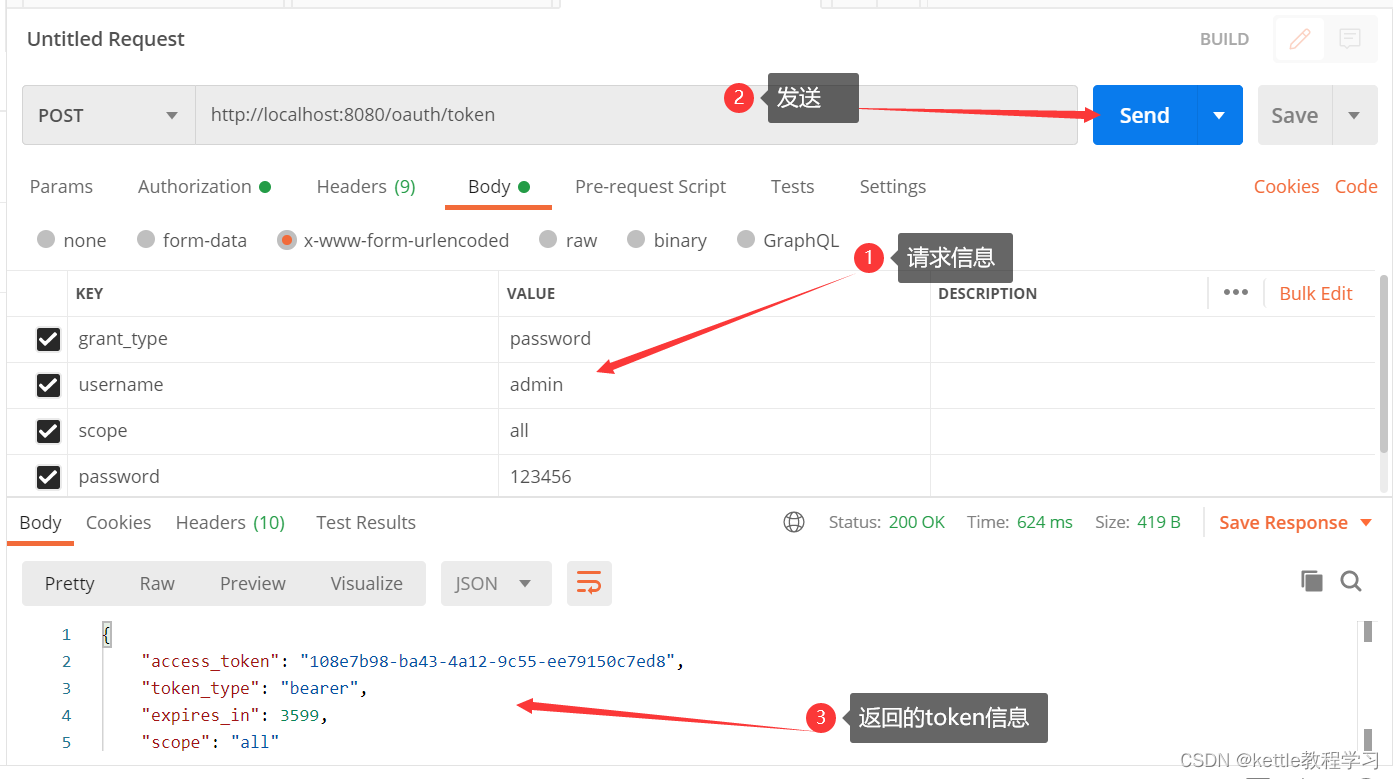
2.7 通过token访问授保护的资源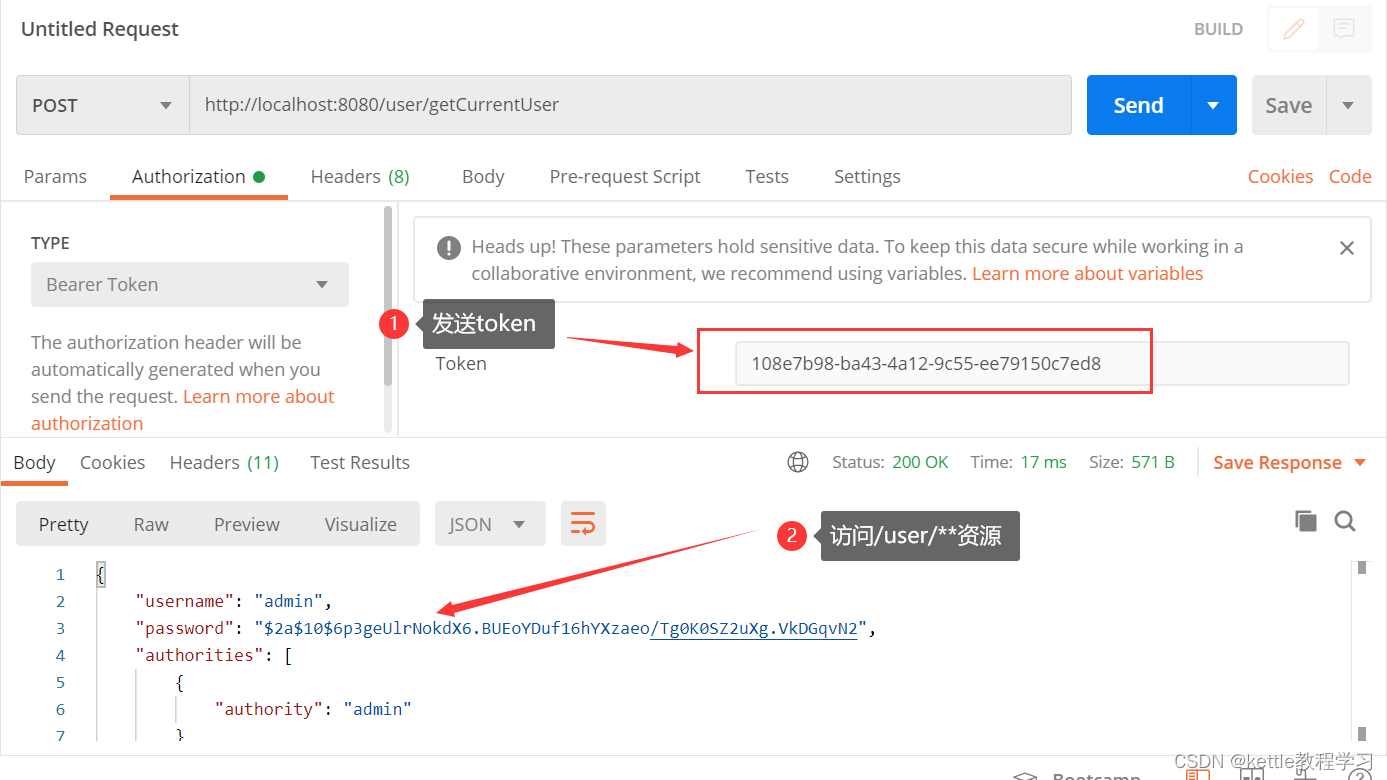
参考文档:OAuth 2.0 的四种方式 - 阮一峰的网络日志 (ruanyifeng.com)

