目前React使用函数式组件已经成为趋势, 如何把React函数式组件用好, 提高性能, 从而实现业务需求也成为了一种能力的体现......咳咳咳, 进入正题:
我想实现这一个需求, 父组件收到文字消息后将其传送给子组件, 子组件是一个Antd组件中的Modal, 里面只有一个input输入框, 子组件收到父组件传过来的文字消息后打开Modal对话框, 其input输入框中的默认值为父组件传递过来的文字消息, 并且自动focus到文字消息的最后, 从而方便用户输入, 当输入完之后, 点击确定按钮调用函数再把消息发送回去.
怎么说呢, 我本来是打算使用一个给input输入框一个ref(inputRef), 然后当modal框打开时, 使用useEffect副作用钩子, 然后通过使用inputRef的foucs函数来实现自动聚焦, 然而想象是美好的, 现实是残酷的, 如果这么容易能解决我就不会写博客了, 先上错误代码:
import React, { useRef, useEffect } from 'react'import { Input, Modal } from 'antd'// 引入useSelector用于读取redux store中保存的数据, 引入useDispath用于分发数据import { useSelector, useDispatch } from "react-redux"// 引入actionimport { change_input_modal_visible } from "../../redux/actions/visible"const { TextArea } = Input// props 传递过来的是发送消息的函数和文本编辑框已有的内容textContentexport default function InputModal(props) { const inputRef = useRef() // store dispatch const dispatch = useDispatch() // store里保存的数据, 来控制modal是否显示, 父组件收到文本框编辑消息后会改为true, 从而显示modal对话框 const inputModalVisible = useSelector(state => state.visible.inputModalVisible) // 如果inputModalVisible为true, 聚焦input框 useEffect(() => { if(inputModalVisible) { inputRef.current.focus({ cursor: 'end' }) } }, [inputModalVisible, inputRef]) const handleOk = () => { let textValue = inputRef.current.resizableTextArea.props.value console.log(textValue) // 去除前后多余的空格 let res = textValue.trim() // 如果内容不为空才发送给UE4程序, 具体发送逻辑省略 // 将modal对话框关闭 dispatch(change_input_modal_visible(false)); }; // 取消发送消息 const handleCancel = () => { // 将modal对话框关闭 dispatch(change_input_modal_visible(false)); }; return ( <div className='modal_wrapper'> <Modal centered closable={false} destroyOnClose title={null} visible={inputModalVisible} onOk={handleOk} onCancel={handleCancel} cancelText="取消" okText="确定" > <TextArea showCount maxLength={100} placeholder="请输入内容" allowClear defaultValue={props.textContent} ref={inputRef} /> </Modal> </div> )}但是bug随之就来了: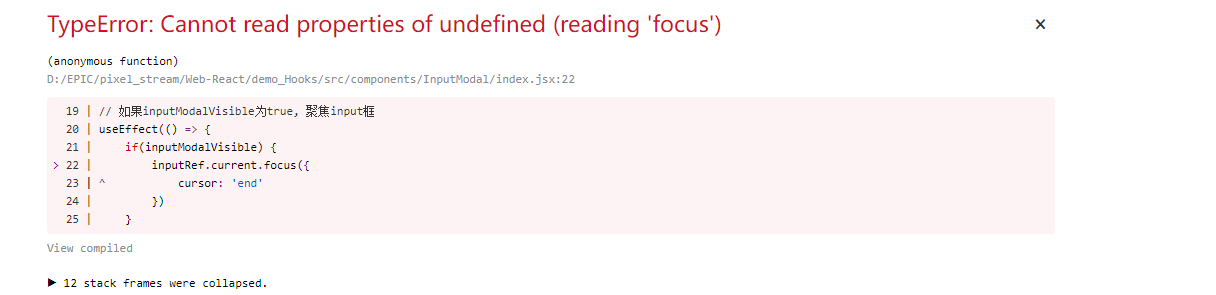
原因是在Modal框的visible为false时, 网页上根本不会加载Modal节点, 当然就获取不到inputRef, inputRef.current的结果就为null, 下图第一张图为Modal框的visible为false时的DOM树, 第二张图为Modal框的visible为true时的DOM树: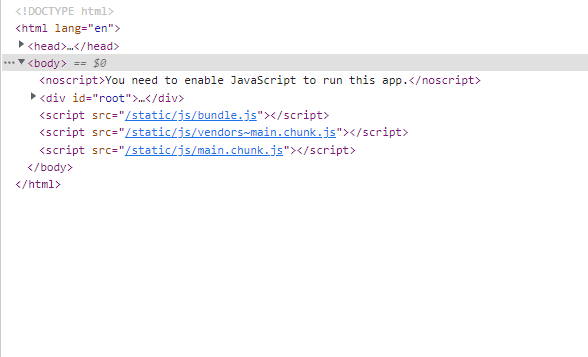
Modal框的visible为false时的DOM树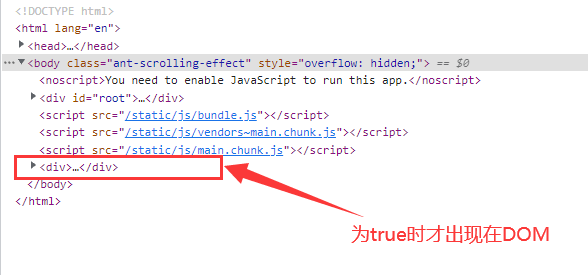
Modal框的visible为true时的DOM树
既然问题找到了, 那就提一下我目前的解决办法吧!
我的解决办法是利用ref的原理, 当input输入框挂载时, 使用ref进行聚焦, 关键代码片段如下:
<TextArea ref={(input) => { if (input != null) { input.focus({ cursor: 'end' }); } }}>但是随之还有一个问题, 我现在ref用来进行聚焦了, 我如何拿到input输入框内的值呢? 我还要输入框消息发送回去呢! 还好Input输入框还有一个onChange函数, 我可以用这个来维护一个state来保存在state中, 既然思路有了, 就上一下源代码:
import React, { useState, useEffect } from 'react'import { Input, Modal } from 'antd'// 引入useSelector用于读取redux store中保存的数据, 引入useDispath用于分发数据import { useSelector, useDispatch } from "react-redux"// 引入actionimport { change_input_modal_visible } from "../../redux/actions/visible"const { TextArea } = Input// props 传递过来的是发送消息的函数和UE4中文本编辑框已有的内容textContentexport default function InputModal(props) { // 在state中保存目前输入框内的内容, 初始化为空字符串 const [textValue, setTextValue] = useState('') // store dispatch const dispatch = useDispatch() // store里保存的数据, 来控制modal是否显示, 父组件收到文本框编辑消息后会改为true, 从而显示modal对话框 const inputModalVisible = useSelector(state => state.visible.inputModalVisible) // 当props中textContent发生变化时, 即收到文本编辑框内容消息更新之后 // 同步更新保存在textValue中 useEffect(() => { setTextValue(props.textContent) }, [props.textContent]) const handleOk = () => { // 发送消息 console.log(textValue) // 去除前后多余的空格 let res = textValue.trim() // 如果内容不为空才发送给UE4程序, 具体发送逻辑不再展示 // 将modal对话框关闭 dispatch(change_input_modal_visible(false)); }; // 取消发送消息 const handleCancel = () => { // 将modal对话框关闭 dispatch(change_input_modal_visible(false)); }; const handleChange = e => { // 当输入框内容发生变化时, 同步给textValue setTextValue(e.target.value) } return ( <> <Modal centered closable={false} destroyOnClose title={null} visible={inputModalVisible} onOk={handleOk} onCancel={handleCancel} cancelText="取消" okText="确定" > <TextArea showCount maxLength={100} placeholder="请输入内容" allowClear defaultValue={props.textContent} ref={(input) => { if (input != null) { input.focus({ cursor: 'end' }); } }} onChange={handleChange} /> </Modal> </> )}至此, 本篇结束, 如果大家有更好的方法, 希望大家提出来, 或者有不懂的也可以留言, 感谢!