官网下载安装
# wget http://dev.mysql.com/get/mysql-community-release-el7-5.noarch.rpm# rpm -ivh mysql-community-release-el7-5.noarch.rpm# yum install mysql-community-server
安装成功后重启mysql服务。
# service mysqld restart
初次安装mysql,root账户没有密码。

[root@yl-web yl]# mysql -u root Welcome to the MySQL monitor. Commands end with ; or \g.Your MySQL connection id is 3Server version: 5.6.26 MySQL Community Server (GPL)Copyright (c) 2000, 2015, Oracle and/or its affiliates. All rights reserved.Oracle is a registered trademark of Oracle Corporation and/or itsaffiliates. Other names may be trademarks of their respectiveowners.Type 'help;' or '\h' for help. Type '\c' to clear the current input statement.mysql> show databases;+--------------------+| Database |+--------------------+| information_schema || mysql || performance_schema || test |+--------------------+4 rows in set (0.01 sec)mysql>
设置密码
mysql> set password for 'root'@'localhost' =password('password');Query OK, 0 rows affected (0.00 sec)mysql> 不需要重启数据库即可生效。
在mysql安装过程中如下内容:
Installed:
  mysql-community-client.x86_64 0:5.6.26-2.el7                mysql-community-devel.x86_64 0:5.6.26-2.el7
  mysql-community-libs.x86_64 0:5.6.26-2.el7                  mysql-community-server.x86_64 0:5.6.26-2.el7

Dependency Installed:
  mysql-community-common.x86_64 0:5.6.26-2.el7

Replaced:
  mariadb.x86_64 1:5.5.41-2.el7_0          mariadb-devel.x86_64 1:5.5.41-2.el7_0   mariadb-libs.x86_64 1:5.5.41-2.el7_0
  mariadb-server.x86_64 1:5.5.41-2.el7_0
所以安装完以后mariadb自动就被替换了,将不再生效。
[root@yl-web yl]# rpm -qa |grep mariadb[root@yl-web yl]#
mysql配置文件为/etc/my.cnf
最后加上编码配置
[mysql]default-character-set =utf8
这里的字符编码必须和/usr/share/mysql/charsets/Index.xml中一致。
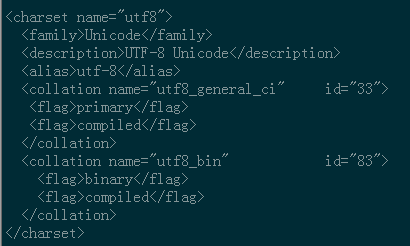
把在所有数据库的所有表的所有权限赋值给位于所有IP地址的root用户。
mysql> grant all privileges on *.* to root@'%'identified by 'password';
如果是新用户而不是root,则要先新建用户
mysql>create user 'username'@'%' identified by 'password';
此时就可以进行远程连接了。
本文来自博客园,作者:明明改变世界,转载请注明原文链接:https://www.cnblogs.com/mmworld/p/16034713.html

