其他章节请看:
七天接手react项目 系列
本篇首先讲解路由原理,接着以一个基础路由示例为起点讲述路由最基础的知识,然后讲解嵌套路由、路由传参,最后讲解路由组件和一般组件的区别,以及编程式导航。
Tip:我们要接手的 react 项目是:spug_web。
路由就是根据不同的 url(网址) 返回不同的页面(数据)。如果这个工作在后端做(或者说由后端程序员做),就是后端路由;在前端做就是前端路由。
平时总说的 SPA(单页面应用)就是前后端分离的基础上,再加一层前端路由。
下面通过一个js 库(history)来演示一下路由的原理:
<body> 请在浏览器控制台下体验! <!-- https://github.com/remix-run/history/blob/dev/docs/installation.md --> <script src="https://unpkg.com/history/umd/history.production.min.js"></script> <script> let myHistory = window.HistoryLibrary.createBrowserHistory() let unlisten = myHistory.listen(({ location, action }) => { console.log(action, location.pathname) }); </script></body>访问页面,浏览器 url 为 http://127.0.0.1:5500/public/test.html
Tip:笔者在 vscode 中安装 “open in browser” 插件,直接右键选择 “Open with Live Server” 即可。
打开控制台进行测试:
> myHistory.push('/home')PUSH /homeurl 变为:http://127.0.0.1:5500/home> myHistory.push('/about')PUSH /abouturl 变成:http://127.0.0.1:5500/about> myHistory.back()POP /homeurl 变成:http://127.0.0.1:5500/home> myHistory.replace('about')REPLACE /abouturl 变成:http://127.0.0.1:5500/about> myHistory.back()POP /public/test.htmlurl 变成:http://127.0.0.1:5500/public/test.html这个流程其实就是 react 路由的基础。
hash模式:
<script> let hashHistory = window.HistoryLibrary.createHashHistory() hashHistory.listen(({ location, action }) => { console.log(action, location.pathname) });</script>> hashHistory.push('/home')PUSH /homeurl 变为:http://127.0.0.1:5500/public/test.html#/homeVersion 5 is used in React Router version 6 —— history
Tip:react router 用到了这个包,另外这个包的作者和 react-router、react-router-dom 是同一人。
react 中有三种模式,本篇主要研究 history 和 hash 两种模式。
官网-history:
笔者使用的环境是 react 脚手架创建的项目。
Tip:详细介绍请看 react 脚手架创建项目
打开 react-router 官网。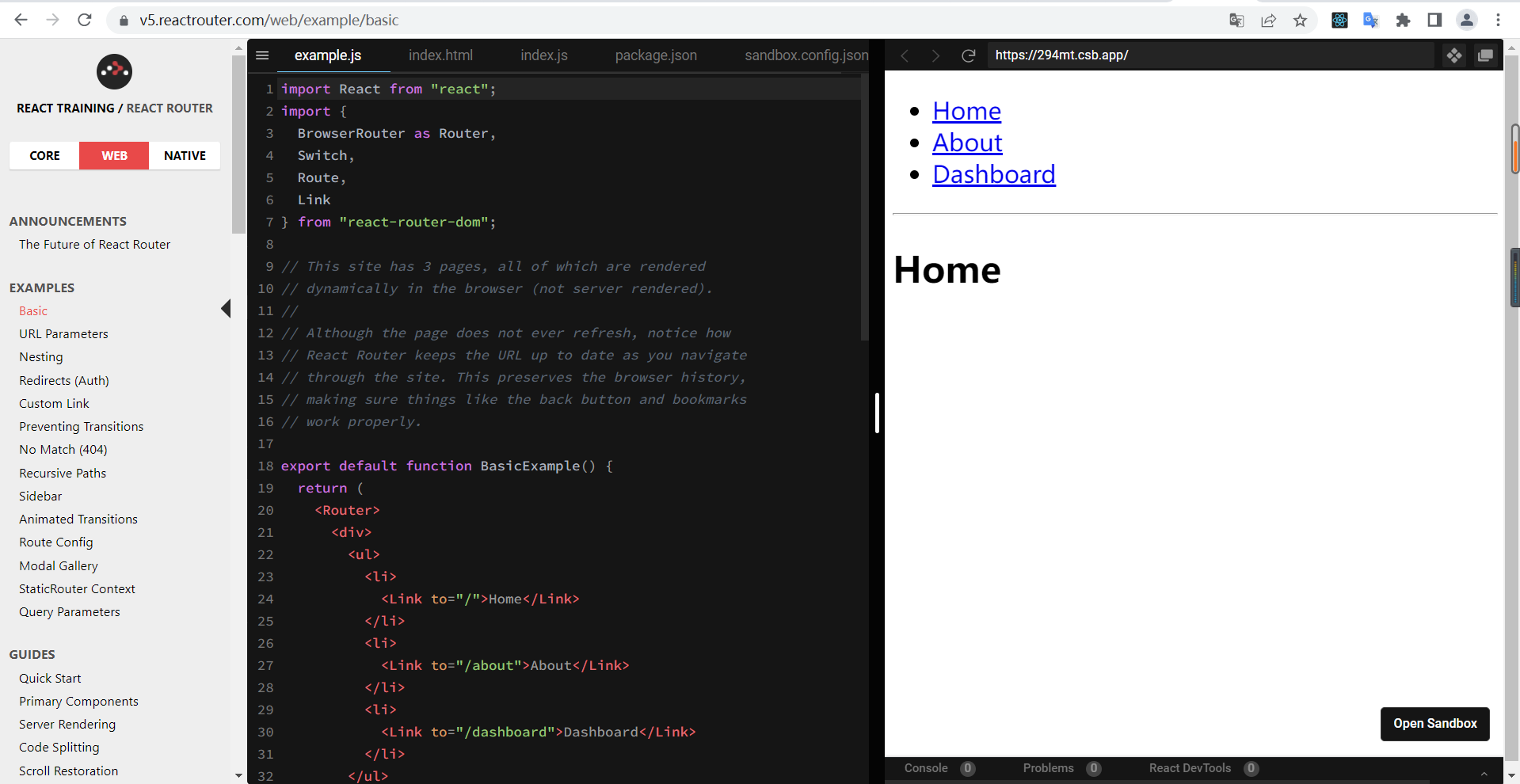
Tip:react 有三个版本,我们学习 web 版本 5。印记中文(深入挖掘国外前端新领域,为中国 Web 前端开发...)有 react-router 中文。
安装 react 路由依赖包:
react-cli-demo> npm i react-router-dom@5added 13 packages, and audited 1421 packages in 6s169 packages are looking for funding run `npm fund` for details6 moderate severity vulnerabilitiesTo address all issues (including breaking changes), run: npm audit fix --forceRun `npm audit` for details.注:版本是5,倘若是版本 6,下面的代码运行会报错。
将 App.js 替换成下面代码:
// src/App.jsimport React from "react";import { BrowserRouter as Router, Switch, Route, Link} from "react-router-dom";export default function BasicExample() { return ( <Router> <div> <ul> <li> <Link to="/">Home</Link> </li> <li> <Link to="/about">About</Link> </li> <li> <Link to="/dashboard">Dashboard</Link> </li> </ul> <hr /> <Switch> <Route exact path="/"> <Home /> </Route> <Route path="/about"> <About /> </Route> <Route path="/dashboard"> <Dashboard /> </Route> </Switch> </div> </Router> );}// Home 组件function Home() { return ( <div> <h2>Home</h2> </div> );}// About 组件function About() { return ( <div> <h2>About</h2> </div> );}// Dashboard 组件function Dashboard() { return ( <div> <h2>Dashboard</h2> </div> );}重启服务器,页面显示:
· Home· About· Dashboard________________________________Home注:本篇为了演示,所以将多个组件都放在一个文件中。
整个页面分上下两部分,上面是导航区,下面是内容区。
倘若点击导航“About”,内容区显示 About,浏览器 url 也会变化:
http://localhost:3000/变成http://localhost:3000/about当我们点击 <Link to="/about">About</Link>,则会匹配上 <Route path="/about">,于是 <About /> 组件显示。
Tip:Link、exact、<Switch>、<Router>的作用?请接着看。
<Link to="/about/a">About</Link> 会被渲染成 <a href="/about">About</a>,即使点击 About 导航,渲染的内容依旧不变。
一个特殊版本的 Link,当它与当前 URL 匹配时,为其渲染元素添加样式属性 —— 官网-<NavLink>
将 About 导航改成 NavLink:
<NavLink to="/about">About</NavLink>初始时(即未选中)依旧渲染成 <a href="/about">About</a>,但点击 About 导航后,渲染内容变成:
<a href="/about" aria-current="page" >About</a>所以我们可以给 .active 增加选中效果。
如果要修改默认选中时的 active 类名,可以使用 activeClassName 属性。就像这样:
<NavLink to="/about" activeClassName="z-selected">About</NavLink>function MyNavLink(props) { return <NavLink to={props.to} activeClassName="z-selected">{props.children}</NavLink>}使用:
<MyNavLink to="/about" children="About" />function MyNavLink(props) { return <NavLink {...props} activeClassName="z-selected" />}当 React 元素为用户自定义组件时,它会将 JSX 所接收的属性(attributes)以及子组件(children)转换为单个对象传递给组件,这个对象被称之为 “props” —— react 官网
使用 HTML5 历史 API 记录( pushState,replaceState 和 popstate 事件)的 <Router> 使您的UI与URL保持同步 —— 官网-BrowserRouter
假如将 BasicExample 组件中的 <Router> 删除,浏览器控制台将报错如下:
Uncaught Error: Invariant failed: You should not use <Link> outside a <Router>未捕获的错误:不变式失败:您不应该在 <Router> 之外使用 <Link>倘若将 <Switch> 外边的 <Router> 删除,浏览器控制台将报错如下:
Uncaught Error: Invariant failed: You should not use <Switch> outside a <Router>未捕获的错误:不变量失败:您不应该在 <Router> 之外使用 <Switch>倘若将 <Route>(<Switch>在这里可以删除) 外边的 <Router> 删除,浏览器控制台将报错如下:
Uncaught Error: Invariant failed: You should not use <Route> outside a <Router>未捕获的错误:不变式失败:您不应在 <Router> 之外使用 <Route>倘若我们在 BasicExample 组件中使用两个 <Router> 会发生什么?
export default function BasicExample() { return ( <div> <Router> <ul> <li> <Link to="/">Home</Link> </li> ... </ul> </Router> <hr /> <Router> <Switch> <Route exact path="/"> <Home /> </Route> ... </Switch> </Router> </div> );}浏览器没有任何报错,点击导航“About”,url正常变化,但内容区没有跟着变。
Router 即路由器,Route 即线路,线路由路由器管理,上面用了两个路由器,你管你的,我管我的,相互间没有通信。
在 spug_web 中搜索 <Router 仅出现一次:
// spug_web/src/index.jsReactDOM.render( <Router history={history}> <ConfigProvider locale={zhCN} getPopupContainer={() => document.fullscreenElement || document.body}> <App/> </ConfigProvider> </Router>, document.getElementById('root'))我们也依葫芦画瓢,将 <Router> 包裹 <App/>。
js 语法中就有 switch,类似于 if...else。我们对比有无 Switch 的两种情况:
点击 About 导航,请问内容区显示什么?
// 没有 Switchexport default function BasicExample() { return ( <div> <ul> <li> <Link to="/about">About</Link> </li> ... </ul> <hr /> <Route path="/about"> <About />1 </Route> <Route path="/about"> <About />2 </Route> ... </div> );}内容区显示:
About1About2// 有 Switchexport default function BasicExample() { return ( <div> <ul> <li> <Link to="/about">About</Link> </li> ... </ul> <hr /> <Switch> <Route path="/about"> <About />1 </Route> <Route path="/about"> <About />2 </Route> ... </Switch> </div> );}内容区显示:
About1渲染与该地址匹配的第一个子节点 <Route> 或者 <Redirect> —— 官网
Tip:既然只匹配第一个子节点,那么性能方面肯定会好些,因为不用在尝试匹配后面的节点。
如果 URL 是 /about ,那么 <About>,<User> ,<NoMatch>将全部渲染,因为他们都与路径匹配:
// from 官网<Route exact path="/" component={Home}/><Route path="/about" component={About}/><Route path="/:user" component={User}/><Route component={NoMatch}/>exact 即精确的。首先做一个小练习:
点击导航 About,下面两个例子分别输出什么,是否匹配?
export default function BasicExample() { return ( <div> <ul> <li> <Link to="/about">About</Link> </li> </ul> <hr /> <Route path="/about/a"> <About /> </Route> </div> );}export default function BasicExample() { return ( <div> <ul> <li> <Link to="/about/a">About</Link> </li> </ul> <hr /> <Route path="/about"> <About /> </Route> </div> );}第一个例子:内容区空白。未能匹配
第二个例子:内容区显示”About“。匹配。
下面这段代码呢?
export default function BasicExample() { return ( <div> <ul> <li> <Link to="/a/about/b">About</Link> </li> </ul> <hr /> <Route path="/about"> <About /> </Route> </div> );}内容区空白。未能匹配。
总结:Link 可以多给,比如你要 /about,我给你传 /about/a,但不能少给,而且顺序不能乱,例如 /a/about/b 就不能匹配 /about
我们给第二个例子加上 exact,请问输出什么?
export default function BasicExample() { return ( <div> <ul> <li> <Link to="/about/a">About</Link> </li> </ul> <hr /> <Route exact path="/about"> <About /> </Route> </div> );}内容区空白。未能匹配。
如果为 true,则只有在路径完全匹配 location.pathname 时才匹配 —— 官网-exact: bool
注:只有需要的时候才开启精确匹配,也就是说页面正常,就不要去开启它。
渲染 <Redirect> 将使导航到一个新的地址。这个新的地址会覆盖 history 栈中的当前地址,类似服务器端(HTTP 3xx)的重定向 —— 官网-<Redirect>
下面我们用 <Redirect> 解决一个问题:
首先看下面这个例子:
export default function BasicExample() { return ( <div> <ul> <li> <Link to="/about">About</Link> </li> <li> <Link to="/dashboard">Dashboard</Link> </li> </ul> <hr /> <Switch> <Route path="/about"> <About /> </Route> <Route path="/dashboard"> <Dashboard /> </Route> </Switch> </div> );}第一次来到网站(http://localhost:3000/),内容区是空白的,因为未能匹配任何 <Route>。
现在需求:进入网站,默认显示 <Dashboard />。
只需要增加 2 行代码:
import { + Redirect, ...} from "react-router-dom";export default function BasicExample() { return ( <div> ... <Switch> <Route path="/about"> <About /> </Route> <Route path="/dashboard"> <Dashboard /> </Route> + <Redirect to="/dashboard" /> </Switch> </div> );}浏览器输入 http://localhost:3000/,由于前两个 <Route> 未能匹配,最后就会重定向到 http://localhost:3000/dashboard。
如果为 true,则单击链接将替换历史堆栈中的当前入口,而不是添加新入口 —— 官网-replace: bool
上面 BasicExample 组件,倘若我们依次点击 About 组件、Dashboard 组件,接着点击网页左上角的返回(<-)按钮,第一次会返回到 About 组件,再次点击则会返回到 Home 组件。
如果我们给 Dashboard 组件加上 replace 属性。就像这样:
<ul> <li> <Link to="/">Home</Link> </li> <li> <Link to="/about">About</Link> </li> <li> <Link to="/dashboard" replace>Dashboard</Link> </li></ul>依次点击 About 组件、Dashboard 组件,然后第一次点击返回按钮,则回到 Home 组件。
因为点击 Dashboard 导航时,不再是入栈操作(将 /dashboard 压入栈中),而是替换操作(将栈中的 /about 替换成 /dashboard),再次点击返回,就回到 /。
通过一个示例演示问题:
首先在 index.html 增加样式:
// public/index.html+ <link rel="stylesheet" href="./css/index.css" />// public/css/index.cssbody{background-color: pink;}修改 BasicExample 组件中 About 导航的路径为多级路径(/about 非多级路径;/about/a 多级路径):
// src/App.jsexport default function BasicExample() { return ( <Router> <div> <ul> <li> <Link to="/">Home</Link> </li> <li> <Link to="/about/a/b">About</Link> </li> </ul> <hr /> <Switch> <Route exact path="/"> <Home /> </Route> <Route path="/about/a/b"> <About /> </Route> </Switch> </div> </Router> );}开始测试:
启动,http://localhost:3000/ 背景是粉色,样式正常,点击 ”About“导航,url 变成 http://localhost:3000/about/a/b,背景依旧是粉色,刷新页面,粉色背景不见了,也就是样式丢失了!
刷新的时候,发现样式请求的地址和返回内容如下:
http://localhost:3000/about/a/css/index.css<!DOCTYPE html><html lang="en"><head> <meta charset="utf-8" /> <link rel="icon" href="/favicon.ico" /> <meta name="viewport" content="width=device-width, initial-scale=1" /> <meta name="theme-color" content="#000000" /> <meta name="description" content="Web site created using create-react-app" /> <link rel="apple-touch-icon" href="/logo192.png" /> <link rel="stylesheet" href="./css/index.css" /> <link rel="manifest" href="/manifest.json" /> <title>React App</title><script defer src="/static/js/bundle.js"></script></head><body> <noscript>You need to enable JavaScript to run this app.</noscript> <div id="root"></div></body></html>注:请求不存在的资源,服务器会将 public/index.html 返回给你。例如请求:http://localhost:3000/a/b/c/d
我们放慢刷新这个动作:
http://localhost:3000/about/a/b,没有这个资源,所以服务器返回 index.html。<link rel="stylesheet" href="./css/index.css" />,需要加载当前目录下的 css/index.css 资源,当前目录是 http://localhost:3000/about/a,于是请求 http://localhost:3000/about/a/css/index.css既然知道问题原因,只需要让 css 资源路径正常即可:
将<link rel="stylesheet" href="./css/index.css" />改成<link rel="stylesheet" href="/css/index.css" />或 <link rel="stylesheet" href="%PUBLIC_URL%/css/index.css" />嵌套路由也叫子路由。
将 BasicExample 组件中的 About 改造成嵌套路由。
首先看效果:
初始时 Home 导航选中:
· Home· About· Dashboard________________________________Home点击 About 导航:
· Home· About· Dashboard________________________________About________________________________· article1· article2点击 article2 导航,显示:
· Home· About· Dashboard________________________________About________________________________· article1· article2文章2...嵌套路由相关代码如下:
// About 组件function About() { return ( // 新增一个路由器 Router <Router> <div> <h2>About</h2> <hr /> <ul> <li> <Link to="/about/article1">article1</Link> </li> <li> <Link to="/about/article2">article2</Link> </li> </ul> <Switch> <Route path="/about/article1"> 文章1... </Route> <Route path="/about/article2"> 文章2... </Route> </Switch> </div> </Router> );}路由组件和一般组件最大的一个区别是:props 中是否有路由相关方法。
这里有三个组件,请观察每个组件的 props:
// src/App.jsimport React from "react";import { Switch, Route, Link} from "react-router-dom";export default function BasicExample() { return ( <div> <Header /> <ul> <li> <Link to="/about">About</Link> </li> <li> <Link to="/dashboard">Dashboard</Link> </li> </ul> <hr /> <Switch> <Route path="/about" component={About} /> <Route path="/dashboard"> <Dashboard name="pjl" /> </Route> </Switch> </div> );}// Home 组件function Header(props) { console.log('Header props,', props) return ( <h2>Header</h2> );}// About 组件function About(props) { console.log('About props,', props) return ( <div> <h2>About</h2> </div> );}// Dashboard 组件function Dashboard(props) { console.log('Dashboard props,', props) return ( <div> <h2>Dashboard</h2> </div> );}初始 url 为:http://localhost:3000/,控制台输出:Header props, {}
点击 Dashboard 导航,控制台输出:Dashboard props, {name: 'pjl'}
点击 About 导航,控制台输出:
About props, {history: {…}, location: {…}, match: {…}, staticContext: undefined}三个组件只有 About 组件是路由组件,其用法不同于另外两种组件:
// 通过 component 属性指定组件<Route path="/about" component={About} /><Dashboard name="pjl" /><Header />Tip:路由组件中的 history、location、match 属性,下文都会讲到。
有人说路由组件和一般组件从项目结构上可以区分,比如将路由组件放在 src/pages 文件夹中,一般组件放在 src/components 中。
spug_web 中有 src/pages 和 src/components 目录,是否就是根据一般组件和路由组件进行区分?请看截取的代码片段:
首先是 src/routes.js,猜测与路由相关:
// src/routes.jsimport HomeIndex from './pages/home';import DashboardIndex from './pages/dashboard';import HostIndex from './pages/host';import ExecTask from './pages/exec/task';import ExecTemplate from './pages/exec/template';import DeployApp from './pages/deploy/app';import DeployRepository from './pages/deploy/repository';import DeployRequest from './pages/deploy/request';import ScheduleIndex from './pages/schedule';import ConfigEnvironment from './pages/config/environment';import ConfigService from './pages/config/service';import ConfigApp from './pages/config/app';import ConfigSetting from './pages/config/setting';import MonitorIndex from './pages/monitor';import AlarmIndex from './pages/alarm/alarm';import AlarmGroup from './pages/alarm/group';import AlarmContact from './pages/alarm/contact';import SystemAccount from './pages/system/account';import SystemRole from './pages/system/role';import SystemSetting from './pages/system/setting';import WelcomeIndex from './pages/welcome/index';import WelcomeInfo from './pages/welcome/info';引入的都是 pages 中的组件。
src/routes.js 又被 src\layout\index.js 引用:
// src/layout/index.jsimport routes from '../routes';// initRoutes 的实参 routes 就是上面导入的 routesfunction initRoutes(Routes, routes) { for (let route of routes) { if (route.component) { if (!route.auth || hasPermission(route.auth)) { // 通过 component 属性指定组件 Routes.push(<Route exact key={route.path} path={route.path} component={route.component}/>) } } else if (route.child) { initRoutes(Routes, route.child) } }}...至此,初步判断:spug_web 中的 pages 目录和 components 目录就是根据一般组件和路由组件进行区分的。
给路由组件传递参数有三种方式。
下面通过这三种方式实现同一个功能:给路由组件 About 传递 name 和 age 两个参数。
export default function BasicExample() { return ( <div> <ul> <li> <Link to="/about/pjl/18">About</Link> </li> </ul> <hr /> <Switch> <Route path="/about/:name/:age" component={About}> </Route> </Switch> </div> );}// About 组件function About(props) { // {history: {…}, location: {…}, match: {…}, staticContext: undefined} console.log(props) // {name: 'pjl', age: '18'} console.log(props.match.params) return ( <div> <h2>About</h2> </div> );}点击 About 导航组件,控制台输出:
{history: {…}, location: {…}, match: {…}, staticContext: undefined}// 接收两个参数{name: 'pjl', age: '18'}一个 match 对象中包涵了有关如何匹配 URL 的信息 —— 官网-match
以 search 方式重写 params 传递参数的例子:
export default function BasicExample() { return ( <div> <ul> <li> <Link to="/about/?name=pjl&age=18">About</Link> </li> </ul> <hr /> <Switch> <Route path="/about" component={About}> </Route> </Switch> </div> );}// About 组件function About(props) { // ?name=pjl&age=18 console.log(props.location.search) var searchParams = new URLSearchParams(props.location.search) const params = {} for (const [key, value] of searchParams) { params[key] = value } // params: {name: 'pjl', age: '18'} console.log('params: ', params); return ( <div> <h2>About</h2> </div> );}需要自己将接收到的数据(例如 ?name=pjl&age=18)处理一下。
Tip:params 和 search 传参,在地址栏中都能看见。例如 search:http://localhost:3000/about/?name=pjl&age=18。刷新页面参数都不会丢失。
注:与组件中的 state 没有任何关系
export default function BasicExample() { return ( <div> <ul> <li> <Link to={{ pathname: '/about', state: { name: 'pjl', age: 18 } }}>About</Link> </li> </ul> <hr /> <Switch> <Route path="/about" component={About}> </Route> </Switch> </div> );}// About 组件function About(props) { // {name: 'pjl', age: 18} console.log(props.location.state) return ( <div> <h2>About</h2> </div> );}有两个特点:
http://localhost:3000/abouthttp://localhost:3000/about,控制台输出 undefinedTip:props.location === props.history.location 为 true
HashRouter 模式下,刷新(非强刷)页面会造成 state 参数的丢失。
将 App.js 中的 BrowserRouter 切换成 HashRouter 进行自测即可。
比如过3秒需要自动跳转,这时就可以使用编程式导航。用法类似 History API。不过这里我们操作的是 props.history。
运行下面这个熟悉的例子,将会把 props.history 导出给 window.aHistory,我们直接在控制台中操作 aHistory:
// src/App.jsexport default function BasicExample() { return ( <div> <ul> <li> <Link to="/">Home</Link> </li> <li> <Link to="/about">About</Link> </li> <li> <Link to="/dashboard">Dashboard</Link> </li> </ul> <hr /> <Switch> <Route exact path="/" component={Home} /> <Route path="/about" component={About} /> <Route path="/dashboard" component={Dashboard} /> </Switch> </div> );}// Home 组件function Home(props) { // 将 history 导出,用于测试 window.aHistory = props.history return ( <div> <h2>Home</h2> </div> );}// About 组件function About() { return ( <div> <h2>About</h2> </div> );}// Dashboard 组件function Dashboard() { return ( <div> <h2>Dashboard</h2> </div> );}浏览器 url 是 http://localhost:3000/,页面内容如下:
· Home· About· Dashboard________________________________Home测试开始:
> aHistory.push('/about')url:http://localhost:3000/about> aHistory.push('/dashboard')url: http://localhost:3000/dashboard> aHistory.goBack()url: http://localhost:3000/about// 等于 aHistory.goBack()> aHistory.go(-1)url: http://localhost:3000/一般组件中没有 history,如果需要使用编程式导航,可以借助 withRouter 将一般组件处理一下即可。请看示例:
import React from "react";import { Switch, Route, withRouter, Link} from "react-router-dom";export default function BasicExample() { return ( <div> <ul> <li> <Link to="/about">About</Link> </li> <li> <Link to="/new-about">NewAbout</Link> </li> </ul> <hr /> <Switch> <Route path="/about"> <About /> </Route> <Route path="/new-about"> <NewAbout /> </Route> </Switch> </div> );}// About 组件function About(props) { console.log(props) return ( <div> <h2>About</h2> </div> );}var NewAbout = withRouter(About)页面显示:
AboutNewAbout________________________________依次点击 About 导航、NewAbout 导航,控制台输出:
{}{history: {…}, location: {…}, match: {…}, staticContext: undefined}其他章节请看:
七天接手react项目 系列

