写这篇博客的原因是,由于之前自定义的一些样式, 会导致页面内容量过多时造成网页卡顿的现象,
自己也比较喜欢干净直观的阅读方式,所以尝试不同的博客样式,从博客开通以来,差不多也改了四五次了吧,
所以这次做个总结,也是一种备份吧。
如果感兴趣可以慢慢看完,我也想表达一些对于一些自定义设置的原因。
首先去后台设置中开通JS权限,写一些原因(比如写博客的原因,可以多写一点),审核其实也很快的一半天吧,看官方情况,反正我当时记得是很快就好了。

注意一:利用好网页的CTRL+F来进行搜索关键字,能快速定位自定义内容位置,编辑栏内也可以使用此快捷键进行查找。
同时CTRL+F也是提高开发效率的必备技能。
注意二:用好搜索快捷键的同时,也要用好目录,因为这次很多代码会占一大部分篇幅,所以用好目录,可以清楚的知道哪一块是做什么的。
注意三:总共总结四次比较重要的自定义操作,而且这次文章内容量也比较多,顺便自己想测试一下当前这款主题流畅阅读程度
链接直达:https://www.cnblogs.com/SkinUser.aspx?SkinName=SimpleMemory
记得自己第一次写博客的时候,就挑选的这个博客样式,感觉很干净直观,其他博客样式也尝试去用了,可能还是偏向这款博客样式吧,整体真的简洁。
当时在博客“设置”中看到css栏,支持js啥的东西,还不太懂这是干什么的,后来自己学了一些前端的三件套,突然想到这块是不是官方留出来可以自定义化,然后网上搜了一下,果然是自己阳光浅了,还真的可以自定义化,然后自己就开始了DIY历程……
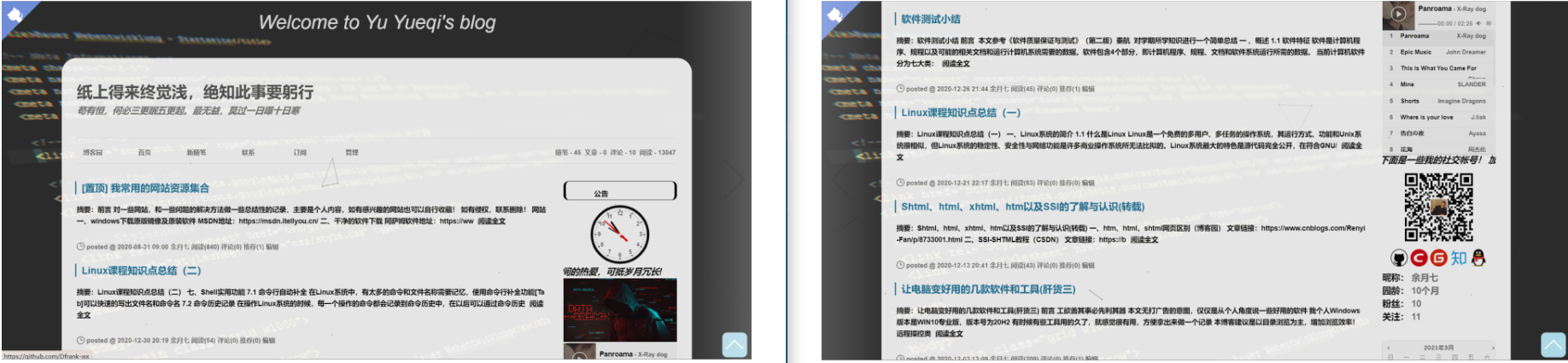
当初因为是第一次DIY,所以也没有留下什么记录,而且当时博客园,对于这块的语法检测是很松的,直到我去年秋天那时候吧,想再改动一下样式,发现博客园后台设置变样了,而且语法检测严格了。
当时好奇的是,虽然自己没有改动什么但由于报语法错误,保存不了,但是自己博客样式还是很好的渲染出来。自己没法改的是因为当时都是从网上照抄下来的代码,像CSS这种,我根本无从下手去改,几百行的东西,当时看见就吐了,然后我渐渐去找寻可以再次替代这款主题,并且可以自定义出来自己比较喜欢样式的主题,发现寥寥无几,还是打算重新开始simplememory的自定义化吧!
这款主题是别人已经改好的主题,整体样式还是很不错的。
(需要提一点的是,根据我下面的自定义内容,可能会与作者的样式稍稍有点差别,还请自行看主题作者文档更改!)
记得选择这个主题!!!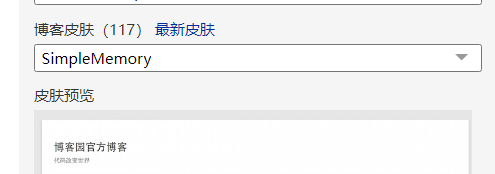
大佬博客:https://www.cnblogs.com/bndong/
附上GItHub:https://github.com/BNDong/Cnblogs-Theme-SimpleMemory
文档:https://www.dbnuo.com/Cnblogs-Theme-SimpleMemory/docs/v2/#/
当时也是冲着主题打开后可以有一个简单而且对Markdown渲染比较好的页面去的,而且也有自己的目录结构,其实后面我写博客的时候发现,有一个目录导航会很好的增加文章的可阅读性,毕竟点进来博客的人,也不是都喜欢看,只是冲着标题点进来的,所以目录结构能够大致的反应出博客内容。
(今年开年那时候发现,博客园在文章每一层级的标题上支持目录的展示,瞬间对官方爱了爱了,这个功能是真心不错)。
这块的话个人觉得直接看主题文档比较直接一点,我这里简单说一下,我自己自定义化的一些内容,其实也很少。
这里我选的2.*版本,直接进去CTRL+A全选,复制粘贴到CSS栏中,记得勾选“禁用模板CSS”
GitHub:https://github.com/BNDong/Cnblogs-Theme-SimpleMemory/blob/v2/dist/simpleMemory.css
Gitee:https://gitee.com/dbnuo/Cnblogs-Theme-SimpleMemory/blob/v2/dist/simpleMemory.css
重点就在这,其实很多DIY的东西就在这里面,我也把我之前的配置放着,主要修改内容如图
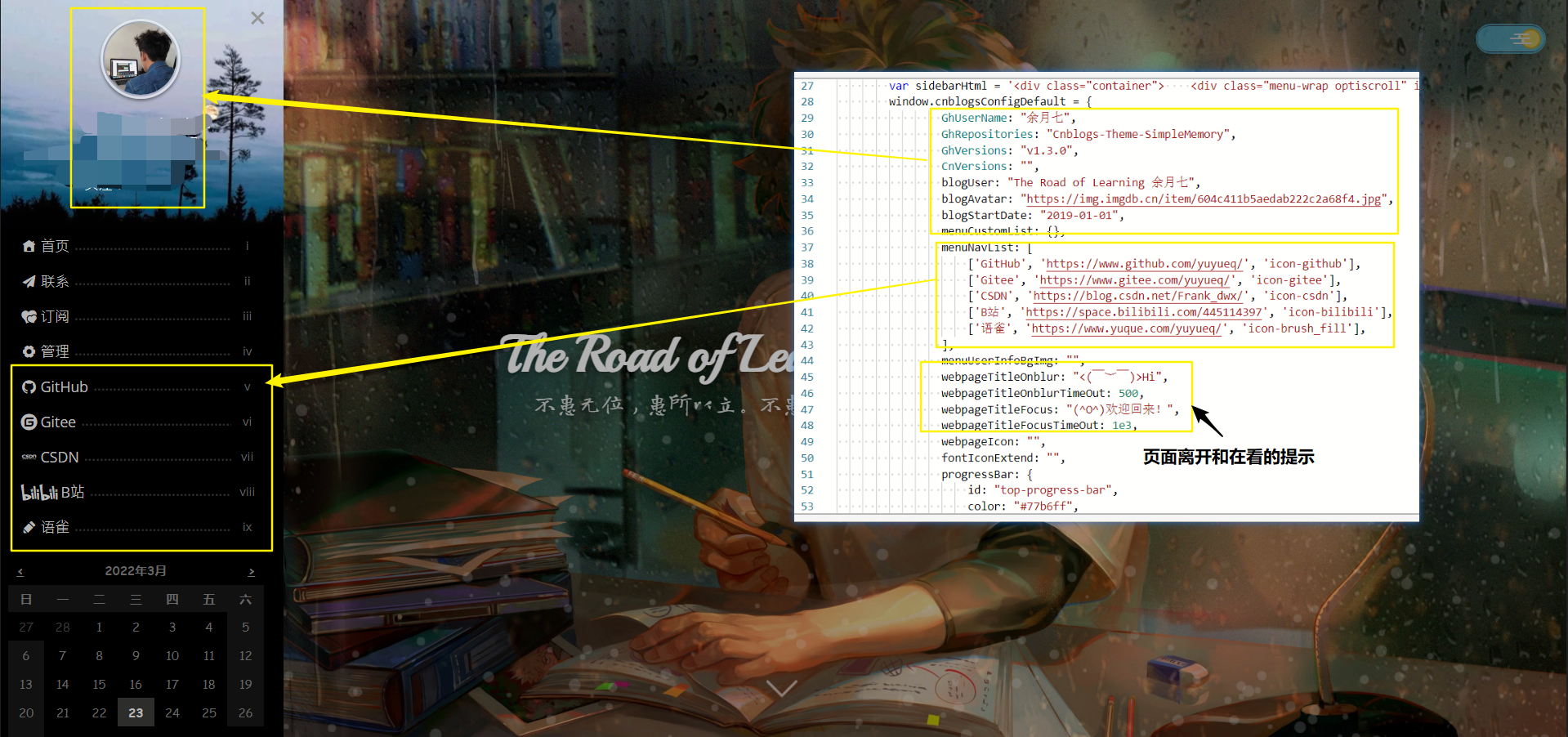
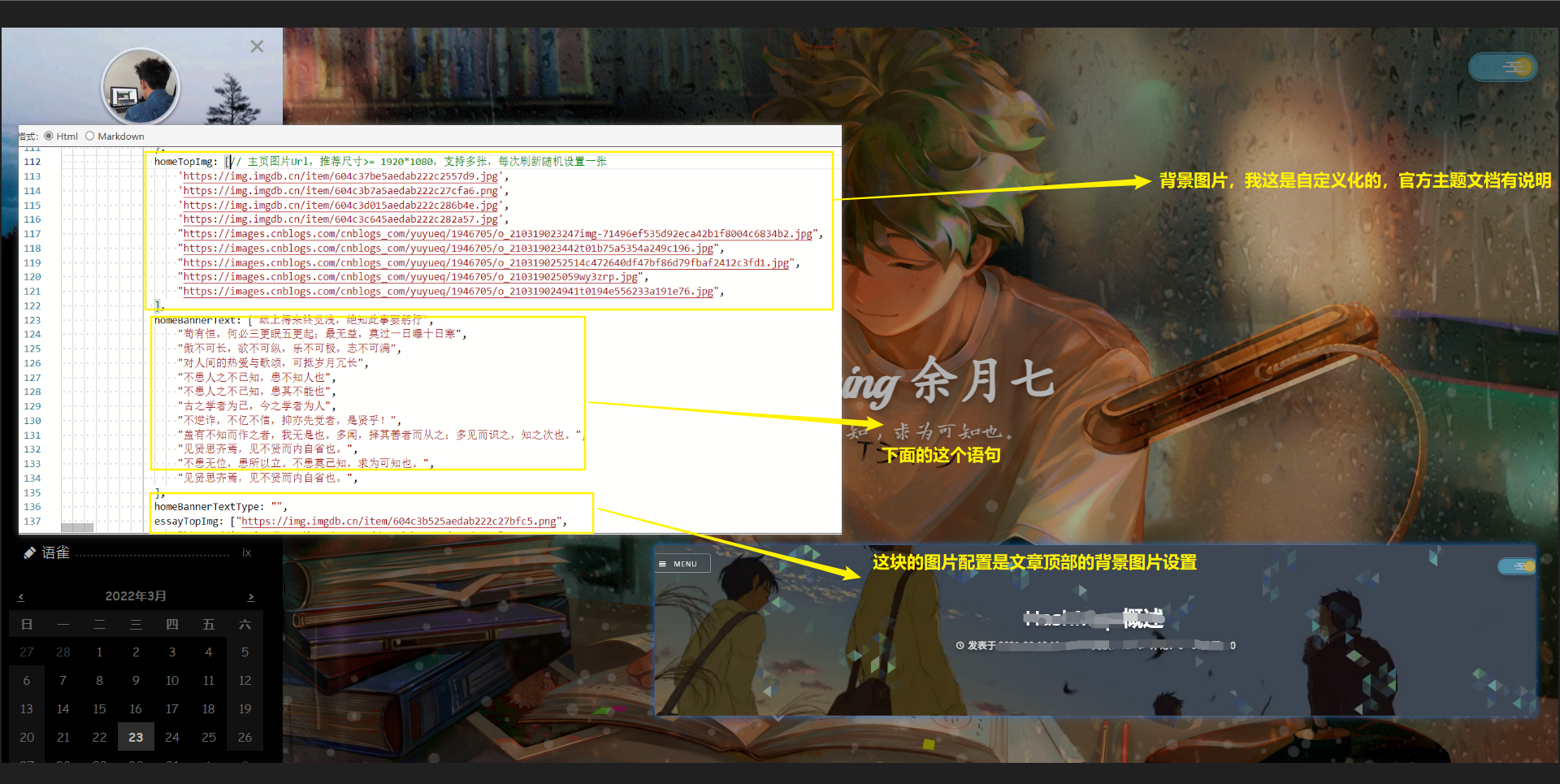
<script type="text/javascript"> window.cnblogsConfig = { code: { type: 'hljs', theme: 'atom-one-dark-reasonable', // options: { line: true, }, }, animate: { homeBanner: { enable: true, options: { radius: 15, } }, articleTitle: { enable: true, }, articleBanner: { enable: true, }, background: { enable: true, }, }, info: { name: 'The Road of Learning 余月七', // 用户名 startDate: '2020-05-07', avatar: 'https://img.imgdb.cn/item/604c411b5aedab222c2a68f4.jpg', // 用户头像 blogIcon: 'https://img.imgdb.cn/item/604c411b5aedab222c2a68f4.jpg', }, sidebar: { // 列表数据 ['导航名称', '链接', 'icon'] navList: [ ['www.yuyueq.cn', 'http://www.yuyueq.cn', 'icon-logo_ie'], ['GitHub', 'https://www.github.com/yuyueq/', 'icon-github'], ['Gitee', 'https://www.gitee.com/yuyueq/', 'icon-gitee'], ['CSDN', 'https://blog.csdn.net/Frank_dwx/', 'icon-csdn'], ['我的语雀', 'https://www.yuque.com/yuyueq/', 'icon-brush_fill'], ['Java编程思想(第5版)', 'https://www.cnblogs.com/yuyueq/category/2031635.html', 'icon-logo_ie'], ], infoBackground: 'https://images.cnblogs.com/cnblogs_com/yuyueq/1946705/o_210417133712%E8%9C%82%E8%9C%9C%E6%B5%8F%E8%A7%88%E5%99%A8_nrkeww.jpg', }, banner: { home: { background: [ 'https://img.imgdb.cn/item/604c37be5aedab222c2557d9.jpg', 'https://img.imgdb.cn/item/604c3b7a5aedab222c27cfa6.png', 'https://img.imgdb.cn/item/604c3d015aedab222c286b4e.jpg', 'https://img.imgdb.cn/item/606fa9608322e6675cd06bf3.png', 'https://img.imgdb.cn/item/604c3c645aedab222c282a57.jpg', 'https://images.cnblogs.com/cnblogs_com/yuyueq/1946705/o_210319023247img-71496ef535d92eca42b1f8004c6834b2.jpg', 'https://images.cnblogs.com/cnblogs_com/yuyueq/1946705/o_210319023442t01b75a5354a249c196.jpg', 'https://images.cnblogs.com/cnblogs_com/yuyueq/1946705/o_2103190252514c472640df47bf86d79fbaf2412c3fd1.jpg', 'https://images.cnblogs.com/cnblogs_com/yuyueq/1946705/o_210319025059wy3zrp.jpg', 'https://images.cnblogs.com/cnblogs_com/yuyueq/1946705/o_210319024941t0194e556233a191e76.jpg', 'https://images.cnblogs.com/cnblogs_com/yuyueq/1946705/o_21042509555681e00a4690bfbe15eb507a7c3f28246b.png', 'https://images.cnblogs.com/cnblogs_com/yuyueq/1946705/o_21042510055922.jpg', 'https://images.cnblogs.com/cnblogs_com/yuyueq/1946705/o_210425112726db286af4881011ebb6edd017c2d2eca2.jpg', 'https://images.cnblogs.com/cnblogs_com/yuyueq/1946705/o_21042511295233.jpg', ], title: [ "悟已往之不谏,知来者之可追", "纸上得来终觉浅,绝知此事要躬行", "苟有恒,何必三更眠五更起;最无益,莫过一日曝十日寒", "傲不可长,欲不可纵,乐不可极,志不可满", "对人间的热爱与歌颂,可抵岁月冗长", "不患人之不己知,患不知人也", "不患人之不己知,患其不能也", "古之学者为己,今之学者为人", "不逆诈,不亿不信,抑亦先觉者,是贤乎!", "盖有不知而作之者,我无是也。多闻,择其善者而从之;多见而识之,知之次也。", "见贤思齐焉,见不贤而内自省也。", "不患无位,患所以立。不患莫己知,求为可知也。", "见贤思齐焉,见不贤而内自省也。", ], }, article: { background: [ "https://img.imgdb.cn/item/604c3b525aedab222c27bfc5.png", "https://img.imgdb.cn/item/604c46dd5aedab222c2d637d.png", "https://img.imgdb.cn/item/604c467b5aedab222c2d3e61.jpg", ], }, }, loading: { rebound: { tension: 16, }, spinner: { id: 'spinner', radius: 90, } }, footer: { style: 1, }, switchDayNight: { enable: true, auto: { enable: true } }, }</script><script src="https://cdn.jsdelivr.net/gh/BNDong/Cnblogs-Theme-SimpleMemory@v2.0.7/dist/simpleMemory.js" defer></script><script src="https://files.cnblogs.com/files/cainiao-chuanqi/mouse-click.js"></script>侧边栏这块最后两行是为了鼠标点击的效果增添的,至于背景上面的线条是在页脚代码块添加的,下面有。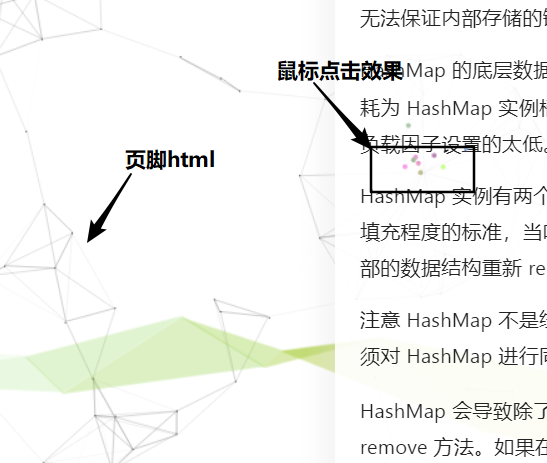
<!--<meta http-equiv="x-dns-prefetch-control" content="on">--><link rel="dns-prefetch" href="https://cdn.jsdelivr.net"><link rel="dns-prefetch" href="https://at.alicdn.com"><link rel="dns-prefetch" href="https://fonts.gstatic.com"><link rel="dns-prefetch" href="https://static.cnblogs.com/"><link rel="dns-prefetch" href="https://images2018.cnblogs.com/"><link rel="dns-prefetch" href="https://v2.jinrishici.com/"><link rel="preload" href="https://cdn.jsdelivr.net/gh/BNDong/Cnblogs-Theme-SimpleMemory@v1.3.3/src/script/simpleMemory.min.js" as="script"><!DOCTYPE html><html lang="en"><head> <meta charset="UTF-8"> <title>Title</title></head><body><!--网格动态背景开始--><script type="text/javascript"> !function () { //封装方法,压缩之后减少文件大小 function get_attribute(node, attr, default_value) { return node.getAttribute(attr) || default_value; } //封装方法,压缩之后减少文件大小 function get_by_tagname(name) { return document.getElementsByTagName(name); } //获取配置参数 function get_config_option() { var scripts = get_by_tagname("script"), script_len = scripts.length, script = scripts[script_len - 1]; //当前加载的script return { l: script_len, //长度,用于生成id用 z: get_attribute(script, "zIndex", -1), //z-index o: get_attribute(script, "opacity", 0.8), //opacity c: get_attribute(script, "color", "255,255,255"), //color n: get_attribute(script, "count", 350) //count }; } //设置canvas的高宽 function set_canvas_size() { canvas_width = the_canvas.width = window.innerWidth || document.documentElement.clientWidth || document.body.clientWidth, canvas_height = the_canvas.height = window.innerHeight || document.documentElement.clientHeight || document.body.clientHeight; } //绘制过程 function draw_canvas() { context.clearRect(0, 0, canvas_width, canvas_height); //随机的线条和当前位置联合数组 var e, i, d, x_dist, y_dist, dist; //临时节点 //遍历处理每一个点 random_points.forEach(function (r, idx) { r.x += r.xa, r.y += r.ya, //移动 r.xa *= r.x > canvas_width || r.x < 0 ? -1 : 1, r.ya *= r.y > canvas_height || r.y < 0 ? -1 : 1, //碰到边界,反向反弹 context.fillRect(r.x - 0.5, r.y - 0.5, 1, 1); //绘制一个宽高为1的点 //从下一个点开始 for (i = idx + 1; i < all_array.length; i++) { e = all_array[i]; // 当前点存在 if (null !== e.x && null !== e.y) { x_dist = r.x - e.x; //x轴距离 l y_dist = r.y - e.y; //y轴距离 n dist = x_dist * x_dist + y_dist * y_dist; //总距离, m dist < e.max && (e === current_point && dist >= e.max / 2 && (r.x -= 0.03 * x_dist, r.y -= 0.03 * y_dist), //靠近的时候加速 d = (e.max - dist) / e.max, context.beginPath(), context.lineWidth = d / 2, context.strokeStyle = "#555555",//这里是线条的颜色 context.moveTo(r.x, r.y), context.lineTo(e.x, e.y), context.stroke()); } } }), frame_func(draw_canvas); } //创建画布,并添加到body中 var the_canvas = document.createElement("canvas"), //画布 config = get_config_option(), //配置 canvas_id = "c_n" + config.l, //canvas id context = the_canvas.getContext("2d"), canvas_width, canvas_height, frame_func = window.requestAnimationFrame || window.webkitRequestAnimationFrame || window.mozRequestAnimationFrame || window.oRequestAnimationFrame || window.msRequestAnimationFrame || function (func) { window.setTimeout(func, 1000 / 40); }, random = Math.random, current_point = { x: null, //当前鼠标x y: null, //当前鼠标y max: 20000 // 圈半径的平方 }, all_array; the_canvas.id = canvas_id; the_canvas.style.cssText = "position:fixed;top:0;left:0;z-index:" + config.z + ";opacity:" + config.o; get_by_tagname("body")[0].appendChild(the_canvas); //初始化画布大小 set_canvas_size(); window.onresize = set_canvas_size; //当时鼠标位置存储,离开的时候,释放当前位置信息 window.onmousemove = function (e) { e = e || window.event; current_point.x = e.clientX; current_point.y = e.clientY; }, window.onmouseout = function () { current_point.x = null; current_point.y = null; }; //随机生成config.n条线位置信息 for (var random_points = [], i = 0; config.n > i; i++) { var x = random() * canvas_width, //随机位置 y = random() * canvas_height, xa = 2 * random() - 1, //随机运动方向 ya = 2 * random() - 1; // 随机点 random_points.push({ x: x, y: y, xa: xa, ya: ya, max: 6000 //沾附距离 }); } all_array = random_points.concat([current_point]); //0.1秒后绘制 setTimeout(function () { draw_canvas(); }, 100); }();</script></body></html>这次我又回归了最初的博客园官方simplememory主题,因为,我又发现,有时候在网络不好的情况下,主题也会出现卡顿。
再一个就是自己也是有点看腻了,不能说这款样式不好看,因为在后面这段时间,我发现很多人都是这个样式,自己也觉得新鲜感丧失了吧,
就想回到最初那个时候,体会一下第一次DIY的快乐。所以这一次简单的说一下,那张第一次DIY图片里的内容,加上这次修改的内容。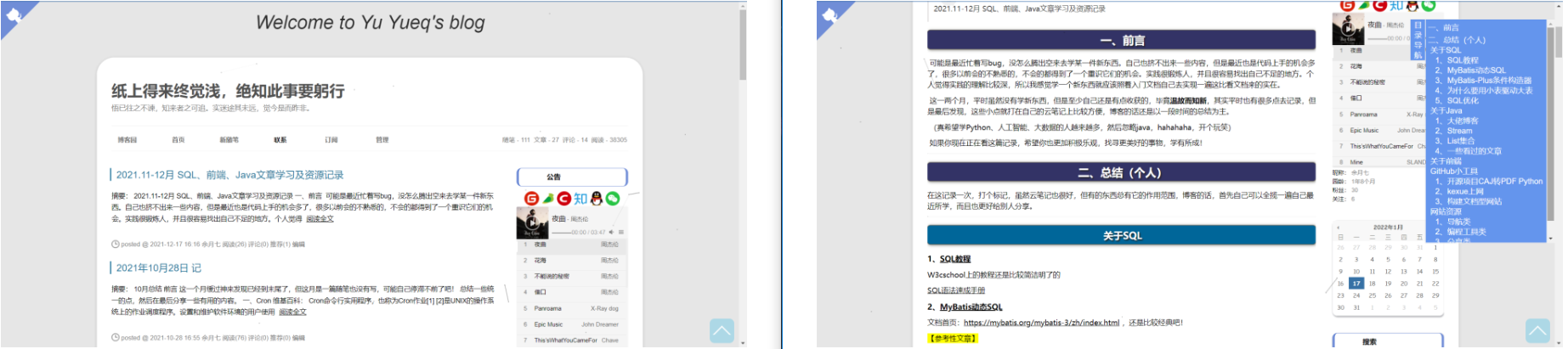
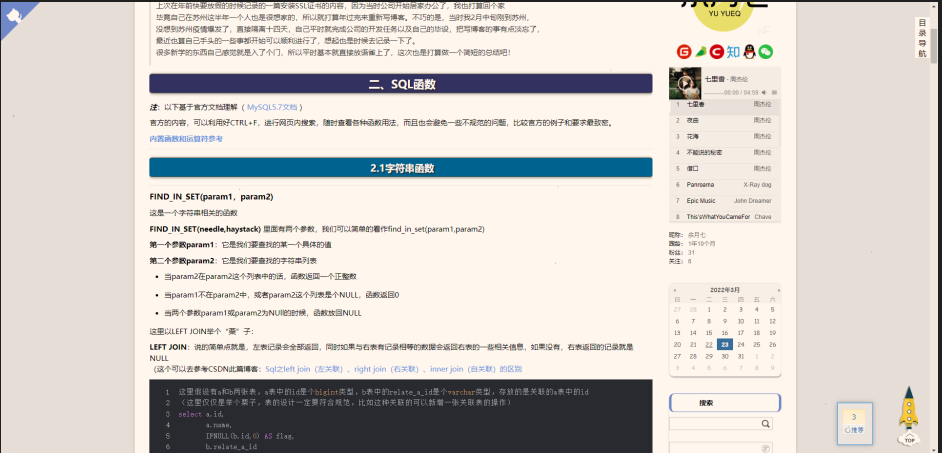
上面是经过多次不同的修改才有有内容,所以这里只放第二张图片里的配置,因为两者相差不大。
下面都是完整的配置文件,我在自己更改过的地方,都有备注,所以请自行复制后查看修改。
a:link { color: #6495ED; text-decoration: none}a:visited { color: #6495ED; text-decoration: none}a:hover { color: rgb(146, 122, 33); text-decoration: underline;}a:active { color: rgb(146, 122, 33); text-decoration: underline;}/*博客导航栏 *//* #navList {float:right;}#navList li {border: none;font-size: 16px;}.blogStats {display: none;} *//*侧边栏公告*//* #blog-news > img {/*头像*/display: block;margin: auto;border-radius: 50%;} *//* #profile_block {font-size: 15px;padding: 20px;line-height: 1.8;}#profile_block > a:link {color: #F60;} *//*公告结束*/#ad_t2, #cnblogs_c1, #under_post_news, #cnblogs_c2, #under_post_kb { display: none;}/* 文章title自定义带动画样式 */.postTitle { font-family: "Lato", Helvetica Neue, Helvetica, Arial, sans-serif; clear: both; background-color: #FBF9F9; margin-bottom: 8px; padding-top: 5px; padding-bottom: 0px; margin-top: 12px; border-left: 8px solid #21759b; padding-left: 17px; font-size: 18px; border-radius:0px;}.postTitle a:hover { text-decoration: none; margin-left: 17px; color: #E00000;}.postTitle a:link,.postTitle a:visited,.postTitle a:active { transition: all 0.4s linear 0s;}/*页面大小*/#home { margin: 0 auto; opacity: 1; /*透明度越小越透明*/ width: 68%; min-width: 980px; background-color: #fff; padding: 30px; margin-top: 50px; margin-bottom: 50px; box-shadow: 0 2px 6px rgba(100, 100, 100, 0.3); border-radius: 36px;}/* body {background: rgba(12, 100, 129, 1) url('https://pic.imgdb.cn/item/61e521d52ab3f51d9107a088.jpg') fixed no-repeat; <!--背景图片-->background-position: 50% 5%;background-size: cover;} */#blogTitle { height: 66px; /*高度*/ clear: both; background-color: rgba(0, 0, 0,0);}#blog-calendar, #sidebar_postcategory, #sidebar_postcategory, #sidebar_postarchive, #sidebar_search { /*侧边栏每一模块添加圆角和阴影*/ border-radius: 10px; box-shadow: 1px 2px 3px #A7A8AD; background-color: #fff0;}#sideBarMain h3, .newsItem h3 { /*侧边栏每个模块的标题部分*/ font-size: 1.2em; height: 36px; line-height: 36px; text-indent: 0.5em; background: url() no-repeat left center #fff; padding: 0 0 0 50px; margin-bottom: 1; border: 1px solid rgba(112, 141, 215); border-left-width: 5px; border-radius: 10px; border-right-width: 5px;}/*生成博客目录的CSS*/#uprightsideBar{ font-size: 14px; font-family: ArialBold, Helvetica, sans-serif; text-align:left; position:fixed;/*将div的位置固定到距离top:50px,right:0px的位置,这样div就会处在最右边的位置,距离顶部50px*/ top: 30px; right:0px; width: auto; height: auto; color: rgb(29, 4, 4);}#sideBarTab{ font-size: 16px; float:left; width:30px; border:1px solid #e5e5e5; border-right:none; text-align:center; background:#fff;}#sideBarContents{ float:left; overflow:auto; overflow-x:hidden;!important; width:266px; min-height:108px; max-height:460px; border:1px solid #e5e5e5; border-right:none; background: #fff;}#sideBarContents dl{ margin:0; padding:0;}#sideBarContents dt{ margin-top:5px; margin-left:5px;}#sideBarContents dd, dt { cursor: pointer;}#sideBarContents dd:hover, dt:hover { color:#abb0f3;}#sideBarContents dd{ margin-left:10px;}#sideBarContents dd.indent3{ margin-left:20px;}#sideBarContents dd.indent4{ margin-left:30px;}#sideBarContents dd.indent5{ margin-left:40px;}#sideBarContents dd.indent6{ margin-left:50px;}.box{ position:fixed; right:10px; bottom: 10px; height:30px; width: 50px; text-align:center; padding-top:20px; background-color: lightblue; border-radius: 20%; overflow: hidden;}.box:hover:before{ top:50%}.box:hover .box-in{ visibility: hidden;}.box:before{ position: absolute; top: -50%; left: 50%; transform: translate(-50%,-50%); content:'回到顶部'; width: 40px; color:peru; font-weight:bold; } .box-in{ visibility: visible; display:inline-block; height:20px; width: 20px; border: 3px solid black; border-color: white transparent transparent white; transform:rotate(45deg);}#cnblogs_post_body { color: black; font: 0.875em/1.5em "微软雅黑" , "PTSans" , "Arial" ,sans-serif; font-size: 15px; } #cnblogs_post_body h1 { text-align:center; background: #333366; border-radius: 6px 6px 6px 6px; box-shadow: 0 0 0 1px #5F5A4B, 1px 1px 6px 1px rgba(10, 10, 0, 0.5); color: #FFFFFF; font-family: "微软雅黑" , "宋体" , "黑体" ,Arial; font-size: 23px; font-weight: bold; height: 25px; line-height: 25px; margin: 18px 0 !important; padding: 8px 0 5px 5px; text-shadow: 2px 2px 3px #222222;} #cnblogs_post_body h2 { text-align:center; background: #006699; border-radius: 6px 6px 6px 6px; box-shadow: 0 0 0 1px #5F5A4B, 1px 1px 6px 1px rgba(10, 10, 0, 0.5); color: #FFFFFF; font-family: "微软雅黑" , "宋体" , "黑体" ,Arial; font-size: 20px; font-weight: bold; height: 25px; line-height: 25px; margin: 18px 0 !important; padding: 8px 0 5px 5px; text-shadow: 2px 2px 3px #222222; }/* 关注收藏等几个按钮 */#green_channel { padding: 5px 0 15px 0; margin-bottom: 10px; margin-top: 10px; border: 0; border-top: #eee 1px dashed; border-bottom: #eee 1px dashed; border-bottom-width: 1px; border-bottom-style: dashed; border-bottom-color: rgb(238, 238, 238); font-size: 12px; width: 100%!important; text-align: center; display: inline-block; vertical-align: middle;}a#green_channel_digg, a#green_channel_follow, a#green_channel_favorite, a#green_channel_weibo, a#green_channel_wechat { text-decoration: none; color: #fff; margin: auto; width: 80px; display: inline-block; line-height: 30px; font-size: 15px; font-weight: 500; letter-spacing: 2px; border-radius: 3px; text-transform: uppercase; transition: all .4s; -webkit-transition: all .4s; -moz-transition: all .4s; -ms-transition: all .4s; -o-transition: all .4s; position: relative; margin-left: 10px; background-image: none; margin-top: 10px;}a#green_channel_digg { background-color: #2daebf; box-shadow: 0 15px 18px -6px rgba(95,193,206,0.65);}a#green_channel_favorite { background-color: #ffb515; box-shadow: 0 15px 18px -6px rgba(255,198,75,0.65); margin-left: 10px;}a#green_channel_follow { background-color: #e33100!important; box-shadow: 0 15px 18px -6px rgba(227,49,0,0.65); margin-left: 10px;}a#green_channel_wechat { padding: 3px 8px!important; background-color: #3cb034!important; box-shadow: 0 15px 18px -6px rgba(60,176,52,0.65)!important; margin-left: 10px; width: 35px;}a#green_channel_weibo { padding: 3px 8px!important; background-color: #ff464b!important; box-shadow: 0 15px 18px -6px rgba(255,70,75,0.65)!important; margin-left: 10px; width: 35px;}/*下面的头像边框*/#author_profile_info img.author_avatar { border-radius: 100%; box-shadow: inset 1px 1px 3px rgba(0,0,0,0.3), 0 1px 3px rgba(0,0,0,0.4); border: 3px solid #f7f7f7; padding: 0; margin-left: 3px; margin-right: 7px;}/* 禁用下划线 */.postBody a:link, .postBody a:visited, .postBody a:active { text-decoration: none;}/* 上一篇下一篇 */#post_next_prev { font-size: 14px; color: #535353;}/* 设置签名格式 定制css样式 *//* 个性签名 */#MySignature { box-shadow: 8px 1px 10px #989898; padding: 10px; text-shadow: 1px 1px 1px #FFF; font-size: 15px; border-left: solid 5px #55895B; background: #FBF9F9; border-radius: 10px 10px 37% 10px; line-height: 2.4; margin: 37px 0;}#MySignature a { text-decoration: none; color: #4183c4; font-weight: bold;}#MySignature a:hover { text-decoration: underline; color: #f60;}#MySignature span { color: #f60;}/*推荐和反对*/#div_digg { float: right; position: fixed; width: 50px; bottom: 10px; left: 90%; margin-bottom: 10px; background: rgba(247,247,247,0.3); margin-right: 10px; font-size: 12px; box-shadow: 0 0 10px 0 #AAA; padding: 10px; border: 2px solid rgba(82, 168, 236, 0.8); text-align: center; margin-top: 10px;}/*这里是将反对按钮做了一个隐藏,如果需要反对按钮,直接删除这块配置*/.buryit { display: none;}<!--时钟和图片--><!--<div id="clockdiv"> <canvas id="dom" width="120" height="120">时钟canvas</canvas></div><script type="text/javascript" src="https://files.cnblogs.com/files/shwee/clock.js"></script><a href="https://www.cnblogs.com/unleashed"> <img src="https://pic.downk.cc/item/5f38a70c14195aa59437326b.png" border="" width="" height=""></a>--><div align="center"> <!-- 那些小图标 --> <span> <a href="https://www.yuyueq.cn/" target="_blank"> <img src="https://pic.cnblogs.com/avatar/2031154/20220119112707.png"></a> <br> <a href="https://gitee.com/yuyueq" target="_blank"> <img src="https://pic.downk.cc/item/5f3269d814195aa594a36563.png" width = 30 height=30> </a> <a href="https://www.yuque.com/yuyueq" target="_blank"> <img src="https://pic.imgdb.cn/item/61e51fe82ab3f51d910562ae.png" width = 30 height=30> </a> <a href="https://blog.csdn.net/Frank_dwx" target="_blank"> <img src="http://images.cnblogs.com/cnblogs_com/enjoy233/1389971/o_csdn.png" width = 30 height=30> </a> <a href="https://www.zhihu.com/people/ming-ke-66" target="_blank"> <img src="https://www.cnblogs.com/images/cnblogs_com/enjoy233/1389971/o_zhihu.png" width = 30 height=30> </a> <a href="https://images.cnblogs.com/cnblogs_com/yuyueq/1946705/o_220117073857_%E5%BE%AE%E4%BF%A1%E5%9B%BE%E7%89%87_20220117153840.jpg" target="_blank"> <img src="https://pic.downk.cc/item/5f407ca3160a154a672a5964.png" width = 30 height=30> </a> <a href="https://images.cnblogs.com/cnblogs_com/yuyueq/1946705/o_220117073906_%E5%BE%AE%E4%BF%A1%E5%9B%BE%E7%89%87_20220117153847.jpg" target="_blank"> <img src="https://pic.imgdb.cn/item/61e51cc62ab3f51d9101801d.png" width = 30 height=30> </a> </span> <br></div><br><!-- 为博客底部添加音乐组件 --><div id="player" ></div><link href="https://files.cnblogs.com/files/shwee/APlayer.min_v1.10.1.css" rel="stylesheet"><script src="https://files.cnblogs.com/files/shwee/APlayer.min_v1.10.1.js"></script><script type="text/javascript"> var ap = new APlayer({ element: document.getElementById('player'), narrow: false, autoplay: false, <!-- 是否自动播放 --> showlrc: false, theme: '#FFFFFF', <!-- 插件背景颜色,建议和你的公告栏背景色一样,这样融为一体的感觉 --> listFolded: true, <!-- 默认折叠 --> fixed: false, <!-- 底部展示 --> volume: 0.5, <!-- 默认音量 --> mutex: true, <!-- 不允许多个播放器同时播放 --> music: [{ title: '七里香', author: '周杰伦', url: 'https://files.cnblogs.com/files/yuyueq/%E4%B8%83%E9%87%8C%E9%A6%99.css', pic: 'https://images.cnblogs.com/cnblogs_com/yuyueq/1946705/o_220119013521_Snipaste_2022-01-19_09-31-35.png' }, { title: '夜曲', author: '周杰伦', url: 'https://files.cnblogs.com/files/yuyueq/%E5%A4%9C%E6%9B%B2.css', pic: 'https://images.cnblogs.com/cnblogs_com/yuyueq/1946705/o_220117061210_%E5%A4%9C%E6%9B%B2.png' }, { title: '花海', author: '周杰伦', url: 'https://files.cnblogs.com/files/unleashed/%E8%8A%B1%E6%B5%B7.css', pic: 'https://pic.downk.cc/item/5f3e3d0714195aa5949ad064.jpg' }, { title: '不能说的秘密', author: '周杰伦', url: 'https://files.cnblogs.com/files/unleashed/%E4%B8%8D%E8%83%BD%E8%AF%B4%E7%9A%84%E7%A7%98%E5%AF%86.css', pic: 'https://images.cnblogs.com/cnblogs_com/unleashed/1801489/o_200820064737t010e12e6a774215909.jpg' }, { title: '借口', author: '周杰伦', url: 'https://files.cnblogs.com/files/unleashed/%E5%80%9F%E5%8F%A3.css', pic: 'https://images.cnblogs.com/cnblogs_com/unleashed/1801489/o_200820064908e0c14e6d62d096386e1e70a0d5b719f7.png' }, { title: 'Panroama', author: 'X-Ray dog', url: 'https://files.cnblogs.com/files/unleashed/Panorama.css', pic: 'https://images.cnblogs.com/cnblogs_com/unleashed/1801489/o_2007160616417ef991ceb1481c31422c0f14287690f8.png' }, { title: 'Epic Music', author: 'John Dreamer', url: 'https://files.cnblogs.com/files/unleashed/EpicMusic.css', pic: 'https://images.cnblogs.com/cnblogs_com/unleashed/1801489/o_200708082237a3b8f6a8713f1cc5d26861d847989412.jpg' }, { title: 'This’sWhatYouCameFor', author: 'Chave', url: 'https://files.cnblogs.com/files/unleashed/ChaveSunflyKaraokeThisIsWhatYouCameFor.css', pic: 'https://images.cnblogs.com/cnblogs_com/unleashed/1801489/o_2007170147331ff2be3d5e7168150c1aff88f4186244.png' }, { title: 'Mine', author: 'SLANDER', url: 'https://files.cnblogs.com/files/unleashed/Mine1.css', pic: 'https://images.cnblogs.com/cnblogs_com/unleashed/1801489/o_200707143300wallhaven-83ywmo.jpg' }, { title: 'Shorts', author: 'Imagine Dragons', url: 'https://files.cnblogs.com/files/unleashed/Shorts.css', pic: 'https://images.cnblogs.com/cnblogs_com/unleashed/1801489/o_200716061133e9a018a8ab71975f6b9b30c2fcc62e39.png' }, { title: 'Where is your love', author: 'J.lisk', url: 'https://files.cnblogs.com/files/unleashed/Whereisyourlove.css', pic: 'https://images.cnblogs.com/cnblogs_com/unleashed/1801489/o_20071909221647e991c39efbb1a03ec330f28d072155.png' }, { title: '告白の夜', author: 'Ayasa', url: 'https://files.cnblogs.com/files/unleashed/Ayasa%E5%91%8A%E7%99%BD%E3%81%AE%E5%A4%9C.css', pic: 'https://images.cnblogs.com/cnblogs_com/unleashed/1801489/o_2007080822111587049458312.jpeg' }, { title: '年少有为', author: '李荣浩', url: 'https://files.cnblogs.com/files/unleashed/%E5%B9%B4%E5%B0%91%E6%9C%89%E4%B8%BA.css', pic: 'https://pic.downk.cc/item/5f3e3e5914195aa5949cbf4a.jpg' }, { title: '因为你,所以我', author: '五月天', url: 'https://files.cnblogs.com/files/yuyueq/%E5%9B%A0%E4%B8%BA%E4%BD%A0%E6%89%80%E4%BB%A5%E6%88%91.css', pic: 'https://images.cnblogs.com/cnblogs_com/yuyueq/1946705/o_220117063946_Snipaste_2022-01-17_14-23-13.png' }, { title: '楼顶上的小斑鸠', author: '队长', url: 'https://files.cnblogs.com/files/yuyueq/%E6%A5%BC%E9%A1%B6%E4%B8%8A%E7%9A%84%E5%B0%8F%E6%96%91%E9%B8%A0.css', pic: 'https://images.cnblogs.com/cnblogs_com/yuyueq/1946705/o_220117060058_%E6%A5%BC%E9%A1%B6%E4%B8%8A%E7%9A%84%E5%B0%8F%E6%96%91%E9%B8%A0.png' }, { title: '哪里都是你', author: '队长', url: 'https://files.cnblogs.com/files/yuyueq/%E5%93%AA%E9%87%8C%E9%83%BD%E6%98%AF%E4%BD%A0.css', pic: 'https://images.cnblogs.com/cnblogs_com/yuyueq/1946705/o_220117054903_%E5%93%AA%E9%87%8C%E9%83%BD%E6%98%AF%E4%BD%A0.png' }, { title: '11', author: '队长', url: 'https://files.cnblogs.com/files/yuyueq/11.css', pic: 'https://images.cnblogs.com/cnblogs_com/yuyueq/1946705/o_220117060454_11.png' }, { title: '一万次悲伤(Live)', author: '逃跑计划', url: 'https://files.cnblogs.com/files/unleashed/%E4%B8%80%E4%B8%87%E6%AC%A1%E6%82%B2%E4%BC%A4111.css', pic: 'https://pic.downk.cc/item/5f2587db14195aa59434c04f.jpg' }, { title: '起风了', author: '买辣椒也用券', url: 'https://files.cnblogs.com/files/yuyueq/%E8%B5%B7%E9%A3%8E%E4%BA%86.css', pic: 'https://images.cnblogs.com/cnblogs_com/yuyueq/1946705/o_220117064806_Snipaste_2022-01-17_14-47-44.png' }, { title: '下女的圣经', author: 'Bo Peep', url: 'https://files.cnblogs.com/files/unleashed/%E4%B8%8B%E5%A5%B3%E7%9A%84%E5%9C%A3%E7%BB%8F.css', pic: 'https://images.cnblogs.com/cnblogs_com/unleashed/1801489/o_200730030607t01fea4cae2ab85a945.jpg' }, ] }); ap.init();</script><br><script type="text/javascript"> /* 功能:生成博客目录的JS工具 测试:IE8,火狐,google测试通过 一明 2020-4-19 */ var BlogDirectory = { /* 获取元素位置,距浏览器左边界的距离(left)和距浏览器上边界的距离(top) */ getElementPosition: function(ele) { var topPosition = 0; var leftPosition = 0; while (ele) { topPosition += ele.offsetTop; leftPosition += ele.offsetLeft; ele = ele.offsetParent; } return { top: topPosition, left: leftPosition }; }, /* 获取滚动条当前位置 */ getScrollBarPosition: function() { var scrollBarPosition = document.body.scrollTop || document.documentElement.scrollTop; return scrollBarPosition; }, /* 移动滚动条,finalPos 为目的位置,internal 为移动速度 */ moveScrollBar: function(finalpos, interval) { //若不支持此方法,则退出 if (!window.scrollTo) { return false; } //窗体滚动时,禁用鼠标滚轮 window.onmousewheel = function() { return false; }; //清除计时 if (document.body.movement) { clearTimeout(document.body.movement); } var currentpos = BlogDirectory.getScrollBarPosition(); //获取滚动条当前位置 var dist = 0; if (currentpos == finalpos) { //到达预定位置,则解禁鼠标滚轮,并退出 window.onmousewheel = function() { return true; } return true; } if (currentpos < finalpos) { //未到达,则计算下一步所要移动的距离 dist = Math.ceil((finalpos - currentpos) / 10); currentpos += dist; } if (currentpos > finalpos) { dist = Math.ceil((currentpos - finalpos) / 10); currentpos -= dist; } var scrTop = BlogDirectory.getScrollBarPosition(); //获取滚动条当前位置 window.scrollTo(0, currentpos); //移动窗口 if (BlogDirectory.getScrollBarPosition() == scrTop) //若已到底部,则解禁鼠标滚轮,并退出 { window.onmousewheel = function() { return true; } return true; } //进行下一步移动 var repeat = "BlogDirectory.moveScrollBar(" + finalpos + "," + interval + ")"; document.body.movement = setTimeout(repeat, interval); }, htmlDecode: function(text) { var temp = document.createElement("div"); temp.innerHTML = text; var output = temp.innerText || temp.textContent; temp = null; return output; }, /* 创建博客目录, id表示包含博文正文的 div 容器的 id, mt 和 st 分别表示主标题和次级标题的标签名称(如 H2、H3,大写或小写都可以!), interval 表示移动的速度 */ createBlogDirectory: function(id, mt, st, interval) { //获取博文正文div容器 var elem = document.getElementById(id); if (!elem) return false; //获取div中所有元素结点 var nodes = elem.getElementsByTagName("*"); //创建博客目录的div容器 var divSideBar = document.createElement('DIV'); divSideBar.className = 'uprightsideBar'; divSideBar.setAttribute('id', 'uprightsideBar'); var divSideBarTab = document.createElement('DIV'); divSideBarTab.setAttribute('id', 'sideBarTab'); divSideBar.appendChild(divSideBarTab); var h2 = document.createElement('H2'); divSideBarTab.appendChild(h2); var txt = document.createTextNode('目录导航'); h2.appendChild(txt); var divSideBarContents = document.createElement('DIV'); divSideBarContents.style.display = 'none'; divSideBarContents.setAttribute('id', 'sideBarContents'); divSideBar.appendChild(divSideBarContents); //创建自定义列表 var dlist = document.createElement("dl"); divSideBarContents.appendChild(dlist); var num = 0; //统计找到的mt和st mt = mt.toUpperCase(); //转化成大写 st = st.toUpperCase(); //转化成大写 //遍历所有元素结点 for (var i = 0; i < nodes.length; i++) { var tits = ['H1', 'H2', 'H3', 'H4', 'H5', 'H6']; if (tits.indexOf(nodes[i].nodeName) !== -1) { // nodes[i].nodeName == mt|| nodes[i].nodeName == st //获取标题文本 var nodetext = nodes[i].innerHTML.replace(/<\/?[^>]+>/g, ""); //innerHTML里面的内容可能有HTML标签,所以用正则表达式去除HTML的标签 //nodetext = nodetext.replace(/ /ig, "");//替换掉所有的空格 nodetext = BlogDirectory.htmlDecode(nodetext); //插入锚 nodes[i].setAttribute("id", "blogTitle" + num); var item; switch (nodes[i].nodeName) { case 'H1': //若为主标题 item = document.createElement("dt"); break; case 'H3': item = document.createElement("dd"); item.setAttribute('class', 'indent3'); //通过CSS样式定义距离 break; case 'H4': item = document.createElement("dd"); item.setAttribute('class', 'indent4'); break; case 'H5': item = document.createElement("dd"); item.setAttribute('class', 'indent5'); break; case 'H6': item = document.createElement("dd"); item.setAttribute('class', 'indent6'); break; default: //若为子标题 item = document.createElement("dd"); break; } //创建锚链接 var itemtext = document.createTextNode(nodetext); item.appendChild(itemtext); item.setAttribute("name", num); item.onclick = function() { //添加鼠标点击触发函数 var pos = BlogDirectory.getElementPosition(document.getElementById("blogTitle" + this.getAttribute("name"))); if (!BlogDirectory.moveScrollBar(pos.top, interval)) return false; }; //将自定义表项加入自定义列表中 dlist.appendChild(item); num++; } } if (num == 0) return false; /*鼠标进入时的事件处理*/ divSideBarTab.onmouseenter = function() { divSideBarContents.style.display = 'block'; } /*鼠标离开时的事件处理*/ divSideBar.onmouseleave = function() { divSideBarContents.style.display = 'none'; } document.body.appendChild(divSideBar); } }; window.onload = function() { /*页面加载完成之后生成博客目录*/ BlogDirectory.createBlogDirectory("cnblogs_post_body", "h1", "h2", "h3", 20); }</script><!-- 鼠标点击效果 --><script src="https://blog-static.cnblogs.com/files/e-cat/cursor-effects.js"></script><!-- 右下角live2d效果 --><script src="https://eqcn.ajz.miesnfu.com/wp-content/plugins/wp-3d-pony/live2dw/lib/L2Dwidget.min.js"></script><script> L2Dwidget.init({ "model": { jsonPath: "https://unpkg.com/live2d-widget-model-shizuku@1.0.5/assets/shizuku.model.json", "scale": 1 }, "display": { "position": "left", "width": 150, "height": 300, "hOffset": 0, "vOffset": -20 }, "mobile": { "show": true, "scale": 0.5 }, "react": { "opacityDefault": 0.7, "opacityOnHover": 0.2 } });</script><!-- 背景动画 --><p ><i>Welcome to Yu Yueq's blog</i></p><script type="text/javascript" color="0,0,255" opacity='0.7' zIndex="-2" count="99" src="https://files.cnblogs.com/files/lfri/canvas-nest.js"></script><!-- 返回至顶部 <div id="box" > <div ></div> </div> <script> var timer = null; box.onclick = function(){ cancelAnimationFrame(timer); timer = requestAnimationFrame(function fn(){ var oTop = document.body.scrollTop || document.documentElement.scrollTop; if(oTop > 0){ scrollTo(0,oTop-260); timer = requestAnimationFrame(fn); }else{ cancelAnimationFrame(timer); } }); } </script> --><link type="text/css" rel="stylesheet" href="https://files.cnblogs.com/files/hafiz/feedback.css"><a href="https://github.com/yuyueq" target="_blank" title="Follow me on GitHub" aria-label="Follow me on GitHub"> <svg width="80" height="80" viewBox="0 0 250 250" aria-hidden="true"> <path d="M0,0 L115,115 L130,115 L142,142 L250,250 L250,0 Z"></path><path d="M128.3,109.0 C113.8,99.7 119.0,89.6 119.0,89.6 C122.0,82.7 120.5,78.6 120.5,78.6 C119.2,72.0 123.4,76.3 123.4,76.3 C127.3,80.9 125.5,87.3 125.5,87.3 C122.9,97.6 130.6,101.9 134.4,103.2" fill="currentColor" ></path> <path d="M115.0,115.0 C114.9,115.1 118.7,116.5 119.8,115.4 L133.7,101.6 C136.9,99.2 139.9,98.4 142.2,98.6 C133.8,88.0 127.5,74.4 143.8,58.0 C148.5,53.4 154.0,51.2 159.7,51.0 C160.3,49.4 163.2,43.6 171.4,40.1 C171.4,40.1 176.1,42.5 178.8,56.2 C183.1,58.6 187.2,61.8 190.9,65.4 C194.5,69.0 197.7,73.2 200.1,77.6 C213.8,80.2 216.3,84.9 216.3,84.9 C212.7,93.1 206.9,96.0 205.4,96.6 C205.1,102.4 203.0,107.8 198.3,112.5 C181.9,128.9 168.3,122.5 157.7,114.1 C157.9,116.9 156.7,120.9 152.7,124.9 L141.0,136.5 C139.8,137.7 141.6,141.9 141.8,141.8 Z" fill="currentColor" ></path> </svg></a><!-- 返回顶部 --><style> #back-top { position: fixed; bottom: 10px; right: 8px; z-index: 99; } #back-top span { width: 70px; height: 140px; display: block; /*这是回到顶部的图片,可以自定化*/ background: url('https://images.cnblogs.com/cnblogs_com/yuyueq/2130345/o_220323033235_5-150921100039.png') no-repeat center center; } #back-top a { outline: none }</style><script type="text/javascript"> $(function() { // hide #back-top first $("#back-top").hide(); // fade in #back-top $(window).scroll(function() { if ($(this).scrollTop() > 400) { $('#back-top').fadeIn(); } else { $('#back-top').fadeOut(); } }); // scroll body to 0px on click $('#back-top a').click(function() { $('body,html').animate({ scrollTop: 0 }, 500); return false; }); });</script><p id="back-top" ><a href="#top"><span></span></a></p>上次根据Google官方的开发文档,通过翻译和自己理解总结了《GoogleJava开发规范》,还是以前的问题,虽然这次自定义的东西我都比较符合规范,但还是会导致页面加载卡顿,渲染效果不是很好,所以想着再能不能调整一下主题样式,因为自己当时在用simplememor主题自定义的时候发现
cnblogs-theme-silence这个主题也是很不错的,但是当时自己也是比较喜欢simple这款主题,所以就没怎么在意,还是继续DIY simple,这次打算尝试一下这款主题。
作者GitHub仓库:https://github.com/esofar/cnblogs-theme-silence/
主题文档:http://esofar.gitee.io/cnblogs-theme-silence/#/
这款主题是基于博客园“custom”模板,可不是simplememory了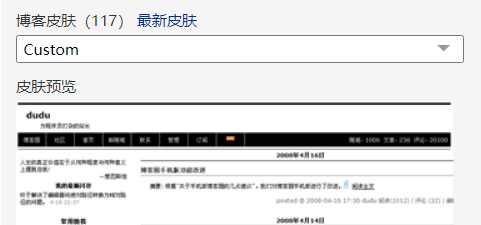
全选复制粘贴,这块没有什么要更改的
GitHub:https://github.com/esofar/cnblogs-theme-silence/blob/master/dist/silence.min.css
CSS-CDN:https://cdn.jsdelivr.net/gh/esofar/cnblogs-theme-silence@3.0.0-beta3/dist/silence.min.css
至于JS的应用可以直接用我的,或者用作者官方CDN
JS-CDN:https://cdn.jsdelivr.net/gh/esofar/cnblogs-theme-silence@3.0.0-beta3/dist/silence.min.js
然后就是一些我的个人配置,标题这块是这种配置
<font size="5">纸上得来终觉浅,绝知此事要躬行.</font><br><font size="3">Talk is cheap. Show me the code.</font> <font size="2"> 悟已往之不谏,知来者之可追。实迷途其未远,觉今是而昨非.</font>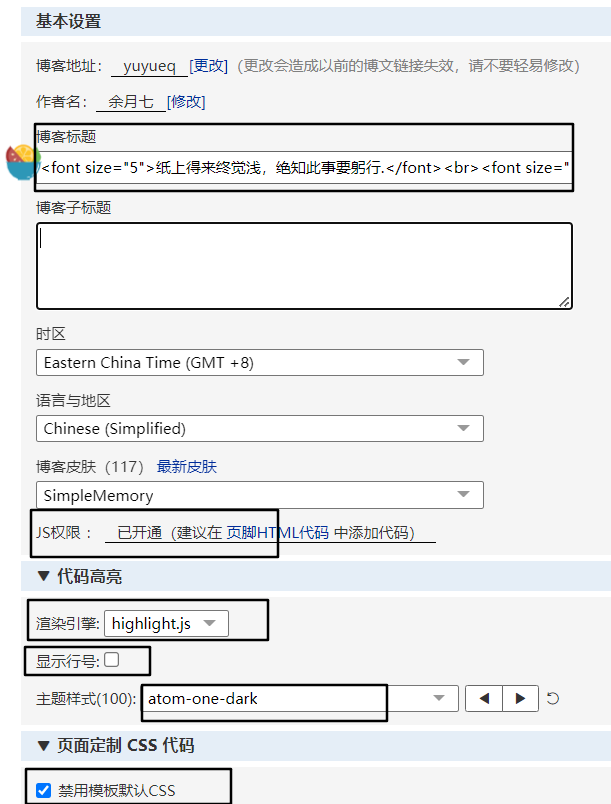
下面是侧边栏内容,很多配置官方有说明,而且我也有一些注释,这里不做过多赘述
<script type="text/javascript"> window.$silence = { avatar: 'https://images.cnblogs.com/cnblogs_com/yuyueq/2130345/o_220323071252_logo1.png', catalog: { enable: true, index: false, active: true, levels: ['h1', 'h2', 'h3'] }, hljsln: true, github: 'https://github.com/yuyueq', navbars: [ { title: '关于我', chilren: [{ title: '语雀', target: '_blank', url: 'https://www.yuque.com/yuyueq', }, { title: 'Gitee', target: '_blank', url: 'https://www.gitee.com/yuyueq', }, { title: 'CSDN', target: '_blank', url: 'https://blog.csdn.net/Frank_dwx', }, { title: '个人网站', target: '_blank', url: 'https://www.yuyueq.cn', }, ] }], signature: { enable: true, author: null, license: ['署名-非商业性使用-相同方式共享 4.0 国际', 'https://creativecommons.org/licenses/by-nc-sa/4.0/'], remark: '尊重每一个原创,从你我开始!<br>无论人生上到哪一层台阶,阶下有人在仰望你,阶上亦有人在俯视你。你抬头自卑,低头自得,唯有平视,才能看见真实的自己。<br>转载请注明原文链接,如果觉得这篇文章对你有小小的帮助的话,记得在右下角点个“??”哦,博主在此感谢你的支持!', }, };</script><script src="https://files.cnblogs.com/files/yuyueq/silence.min.js"></script><!-- 为博客底部添加音乐组件 --><div id="player" ></div><link href="https://files.cnblogs.com/files/shwee/APlayer.min_v1.10.1.css" rel="stylesheet"><script src="https://files.cnblogs.com/files/shwee/APlayer.min_v1.10.1.js"></script><script type="text/javascript"> var ap = new APlayer({ element: document.getElementById('player'), narrow: false, autoplay: false, <!-- 是否自动播放 --> showlrc: false, theme: '#FFFFFF', <!-- 插件背景颜色,建议和你的公告栏背景色一样,这样融为一体的感觉 --> listFolded: true, <!-- 默认折叠 --> fixed: false, <!-- 底部展示 --> volume: 0.5, <!-- 默认音量 --> mutex: true, <!-- 不允许多个播放器同时播放 --> music: [{ title: '七里香', author: '周杰伦', url: 'https://files.cnblogs.com/files/yuyueq/%E4%B8%83%E9%87%8C%E9%A6%99.css', pic: 'https://images.cnblogs.com/cnblogs_com/yuyueq/1946705/o_220119013521_Snipaste_2022-01-19_09-31-35.png' }, { title: '夜曲', author: '周杰伦', url: 'https://files.cnblogs.com/files/yuyueq/%E5%A4%9C%E6%9B%B2.css', pic: 'https://images.cnblogs.com/cnblogs_com/yuyueq/1946705/o_220117061210_%E5%A4%9C%E6%9B%B2.png' }, { title: '花海', author: '周杰伦', url: 'https://files.cnblogs.com/files/unleashed/%E8%8A%B1%E6%B5%B7.css', pic: 'https://pic.downk.cc/item/5f3e3d0714195aa5949ad064.jpg' }, { title: '不能说的秘密', author: '周杰伦', url: 'https://files.cnblogs.com/files/unleashed/%E4%B8%8D%E8%83%BD%E8%AF%B4%E7%9A%84%E7%A7%98%E5%AF%86.css', pic: 'https://images.cnblogs.com/cnblogs_com/unleashed/1801489/o_200820064737t010e12e6a774215909.jpg' }, { title: '借口', author: '周杰伦', url: 'https://files.cnblogs.com/files/unleashed/%E5%80%9F%E5%8F%A3.css', pic: 'https://images.cnblogs.com/cnblogs_com/unleashed/1801489/o_200820064908e0c14e6d62d096386e1e70a0d5b719f7.png' }, { title: 'Panroama', author: 'X-Ray dog', url: 'https://files.cnblogs.com/files/unleashed/Panorama.css', pic: 'https://images.cnblogs.com/cnblogs_com/unleashed/1801489/o_2007160616417ef991ceb1481c31422c0f14287690f8.png' }, { title: 'Epic Music', author: 'John Dreamer', url: 'https://files.cnblogs.com/files/unleashed/EpicMusic.css', pic: 'https://images.cnblogs.com/cnblogs_com/unleashed/1801489/o_200708082237a3b8f6a8713f1cc5d26861d847989412.jpg' }, { title: 'This’sWhatYouCameFor', author: 'Chave', url: 'https://files.cnblogs.com/files/unleashed/ChaveSunflyKaraokeThisIsWhatYouCameFor.css', pic: 'https://images.cnblogs.com/cnblogs_com/unleashed/1801489/o_2007170147331ff2be3d5e7168150c1aff88f4186244.png' }, { title: 'Mine', author: 'SLANDER', url: 'https://files.cnblogs.com/files/unleashed/Mine1.css', pic: 'https://images.cnblogs.com/cnblogs_com/unleashed/1801489/o_200707143300wallhaven-83ywmo.jpg' }, { title: 'Shorts', author: 'Imagine Dragons', url: 'https://files.cnblogs.com/files/unleashed/Shorts.css', pic: 'https://images.cnblogs.com/cnblogs_com/unleashed/1801489/o_200716061133e9a018a8ab71975f6b9b30c2fcc62e39.png' }, { title: 'Where is your love', author: 'J.lisk', url: 'https://files.cnblogs.com/files/unleashed/Whereisyourlove.css', pic: 'https://images.cnblogs.com/cnblogs_com/unleashed/1801489/o_20071909221647e991c39efbb1a03ec330f28d072155.png' }, { title: '告白の夜', author: 'Ayasa', url: 'https://files.cnblogs.com/files/unleashed/Ayasa%E5%91%8A%E7%99%BD%E3%81%AE%E5%A4%9C.css', pic: 'https://images.cnblogs.com/cnblogs_com/unleashed/1801489/o_2007080822111587049458312.jpeg' }, { title: '年少有为', author: '李荣浩', url: 'https://files.cnblogs.com/files/unleashed/%E5%B9%B4%E5%B0%91%E6%9C%89%E4%B8%BA.css', pic: 'https://pic.downk.cc/item/5f3e3e5914195aa5949cbf4a.jpg' }, { title: '因为你,所以我', author: '五月天', url: 'https://files.cnblogs.com/files/yuyueq/%E5%9B%A0%E4%B8%BA%E4%BD%A0%E6%89%80%E4%BB%A5%E6%88%91.css', pic: 'https://images.cnblogs.com/cnblogs_com/yuyueq/1946705/o_220117063946_Snipaste_2022-01-17_14-23-13.png' }, { title: '楼顶上的小斑鸠', author: '队长', url: 'https://files.cnblogs.com/files/yuyueq/%E6%A5%BC%E9%A1%B6%E4%B8%8A%E7%9A%84%E5%B0%8F%E6%96%91%E9%B8%A0.css', pic: 'https://images.cnblogs.com/cnblogs_com/yuyueq/1946705/o_220117060058_%E6%A5%BC%E9%A1%B6%E4%B8%8A%E7%9A%84%E5%B0%8F%E6%96%91%E9%B8%A0.png' }, { title: '哪里都是你', author: '队长', url: 'https://files.cnblogs.com/files/yuyueq/%E5%93%AA%E9%87%8C%E9%83%BD%E6%98%AF%E4%BD%A0.css', pic: 'https://images.cnblogs.com/cnblogs_com/yuyueq/1946705/o_220117054903_%E5%93%AA%E9%87%8C%E9%83%BD%E6%98%AF%E4%BD%A0.png' }, { title: '11', author: '队长', url: 'https://files.cnblogs.com/files/yuyueq/11.css', pic: 'https://images.cnblogs.com/cnblogs_com/yuyueq/1946705/o_220117060454_11.png' }, { title: '一万次悲伤(Live)', author: '逃跑计划', url: 'https://files.cnblogs.com/files/unleashed/%E4%B8%80%E4%B8%87%E6%AC%A1%E6%82%B2%E4%BC%A4111.css', pic: 'https://pic.downk.cc/item/5f2587db14195aa59434c04f.jpg' }, { title: '起风了', author: '买辣椒也用券', url: 'https://files.cnblogs.com/files/yuyueq/%E8%B5%B7%E9%A3%8E%E4%BA%86.css', pic: 'https://images.cnblogs.com/cnblogs_com/yuyueq/1946705/o_220117064806_Snipaste_2022-01-17_14-47-44.png' }, { title: '下女的圣经', author: 'Bo Peep', url: 'https://files.cnblogs.com/files/unleashed/%E4%B8%8B%E5%A5%B3%E7%9A%84%E5%9C%A3%E7%BB%8F.css', pic: 'https://images.cnblogs.com/cnblogs_com/unleashed/1801489/o_200730030607t01fea4cae2ab85a945.jpg' }, ] }); // ap.init();</script><br>这块我是用的 Aplayer:https://aplayer.js.org/#/zh-Hans/
可以去参考一下官方文档进行自定义化和配置。
当时是直接在博客园里面,搜索相关的样式修改文章的,把文章日期尽量定位到比较旧的日期相对来说有新发现
这里推荐两篇很不错的文章:
博客园美化教程大集合----极致个性化你的专属博客(超详细,看这篇就够了)
【全网最全的博客美化系列教程】
目前自己的博客样式就是这个,暂时感觉还不错,可能自己也有审美疲劳吧,不知道会过多久,再次尝试换一个新的主题,也很有可能兜兜转转回归默认。
此外也是因为最近刚换博客主题,所以抽了点时间把以前的修改做个总结。
顺便提一下上一篇对sql函数和优化的记录,今天看到公众号有一篇文章
警告!别再使用 TIMESTAMP 作为日期字段~
本人现在就有点懵,因为自己也有一点设计习惯了,也不知道这种方式到底怎么样,感觉网上说的大多都不一,多数情况下还是要根据业务来吧,到底哪种方式更普遍
更优先,还是都可以,希望有大佬可以不吝赐教,我在此非常感谢!

