首先使用 PyTorch 定义一个简单的网络模型:
class ConvBnReluBlock(nn.Module): def __init__(self) -> None: super().__init__() self.conv1 = nn.Conv2d(3, 64, 3) self.bn1 = nn.BatchNorm2d(64) self.maxpool1 = nn.MaxPool2d(3, 1) self.conv2 = nn.Conv2d(64, 32, 3) self.bn2 = nn.BatchNorm2d(32) self.relu = nn.ReLU() def forward(self, x): out = self.conv1(x) out = self.bn1(out) out = self.relu(out) out = self.maxpool1(out) out = self.conv2(out) out = self.bn2(out) out = self.relu(out) return out在导出模型之前,需要提前定义一些变量:
model = ConvBnReluBlock() # 定义模型对象x = torch.randn(2, 3, 255, 255) # 定义输入张量然后使用 PyTorch 官方 API(torch.onnx.export)导出 ONNX 格式的模型:
# way1:torch.onnx.export(model, (x), "conv_bn_relu_evalmode.onnx", input_names=["input"], output_names=['output'])# way2:import torch._C as _CTrainingMode = _C._onnx.TrainingModetorch.onnx.export(model, (x), "conv_bn_relu_trainmode.onnx", input_names=["input"], output_names=['output'], opset_version=12, # 默认版本为9,但是如果低于12,将不能正确导出 Dropout 和 BatchNorm 节点 training=TrainingMode.TRAINING, # 默认模式为 TrainingMode.EVAL do_constant_folding=False) # 常量折叠,默认为True,但是如果使用TrainingMode.TRAINING模式,则需要将其关闭# way3torch.onnx.export(model, (x), "conv_bn_relu_dynamic.onnx", input_names=['input'], output_names=['output'], dynamic_axes={'input': {0: 'batch_size', 2: 'input_width', 3: 'input_height'}, 'output': {0: 'batch_size', 2: 'output_width', 3: 'output_height'}})可以看到,这里主要以三种方式导出模型,下面分别介绍区别:
下图分别将这三种导出方式的模型结构使用 Netron 可视化: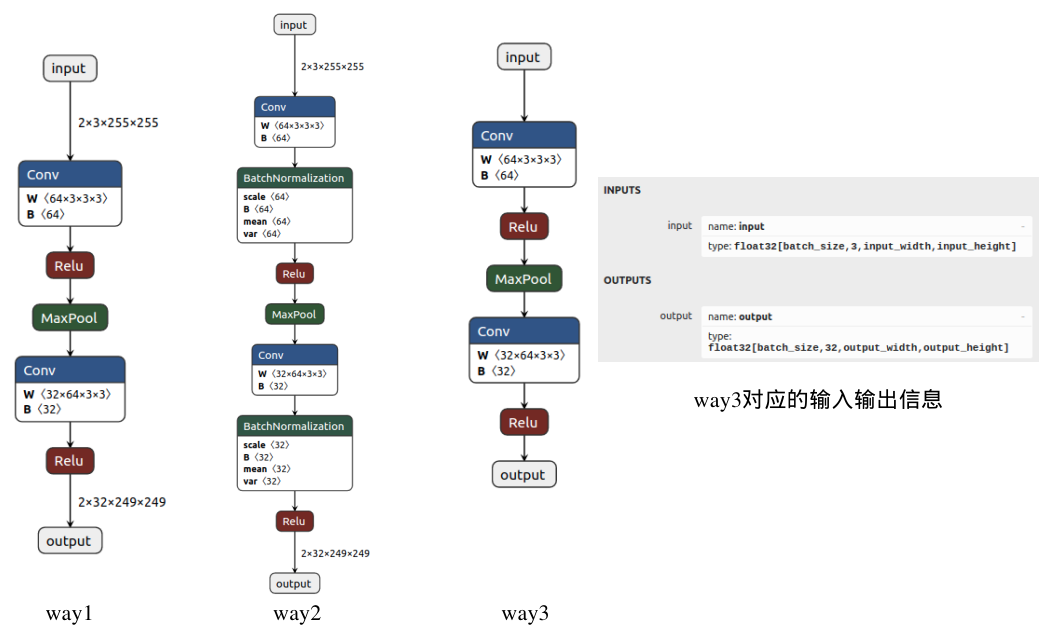
这里参考了BBuf大佬的讲解:【传送门:https://zhuanlan.zhihu.com/p/346511883】
接下来主要针对 way1 方式导出的ONNX模型进行深入分析。
ONNX格式定义:https://github.com/onnx/onnx/blob/master/onnx/onnx.proto
在这个文件中,定义了多个核心对象:ModelProto、GraphProto、NodeProto、ValueInfoProto、TensorProto 和 AttributeProto。
在加载ONNX模型之后,就获得了一个ModelProto,其中包含一些
在 GraphProto 中,有如下几个属性需要注意:
[name: "input"type { tensor_type { elem_type: 1 shape { dim { dim_value: 2 } dim { dim_value: 3 } dim { dim_value: 255 } dim { dim_value: 255 } } }}][name: "output"type { tensor_type { elem_type: 1 shape { dim { dim_value: 2 } dim { dim_value: 32 } dim { dim_value: 249 } dim { dim_value: 249 } } }}] [input: "input"input: "23"input: "24"output: "22"name: "Conv_0"op_type: "Conv"attribute { name: "dilations" ints: 1 ints: 1 type: INTS}attribute { name: "group" i: 1 type: INT}attribute { name: "kernel_shape" ints: 3 ints: 3 type: INTS}attribute { name: "pads" ints: 0 ints: 0 ints: 0 ints: 0 type: INTS}attribute { name: "strides" ints: 1 ints: 1 type: INTS}, input: "22"output: "17"name: "Relu_1"op_type: "Relu", input: "17"output: "18"name: "MaxPool_2"op_type: "MaxPool"attribute { name: "kernel_shape" ints: 3 ints: 3 type: INTS}attribute { name: "pads" ints: 0 ints: 0 ints: 0 ints: 0 type: INTS}attribute { name: "strides" ints: 1 ints: 1 type: INTS}, input: "18"input: "26"input: "27"output: "25"name: "Conv_3"op_type: "Conv"attribute { name: "dilations" ints: 1 ints: 1 type: INTS}attribute { name: "group" i: 1 type: INT}attribute { name: "kernel_shape" ints: 3 ints: 3 type: INTS}attribute { name: "pads" ints: 0 ints: 0 ints: 0 ints: 0 type: INTS}attribute { name: "strides" ints: 1 ints: 1 type: INTS}, input: "25"output: "output"name: "Relu_4"op_type: "Relu"][dims: 64dims: 3dims: 3dims: 3data_type: 1name: "23"raw_data: "\220\251\001>\232\326&>\253\227\372 ... 省略一眼望不到头的内容 ... "dims: 64data_type: 1name: "24"raw_data: "Rt\347\275\005\203\0 ..."dims: 32dims: 64dims: 3dims: 3data_type: 1name: "26"raw_data: "9\022\273;+^\004\2 ..."...至此,我们已经分析完 GraphProto 的内容,下面根据图中的一个节点可视化说明以上内容:
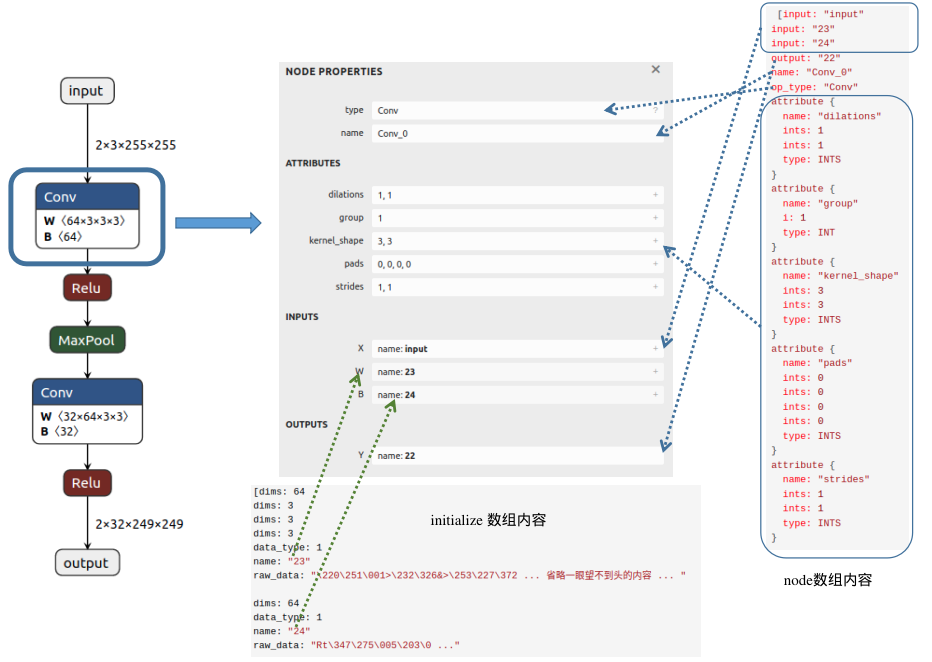
从图中可以发现,Conv 节点的输入包含三个部分:输入的图像(input)、权重(这里以数字23代表该节点权重W的名字)以及偏置(这里以数字24表示该节点偏置B的名字);输出内容的名字为22;属性信息包括dilations、group、kernel_shape、pads和strides,不同节点会具有不同的属性信息。在initializer数组中,我们可以找到该Conv节点权重(name:23)对应的值(raw_data),并且可以清楚地看到维度信息(64X3X3X3)。

