想要学习ansible,只有一个节点肯定是不行的,而搭建虚拟机又是一件非常费时费力费资源的事情,所以通过docker 快速搭建一个容器学习环境是一个不错的选择
Ansible默认通过 SSH 协议管理机器。
安装Ansible之后,不需要启动或运行一个后台进程,或是添加一个数据库。只要在一个节点上安装好,就可以通过这台电脑管理一组远程的机器。在远程被管理的机器上,不需要安装运行任何软件,因此升级Ansible版本不会有太多问题.
通常我们使用 ssh 与托管节点通信,默认使用 sftp.如果 sftp 不可用,可在 ansible.cfg 配置文件中配置成 scp 的方式. 在托管节点上也需要安装 Python 2.4 或以上的版本.如果版本低于 Python 2.5 ,还需要额外安装一个模块:
所以通过第一部分介绍,我们的学习环境准备4个节点,所有节点安装相同的python版本,然后在一个节点安装ansible即可。
ansible
host1
host2
host3
Dockerfile.host
# Latest version of centos7FROM centos:centos7RUN yum clean all && \ yum -y install epel-release && \ yum -y install PyYAML python-jinja2 python-httplib2 python-keyczar python-paramiko python-setuptools git python-pip vim net-tools openssh-server# sshdRUN sed -i "s/#PermitRootLogin.*/PermitRootLogin yes/g" /etc/ssh/sshd_config && \ ssh-keygen -t rsa -P "" -f /etc/ssh/ssh_host_rsa_key && \ ssh-keygen -t ecdsa -P "" -f /etc/ssh/ssh_host_ecdsa_key && \ ssh-keygen -t ed25519 -P "" -f /etc/ssh/ssh_host_ed25519_keyEXPOSE 22RUN echo "root:123456" | chpasswdCMD ["/usr/sbin/sshd", "-D"]Dockerfile.ansible
# Latest version of centos7FROM centos:centos7RUN yum clean all && \ yum -y install epel-release && \ yum -y install PyYAML python-jinja2 python-httplib2 python-keyczar python-paramiko python-setuptools git python-pip vim net-tools openssh-server ansible# sshdRUN sed -i "s/#PermitRootLogin.*/PermitRootLogin yes/g" /etc/ssh/sshd_config && \ ssh-keygen -t rsa -P "" -f /etc/ssh/ssh_host_rsa_key && \ ssh-keygen -t ecdsa -P "" -f /etc/ssh/ssh_host_ecdsa_key && \ ssh-keygen -t ed25519 -P "" -f /etc/ssh/ssh_host_ed25519_keyEXPOSE 22RUN echo "root:123456" | chpasswdCMD ["/usr/sbin/sshd", "-D"]构建命令
# 构建ansible镜像docker build -t myansible/asible:1.0 -f Dockerfile.ansible .docker build -t myansible/host:1.0 -f Dockerfile.host .# 运行容器## hostfor ((i=1;i<=3;i++));do echo "start host$i";docker run -td --name host${i} --hostname host${i} myansible/host:1.0 ;done## ansibledocker run -itd --name myansible --hostname myansible myansible/asible:1.0 /bin/bash#获取容器ipfor ((i=1;i<=3;i++));do docker inspect --format '{{.NetworkSettings.IPAddress}}' host${i};done# 进入ansible容器docker exec -it myansible /bin/bashcat >> /etc/hosts <<EOF172.17.0.2 host1172.17.0.3 host2172.17.0.4 host3EOFssh-keygen -t rsa -P '' -f ~/.ssh/id_rsassh-copy-id root@host1ssh-copy-id root@host2ssh-copy-id root@host3# 配置hostsvim /etc/ansible/hosts[group1]host1host2[group2]host3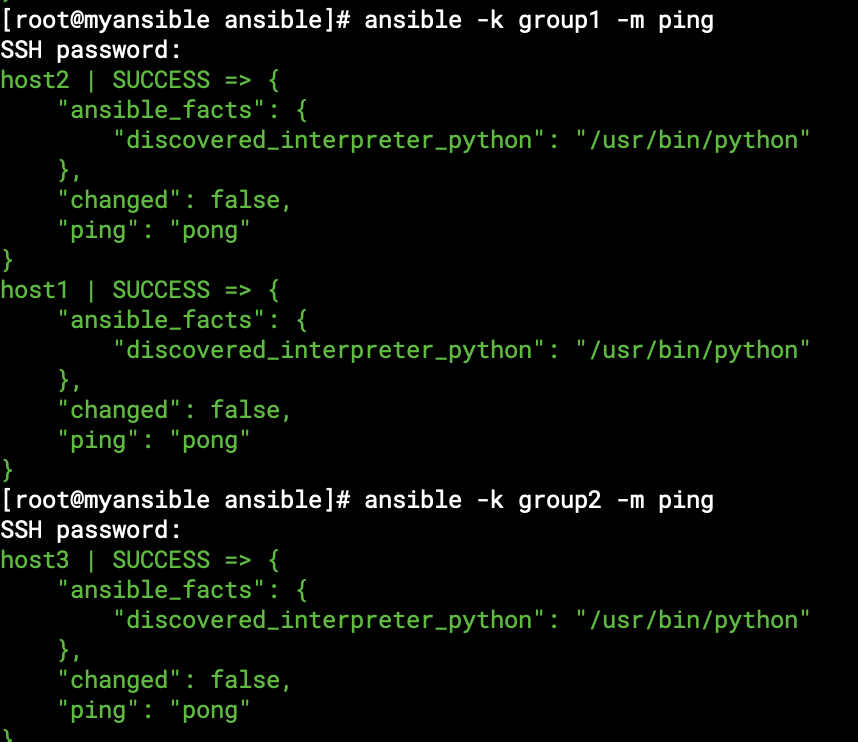
使用完了清除命令
# 清除容器docker stop myansible && docker rm myansiblefor ((i=1;i<=3;i++));do echo "clean host$i";docker stop host${i} && docker rm host${i} ;done# 清除镜像docker rmi myansible/asible:1.0 myansible/host:1.0
