请各大网友尊重本人原创知识分享,谨记本人博客:南国以南i
上篇我们介绍到 保姆教程系列一、Linux搭建Nacos
注册中心原理
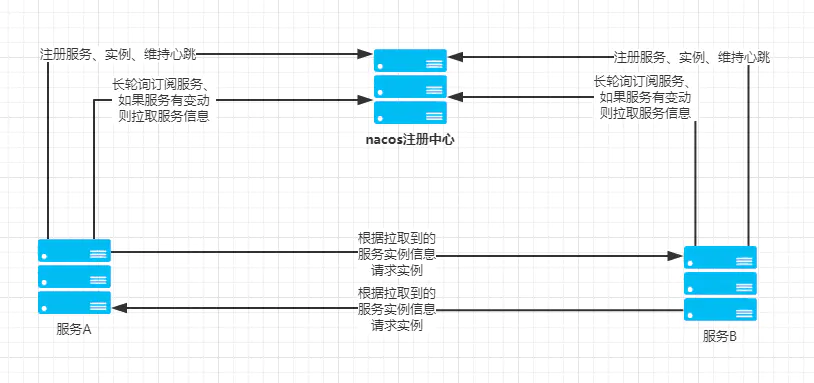
IDEA中创建聚合项目nacos作为父工程,其pom.xml如下
<?xml version="1.0" encoding="UTF-8"?><project xmlns="http://maven.apache.org/POM/4.0.0" xmlns:xsi="http://www.w3.org/2001/XMLSchema-instance" xsi:schemaLocation="http://maven.apache.org/POM/4.0.0 https://maven.apache.org/xsd/maven-4.0.0.xsd"> <modelVersion>4.0.0</modelVersion> <!--SpringBoot版本--> <parent> <groupId>org.springframework.boot</groupId> <artifactId>spring-boot-starter-parent</artifactId> <version>2.3.3.RELEASE</version> <relativePath/> <!-- lookup parent from repository --> </parent> <groupId>com.example</groupId> <artifactId>nacos</artifactId> <version>0.0.1</version> <name>nacos</name> <description>Spring Cloud Nacos</description> <properties> <java.version>1.8</java.version> </properties> <!--引入子模块--> <modules> <module>provider</module><!--生产者--> <module>consumer</module><!--消费者--> </modules> <dependencies> <!--web依赖--> <dependency> <groupId>org.springframework.boot</groupId> <artifactId>spring-boot-starter-web</artifactId> </dependency> <!--测试依赖--> <dependency> <groupId>org.springframework.boot</groupId> <artifactId>spring-boot-starter-test</artifactId> <scope>test</scope> </dependency> <!--nacos配置中心依赖--> <dependency> <groupId>com.alibaba.cloud</groupId> <artifactId>spring-cloud-starter-alibaba-nacos-config</artifactId> <version>2.1.1.RELEASE</version> </dependency> <!--nacos配置中心依赖--> <!--<dependency>--> <!--<groupId>org.springframework.cloud</groupId>--> <!--<artifactId>spring-cloud-starter-alibaba-nacos-config</artifactId>--> <!--<version>0.2.1.RELEASE</version>--> <!--</dependency>--> <!--lombok依赖--> <dependency> <groupId>org.projectlombok</groupId> <artifactId>lombok</artifactId> <optional>true</optional> </dependency> <!--注册中心依赖--> <dependency> <groupId>org.springframework.cloud</groupId> <artifactId>spring-cloud-starter-alibaba-nacos-discovery</artifactId> <version>0.2.2.RELEASE</version> </dependency> </dependencies> <build> <plugins> <plugin> <groupId>org.springframework.boot</groupId> <artifactId>spring-boot-maven-plugin</artifactId> </plugin> </plugins> </build> <dependencyManagement> <dependencies> <dependency> <groupId>org.springframework.cloud</groupId> <artifactId>spring-cloud-dependencies</artifactId> <version>Greenwich.SR2</version> <type>pom</type> <scope>import</scope> </dependency> </dependencies> </dependencyManagement></project>
在父工程Nacos下创建springboot子工程provider,其pom.xml文件为:
<?xml version="1.0" encoding="UTF-8"?><project xmlns="http://maven.apache.org/POM/4.0.0" xmlns:xsi="http://www.w3.org/2001/XMLSchema-instance" xsi:schemaLocation="http://maven.apache.org/POM/4.0.0 https://maven.apache.org/xsd/maven-4.0.0.xsd"> <modelVersion>4.0.0</modelVersion> <!--父工程--> <parent> <groupId>com.example</groupId> <artifactId>nacos</artifactId> <version>0.0.1</version> <relativePath/> <!-- lookup parent from repository --> </parent> <groupId>com.example</groupId> <artifactId>provider</artifactId> <version>0.0.1</version> <name>provider</name> <description>Provider Nacos</description> <properties> <java.version>1.8</java.version> </properties> <dependencies> <!--lombok依赖--> <dependency> <groupId>org.projectlombok</groupId> <artifactId>lombok</artifactId> <optional>true</optional> </dependency> </dependencies> <build> <plugins> <plugin> <groupId>org.springframework.boot</groupId> <artifactId>spring-boot-maven-plugin</artifactId> </plugin> </plugins> </build></project>
在启动类ProviderApplication.java中增加@EnableDiscoveryClient注解
import org.springframework.boot.SpringApplication;import org.springframework.boot.autoconfigure.SpringBootApplication;import org.springframework.cloud.client.discovery.EnableDiscoveryClient;@SpringBootApplication@EnableDiscoveryClient//开启注册public class ProviderApplication { public static void main(String[] args) { SpringApplication.run(ProviderApplication.class, args); }}
配置文件application.yml进行如下配置
#生产者配置server: port: 8081spring: application: name: nacos-provider #服务名称 cloud: nacos: discovery: #使用注册中心 server-addr: 192.168.36.135:8848 #Nacos访问地址 enabled: true在服务提供方创建一个对外接口
import org.springframework.web.bind.annotation.GetMapping;import org.springframework.web.bind.annotation.RequestMapping;import org.springframework.web.bind.annotation.RestController;@RequestMapping("/provider")@RestControllerpublic class IndexController { @GetMapping("/hello") public String hello() { return "我是provider服务生产者"; }}
在父工程Nacos下创建springboot子工程consumer,其pom.xml文件为:
<?xml version="1.0" encoding="UTF-8"?><project xmlns="http://maven.apache.org/POM/4.0.0" xmlns:xsi="http://www.w3.org/2001/XMLSchema-instance" xsi:schemaLocation="http://maven.apache.org/POM/4.0.0 https://maven.apache.org/xsd/maven-4.0.0.xsd"> <modelVersion>4.0.0</modelVersion> <!--父工程--> <parent> <groupId>com.example</groupId> <artifactId>nacos</artifactId> <version>0.0.1</version> <relativePath/> <!-- lookup parent from repository --> </parent> <groupId>com.example</groupId> <artifactId>consumer</artifactId> <version>0.0.1</version> <name>consumer</name> <description>Consumer Nacos</description> <properties> <java.version>1.8</java.version> </properties> <dependencies> <!--feign依赖--> <dependency> <groupId>org.springframework.cloud</groupId> <artifactId>spring-cloud-starter-openfeign</artifactId> </dependency> <!--hystrix断路器--> <dependency> <groupId>org.springframework.cloud</groupId> <artifactId>spring-cloud-starter-netflix-hystrix</artifactId> </dependency> </dependencies> <build> <plugins> <plugin> <groupId>org.springframework.boot</groupId> <artifactId>spring-boot-maven-plugin</artifactId> </plugin> </plugins> </build></project>
在启动类ConsumerApplication.java中增加注解
import org.springframework.boot.SpringApplication;import org.springframework.boot.autoconfigure.SpringBootApplication;import org.springframework.cloud.client.discovery.EnableDiscoveryClient;import org.springframework.cloud.openfeign.EnableFeignClients;@SpringBootApplication@EnableDiscoveryClient //开启注册@EnableFeignClients //开启Feign服务public class ConsumerApplication { public static void main(String[] args) { SpringApplication.run(ConsumerApplication.class, args); }}
配置文件application.yml进行如下配置
#消费者配置server: port: 8082spring: application: name: nacos-consumer cloud: nacos: discovery: #使用注册中心 server-addr: 192.168.36.135:8848 enabled: true#开启断路器feign: hystrix: enabled: true使用FeginClient进行服务调用,hystrix进行熔断
import com.example.consumer.hystrix.HystrixUtils;import org.springframework.cloud.openfeign.FeignClient;import org.springframework.web.bind.annotation.GetMapping;@FeignClient(name = "nacos-provider",fallback = HystrixUtils.class)//服务出现异常进行容错public interface ProviderFeignClient { /** * . * 调用生产者服务 * @return */ @GetMapping("/provider/hello") String hello();}
HystrixUtils.class容错类
import com.example.consumer.client.ProviderFeignClient;import org.springframework.stereotype.Component;@Componentpublic class HystrixUtils implements ProviderFeignClient { /** * . * 方法重写 * * @return */ @Override public String hello() { return "断路器容错,服务开小差了,稍等片刻..."; }}
service层服务调用
import com.example.consumer.client.ProviderFeignClient;import org.springframework.beans.factory.annotation.Autowired;import org.springframework.stereotype.Service;@Servicepublic class IndexService { @Autowired private ProviderFeignClient client; //注入 public String hello() { return client.hello(); // 服务调用 }}
在controller中调用service的接口,像一般的接口调用一样
import com.example.consumer.service.IndexService;import org.springframework.beans.factory.annotation.Autowired;import org.springframework.web.bind.annotation.GetMapping;import org.springframework.web.bind.annotation.RequestMapping;import org.springframework.web.bind.annotation.RestController;@RequestMapping("/consumer")@RestControllerpublic class IndexController { @Autowired private IndexService service; @GetMapping("/hello") public String hello(){ return service.hello(); }}
启动完成后,在服务提供者和消费者的日志中应该可以分别看到如下信息
INFO 18388 --- [ main] o.s.c.a.n.registry.NacosServiceRegistry : nacos registry, nacos-provider 192.168.22.1:8081 register finished
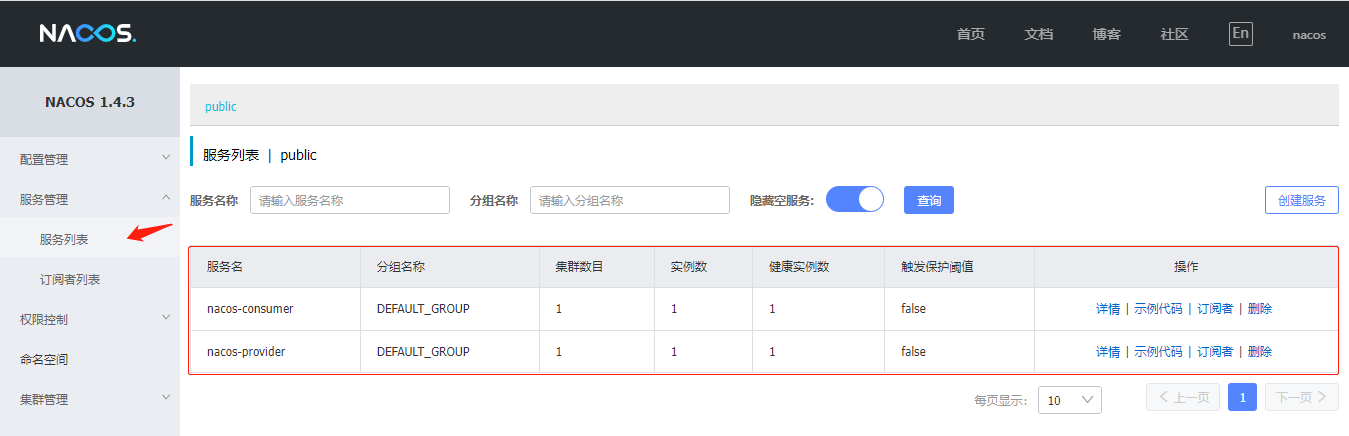
你会发现服务列表中,已经显示了我们刚才创建的两个项目,并可以对其进行简单的监控和管理。
打开浏览器输入:http://localhost:8082/consumer/hello
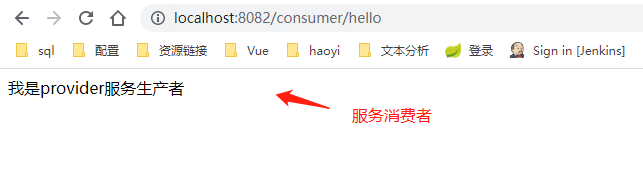
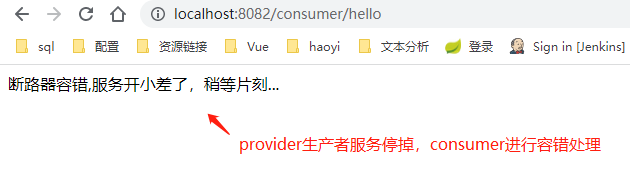
Nacos服务发现与Eureak服务发现无差异
敬请关注下篇 保姆教程系列三、Nacos Config–服务配置中心
我是南国以南i记录点滴每天成长一点点,学习是永无止境的!转载请附原文链接!!!
参考链接

