springboot微服务整合swagger3方法很简单,下文会演示。但是在分布式项目中如果每个微服务都需要单独的分开访问获取接口文档就不方便了,本文将详细讲解springcloud gateway网关如何聚合统一管理swagger接口文档。
先贴张整合后的效果图(通过切换左上角的下拉窗口获取每个微服务的接口文档):

首先看下单体微服务是如何整合swagger3的,事实上这也是后面gateway网关聚合统一文档的步骤之一。
步骤一:
SpringBoot添加pom文件依赖
<dependency> <groupId>io.springfox</groupId> <artifactId>springfox-boot-starter</artifactId> <version>3.0.0</version></dependency>
如果想让浏览器展示的UI效果更好看一点,需要引入最新的下面的依赖
<!--swagger UI--> <dependency> <groupId>com.github.xiaoymin</groupId> <artifactId>knife4j-spring-ui</artifactId> <version>3.0.3</version> </dependency>
步骤二:
配置文件增加配置
swagger: enable: true application-name: 鉴权配置中心接口 application-version: 1.0 application-description: 鉴权配置中心
步骤三:
创建配置类
import org.springframework.boot.context.properties.ConfigurationProperties;import org.springframework.context.annotation.Bean;import org.springframework.stereotype.Component;import io.swagger.annotations.ApiOperation;import lombok.Data;import springfox.documentation.builders.ApiInfoBuilder;import springfox.documentation.builders.PathSelectors;import springfox.documentation.builders.RequestHandlerSelectors;import springfox.documentation.oas.annotations.EnableOpenApi;import springfox.documentation.service.ApiInfo;import springfox.documentation.service.Contact;import springfox.documentation.spi.DocumentationType;import springfox.documentation.spring.web.plugins.Docket;/** * @author: shf description: date: 2022/3/28 11:35 */@Component@EnableOpenApi@ConfigurationProperties(prefix = "swagger")@Datapublic class SwaggerConfig { /** * 是否开启swagger,生产环境一般关闭,所以这里定义一个变量 */ private Boolean enable; /** * 项目应用名 */ private String applicationName; /** * 项目版本信息 */ private String applicationVersion; /** * 项目描述信息 */ private String applicationDescription; @Bean public Docket docket() { return new Docket(DocumentationType.OAS_30) .pathMapping("/") // 定义是否开启swagger,false为关闭,可以通过变量控制,线上关闭 .enable(enable) //配置api文档元信息 .apiInfo(apiInfo()) // 选择哪些接口作为swagger的doc发布 .select() //apis() 控制哪些接口暴露给swagger, // RequestHandlerSelectors.any() 所有都暴露 // RequestHandlerSelectors.basePackage("net.xdclass.*") 指定包位置 // withMethodAnnotation(ApiOperation.class)标记有这个注解 ApiOperation .apis(RequestHandlerSelectors.withMethodAnnotation(ApiOperation.class)) .paths(PathSelectors.any()) .build(); } private ApiInfo apiInfo() { return new ApiInfoBuilder() .title(applicationName) .description(applicationDescription) .contact(new Contact("鉴权中心平台接口文档", "www.yifeng.com", "123@qq.com")) .version(applicationVersion) .build(); }}
启动服务看下效果:
浏览器访问http://localhost:9799/doc.html
端口号是你服务配置指定的
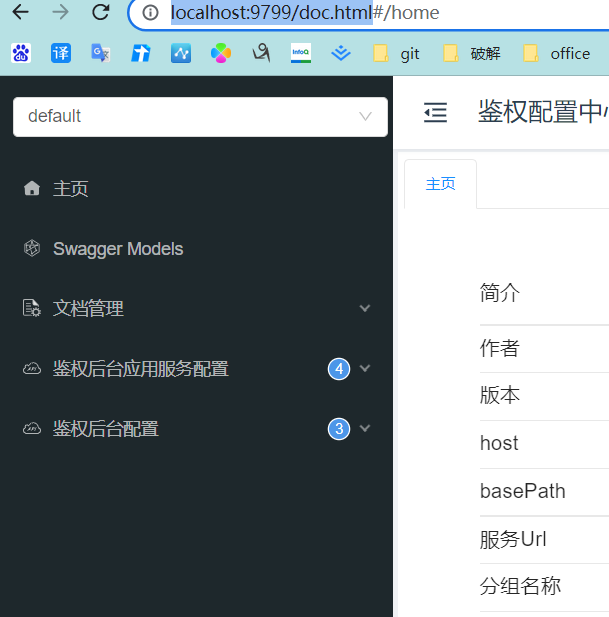
成功完成上面微服务整合swagger的步骤后,还需要在网关中增加配置
步骤一:
同样的引入依赖:
<dependency> <groupId>io.springfox</groupId> <artifactId>springfox-boot-starter</artifactId> <version>3.0.0</version></dependency><dependency> <groupId>com.github.xiaoymin</groupId> <artifactId>knife4j-spring-ui</artifactId> <version>3.0.3</version></dependency>
步骤二:
配置文件:
spring: cloud: gateway: globalcors: cors-configurations: '[/**]': allowCredentials: true allowedOrigins: "*" allowedMethods: "*" allowedHeaders: "*" routes: - filters: - RequestTime=true - StripPrefix=1 id: core-route predicates: - Path=/core/** uri: xxxxxxxxgateway-config: uriWhitelist: - /v3/api-docs
在网关的全局过滤器中要将配置的白名单放行。
步骤三:
添加路由枚举类,将上面配置文件中的每个微服务的路由ID替换为中文,即在UI页面的左上角显示的微服务文档名称。
/** * 服务路由枚举 * * @author shf * @date Created in 2022-03-28 16:28 */public enum ServerRouteEnum { /** * 路由信息 */ CORE_ROUTE("core-route", "开放平台鉴权配置接口"); private String routeId; private String swaggerInfo; ServerRouteEnum(String routeId, String swaggerInfo) { this.routeId = routeId; this.swaggerInfo = swaggerInfo; } /** * 根据路由id获取swagger信息 * * @param routId 路由id * @return swagger信息 */ public static String getSwaggerInfoByRoutId(String routId) { for (ServerRouteEnum routeEnum : ServerRouteEnum.values()) { if (routId.equals(routeEnum.getRouteId())) { return routeEnum.getSwaggerInfo(); } } return null; } /** * @return the routeId */ public String getRouteId() { return routeId; } /** * @param routeId : the routeId to set */ public void setRouteId(String routeId) { this.routeId = routeId; } /** * @return the swaggerInfo */ public String getSwaggerInfo() { return swaggerInfo; } /** * @param swaggerInfo : the swaggerInfo to set */ public void setSwaggerInfo(String swaggerInfo) { this.swaggerInfo = swaggerInfo; }}
最后一步:
新增配置类:
部分说明:
①SwaggerResource:处理的是UI页面中顶部的选择框以及拉取到每个微服务上swagger接口文档的json数据。
②RouteLocator:获取spring cloud gateway中注册的路由
import org.apache.commons.lang3.StringUtils;import org.springframework.cloud.gateway.config.GatewayProperties;import org.springframework.cloud.gateway.route.RouteLocator;import org.springframework.cloud.gateway.support.NameUtils;import org.springframework.context.annotation.Primary;import org.springframework.stereotype.Component;import java.util.ArrayList;import java.util.List;import springfox.documentation.swagger.web.SwaggerResource;import springfox.documentation.swagger.web.SwaggerResourcesProvider;/** * @author: shf description: date: 2022/3/28 14:16 */@Component@Primarypublic class SwaggerProvider implements SwaggerResourcesProvider { public static final String API_URI = "/v3/api-docs"; private final RouteLocator routeLocator; private final GatewayProperties gatewayProperties; public SwaggerProvider(RouteLocator routeLocator, GatewayProperties gatewayProperties) { this.routeLocator = routeLocator; this.gatewayProperties = gatewayProperties; } @Override public List<SwaggerResource> get() { List<SwaggerResource> resources = new ArrayList<>(); List<String> routes = new ArrayList<>(); // 取出gateway的route routeLocator.getRoutes().subscribe(route -> routes.add(route.getId())); // 结合配置的route-路径(Path),和route过滤,只获取在枚举中说明的route节点 gatewayProperties.getRoutes().stream().filter(routeDefinition -> routes.contains(routeDefinition.getId())) .forEach(routeDefinition -> routeDefinition.getPredicates().stream() // 目前只处理Path断言 Header或其他路由需要另行扩展 .filter(predicateDefinition -> ("Path").equalsIgnoreCase(predicateDefinition.getName())) .forEach(predicateDefinition -> { String routeId = routeDefinition.getId(); String swaggerInfo = ServerRouteEnum.getSwaggerInfoByRoutId(routeId); if (StringUtils.isNotEmpty(swaggerInfo)) { resources.add(swaggerResource(swaggerInfo, predicateDefinition.getArgs().get(NameUtils.GENERATED_NAME_PREFIX + "0").replace("/**", API_URI))); } } )); return resources; } private SwaggerResource swaggerResource(String name, String location) { SwaggerResource swaggerResource = new SwaggerResource(); swaggerResource.setName(name); swaggerResource.setLocation(location); swaggerResource.setSwaggerVersion("3.0"); return swaggerResource; }}
浏览器访问:
旧版UI:http://localhost:9999/swagger-ui/index.html
新版UI:http://localhost:9999/doc.html