本文对colly如何使用,整个代码架构设计,以及一些使用实例的收集。
Colly是Go语言开发的Crawler Framework,并不是一个完整的产品,Colly提供了类似于Python的同类产品(BeautifulSoup 或 Scrapy)相似的表现力和灵活性。
Colly这个名称源自 Collector 的简写,而Collector 也是 Colly的核心。
Colly Official Docs,内容不是很多,最新的消息也很就远了,仅仅是活跃在Github
从理解上来说,Colly的设计分为两层,核心层和解析层,
Collector :是Colly实现,该组件负责网络通信,并负责在Collector 作业运行时执行对应事件的回调。Parser :这个其实是抽象的,官网并未对此说明,goquery和一些htmlquery,通过这些就可以将访问的结果解析成类Jquery对象,使html拥有了,XPath选择器和CSS选择器通常情况下Crawler的工作流生命周期大致为
- 构建客户端
- 发送请求
- 获取响应的数据
- 将相应的数据解析
- 对所需数据处理
- 持久化
而Colly则是将这些概念进行封装,通过将事件注册到每个步骤中,通过事件的方式对数据进行清理,抽象来说,Colly面向的是过程而不是对象。大概的工作架构如图
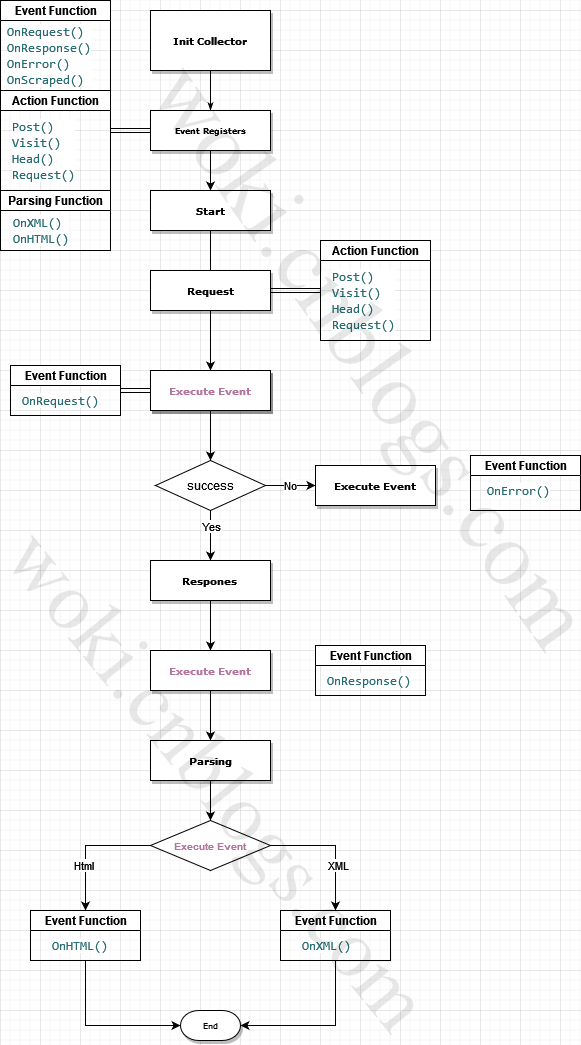
通过上述的概念,可以大概了解到 Colly 是一个基于事件的Crawler,通过开发者自行注册事件函数来触发整个流水线的工作
Colly 具有以下事件处理程序:
Reference
goquery
htmlquery
package mainimport ( "fmt" "github.com/gocolly/colly")func main() { // Instantiate default collector c := colly.NewCollector( // Visit only domains: hackerspaces.org, wiki.hackerspaces.org colly.AllowedDomains("hackerspaces.org", "wiki.hackerspaces.org"), ) // On every a element which has href attribute call callback c.OnHTML("a[href]", func(e *colly.HTMLElement) { link := e.Attr("href") // Print link fmt.Printf("Link found: %q -> %s\n", e.Text, link) // Visit link found on page // Only those links are visited which are in AllowedDomains c.Visit(e.Request.AbsoluteURL(link)) }) // Before making a request print "Visiting ..." c.OnRequest(func(r *colly.Request) { fmt.Println("Visiting", r.URL.String()) }) // Start scraping on https://hackerspaces.org c.Visit("https://hackerspaces.org/")}package mainimport ( "fmt" "github.com/gocolly/colly")func main() { // Create a collector c := colly.NewCollector() // Set HTML callback // Won't be called if error occurs c.OnHTML("*", func(e *colly.HTMLElement) { fmt.Println(e) }) // Set error handler c.OnError(func(r *colly.Response, err error) { fmt.Println("Request URL:", r.Request.URL, "failed with response:", r, "\nError:", err) }) // Start scraping c.Visit("https://definitely-not-a.website/")}word.html
<!DOCTYPE html><html lang="en"><head> <meta charset="UTF-8"> <title>Document title</title></head><body><p>List of words</p><ul> <li>dark</li> <li>smart</li> <li>war</li> <li>cloud</li> <li>park</li> <li>cup</li> <li>worm</li> <li>water</li> <li>rock</li> <li>warm</li></ul><footer>footer for words</footer></body></html>package mainimport ( "fmt" "net/http" "github.com/gocolly/colly/v2")func main() { t := &http.Transport{} t.RegisterProtocol("file", http.NewFileTransport(http.Dir("."))) c := colly.NewCollector() c.WithTransport(t) words := []string{} c.OnHTML("li", func(e *colly.HTMLElement) { words = append(words, e.Text) }) c.Visit("file://./words.html") for _, p := range words { fmt.Printf("%s\n", p) }}通过 ProxySwitcher , 可以直接使用一批代理IP池进行访问了,然而这里只有RR,如果需要其他的均衡算法,需要有自己实现了
package mainimport ( "bytes" "log" "github.com/gocolly/colly" "github.com/gocolly/colly/proxy")func main() { // Instantiate default collector c := colly.NewCollector(colly.AllowURLRevisit()) // Rotate two socks5 proxies rp, err := proxy.RoundRobinProxySwitcher("socks5://127.0.0.1:1337", "socks5://127.0.0.1:1338") if err != nil { log.Fatal(err) } c.SetProxyFunc(rp) // Print the response c.OnResponse(func(r *colly.Response) { log.Printf("Proxy Address: %s\n", r.Request.ProxyURL) log.Printf("%s\n", bytes.Replace(r.Body, []byte("\n"), nil, -1)) }) // Fetch httpbin.org/ip five times for i := 0; i < 5; i++ { c.Visit("https://httpbin.org/ip") }}该功能可以对行为设置一种特征,以免被反扒机器人检测,并禁止我们,如速率限制和延迟
package mainimport ( "fmt" "time" "github.com/gocolly/colly" "github.com/gocolly/colly/debug")func main() { url := "https://httpbin.org/delay/2" // Instantiate default collector c := colly.NewCollector( // Attach a debugger to the collector colly.Debugger(&debug.LogDebugger{}), colly.Async(true), ) // Limit the number of threads started by colly to two // when visiting links which domains' matches "*httpbin.*" glob c.Limit(&colly.LimitRule{ DomainGlob: "*httpbin.*", Parallelism: 2, RandomDelay: 5 * time.Second, }) // Start scraping in four threads on https://httpbin.org/delay/2 for i := 0; i < 4; i++ { c.Visit(fmt.Sprintf("%s?n=%d", url, i)) } // Start scraping on https://httpbin.org/delay/2 c.Visit(url) // Wait until threads are finished c.Wait()}package mainimport ( "fmt" "github.com/gocolly/colly" "github.com/gocolly/colly/queue")func main() { url := "https://httpbin.org/delay/1" // Instantiate default collector c := colly.NewCollector(colly.AllowURLRevisit()) // create a request queue with 2 consumer threads q, _ := queue.New( 2, // Number of consumer threads &queue.InMemoryQueueStorage{MaxSize: 10000}, // Use default queue storage ) c.OnRequest(func(r *colly.Request) { fmt.Println("visiting", r.URL) if r.ID < 15 { r2, err := r.New("GET", fmt.Sprintf("%s?x=%v", url, r.ID), nil) if err == nil { q.AddRequest(r2) } } }) for i := 0; i < 5; i++ { // Add URLs to the queue q.AddURL(fmt.Sprintf("%s?n=%d", url, i)) } // Consume URLs q.Run(c)}默认情况下,Colly的工作模式是同步的。可以使用 Async 函数启用异步模式。在异步模式下,我们需要调用Wait 等待Collector 工作完成。
package mainimport ( "fmt" "github.com/gocolly/colly/v2")func main() { urls := []string{ "http://webcode.me", "https://example.com", "http://httpbin.org", "https://www.perl.org", "https://www.php.net", "https://www.python.org", "https://code.visualstudio.com", "https://clojure.org", } c := colly.NewCollector( colly.Async(), ) c.OnHTML("title", func(e *colly.HTMLElement) { fmt.Println(e.Text) }) for _, url := range urls { c.Visit(url) } c.Wait()}深度是在访问这个页面时,其页面还有link,此时需要采集到入口link几层的link?默认1
package mainimport ( "fmt" "github.com/gocolly/colly")func main() { // Instantiate default collector c := colly.NewCollector( // MaxDepth is 1, so only the links on the scraped page // is visited, and no further links are followed colly.MaxDepth(1), ) // On every a element which has href attribute call callback c.OnHTML("a[href]", func(e *colly.HTMLElement) { link := e.Attr("href") // Print link fmt.Println(link) // Visit link found on page e.Request.Visit(link) }) // Start scraping on https://en.wikipedia.org c.Visit("https://en.wikipedia.org/")}Reference
gocolly
colly