参考资料:
《Spring Microservices in Action》
《Spring Cloud Alibaba 微服务原理与实战》
《B站 尚硅谷 SpringCloud 框架开发教程 周阳》
《Sentinel GitHub 官网》
《Sentinel 官网》
调用链路是 Sentinel 的工作主流程,由各个 Slot 槽组成,将不同的 Slot 槽按照顺序串在一起,从而将不同的功能(限流、降级、系统保护)组合在一起;
本篇《2. 获取 ProcessorSlot 链》将从源码级讲解如何获取调用链路,接着会以遍历链表的方式处理每一个 Slot 槽,其中就有:FlowSlot、StatisticSlot、DegradeSlot 等。分别对应本篇《3. 流控槽实施流控逻辑》、《4. 统计槽实施指标数据统计》和《5. 熔断槽实施服务熔断》;

/* 规则拦截所有的请求;@Configuration@EnableConfigurationProperties(SentinelProperties.class)public class SentinelWebAutoConfiguration { //省略其他代码 @Bean @ConditionalOnProperty(name = "spring.cloud.sentinel.filter.enabled", matchIfMissing = true) public FilterRegistrationBean sentinelFilter() { FilterRegistrationBean<Filter> registration = new FilterRegistrationBean<>(); SentinelProperties.Filter filterConfig = properties.getFilter(); if (filterConfig.getUrlPatterns() == null || filterConfig.getUrlPatterns().isEmpty()) { List<String> defaultPatterns = new ArrayList<>(); //默认情况下通过 /* 规则拦截所有的请求 defaultPatterns.add("/*"); filterConfig.setUrlPatterns(defaultPatterns); } registration.addUrlPatterns(filterConfig.getUrlPatterns().toArray(new String[0])); //【点进去】注册 CommonFilter Filter filter = new CommonFilter(); registration.setFilter(filter); registration.setOrder(filterConfig.getOrder()); registration.addInitParameter("HTTP_METHOD_SPECIFY", String.valueOf(properties.getHttpMethodSpecify())); log.info("[Sentinel Starter] register Sentinel CommonFilter with urlPatterns: {}.", filterConfig.getUrlPatterns()); return registration; }}public class CommonFilter implements Filter { //省略部分代码 public void doFilter(ServletRequest request, ServletResponse response, FilterChain chain) throws IOException, ServletException { HttpServletRequest sRequest = (HttpServletRequest)request; Entry urlEntry = null; try { //解析请求 URL String target = FilterUtil.filterTarget(sRequest); //URL 清洗 UrlCleaner urlCleaner = WebCallbackManager.getUrlCleaner(); if (urlCleaner != null) { //如果存在,则说明配置过 URL 清洗策略,替换配置的 targer target = urlCleaner.clean(target); } if (!StringUtil.isEmpty(target)) { String origin = this.parseOrigin(sRequest); ContextUtil.enter("sentinel_web_servlet_context", origin); if (this.httpMethodSpecify) { String pathWithHttpMethod = sRequest.getMethod().toUpperCase() + ":" + target; //使用 SphU.entry() 方法对 URL 添加限流埋点 urlEntry = SphU.entry(pathWithHttpMethod, 1, EntryType.IN); } else { urlEntry = SphU.entry(target, 1, EntryType.IN); } } //执行过滤 chain.doFilter(request, response); } catch (BlockException var14) { HttpServletResponse sResponse = (HttpServletResponse)response; WebCallbackManager.getUrlBlockHandler().blocked(sRequest, sResponse, var14); } catch (ServletException | RuntimeException | IOException var15) { Tracer.traceEntry(var15, urlEntry); throw var15; } finally { if (urlEntry != null) { urlEntry.exit(); } ContextUtil.exit(); } }}| 模块名 | 说明 |
|---|---|
| sentinel-adapter | 负责针对主流开源框架进行限流适配,如:Dubbo、gRPC、Zuul 等; |
| sentinel-core | Sentinel 核心库,提供限流、熔断等实现; |
| sentinel-dashboard | 控制台模块,提供可视化监控和管理; |
| sentinel-demo | 官方案例; |
| sentinel-extension | 实现不同组件的数据源扩展,如:Nacos、ZooKeeper、Apollo 等; |
| sentinel-transport | 通信协议处理模块; |
SphU.entry() 方法,我们给方法打上断点,DeBug 进入,然后登录 Sentinel 控制台;
CtSph.entryWithPriority() 方法里,其主要逻辑与源码如下:private Entry entryWithPriority(ResourceWrapper resourceWrapper, int count, boolean prioritized, Object... args) throws BlockException { Context context = ContextUtil.getContext(); if (context instanceof NullContext) { //上下文量已经超过阈值 -> 只初始化条目,不进行规则检查 return new CtEntry(resourceWrapper, null, context); } if (context == null) { //没有指定上下文 -> 使用默认上下文 context context = InternalContextUtil.internalEnter(Constants.CONTEXT_DEFAULT_NAME); } if (!Constants.ON) { //全局开关关闭 -> 没有规则检查 return new CtEntry(resourceWrapper, null, context); } //【断点步入 2.2.1】通过 lookProcessChain 方法获取 ProcessorSlot 链 ProcessorSlot<Object> chain = lookProcessChain(resourceWrapper); if (chain == null) { //表示资源量超过 Constants.MAX_SLOT_CHAIN_SIZE 常量 -> 不会进行规则检查 return new CtEntry(resourceWrapper, null, context); } Entry e = new CtEntry(resourceWrapper, chain, context); try { //【断点步入 3./4./5.】执行 ProcessorSlot 对 ProcessorSlot 链中的 Slot 槽遍历操作(遍历链表的方式) chain.entry(context, resourceWrapper, null, count, prioritized, args); } catch (BlockException e1) { e.exit(count, args); throw e1; } catch (Throwable e1) { //这种情况不应该发生,除非 Sentinel 内部存在错误 RecordLog.info("Sentinel unexpected exception", e1); } return e;}CtSph.lookProcessChain() 方法;ProcessorSlot<Object> lookProcessChain(ResourceWrapper resourceWrapper) { //从缓存中获取 slot 调用链 ProcessorSlotChain chain = chainMap.get(resourceWrapper); if (chain == null) { synchronized (LOCK) { chain = chainMap.get(resourceWrapper); if (chain == null) { // Entry size limit. if (chainMap.size() >= Constants.MAX_SLOT_CHAIN_SIZE) { return null; } //【断点步入】构造 Slot 链(责任链模式) chain = SlotChainProvider.newSlotChain(); Map<ResourceWrapper, ProcessorSlotChain> newMap = new HashMap<ResourceWrapper, ProcessorSlotChain>( chainMap.size() + 1); newMap.putAll(chainMap); newMap.put(resourceWrapper, chain); chainMap = newMap; } } } return chain;}DefaultSlotChainBuilder.build() 方法构造 DefaultProcessorSlotChain;@Overridepublic ProcessorSlotChain build() { ProcessorSlotChain chain = new DefaultProcessorSlotChain(); List<ProcessorSlot> sortedSlotList = SpiLoader.of(ProcessorSlot.class).loadInstanceListSorted(); for (ProcessorSlot slot : sortedSlotList) { if (!(slot instanceof AbstractLinkedProcessorSlot)) { RecordLog.warn("The ProcessorSlot(" + slot.getClass().getCanonicalName() + ") is not an instance of AbstractLinkedProcessorSlot, can't be added into ProcessorSlotChain"); continue; } chain.addLast((AbstractLinkedProcessorSlot<?>) slot); } return chain;}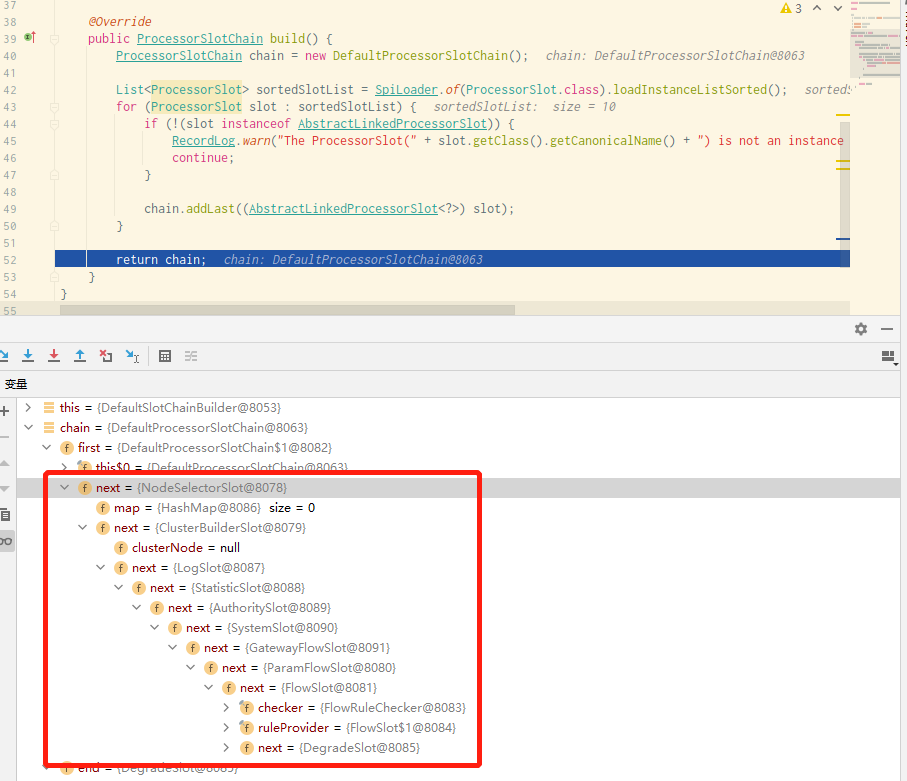
ProcessorSlot.entry();ProcessorSlot.entry() 方法,它会遍历每个 Slot 插槽,并对其进行操作,其中会经过 FlowSlot.entry() 方法(需要提前给该方法打上断点),方法的逻辑跟源码如下:@Overridepublic void entry(Context context, ResourceWrapper resourceWrapper, DefaultNode node, int count, boolean prioritized, Object... args) throws Throwable { //【断点步入】检查流量规则 checkFlow(resourceWrapper, context, node, count, prioritized); //调用下一个 Slot fireEntry(context, resourceWrapper, node, count, prioritized, args);}FlowSlot.checkFlow() 方法,最终调用 FlowRuleChecker.checkFlow() 方法,方法的逻辑和源码如下:public void checkFlow(Function<String, Collection<FlowRule>> ruleProvider, ResourceWrapper resource, Context context, DefaultNode node, int count, boolean prioritized) throws BlockException { if (ruleProvider == null || resource == null) { return; } //【断点步入 3.1】获取流控规则 Collection<FlowRule> rules = ruleProvider.apply(resource.getName()); if (rules != null) { //遍历所有流控规则 FlowRule for (FlowRule rule : rules) { //【点进去 3.2】校验每条规则 if (!canPassCheck(rule, context, node, count, prioritized)) { throw new FlowException(rule.getLimitApp(), rule); } } }}FlowSlot.ruleProvider.apply() 方法,获取到 Sentinel 控制台上的流控规则;private final Function<String, Collection<FlowRule>> ruleProvider = new Function<String, Collection<FlowRule>>() { @Override public Collection<FlowRule> apply(String resource) { // Flow rule map should not be null. Map<String, List<FlowRule>> flowRules = FlowRuleManager.getFlowRuleMap(); return flowRules.get(resource); }};FlowRuleChecker.canPassCheck() 方法,分集群和单机模式校验每条规则;public boolean canPassCheck(/*@NonNull*/ FlowRule rule, Context context, DefaultNode node, int acquireCount, boolean prioritized) { String limitApp = rule.getLimitApp(); if (limitApp == null) { return true; } //集群模式 if (rule.isClusterMode()) { return passClusterCheck(rule, context, node, acquireCount, prioritized); } //【点进去】单机模式 return passLocalCheck(rule, context, node, acquireCount, prioritized);}FlowRuleChecker.passLocalCheck() 方法,其主要逻辑和源码如下:private static boolean passLocalCheck(FlowRule rule, Context context, DefaultNode node, int acquireCount, boolean prioritized) { //【点进去 3.2.1】获取 Node Node selectedNode = selectNodeByRequesterAndStrategy(rule, context, node); if (selectedNode == null) { return true; } //【点进去 3.2.2】获取流控的处理策略 return rule.getRater().canPass(selectedNode, acquireCount, prioritized);}FlowRuleChecker.selectNodeByRequesterAndStrategy() 方法,其根据 FlowRule 中配置的 Strategy 和 limitApp 属性,返回不同处理策略的 Node;static Node selectNodeByRequesterAndStrategy(/*@NonNull*/ FlowRule rule, Context context, DefaultNode node) { //limitApp 不能为空 String limitApp = rule.getLimitApp(); int strategy = rule.getStrategy(); String origin = context.getOrigin(); //场景1:限流规则设置了具体应用,如果当前流量就是通过该应用的,则命中场景1 if (limitApp.equals(origin) && filterOrigin(origin)) { if (strategy == RuleConstant.STRATEGY_DIRECT) { // Matches limit origin, return origin statistic node. return context.getOriginNode(); } return selectReferenceNode(rule, context, node); } else if (RuleConstant.LIMIT_APP_DEFAULT.equals(limitApp)) { //场景2:限流规则未指定任何具体应,默认为default,则当前流量直接命中场景2 if (strategy == RuleConstant.STRATEGY_DIRECT) { // Return the cluster node. return node.getClusterNode(); } return selectReferenceNode(rule, context, node); } else if (RuleConstant.LIMIT_APP_OTHER.equals(limitApp) && FlowRuleManager.isOtherOrigin(origin, rule.getResource())) { //场景3:限流规则设置的是other,当前流量未命中前两种场景 if (strategy == RuleConstant.STRATEGY_DIRECT) { return context.getOriginNode(); } return selectReferenceNode(rule, context, node); } return null;}FlowRule.getRater().canPass() 方法,首先通过 FlowRule.getRater() 获得流控行为 TrafficShapingController,这是一个接口,有四种实现类,如下图所示:
TrafficShapingController.canPass() 方法,执行流控行为;StatisticSlot.entry() 方法里的语句打上断点,运行到光标处;StatisticSlot.entry() 方法的核心是使用 Node 统计“增加线程数”和“请求通过数”;@Overridepublic void entry(Context context, ResourceWrapper resourceWrapper, DefaultNode node, int count, boolean prioritized, Object... args) throws Throwable { try { //先执行后续 Slot 检查,再统计数据(即先调用后续所有 Slot) fireEntry(context, resourceWrapper, node, count, prioritized, args); //【断点步入】使用 Node 统计“增加线程数”和“请求通过数” node.increaseThreadNum(); node.addPassRequest(count); //如果存在来源节点,则对来源节点增加线程数和请求通过数 if (context.getCurEntry().getOriginNode() != null) { context.getCurEntry().getOriginNode().increaseThreadNum(); context.getCurEntry().getOriginNode().addPassRequest(count); } //如果是入口流量,则对全局节点增加线程数和请求通过数 if (resourceWrapper.getEntryType() == EntryType.IN) { Constants.ENTRY_NODE.increaseThreadNum(); Constants.ENTRY_NODE.addPassRequest(count); } //执行事件通知和回调函数 for (ProcessorSlotEntryCallback<DefaultNode> handler : StatisticSlotCallbackRegistry.getEntryCallbacks()) { handler.onPass(context, resourceWrapper, node, count, args); } //处理优先级等待异常 } catch (PriorityWaitException ex) { node.increaseThreadNum(); //如果有来源节点,则对来源节点增加线程数 if (context.getCurEntry().getOriginNode() != null) { context.getCurEntry().getOriginNode().increaseThreadNum(); } //如果是入口流量,对全局节点增加线程数 if (resourceWrapper.getEntryType() == EntryType.IN) { Constants.ENTRY_NODE.increaseThreadNum(); } //执行事件通知和回调函数 for (ProcessorSlotEntryCallback<DefaultNode> handler : StatisticSlotCallbackRegistry.getEntryCallbacks()) { handler.onPass(context, resourceWrapper, node, count, args); } //处理限流、熔断等异常 } catch (BlockException e) { //省略 throw e; //处理业务异常 } catch (Throwable e) { context.getCurEntry().setError(e); throw e; }}DefaultNode.increaseThreadNum() 方法,最终调用的是 StatisticNode.increaseThreadNum(),而统计也是依靠 StatisticNode 维护的,这里放上 StatisticNode 的统计核心与源码:public class StatisticNode implements Node { //省略其他代码 //【断点步入】最近 1s 滑动窗口计数器(默认 1s) private transient volatile Metric rollingCounterInSecond = new ArrayMetric(SampleCountProperty.SAMPLE_COUNT, IntervalProperty.INTERVAL); //最近 1min 滑动窗口计数器(默认 1min) private transient Metric rollingCounterInMinute = new ArrayMetric(60, 60 * 1000, false); //增加 “请求通过数” @Override public void addPassRequest(int count) { rollingCounterInSecond.addPass(count); rollingCounterInMinute.addPass(count); } //增加 RT 和成功数 @Override public void addRtAndSuccess(long rt, int successCount) { rollingCounterInSecond.addSuccess(successCount); rollingCounterInSecond.addRT(rt); rollingCounterInMinute.addSuccess(successCount); rollingCounterInMinute.addRT(rt); } //增加“线程数” @Override public void increaseThreadNum() { curThreadNum.increment(); }}public class ArrayMetric implements Metric { //省略其他代码 //【点进去 4.2.2】数据存储 private final LeapArray<MetricBucket> data; //最近 1s 滑动计数器用的是 OccupiableBucketLeapArray public ArrayMetric(int sampleCount, int intervalInMs) { this.data = new OccupiableBucketLeapArray(sampleCount, intervalInMs); } //最近 1min 滑动计数器用的是 BucketLeapArray public ArrayMetric(int sampleCount, int intervalInMs, boolean enableOccupy) { if (enableOccupy) { this.data = new OccupiableBucketLeapArray(sampleCount, intervalInMs); } else { this.data = new BucketLeapArray(sampleCount, intervalInMs); } } //增加成功数 @Override public void addSuccess(int count) { WindowWrap<MetricBucket> wrap = data.currentWindow(); wrap.value().addSuccess(count); } //增加通过数 @Override public void addPass(int count) { WindowWrap<MetricBucket> wrap = data.currentWindow(); wrap.value().addPass(count); } //增加 RT @Override public void addRT(long rt) { WindowWrap<MetricBucket> wrap = data.currentWindow(); wrap.value().addRT(rt); }}public abstract class LeapArray<T> { //省略其他代码 //单个窗口的长度(1个窗口多长时间) protected int windowLengthInMs; //采样窗口个数 protected int sampleCount; //全部窗口的长度(全部窗口多长时间) protected int intervalInMs; private double intervalInSecond; //窗口数组:存储所有窗口(支持原子读取和写入) protected final AtomicReferenceArray<WindowWrap<T>> array; //更新窗口数据时用的锁 private final ReentrantLock updateLock = new ReentrantLock(); public LeapArray(int sampleCount, int intervalInMs) { //计算单个窗口的长度 this.windowLengthInMs = intervalInMs / sampleCount; this.intervalInMs = intervalInMs; this.intervalInSecond = intervalInMs / 1000.0; this.sampleCount = sampleCount; this.array = new AtomicReferenceArray<>(sampleCount); } //【点进去 4.2.3】获取当前窗口 public WindowWrap<T> currentWindow() { //这里参数是当前时间 return currentWindow(TimeUtil.currentTimeMillis()); } //获取指定时间的窗口 public WindowWrap<T> currentWindow(long timeMillis) { if (timeMillis < 0) { return null; } // 计算数组下标 int idx = calculateTimeIdx(timeMillis); //计算当前请求对应的窗口开始时间 long windowStart = calculateWindowStart(timeMillis); /* * 从 array 中获取窗口。有 3 种情况: * (1) array 中窗口不在,创建一个 CAS 并写入 array; * (2) array 中窗口开始时间 = 当前窗口开始时间,直接返回; * (3) array 中窗口开始时间 < 当前窗口开始时间,表示 o1d 窗口已过期,重置窗口数据并返回; */ while (true) { // 取窗口 WindowWrap<T> old = array.get(idx); //(1)窗口不在 if (old == null) { //创建一个窗口 WindowWrap<T> window = new WindowWrap<T>(windowLengthInMs, windowStart, newEmptyBucket(timeMillis)); //CAS将窗口写进 array 中并返回(CAS 操作确保只初始化一次) if (array.compareAndSet(idx, null, window)) { return window; } else { //并发写失败,释放 CPU 资源,避免有线程长时间占用 CPU,一般下次来的时候 array 中有数据了会命中第2种情况; Thread.yield(); } //(2)array 中窗口开始时间 = 当前窗口开始时间 } else if (windowStart == old.windowStart()) { //直接返回 return old; //(3)array 中窗口开始时间 < 当前窗口开始时间 } else if (windowStart > old.windowStart()) { //尝试获取更新锁 if (updateLock.tryLock()) { try { //拿到锁的线程才重置窗口 return resetWindowTo(old, windowStart); } finally { //释放锁 updateLock.unlock(); } } else { //并发加锁失败,释放 CPU 资源,避免有线程长时间占用 CPU,一般下次来的时候因为 old 对象时间更新了会命中第 2 种情况; Thread.yield(); } //理论上不会出现 } else if (windowStart < old.windowStart()) { // 正常情况不会进入该分支(机器时钟回拨等异常情况) return new WindowWrap<T>(windowLengthInMs, windowStart, newEmptyBucket(timeMillis)); } } } //计算索引 private int calculateTimeIdx(/*@Valid*/ long timeMillis) { //timeId 降低时间精度 long timeId = timeMillis / windowLengthInMs; //计算当前索引,这样我们就可以将时间戳映射到 leap 数组 return (int)(timeId % array.length()); } //计算窗口开始时间 protected long calculateWindowStart(/*@Valid*/ long timeMillis) { return timeMillis - timeMillis % windowLengthInMs; }}public class WindowWrap<T> { //窗口长度,与 LeapArray 的 windowLengthInMs 一致 private final long windowLengthInMs; //窗口开始时间,其值是 windowLengthInMs 的整数倍 private long windowStart; //窗口的数据,支持 MetricBucket 类型,存储统计数据 private T value; //省略其他代码}public class MetricBucket { /** * 存储指标的计数器; * LongAdder 是线程安全的计数器 * counters[0] PASS 通过数; * counters[1] BLOCK 拒绝数; * counters[2] EXCEPTION 异常数; * counters[3] SUCCESS 成功数; * counters[4] RT 响应时长; * counters[5] OCCUPIED_PASS 预分配通过数; **/ private final LongAdder[] counters; //最小 RT,默认值是 5000ms private volatile long minRt; //构造中初始化 public MetricBucket() { MetricEvent[] events = MetricEvent.values(); this.counters = new LongAdder[events.length]; for (MetricEvent event : events) { counters[event.ordinal()] = new LongAdder(); } initMinRt(); } //覆盖指标 public MetricBucket reset(MetricBucket bucket) { for (MetricEvent event : MetricEvent.values()) { counters[event.ordinal()].reset(); counters[event.ordinal()].add(bucket.get(event)); } initMinRt(); return this; } private void initMinRt() { this.minRt = SentinelConfig.statisticMaxRt(); } //重置指标为0 public MetricBucket reset() { for (MetricEvent event : MetricEvent.values()) { counters[event.ordinal()].reset(); } initMinRt(); return this; } //获取指标,从 counters 中返回 public long get(MetricEvent event) { return counters[event.ordinal()].sum(); } //添加指标 public MetricBucket add(MetricEvent event, long n) { counters[event.ordinal()].add(n); return this; } public long pass() { return get(MetricEvent.PASS); } public long block() { return get(MetricEvent.BLOCK); } public void addPass(int n) { add(MetricEvent.PASS, n); } public void addBlock(int n) { add(MetricEvent.BLOCK, n); } //省略其他代码}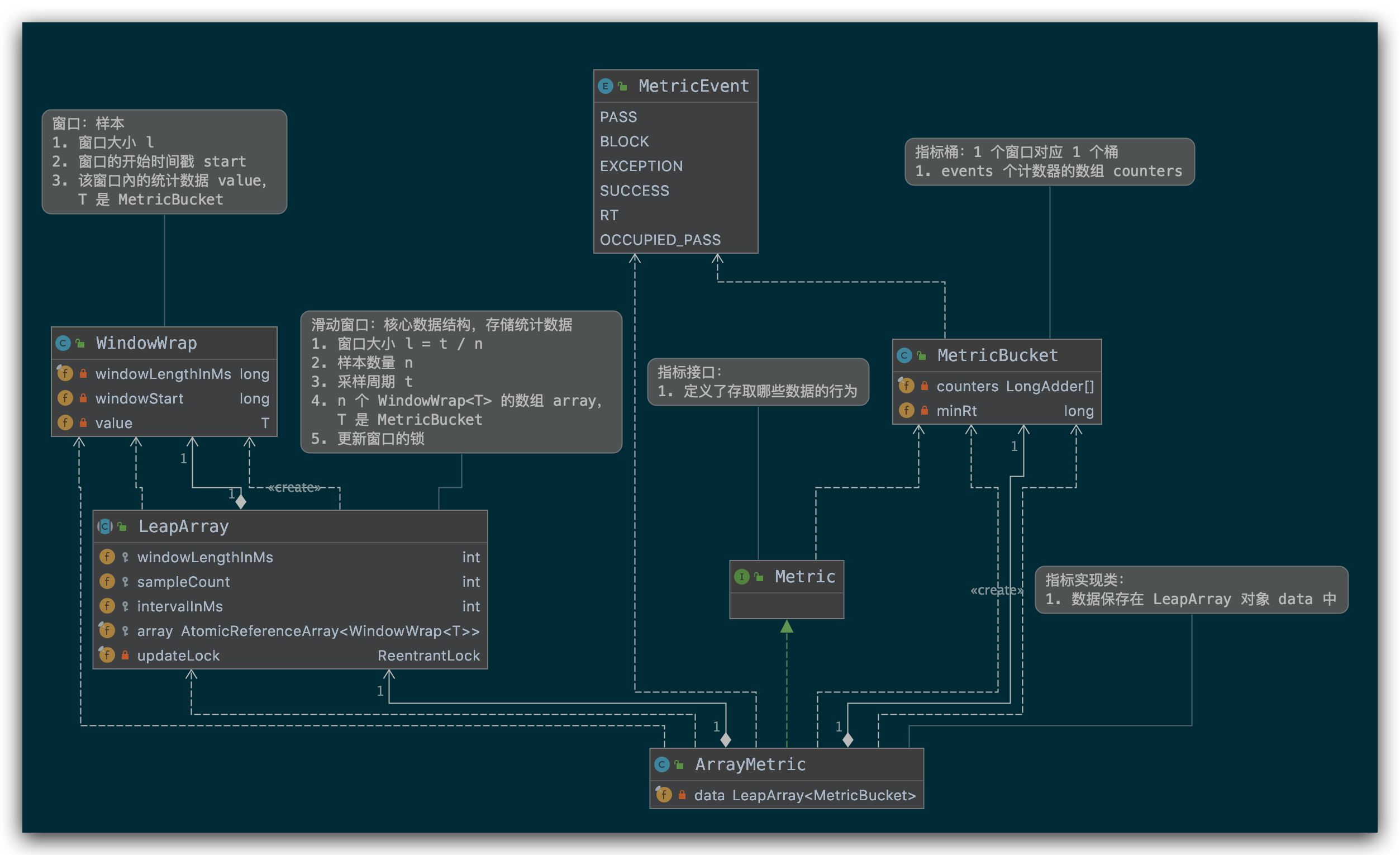


DegradeSlot.entry() 方法里的语句打上断点,运行到光标处;@Overridepublic void entry(Context context, ResourceWrapper resourceWrapper, DefaultNode node, int count, boolean prioritized, Object... args) throws Throwable { //【断点步入】熔断检查 performChecking(context, resourceWrapper); //调用下一个 Slot fireEntry(context, resourceWrapper, node, count, prioritized, args);}DegradeSlot.performChecking() 方法,其逻辑与源码如下:void performChecking(Context context, ResourceWrapper r) throws BlockException { //根据 resourceName 获取断路器 List<CircuitBreaker> circuitBreakers = DegradeRuleManager.getCircuitBreakers(r.getName()); if (circuitBreakers == null || circuitBreakers.isEmpty()) { return; } //循环判断每个断路器 for (CircuitBreaker cb : circuitBreakers) { //【点进去】尝试通过断路器 if (!cb.tryPass(context)) { throw new DegradeException(cb.getRule().getLimitApp(), cb.getRule()); } }}AbstractCircuitBreaker.tryPass() 方法,当请求超时并且处于探测恢复(半开状态,HALF-OPEN 状态)失败时继续断路功能;@Overridepublic boolean tryPass(Context context) { //当前断路器状态为关闭 if (currentState.get() == State.CLOSED) { return true; } if (currentState.get() == State.OPEN) { //【点进去】对于半开状态,我们尝试通过 return retryTimeoutArrived() && fromOpenToHalfOpen(context); } return false;}AbstractCircuitBreaker.fromOpenToHalfOpen() 方法,实现状态的变更;protected boolean fromOpenToHalfOpen(Context context) { //尝试将状态从 OPEN 设置为 HALF_OPEN if (currentState.compareAndSet(State.OPEN, State.HALF_OPEN)) { //状态变化通知 notifyObservers(State.OPEN, State.HALF_OPEN, null); Entry entry = context.getCurEntry(); //在 entry 添加一个 exitHandler entry.exit() 时会调用 entry.whenTerminate(new BiConsumer<Context, Entry>() { @Override public void accept(Context context, Entry entry) { //如果有发生异常,重新将状态设置为OPEN 请求不同通过 if (entry.getBlockError() != null) { currentState.compareAndSet(State.HALF_OPEN, State.OPEN); notifyObservers(State.HALF_OPEN, State.OPEN, 1.0d); } } }); //此时状态已设置为HALF_OPEN正常通行 return true; } //熔断 return false;}DegradeSlot.exit() 方法来改变状态;DegradeSlot.exit();@Overridepublic void exit(Context context, ResourceWrapper r, int count, Object... args) { Entry curEntry = context.getCurEntry(); //无阻塞异常 if (curEntry.getBlockError() != null) { fireExit(context, r, count, args); return; } //通过资源名获取断路器 List<CircuitBreaker> circuitBreakers = DegradeRuleManager.getCircuitBreakers(r.getName()); //没有配置断路器,则直接放行 if (circuitBreakers == null || circuitBreakers.isEmpty()) { fireExit(context, r, count, args); return; } if (curEntry.getBlockError() == null) { for (CircuitBreaker circuitBreaker : circuitBreakers) { //【点进去】在请求完成时 circuitBreaker.onRequestComplete(context); } } fireExit(context, r, count, args);}ExceptionCircuitBreaker.onRequestComplete() 方法,其主要逻辑与源码如下:@Overridepublic void onRequestComplete(Context context) { Entry entry = context.getCurEntry(); if (entry == null) { return; } Throwable error = entry.getError(); //简单错误计数器 SimpleErrorCounter counter = stat.currentWindow().value(); if (error != null) { //异常请求数加 1 counter.getErrorCount().add(1); } //总请求数加 1 counter.getTotalCount().add(1); //【点进去】超过阈值时变更状态 handleStateChangeWhenThresholdExceeded(error);}ExceptionCircuitBreaker.handleStateChangeWhenThresholdExceeded() 方法,变更状态;private void handleStateChangeWhenThresholdExceeded(Throwable error) { //全开则直接放行 if (currentState.get() == State.OPEN) { return; } //半开状态 if (currentState.get() == State.HALF_OPEN) { //检查请求 if (error == null) { //发生异常,将状态从半开 HALF_OPEN 转为关闭 CLOSE fromHalfOpenToClose(); } else { //无异常,解开半开状态 fromHalfOpenToOpen(1.0d); } return; } //计算是否超过阈值 List<SimpleErrorCounter> counters = stat.values(); long errCount = 0; long totalCount = 0; for (SimpleErrorCounter counter : counters) { errCount += counter.errorCount.sum(); totalCount += counter.totalCount.sum(); } if (totalCount < minRequestAmount) { return; } double curCount = errCount; if (strategy == DEGRADE_GRADE_EXCEPTION_RATIO) { //熔断策略为:异常比例 curCount = errCount * 1.0d / totalCount; } if (curCount > threshold) { transformToOpen(curCount); }}FlowSlot.entry():遍历到 FlowSlot 槽,限流规则;
StatisticSlot.entry:遍历到 StatisticSlot 槽,统计数据;
DegradeSlot.entry():遍历到 DegradeSlot 槽,服务熔断;
DegradeSlot.exit():请求失败(超时),启动熔断;


