使用中国区的Azure,在获取Token时候,参考了 adal4j的代码,在官方文档中,发现了如下的片段代码:
ExecutorService service = Executors.newFixedThreadPool(1);AuthenticationContext context = new AuthenticationContext(AUTHORITY, false, service);Future<AuthenticationResult> future = context.acquireToken( "https://graph.windows.net", YOUR_TENANT_ID, username, password, null);AuthenticationResult result = future.get();System.out.println("Access Token - " + result.getAccessToken());System.out.println("Refresh Token - " + result.getRefreshToken());System.out.println("ID Token - " + result.getIdToken());
以上代码中,有一些参数很不明确:
1)AUTHORITY, 是什么意思呢?
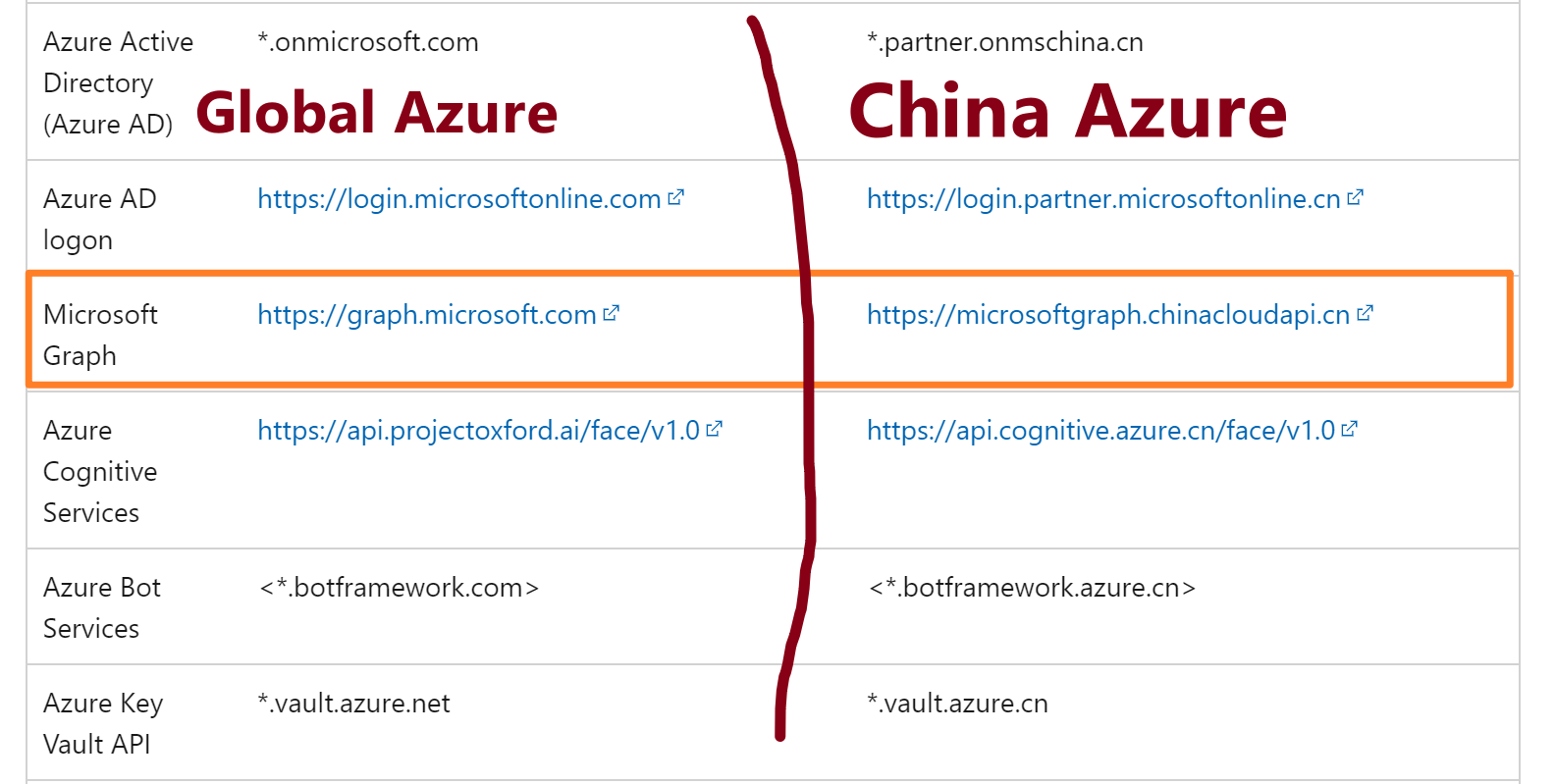
2)acquireTokne方法中的 https://graph.windows.net 是指向global azure的资源,如果是中国区azure的资源,那么resource url是多少呢?
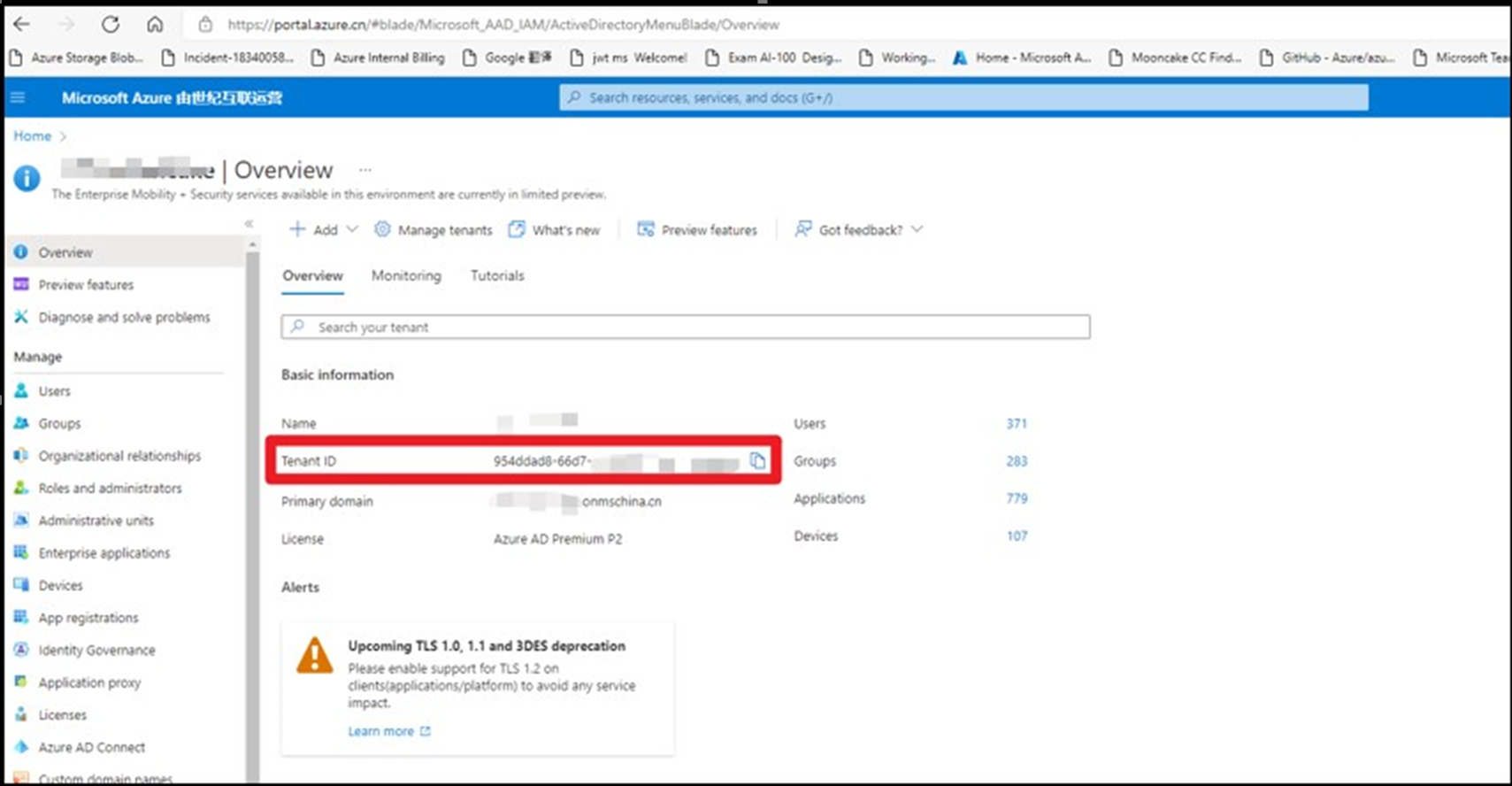
3)YOUR_TENANT_ID,它的值是什么呢?
AUTHORITY,表示认证的主体,它是一个URL,表示可以从该主体中获取到认证Token。 它的格式为:https://<authority host>/<tenant id> ,所以在使用Azure的过程中,根据Azure环境的不同,Host 有以下四个值。
所以,这里我们需要使用的值为:String AUTHORITY = "https://login.chinacloudapi.cn/<tenant id >";
登录到Azure门户 --> 进入AAD中,在Overview页面查看Tenant ID (https://portal.azure.cn/#blade/Microsoft_AAD_IAM/ActiveDirectoryMenuBlade/Overview)
根据中国区Azure的开发文档,并没有查找到对应于 graph.windows.net的中国区Graph 终结点。但是,中国区Graph 的终结点为:microsoftgraph.chinacloudapi.cn,所以,以上示例中应该使用的值应是:
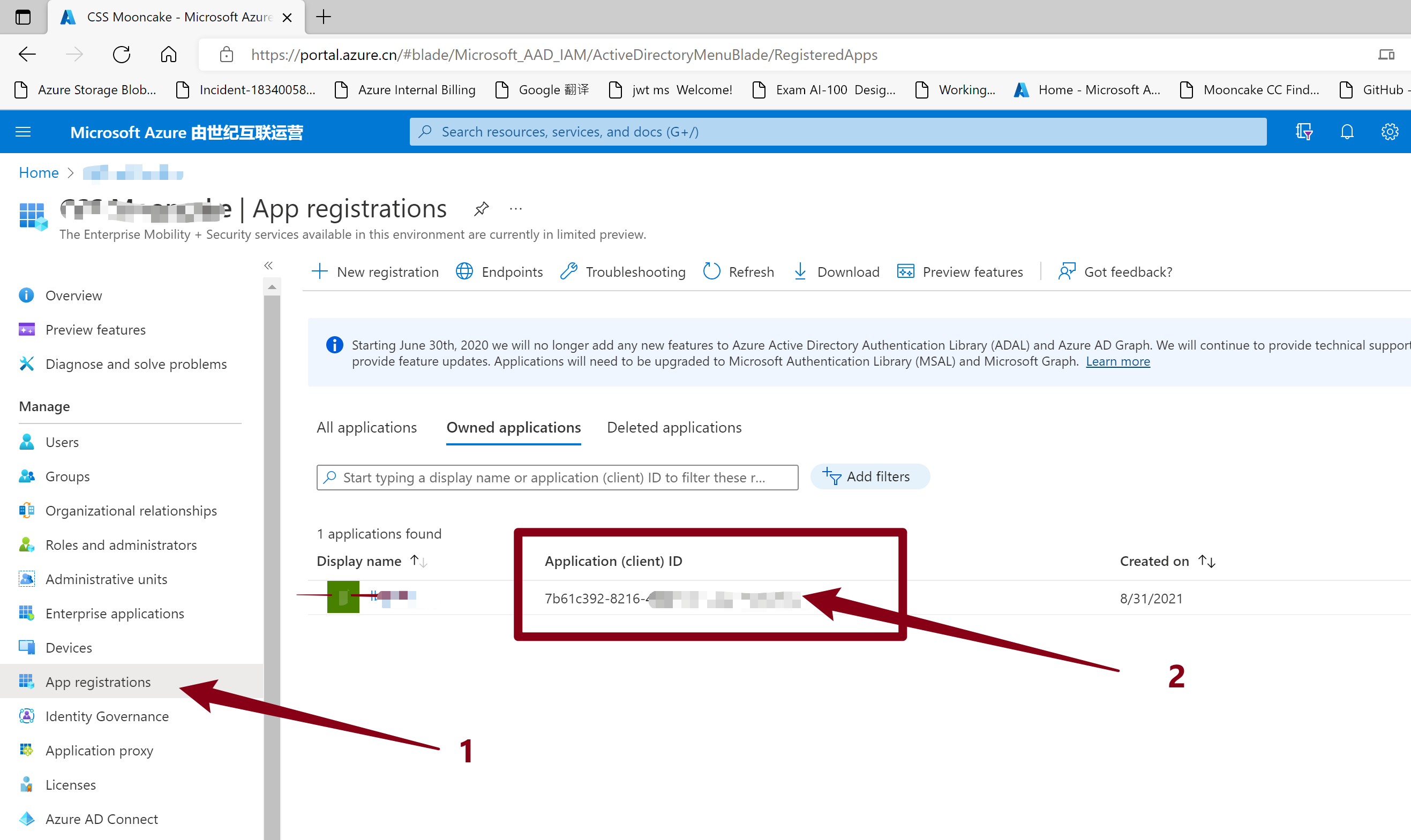
在对比了adal4j的源代码后,在acquireToken方法定义中,发现YOUR_TENANT_ID所对应的值应该是 clientId ()。所以,官网参考文档中的YOUR_TENANT_ID存在误导情景。需要修改为YOUR_CLIENT_ID。
ADAL4J中acquireToken源码(acquireToken有多个重载,但此处只列举出代码中使用的这个重载)
/** * Acquires a security token from the authority using a Refresh Token * previously received. * * @param clientId * Name or ID of the client requesting the token. * @param resource * Identifier of the target resource that is the recipient of the * requested token. If null, token is requested for the same * resource refresh token was originally issued for. If passed, * resource should match the original resource used to acquire * refresh token unless token service supports refresh token for * multiple resources. * @param username * Username of the managed or federated user. * @param password * Password of the managed or federated user. * @param callback * optional callback object for non-blocking execution. * @return A {@link Future} object representing the * {@link AuthenticationResult} of the call. It contains Access * Token, Refresh Token and the Access Token's expiration time. */ public Future<AuthenticationResult> acquireToken(final String resource, final String clientId, final String username, final String password, final AuthenticationCallback callback) { if (StringHelper.isBlank(resource)) { throw new IllegalArgumentException("resource is null or empty"); } if (StringHelper.isBlank(clientId)) { throw new IllegalArgumentException("clientId is null or empty"); } if (StringHelper.isBlank(username)) { throw new IllegalArgumentException("username is null or empty"); } if (StringHelper.isBlank(password)) { throw new IllegalArgumentException("password is null or empty"); } return this.acquireToken(new AdalAuthorizatonGrant( new ResourceOwnerPasswordCredentialsGrant(username, new Secret( password)), resource), new ClientAuthenticationPost( ClientAuthenticationMethod.NONE, new ClientID(clientId)), callback); }
所以,这里指定的Client ID 其实是,AAD中所注册的一个应用(服务主体),而这个主体可以根据需求授予不同的权限,acquireToken就是根据用户验证成功后,生成这个主题所拥有的权限JWT令牌(Token),获取到Token后,就拥有了访问Azure中资源API的授权.
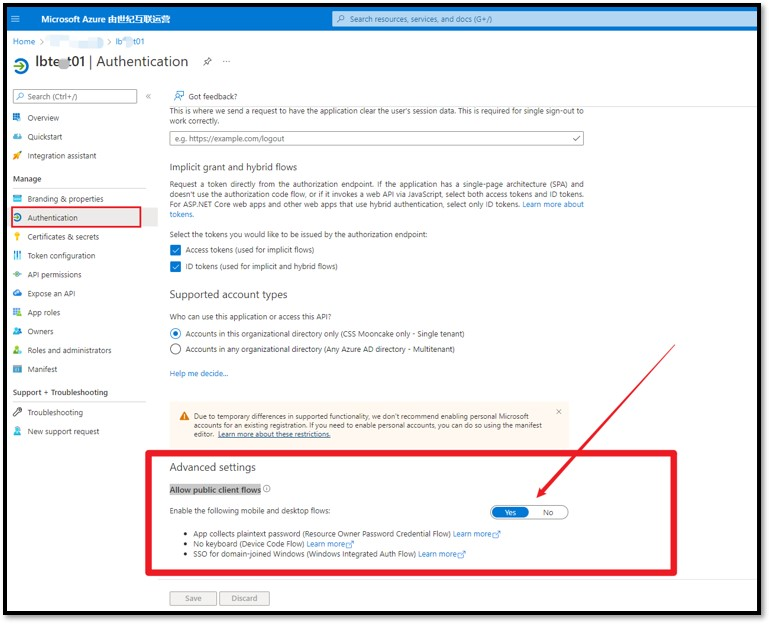
特别注意:这个App必须开启 “Allow public client flows“ 才能成功获取到 Token。 默认情况下,这里选择的是No。 如果不开启这一步,将会收到错误消息:"error_description":"AADSTS7000218: The request body must contain the following parameter: 'client_assertion' or 'client_secret'.
开启方式为:点击这个App的名称,进入详细页面,选择Authentication,滑动到最底部,选择“Allow public client flows”。
<dependency> <groupId>com.microsoft.azure</groupId> <artifactId>adal4j</artifactId> <version>1.2.0</version> </dependency>
package com.example;import java.net.MalformedURLException;import java.util.concurrent.ExecutionException;import java.util.concurrent.ExecutorService;import java.util.concurrent.Executors;import java.util.concurrent.Future;import com.microsoft.aad.adal4j.AuthenticationContext;import com.microsoft.aad.adal4j.AuthenticationResult;/** * Hello world! * */public class App { public static void main(String[] args) throws InterruptedException, ExecutionException, MalformedURLException { System.out.println("Hello World!"); ExecutorService service = Executors.newFixedThreadPool(1); String AUTHORITY = "https://login.chinacloudapi.cn/<tenant id >"; // AzureAuthority String YOUR_Client_ID="7b61c392-xxxx-xxxx-xxxx-xxxxxxxxxxx"; String username = "xxxx@xxxx.xxx.onmschina.cn"; String password = "xxxxxxxxxxx"; AuthenticationContext context = new AuthenticationContext(AUTHORITY, false, service); Future<AuthenticationResult> future = context.acquireToken("https://microsoftgraph.chinacloudapi.cn/", YOUR_Client_ID, username, password, null); AuthenticationResult result = future.get(); System.out.println("Access Token - " + result.getAccessToken()); System.out.println("Refresh Token - " + result.getRefreshToken()); System.out.println("ID Token - " + result.getIdToken()); }}
(PS: 使用的 username, password就是登录Azure的用户名和密码)
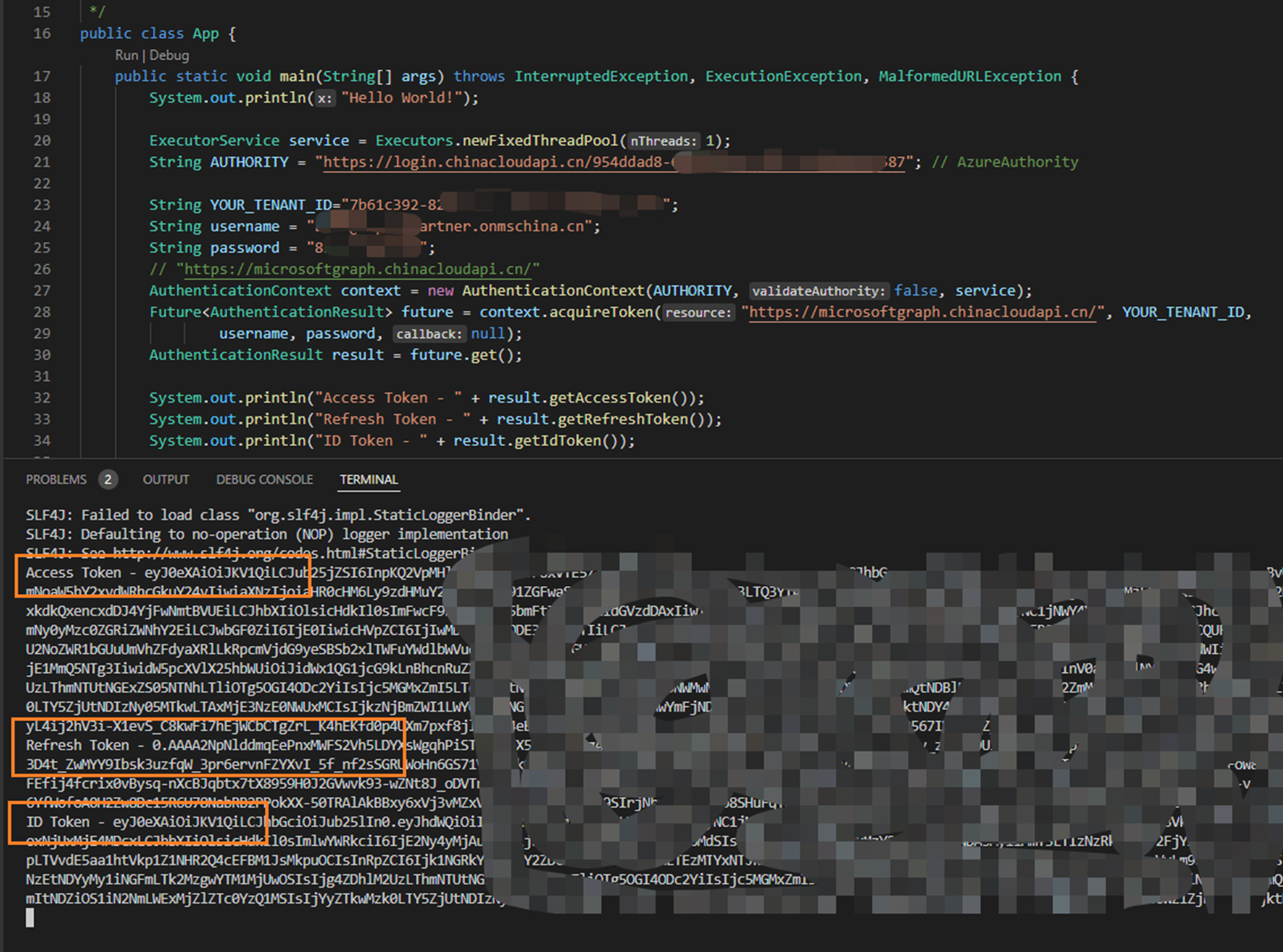
获取Token成功。
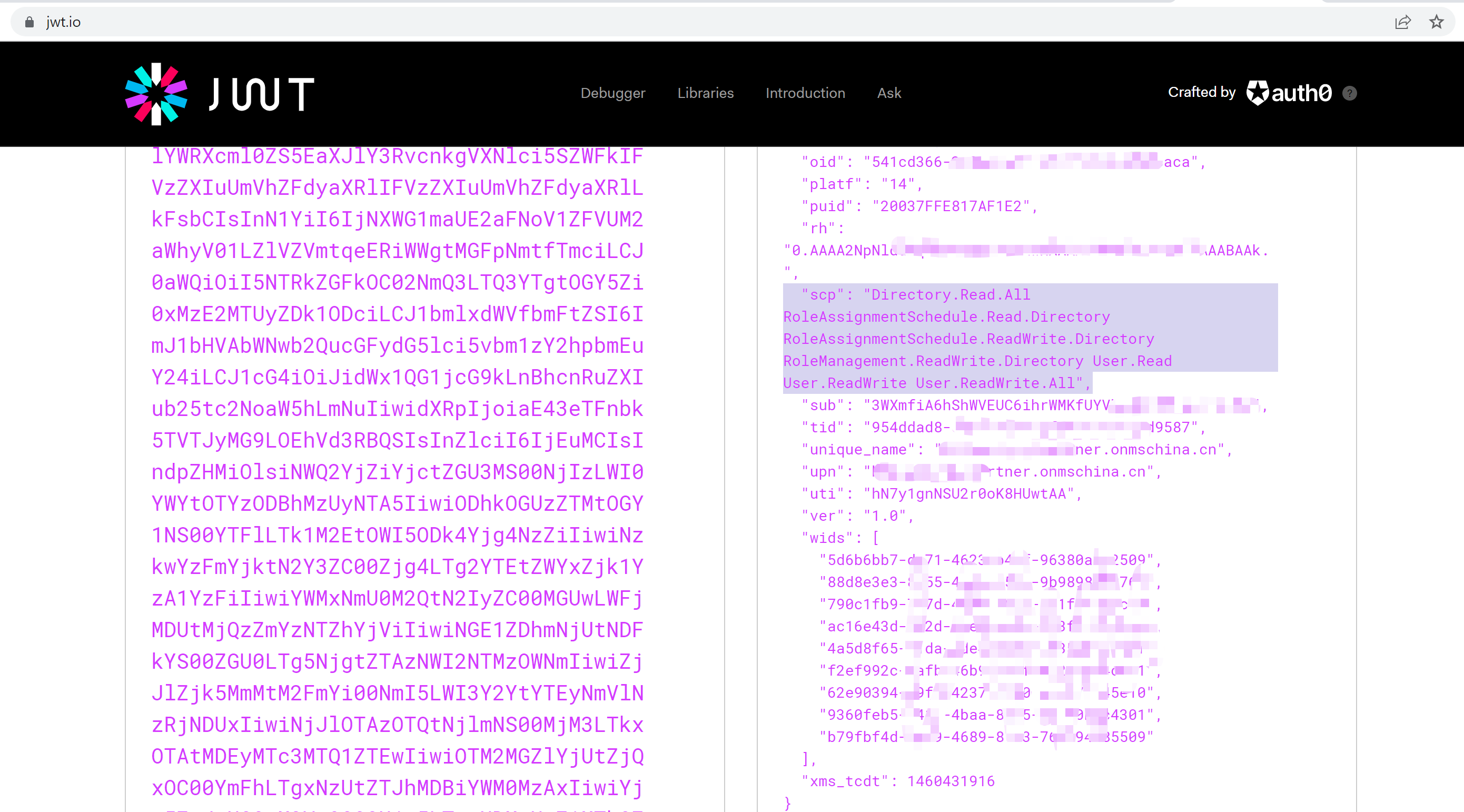
可以通过一个公用网站 jwt.io 来解析Token: https://jwt.io/, 它可以解析出Token内容,让我们可读。
Azure China developer guide:https://docs.microsoft.com/en-us/azure/china/resources-developer-guide#check-endpoints-in-azure
Azure Active Directory libraries for Java: https://docs.microsoft.com/en-us/java/api/overview/azure/activedirectory?view=azure-java-stable#client-library
当在复杂的环境中面临问题,格物之道需:浊而静之徐清,安以动之徐生。 云中,恰是如此!