作者:小傅哥
博客:https://bugstack.cn - 《手写Mybatis系列》
为什么,要读框架源码?
因为手里的业务工程代码太拉胯了!通常作为业务研发,所开发出来的代码,大部分都是一连串的流程化处理,缺少功能逻辑的解耦,有着迭代频繁但可迭代性差的特点。所以这样的代码通常只能学习业务逻辑,却很难吸收到大型系统设计和功能逻辑实现的成功经验,往往都是失败的教训。
而所有系统的设计和实现,核心都在于如何解耦,如果解耦不清晰最后直接导致的就是再继续迭代功能时,会让整个系统的实现越来越臃肿,稳定性越来越差。而关于解耦的实践在各类框架的源码中都有非常不错的设计实现,所以阅读这部分源码,就是在吸收成功的经验。把解耦的思想逐步运用到实际的业务开发中,才会让我们写出更加优秀的代码结构。
在上一章节我们实现了有/无连接池的数据源,可以在调用执行SQL的时候,通过我们实现池化技术完成数据库的操作。
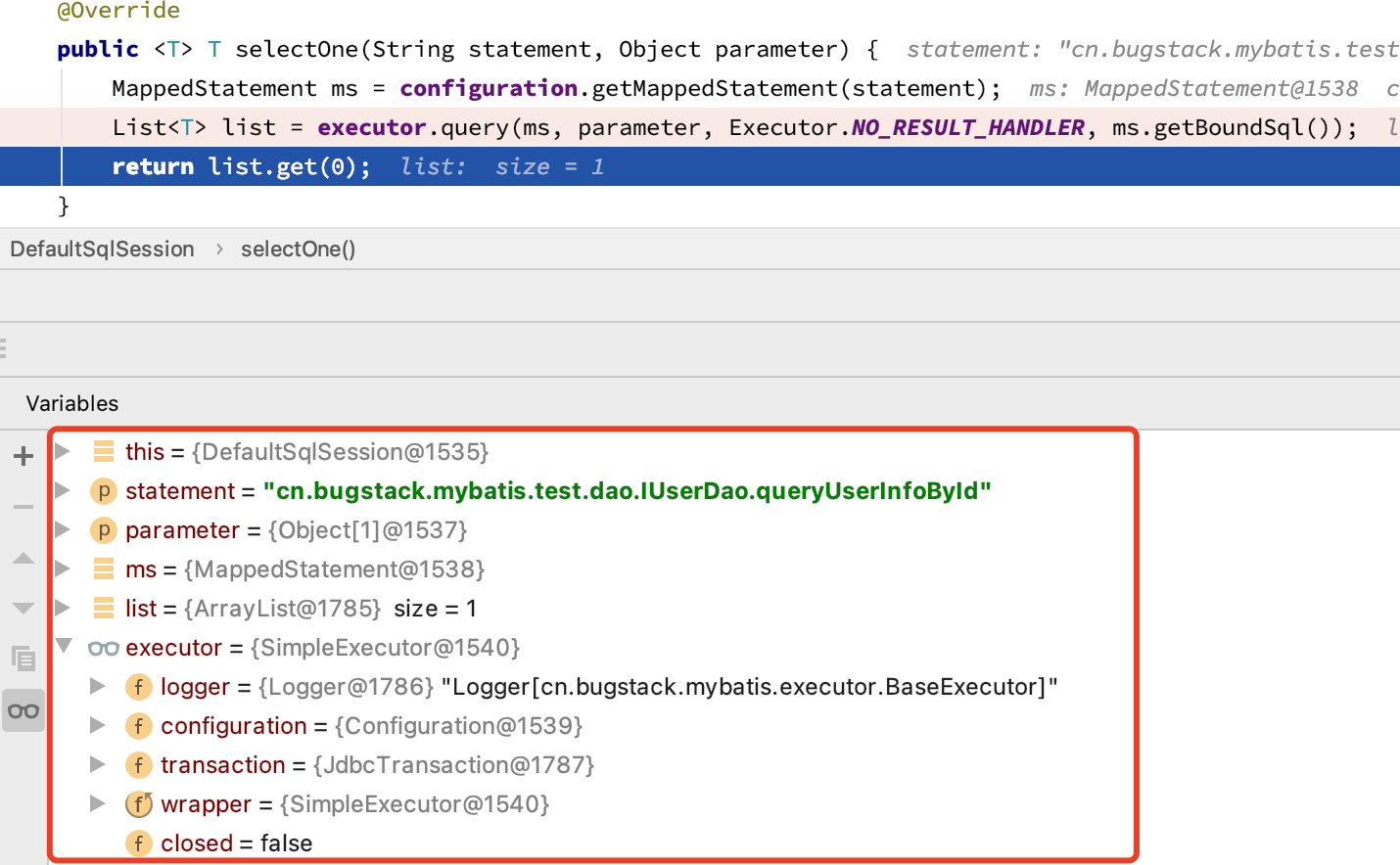
那么关于池化数据源的调用、执行和结果封装,目前我们还都只是在 DefaultSqlSession 中进行发起 如图 7-1 所示。那么这样的把代码流程写死的方式肯定不合适于我们扩展使用,也不利于 SqlSession 中每一个新增定义的方法对池化数据源的调用。

从我们对 ORM 框架渐进式的开发过程上,可以分出的执行动作包括,解析配置、代理对象、映射方法等,直至我们前面章节对数据源的包装和使用,只不过我们把数据源的操作硬捆绑到了 DefaultSqlSession 的执行方法上了。
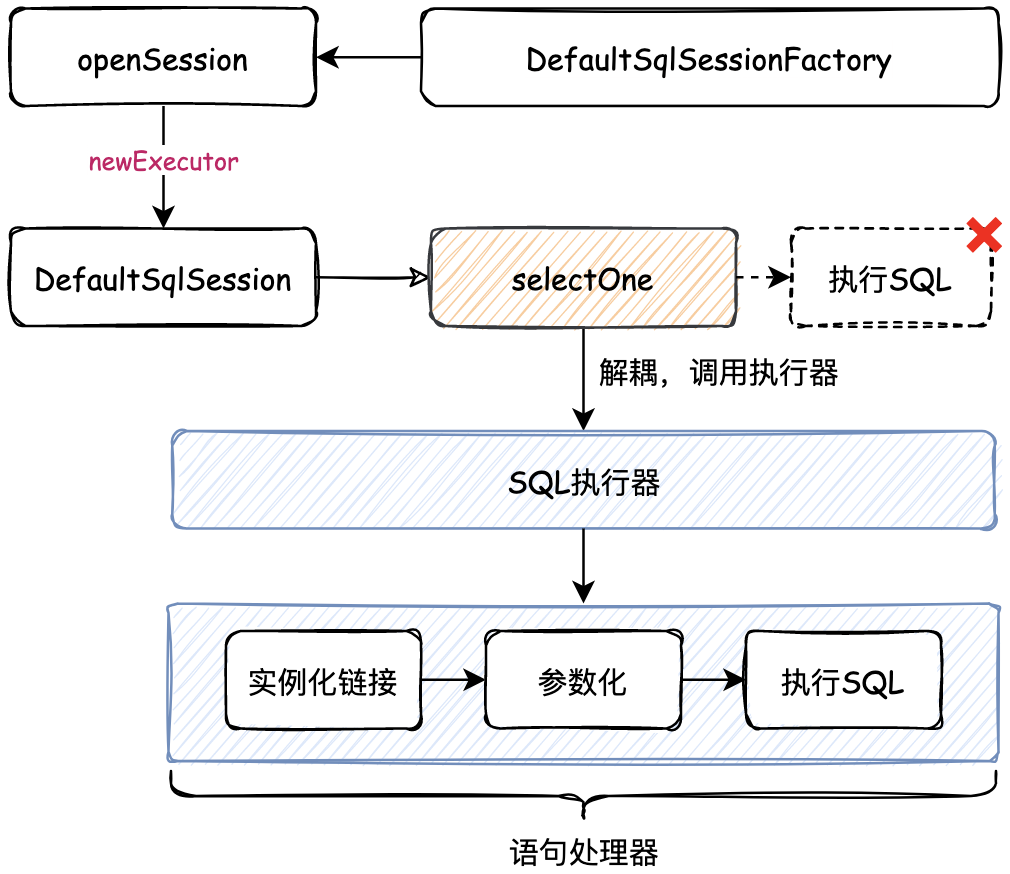
那么现在为了解耦这块的处理,则需要单独提出一块执行器的服务功能,之后将执行器的功能随着 DefaultSqlSession 创建时传入执行器功能,之后具体的方法调用就可以调用执行器来处理了,从而解耦这部分功能模块。如图 7-2 所示。
SimpleExecutor 简单执行器实现中。StatementHandler 的接口实现中。mybatis-step-06└── src ├── main │ └── java │ └── cn.bugstack.mybatis │ ├── binding │ │ ├── MapperMethod.java │ │ ├── MapperProxy.java │ │ ├── MapperProxyFactory.java │ │ └── MapperRegistry.java │ ├── builder │ ├── datasource │ ├── executor │ │ ├── resultset │ │ │ ├── DefaultResultSetHandler.java │ │ │ └── ResultSetHandler.java │ │ ├── statement │ │ │ ├── BaseStatementHandler.java │ │ │ ├── PreparedStatementHandler.java │ │ │ ├── SimpleStatementHandler.java │ │ │ └── StatementHandler.java │ │ ├── BaseExecutor.java │ │ ├── Executor.java │ │ └── SimpleExecutor.java │ ├── io │ ├── mapping │ ├── session │ │ ├── defaults │ │ │ ├── DefaultSqlSession.java │ │ │ └── DefaultSqlSessionFactory.java │ │ ├── Configuration.java │ │ ├── ResultHandler.java │ │ ├── SqlSession.java │ │ ├── SqlSessionFactory.java │ │ ├── SqlSessionFactoryBuilder.java │ │ └── TransactionIsolationLevel.java │ ├── transaction │ └── type └── test ├── java │ └── cn.bugstack.mybatis.test.dao │ ├── dao │ │ └── IUserDao.java │ ├── po │ │ └── User.java │ └── ApiTest.java └── resources ├── mapper │ └──User_Mapper.xml └── mybatis-config-datasource.xmlSQL方法执行器核心类关系,如图 7-3 所示
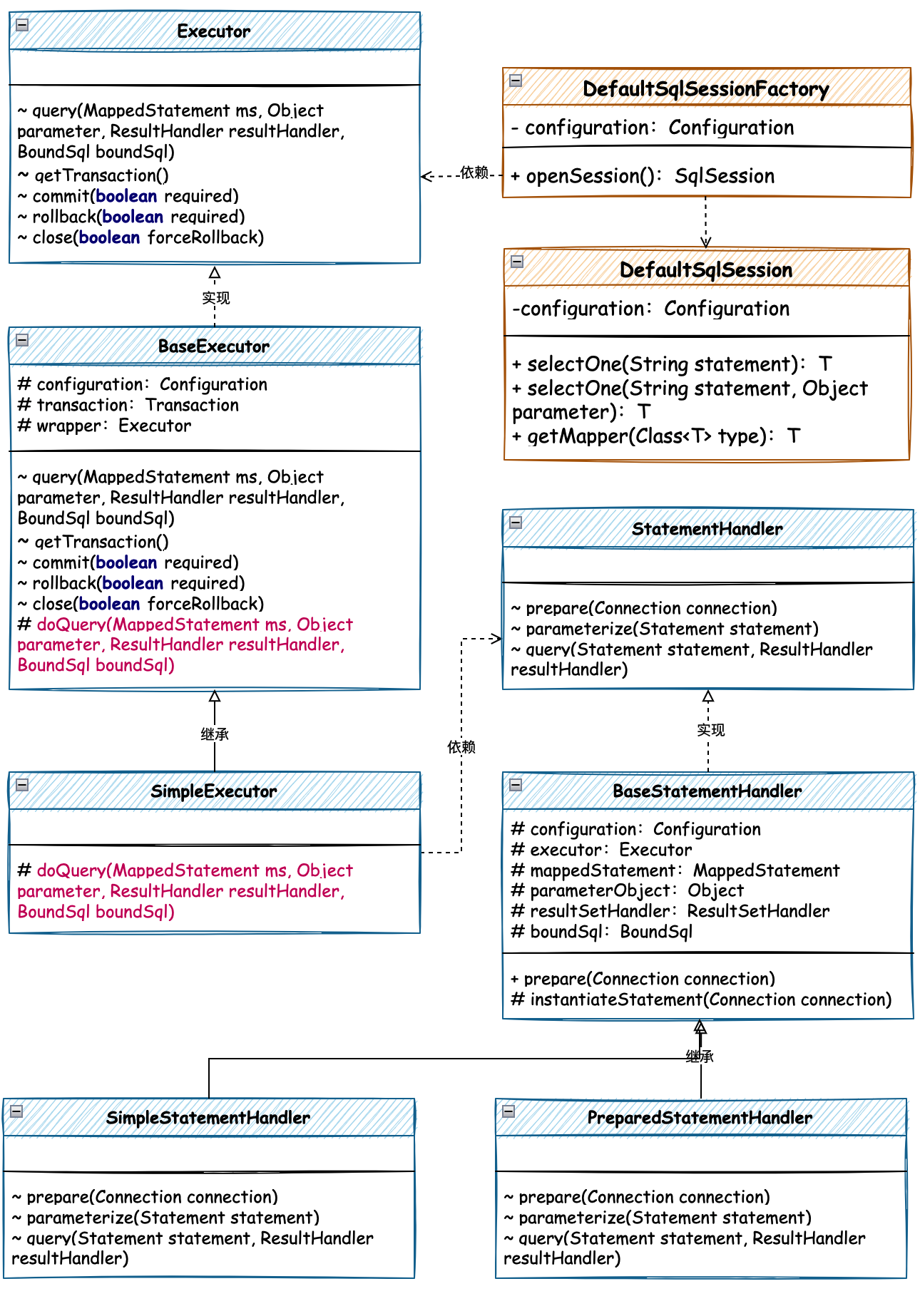
执行器分为接口、抽象类、简单执行器实现类三部分,通常在框架的源码中对于一些标准流程的处理,都会有抽象类的存在。它负责提供共性功能逻辑,以及对接口方法的执行过程进行定义和处理,并提取抽象接口交由子类实现。这种设计模式也被定义为模板模式。
源码详见:cn.bugstack.mybatis.executor.Executor
public interface Executor { ResultHandler NO_RESULT_HANDLER = null; <E> List<E> query(MappedStatement ms, Object parameter, ResultHandler resultHandler, BoundSql boundSql); Transaction getTransaction(); void commit(boolean required) throws SQLException; void rollback(boolean required) throws SQLException; void close(boolean forceRollback);}源码详见:cn.bugstack.mybatis.executor.BaseExecutor
public abstract class BaseExecutor implements Executor { protected Configuration configuration; protected Transaction transaction; protected Executor wrapper; private boolean closed; protected BaseExecutor(Configuration configuration, Transaction transaction) { this.configuration = configuration; this.transaction = transaction; this.wrapper = this; } @Override public <E> List<E> query(MappedStatement ms, Object parameter, ResultHandler resultHandler, BoundSql boundSql) { if (closed) { throw new RuntimeException("Executor was closed."); } return doQuery(ms, parameter, resultHandler, boundSql); } protected abstract <E> List<E> doQuery(MappedStatement ms, Object parameter, ResultHandler resultHandler, BoundSql boundSql); @Override public void commit(boolean required) throws SQLException { if (closed) { throw new RuntimeException("Cannot commit, transaction is already closed"); } if (required) { transaction.commit(); } }}源码详见:cn.bugstack.mybatis.executor.SimpleExecutor
public class SimpleExecutor extends BaseExecutor { public SimpleExecutor(Configuration configuration, Transaction transaction) { super(configuration, transaction); } @Override protected <E> List<E> doQuery(MappedStatement ms, Object parameter, ResultHandler resultHandler, BoundSql boundSql) { try { Configuration configuration = ms.getConfiguration(); StatementHandler handler = configuration.newStatementHandler(this, ms, parameter, resultHandler, boundSql); Connection connection = transaction.getConnection(); Statement stmt = handler.prepare(connection); handler.parameterize(stmt); return handler.query(stmt, resultHandler); } catch (SQLException e) { e.printStackTrace(); return null; } }}语句处理器是 SQL 执行器中依赖的部分,SQL 执行器封装事务、连接和检测环境等,而语句处理器则是准备语句、参数化传递、执行 SQL、封装结果的处理。
源码详见:cn.bugstack.mybatis.executor.statement.StatementHandler
public interface StatementHandler { /** 准备语句 */ Statement prepare(Connection connection) throws SQLException; /** 参数化 */ void parameterize(Statement statement) throws SQLException; /** 执行查询 */ <E> List<E> query(Statement statement, ResultHandler resultHandler) throws SQLException;}源码详见:cn.bugstack.mybatis.executor.statement.BaseStatementHandler
public abstract class BaseStatementHandler implements StatementHandler { protected final Configuration configuration; protected final Executor executor; protected final MappedStatement mappedStatement; protected final Object parameterObject; protected final ResultSetHandler resultSetHandler; protected BoundSql boundSql; public BaseStatementHandler(Executor executor, MappedStatement mappedStatement, Object parameterObject, ResultHandler resultHandler, BoundSql boundSql) { this.configuration = mappedStatement.getConfiguration(); this.executor = executor; this.mappedStatement = mappedStatement; this.boundSql = boundSql; // 参数和结果集 this.parameterObject = parameterObject; this.resultSetHandler = configuration.newResultSetHandler(executor, mappedStatement, boundSql); } @Override public Statement prepare(Connection connection) throws SQLException { Statement statement = null; try { // 实例化 Statement statement = instantiateStatement(connection); // 参数设置,可以被抽取,提供配置 statement.setQueryTimeout(350); statement.setFetchSize(10000); return statement; } catch (Exception e) { throw new RuntimeException("Error preparing statement. Cause: " + e, e); } } protected abstract Statement instantiateStatement(Connection connection) throws SQLException;}源码详见:cn.bugstack.mybatis.executor.statement.PreparedStatementHandler
public class PreparedStatementHandler extends BaseStatementHandler{ @Override protected Statement instantiateStatement(Connection connection) throws SQLException { String sql = boundSql.getSql(); return connection.prepareStatement(sql); } @Override public void parameterize(Statement statement) throws SQLException { PreparedStatement ps = (PreparedStatement) statement; ps.setLong(1, Long.parseLong(((Object[]) parameterObject)[0].toString())); } @Override public <E> List<E> query(Statement statement, ResultHandler resultHandler) throws SQLException { PreparedStatement ps = (PreparedStatement) statement; ps.execute(); return resultSetHandler.<E> handleResultSets(ps); }}执行器开发完成以后,则需要在串联到 DefaultSqlSession 中进行使用,那么这个串联过程就需要在 创建 DefaultSqlSession 的时候,构建出执行器并作为参数传递进去。那么这块就涉及到 DefaultSqlSessionFactory#openSession 的处理。
源码详见:cn.bugstack.mybatis.session.defaults.DefaultSqlSessionFactory
public class DefaultSqlSessionFactory implements SqlSessionFactory { private final Configuration configuration; public DefaultSqlSessionFactory(Configuration configuration) { this.configuration = configuration; } @Override public SqlSession openSession() { Transaction tx = null; try { final Environment environment = configuration.getEnvironment(); TransactionFactory transactionFactory = environment.getTransactionFactory(); tx = transactionFactory.newTransaction(configuration.getEnvironment().getDataSource(), TransactionIsolationLevel.READ_COMMITTED, false); // 创建执行器 final Executor executor = configuration.newExecutor(tx); // 创建DefaultSqlSession return new DefaultSqlSession(configuration, executor); } catch (Exception e) { try { assert tx != null; tx.close(); } catch (SQLException ignore) { } throw new RuntimeException("Error opening session. Cause: " + e); } }}源码详见:cn.bugstack.mybatis.session.defaults.DefaultSqlSession
public class DefaultSqlSession implements SqlSession { private Configuration configuration; private Executor executor; public DefaultSqlSession(Configuration configuration, Executor executor) { this.configuration = configuration; this.executor = executor; } @Override public <T> T selectOne(String statement, Object parameter) { MappedStatement ms = configuration.getMappedStatement(statement); List<T> list = executor.query(ms, parameter, Executor.NO_RESULT_HANDLER, ms.getBoundSql()); return list.get(0); }}创建一个数据库名称为 mybatis 并在库中创建表 user 以及添加测试数据,如下:
CREATE TABLE USER ( id bigint NOT NULL AUTO_INCREMENT COMMENT '自增ID', userId VARCHAR(9) COMMENT '用户ID', userHead VARCHAR(16) COMMENT '用户头像', createTime TIMESTAMP NULL COMMENT '创建时间', updateTime TIMESTAMP NULL COMMENT '更新时间', userName VARCHAR(64), PRIMARY KEY (id) ) ENGINE=InnoDB DEFAULT CHARSET=utf8; insert into user (id, userId, userHead, createTime, updateTime, userName) values (1, '10001', '1_04', '2022-04-13 00:00:00', '2022-04-13 00:00:00', '小傅哥'); <environments default="development"> <environment id="development"> <transactionManager type="JDBC"/> <dataSource type="POOLED"> <property name="driver" value="com.mysql.jdbc.Driver"/> <property name="url" value="jdbc:mysql://127.0.0.1:3306/mybatis?useUnicode=true"/> <property name="username" value="root"/> <property name="password" value="123456"/> </dataSource> </environment></environments>mybatis-config-datasource.xml 配置数据源信息,包括:driver、url、username、password<select id="queryUserInfoById" parameterType="java.lang.Long" resultType="cn.bugstack.mybatis.test.po.User"> SELECT id, userId, userName, userHead FROM user where id = #{id}</select>@Testpublic void test_SqlSessionFactory() throws IOException { // 1. 从SqlSessionFactory中获取SqlSession SqlSessionFactory sqlSessionFactory = new SqlSessionFactoryBuilder().build(Resources.getResourceAsReader("mybatis-config-datasource.xml")); SqlSession sqlSession = sqlSessionFactory.openSession(); // 2. 获取映射器对象 IUserDao userDao = sqlSession.getMapper(IUserDao.class); // 3. 测试验证 User user = userDao.queryUserInfoById(1L); logger.info("测试结果:{}", JSON.toJSONString(user));}测试结果
22:16:25.770 [main] INFO c.b.m.d.pooled.PooledDataSource - PooledDataSource forcefully closed/removed all connections.22:16:26.076 [main] INFO c.b.m.d.pooled.PooledDataSource - Created connection 540642172.22:16:26.198 [main] INFO cn.bugstack.mybatis.test.ApiTest - 测试结果:{"id":1,"userHead":"1_04","userId":"10001","userName":"小傅哥"}Process finished with exit code 0