前段时间应公司要求开发一款针对现有WPF程序的自动化测试工具,在网上查资料找了一段时间,发现用来做自动化测试的框架还是比较多的,比如python的两个模块pywinauto和uiautomation,但是pywinauto主要是封装Win32的api,只局限于winform框架,而python中的uiautomation其实是封装的windows中的uia框架。基于项目效率考虑,所以最后决定使用windows中的UIAutomation框架。
这款WindowsUIA框架是同时支持wpf和winform,由于公司项目主要是wpf为主,所以以下学习和举例也是基于wpf框架,没有深入研究winform下的差异,但是大体上还是差不多的。
仅仅作为客户端来invoke的话,只需要引用下面两个dll即可,可以在.Net框架中查找:UIAutomationClient.dll,UIAutomationTypes.dll
在UIA框架中,所有元素包括窗口和控件都表现为AutomationElement。一个进程中的UI在空间上分布在一棵UI树上面,只需要找到UI树的根元素,就可以检索到与之相关联的其他任何元素
查找每个进程的根元素最常用的是根据控件句柄查找,方法如下:

 ?
?
但是这个框架没有提供检索句柄的功能,所以需要和API配合使用:
private static extern IntPtr findWindow(string lpClassName, string lpWindowName);
根据这个API获取某个窗口的句柄,根据这个窗口的句柄获取到AutomationElement,然后就可以通过下面的方法来查找其他元素
 ?
?
以上两个方法可以搜索到这颗UI树上的所有子控件,例如查找某个Name属性为MyButton的Button控件并触发它的点击事件,就可以这样实现:
PropertyCondition typeProperty = new PropertyCondition(AutomationElement.IsInvokePatternAvailableProperty, true); PropertyCondition nameProperty = new PropertyCondition(AutomationElement.AutomationIdProperty, “MyButton”);//搜索条件 AutomationElement ele = _mainAutomationElement.FindFirst(TreeScope.Subtree, new AndCondition(typeProperty, nameProperty)); if (ele != null) { if (ele.Current.IsEnabled) { InvokePattern pattern = (InvokePattern)ele.GetCurrentPattern(InvokePattern.Pattern); pattern.Invoke();//触发点击事件 } }
需要注意的是WPF中控件的属性映射到AutomationElement有以下对应关系
| Control property in WPF | Property in AutomationElement |
| Name | AutomationIdProperty |
| Content | Name |
| Title | Name |
窗口的Title和继承ContentControl 的控件的Content 都会映射为AutomationElement中的Name属性
通过上述方法,基本可以查找到WPF中所有常用的控件,至于三方控件也有一定的兼容性。
基于以上信息,我们可以开发一个小工具,用于读取QQ软件的好友列表。
读取QQ软件的好友列表
?这个小功能还是通过win32API+UIA框架实现的,获取到qq好友列表中的成员备注名称,图中的好友姓名只取姓氏。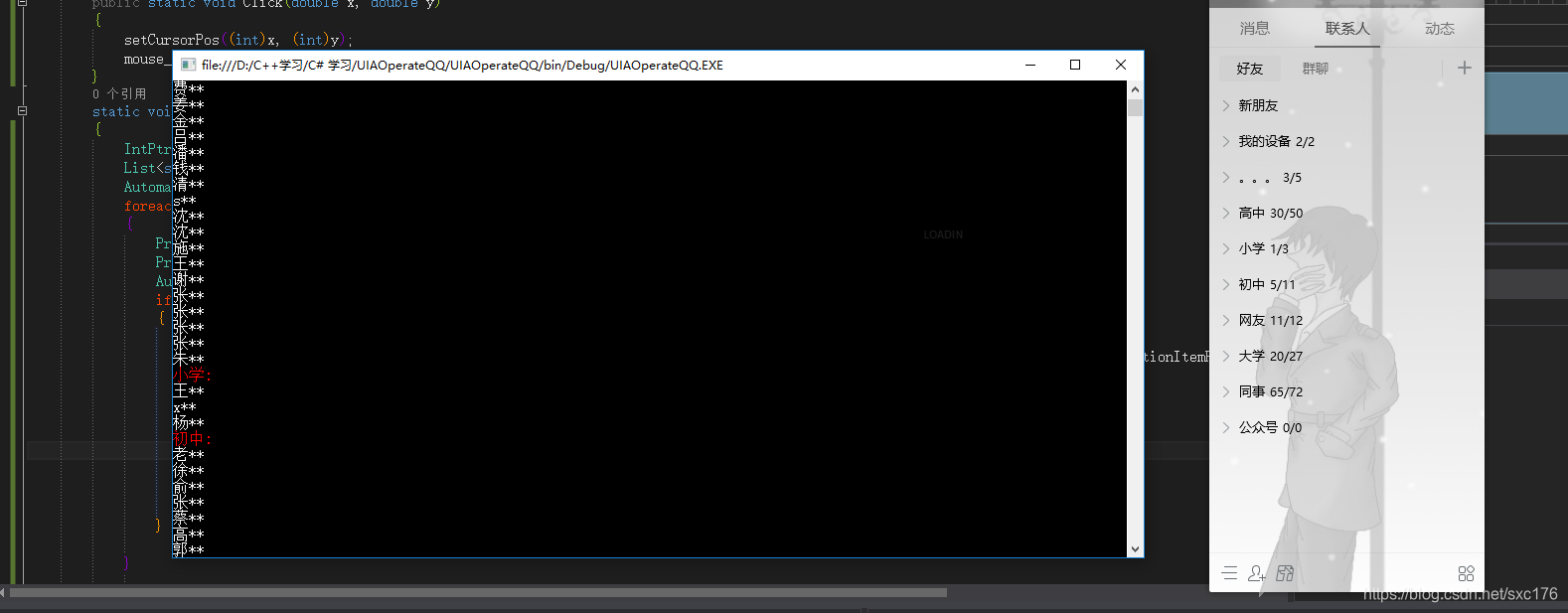
 ?
?
用到的API如下:
private const int MOUSEEVENTF_LEFTDOWN = 0x0002;//press the mouse left button private const int MOUSEEVENTF_LEFTUP = 0x0004; //release the mouse right buttonprivate const int MOUSEEVENTF_WHEEL = 0x800;//mouse wheel [DllImport("user32.dll", EntryPoint = "FindWindow")] private static extern IntPtr findWindow(string lpClassName, string lpWindowName);[DllImport("user32.dll")]private static extern int mouse_event(int dwFlags, int dx, int dy, int cButtons, int dwExtraInfo);[DllImport("user32.dll", EntryPoint = "SetCursorPos")]private static extern bool setCursorPos(int X, int Y);
第一个API是为了获取qq窗口的句柄,第二个和第三个是用来模拟鼠标操作。
主程序代码很简单,基本流程是先检索到列表名称的控件,然后通过获取坐标控制鼠标点击将列表展开,检索该列表中所有的成员。检索完成后将列表重新隐藏,避免列表成员太多,列表太长,影响下一个列表的展开。
IntPtr ptr = findWindow(null,"QQ"); List<string> tables = new List<string>() {"高中","小学","初中","网友","大学"};//好友列表名称 AutomationElement _mainElement = AutomationElement.FromHandle(ptr); foreach (var item in tables) { PropertyCondition type = new PropertyCondition(AutomationElement.IsControlElementProperty, true); PropertyCondition name = new PropertyCondition(AutomationElement.NameProperty, item); AutomationElement tableElement = _mainElement.FindFirst(TreeScope.Subtree, new AndCondition(type, name)); if(tableElement!=null) { Click(tableElement.GetClickablePoint().X, tableElement.GetClickablePoint().Y);//展开列表 AutomationElementCollection ac = _mainElement.FindAll(TreeScope.Subtree, new PropertyCondition(AutomationElement.IsSelectionItemPatternAvailableProperty, true)); Console.ForegroundColor = ConsoleColor.Red; Console.WriteLine(tableElement.Current.Name+":"); Console.ForegroundColor = ConsoleColor.White; foreach (AutomationElement ele in ac) { Console.WriteLine(ele.Current.Name.Substring(0, 1) + "**"); } Click(tableElement.GetClickablePoint().X, tableElement.GetClickablePoint().Y);//重新隐藏列表 } } Console.ReadLine();
通过控制鼠标的API和UIA框架基本可以实现模拟任何人为操作,对实现windows app自动化测试是一个不错的选择
?