转载请标明出处,维权必究: https://www.cnblogs.com/tangZH/p/12543154.html
Glide作为一个强大的图片加载框架,已经被android官方使用,所以,明白Glide的加载流程以及原理对加深我们对glide的理解是很重要的。
本文基于glide 4.11
Glide.with(this).load("").into(new ImageView(this));
我们从这一句入手,上次我们看了Glide的初始化过程,也就是Glide.with(this)这个方法。现在我们来看into方法。
@NonNull public ViewTarget<ImageView, TranscodeType> into(@NonNull ImageView view) { Util.assertMainThread(); //检查view是否为null Preconditions.checkNotNull(view); //根据view.getScaleType()设置不同的transform变换,这个transform变换我们单独讲 BaseRequestOptions<?> requestOptions = this; if (!requestOptions.isTransformationSet() && requestOptions.isTransformationAllowed() && view.getScaleType() != null) { // Clone in this method so that if we use this RequestBuilder to load into a View and then // into a different target, we don't retain the transformation applied based on the previous // View's scale type. switch (view.getScaleType()) { case CENTER_CROP: requestOptions = requestOptions.clone().optionalCenterCrop(); break; case CENTER_INSIDE: requestOptions = requestOptions.clone().optionalCenterInside(); break; case FIT_CENTER: case FIT_START: case FIT_END: requestOptions = requestOptions.clone().optionalFitCenter(); break; case FIT_XY: requestOptions = requestOptions.clone().optionalCenterInside(); break; case CENTER: case MATRIX: default: // Do nothing. } } return into( //根据transcodeClass的类型构造不同的Target glideContext.buildImageViewTarget(view, transcodeClass), /*targetListener=*/ null, requestOptions, Executors.mainThreadExecutor()); }
构建不同的target
glideContext.buildImageViewTarget(view, transcodeClass),跟着代码点进去,最后跟踪到了这里:
public <Z> ViewTarget<ImageView, Z> buildTarget( @NonNull ImageView view, @NonNull Class<Z> clazz) { if (Bitmap.class.equals(clazz)) { return (ViewTarget<ImageView, Z>) new BitmapImageViewTarget(view); } else if (Drawable.class.isAssignableFrom(clazz)) { return (ViewTarget<ImageView, Z>) new DrawableImageViewTarget(view); } else { throw new IllegalArgumentException( "Unhandled class: " + clazz + ", try .as*(Class).transcode(ResourceTranscoder)"); } }
如果说我们最终要将资源解码为bitmap,那么就构造BitmapImageViewTarget,如果要将资源解码为Drawable,那么就构造DrawableImageViewTarget。
private <Y extends Target<TranscodeType>> Y into( @NonNull Y target, @Nullable RequestListener<TranscodeType> targetListener, BaseRequestOptions<?> options, Executor callbackExecutor) { Preconditions.checkNotNull(target); //检测是否已经调用过load方法 if (!isModelSet) { throw new IllegalArgumentException("You must call #load() before calling #into()"); } //构造request Request request = buildRequest(target, targetListener, options, callbackExecutor); //获取改target是否已经有绑定的request Request previous = target.getRequest(); /** * 这里修复了一个bug,详见 https://github.com/bumptech/glide/issues/2270 */ if (request.isEquivalentTo(previous) && !isSkipMemoryCacheWithCompletePreviousRequest(options, previous)) { // If the request is completed, beginning again will ensure the result is re-delivered, // triggering RequestListeners and Targets. If the request is failed, beginning again will // restart the request, giving it another chance to complete. If the request is already // running, we can let it continue running without interruption. if (!Preconditions.checkNotNull(previous).isRunning()) { // Use the previous request rather than the new one to allow for optimizations like skipping // setting placeholders, tracking and un-tracking Targets, and obtaining View dimensions // that are done in the individual Request. previous.begin(); } return target; } requestManager.clear(target); //将该request设置给target target.setRequest(request); requestManager.track(target, request); return target; }
先看一下buildRequest(target, targetListener, options, callbackExecutor);做了什么
追踪进去,调用buildRequestRecursive方法。
然后主要是这两个方法:
Request mainRequest = buildThumbnailRequestRecursive( requestLock, target, targetListener, parentCoordinator, transitionOptions, priority, overrideWidth, overrideHeight, requestOptions, callbackExecutor);
Request errorRequest = errorBuilder.buildRequestRecursive( requestLock, target, targetListener, errorRequestCoordinator, errorBuilder.transitionOptions, errorBuilder.getPriority(), errorOverrideWidth, errorOverrideHeight, errorBuilder, callbackExecutor);最后设置给ErrorRequestCoordinator
errorRequestCoordinator.setRequests(mainRequest, errorRequest);
ErrorRequestCoordinator负责管理这些请求,如果请求失败就运行错误的请求。
我们看这个方法:buildThumbnailRequestRecursive
private Request buildThumbnailRequestRecursive( Object requestLock, Target<TranscodeType> target, RequestListener<TranscodeType> targetListener, @Nullable RequestCoordinator parentCoordinator, TransitionOptions<?, ? super TranscodeType> transitionOptions, Priority priority, int overrideWidth, int overrideHeight, BaseRequestOptions<?> requestOptions, Executor callbackExecutor) { if (thumbnailBuilder != null) { // Recursive case: contains a potentially recursive thumbnail request builder. if (isThumbnailBuilt) { throw new IllegalStateException( "You cannot use a request as both the main request and a " + "thumbnail, consider using clone() on the request(s) passed to thumbnail()"); } TransitionOptions<?, ? super TranscodeType> thumbTransitionOptions = thumbnailBuilder.transitionOptions; // Apply our transition by default to thumbnail requests but avoid overriding custom options // that may have been applied on the thumbnail request explicitly. if (thumbnailBuilder.isDefaultTransitionOptionsSet) { thumbTransitionOptions = transitionOptions; } Priority thumbPriority = thumbnailBuilder.isPrioritySet() ? thumbnailBuilder.getPriority() : getThumbnailPriority(priority); int thumbOverrideWidth = thumbnailBuilder.getOverrideWidth(); int thumbOverrideHeight = thumbnailBuilder.getOverrideHeight(); if (Util.isValidDimensions(overrideWidth, overrideHeight) && !thumbnailBuilder.isValidOverride()) { thumbOverrideWidth = requestOptions.getOverrideWidth(); thumbOverrideHeight = requestOptions.getOverrideHeight(); } ThumbnailRequestCoordinator coordinator = new ThumbnailRequestCoordinator(requestLock, parentCoordinator); Request fullRequest = obtainRequest( requestLock, target, targetListener, requestOptions, coordinator, transitionOptions, priority, overrideWidth, overrideHeight, callbackExecutor); isThumbnailBuilt = true; // Recursively generate thumbnail requests. Request thumbRequest = thumbnailBuilder.buildRequestRecursive( requestLock, target, targetListener, coordinator, thumbTransitionOptions, thumbPriority, thumbOverrideWidth, thumbOverrideHeight, thumbnailBuilder, callbackExecutor); isThumbnailBuilt = false; coordinator.setRequests(fullRequest, thumbRequest); return coordinator; } else if (thumbSizeMultiplier != null) { // Base case: thumbnail multiplier generates a thumbnail request, but cannot recurse. ThumbnailRequestCoordinator coordinator = new ThumbnailRequestCoordinator(requestLock, parentCoordinator); Request fullRequest = obtainRequest( requestLock, target, targetListener, requestOptions, coordinator, transitionOptions, priority, overrideWidth, overrideHeight, callbackExecutor); BaseRequestOptions<?> thumbnailOptions = requestOptions.clone().sizeMultiplier(thumbSizeMultiplier); Request thumbnailRequest = obtainRequest( requestLock, target, targetListener, thumbnailOptions, coordinator, transitionOptions, getThumbnailPriority(priority), overrideWidth, overrideHeight, callbackExecutor); coordinator.setRequests(fullRequest, thumbnailRequest); return coordinator; } else { // Base case: no thumbnail. return obtainRequest( requestLock, target, targetListener, requestOptions, parentCoordinator, transitionOptions, priority, overrideWidth, overrideHeight, callbackExecutor); } }
首先对缩略图及是否对Target设置参数的判断(是否使用了thumbnail()方法和sizeMultiplier()方法),如果有使用thunmnail()方法,则生成原始图片和缩略图的请求,并由ThumbnailRequestCoordinator对象来协调管理,使用了sizeMultiplier()方法,则同样的处理(前者递归的获得缩略图的Request,后者不递归),否则就只生成原始图片的请求。
他们最终都会调用obtainRequest方法,追踪进去可以发现该方法最终返回的是SingleRequest对象。初始化request的时候传递的参数很多:
public static <R> SingleRequest<R> obtain( Context context, GlideContext glideContext, Object requestLock, Object model, Class<R> transcodeClass, BaseRequestOptions<?> requestOptions, int overrideWidth, int overrideHeight, Priority priority, Target<R> target, RequestListener<R> targetListener, @Nullable List<RequestListener<R>> requestListeners, RequestCoordinator requestCoordinator, Engine engine, TransitionFactory<? super R> animationFactory, Executor callbackExecutor) {
1.GlideContext glideContext : 全局上下文
2.Object model :加载的资源类型
3.Class transcodeClass :转换的类型
4.RequestOptions requestOptions:设置选项(包括:skipMemoryCache,errorDrawable,placeholder,timeoutOf,encodeFormatOf等等)
5.int overrideWidth:目标宽度在所需资源的像素点。
6.int overrideHeight:目标高度在所需资源的像素点。
7. Priority priority:加载的优先级(IMMEDIATE,HIGH,NORMAL,LOW)
8.Target target:上面刚讲过,绑定的target
9.RequestListener requestListener:请求加载时候的监听器
10.RequestCoordinator requestCoordinator:请求协调器(用来协调具有相同Target的协调器)
11.Engine engine:负责启动负载和管理活动和缓存资源。
12.TransitionFactory<? super R> animationFactory:一个工厂类,可以根据请求的状态产生不同的转换。
我们再回到into代码中,获取了request之后我们就要开始请求了。
我们看着一句requestManager.track(target, request);
synchronized void track(@NonNull Target<?> target, @NonNull Request request) { targetTracker.track(target); requestTracker.runRequest(request); }
runRequest就是执行请求的代码:
/** Starts tracking the given request. */ public void runRequest(@NonNull Request request) { requests.add(request); if (!isPaused) { request.begin(); } else { request.clear(); if (Log.isLoggable(TAG, Log.VERBOSE)) { Log.v(TAG, "Paused, delaying request"); } pendingRequests.add(request); } }
判断Glide当前是不是处理暂停状态,如果不是暂停状态就调用Request的begin()方法来执行Request,否则的话就先将Request添加到待执行队列里面,等暂停状态解除了之后再执行。
我们来看begin方法:
  @Override  public void begin() {    synchronized (requestLock) {      assertNotCallingCallbacks();      stateVerifier.throwIfRecycled();      startTime = LogTime.getLogTime();      if (model == null) {        if (Util.isValidDimensions(overrideWidth, overrideHeight)) {          width = overrideWidth;          height = overrideHeight;        }        // Only log at more verbose log levels if the user has set a fallback drawable, because        // fallback Drawables indicate the user expects null models occasionally.        int logLevel = getFallbackDrawable() == null ? Log.WARN : Log.DEBUG;        onLoadFailed(new GlideException("Received null model"), logLevel);        return;      }      if (status == Status.RUNNING) {        throw new IllegalArgumentException("Cannot restart a running request");      }
      如果说这个资源已经被加载过了,那么我们直接调用onResourceReady      // If we're restarted after we're complete (usually via something like a notifyDataSetChanged      // that starts an identical request into the same Target or View), we can simply use the      // resource and size we retrieved the last time around and skip obtaining a new size, starting      // a new load etc. This does mean that users who want to restart a load because they expect      // that the view size has changed will need to explicitly clear the View or Target before      // starting the new load.      if (status == Status.COMPLETE) {        onResourceReady(resource, DataSource.MEMORY_CACHE);        return;      }            // Restarts for requests that are neither complete nor running can be treated as new requests      // and can run again from the beginning.      status = Status.WAITING_FOR_SIZE;      if (Util.isValidDimensions(overrideWidth, overrideHeight)) {        onSizeReady(overrideWidth, overrideHeight);      } else {        target.getSize(this);      }      if ((status == Status.RUNNING || status == Status.WAITING_FOR_SIZE)          && canNotifyStatusChanged()) {        target.onLoadStarted(getPlaceholderDrawable());      }      if (IS_VERBOSE_LOGGABLE) {        logV("finished run method in " + LogTime.getElapsedMillis(startTime));      }    }  }
如果model为null,说明我们没有调用load方法,这时候会回调onLoadFailed,将status设置为Status.FAILED,然后调用setErrorPlaceholder,这个方法里面最终调用target.onLoadFailed(error);将资源置空,然后显示错误图片。
@Override public void begin() { synchronized (requestLock) { assertNotCallingCallbacks(); stateVerifier.throwIfRecycled(); startTime = LogTime.getLogTime(); if (model == null) { if (Util.isValidDimensions(overrideWidth, overrideHeight)) { width = overrideWidth; height = overrideHeight; } // Only log at more verbose log levels if the user has set a fallback drawable, because // fallback Drawables indicate the user expects null models occasionally. int logLevel = getFallbackDrawable() == null ? Log.WARN : Log.DEBUG; onLoadFailed(new GlideException("Received null model"), logLevel); return; } if (status == SingleRequest.Status.RUNNING) { throw new IllegalArgumentException("Cannot restart a running request"); } /** * 如果完成后重新启动(通常是通过notifyDataSetChanged之类的方法 * 将相同的请求发送到相同的Target或View),我们可以简单地使用 * 我们最后一次检索的资源和大小,然后跳过获取新大小的步骤, * 不用开始一个新的加载。这确实意味着要重新加载的用户,因为他们 * 更改视图大小,那么需要先明确清除view和target,然后 * 开始新的加载。 */ if (status == SingleRequest.Status.COMPLETE) { onResourceReady(resource, DataSource.MEMORY_CACHE); return; } // Restarts for requests that are neither complete nor running can be treated as new requests // and can run again from the beginning. status = SingleRequest.Status.WAITING_FOR_SIZE; /** * 这里会判断Util.isValidDimensions(overrideWidth, overrideHeight) * 如果你在使用时候调用了override() API为图片指定了一个固定的宽高,就会按照你给定的去加载;第二种情况是没有给定的情况, * 那么target.getSize()方法的内部会根据ImageView的layout_width和layout_height值做一系列的计算,来算出图片应该的宽高, * 具体计算就在getSize里面 * 但是不管怎样,最后都会调用onSizeReady()。 */ if (Util.isValidDimensions(overrideWidth, overrideHeight)) { onSizeReady(overrideWidth, overrideHeight); } else { target.getSize(this); } if ((status == SingleRequest.Status.RUNNING || status == SingleRequest.Status.WAITING_FOR_SIZE) && canNotifyStatusChanged()) { target.onLoadStarted(getPlaceholderDrawable()); } if (IS_VERBOSE_LOGGABLE) { logV("finished run method in " + LogTime.getElapsedMillis(startTime)); } } }
我们进去onSizeReady看看
@Override public void onSizeReady(int width, int height) { //如果对象以及被回收了,那么抛出异常 stateVerifier.throwIfRecycled(); synchronized (requestLock) { if (IS_VERBOSE_LOGGABLE) { logV("Got onSizeReady in " + LogTime.getElapsedMillis(startTime)); } //说明没有设置大小或者没有获取到计算后的大小 if (status != SingleRequest.Status.WAITING_FOR_SIZE) { return; } status = SingleRequest.Status.RUNNING; float sizeMultiplier = requestOptions.getSizeMultiplier(); this.width = maybeApplySizeMultiplier(width, sizeMultiplier); this.height = maybeApplySizeMultiplier(height, sizeMultiplier); if (IS_VERBOSE_LOGGABLE) { logV("finished setup for calling load in " + LogTime.getElapsedMillis(startTime)); } loadStatus = engine.load( glideContext, model, requestOptions.getSignature(), this.width, this.height, requestOptions.getResourceClass(), transcodeClass, priority, requestOptions.getDiskCacheStrategy(), requestOptions.getTransformations(), requestOptions.isTransformationRequired(), requestOptions.isScaleOnlyOrNoTransform(), requestOptions.getOptions(), requestOptions.isMemoryCacheable(), requestOptions.getUseUnlimitedSourceGeneratorsPool(), requestOptions.getUseAnimationPool(), requestOptions.getOnlyRetrieveFromCache(), this, callbackExecutor); // This is a hack that's only useful for testing right now where loads complete synchronously // even though under any executor running on any thread but the main thread, the load would // have completed asynchronously. if (status != SingleRequest.Status.RUNNING) { loadStatus = null; } if (IS_VERBOSE_LOGGABLE) { logV("finished onSizeReady in " + LogTime.getElapsedMillis(startTime)); } } }
主要的代码是engine.load。
/** * /** * 所有的请求流程都如下: * 1.检查内存缓存并提供缓存的资源 * 2.检查当前使用的资源,并返回当前的活跃资源 * 3.检查当前的加载进度,并将cb添加到正在进行的加载进度中 * 4.开始一个新的加载 * * @param glideContext * @param model * @param signature * @param width * @param height * @param resourceClass * @param transcodeClass * @param priority * @param diskCacheStrategy * @param transformations * @param isTransformationRequired * @param isScaleOnlyOrNoTransform * @param options * @param isMemoryCacheable * @param useUnlimitedSourceExecutorPool * @param useAnimationPool * @param onlyRetrieveFromCache * @param cb * @param callbackExecutor * @param <R> * @return */ public <R> Engine.LoadStatus load( GlideContext glideContext, Object model, Key signature, int width, int height, Class<?> resourceClass, Class<R> transcodeClass, Priority priority, DiskCacheStrategy diskCacheStrategy, Map<Class<?>, Transformation<?>> transformations, boolean isTransformationRequired, boolean isScaleOnlyOrNoTransform, Options options, boolean isMemoryCacheable, boolean useUnlimitedSourceExecutorPool, boolean useAnimationPool, boolean onlyRetrieveFromCache, ResourceCallback cb, Executor callbackExecutor) { long startTime = VERBOSE_IS_LOGGABLE ? LogTime.getLogTime() : 0; //构造一个key EngineKey key = keyFactory.buildKey( model, signature, width, height, transformations, resourceClass, transcodeClass, options); EngineResource<?> memoryResource; synchronized (this) { //通过这个key去缓存中看是不是存在资源,loadFromMemory里面会先去活跃资源缓存池中获取, // 没有的话再去内存缓存中获取,活跃资源即现在正在被其他组件使用的资源。 memoryResource = loadFromMemory(key, isMemoryCacheable, startTime); if (memoryResource == null) { return waitForExistingOrStartNewJob( glideContext, model, signature, width, height, resourceClass, transcodeClass, priority, diskCacheStrategy, transformations, isTransformationRequired, isScaleOnlyOrNoTransform, options, isMemoryCacheable, useUnlimitedSourceExecutorPool, useAnimationPool, onlyRetrieveFromCache, cb, callbackExecutor, key, startTime); } } // Avoid calling back while holding the engine lock, doing so makes it easier for callers to // deadlock. cb.onResourceReady(memoryResource, DataSource.MEMORY_CACHE); return null; }
如果找得到资源,那么就回调cb.onResourceReady,不然的话会走waitForExistingOrStartNewJob。
我们进去看一下:
private <R> Engine.LoadStatus waitForExistingOrStartNewJob( GlideContext glideContext, Object model, Key signature, int width, int height, Class<?> resourceClass, Class<R> transcodeClass, Priority priority, DiskCacheStrategy diskCacheStrategy, Map<Class<?>, Transformation<?>> transformations, boolean isTransformationRequired, boolean isScaleOnlyOrNoTransform, Options options, boolean isMemoryCacheable, boolean useUnlimitedSourceExecutorPool, boolean useAnimationPool, boolean onlyRetrieveFromCache, ResourceCallback cb, Executor callbackExecutor, EngineKey key, long startTime) { //通过key获取EngineJob,EngineJob负责开启线程异步加载。 EngineJob<?> current = jobs.get(key, onlyRetrieveFromCache); if (current != null) { current.addCallback(cb, callbackExecutor); if (VERBOSE_IS_LOGGABLE) { logWithTimeAndKey("Added to existing load", startTime, key); } return new Engine.LoadStatus(cb, current); } //没有EngineJob则构建一个 EngineJob<R> engineJob = engineJobFactory.build( key, isMemoryCacheable, useUnlimitedSourceExecutorPool, useAnimationPool, onlyRetrieveFromCache); //负责给图片解码等一些复杂操作 DecodeJob<R> decodeJob = decodeJobFactory.build( glideContext, model, key, signature, width, height, resourceClass, transcodeClass, priority, diskCacheStrategy, transformations, isTransformationRequired, isScaleOnlyOrNoTransform, onlyRetrieveFromCache, options, engineJob); jobs.put(key, engineJob); engineJob.addCallback(cb, callbackExecutor); //运行 engineJob.start(decodeJob); if (VERBOSE_IS_LOGGABLE) { logWithTimeAndKey("Started new load", startTime, key); } return new Engine.LoadStatus(cb, engineJob); }
public synchronized void start(DecodeJob<R> decodeJob) { this.decodeJob = decodeJob; GlideExecutor executor = decodeJob.willDecodeFromCache() ? diskCacheExecutor : getActiveSourceExecutor(); executor.execute(decodeJob); }
如果要从磁盘缓存中去解码的话,就获取diskCacheExecutor,否则就用针对原始资源的一个执行器。
在executor.execute(decodeJob)之后便切换到子线程了,我们到DecodeJob里面去看一下。
@Override public void run() { // This should be much more fine grained, but since Java's thread pool implementation silently // swallows all otherwise fatal exceptions, this will at least make it obvious to developers // that something is failing. GlideTrace.beginSectionFormat("DecodeJob#run(model=%s)", model); // Methods in the try statement can invalidate currentFetcher, so set a local variable here to // ensure that the fetcher is cleaned up either way. DataFetcher<?> localFetcher = currentFetcher; try { if (isCancelled) { notifyFailed(); return; } runWrapped(); } catch (CallbackException e) { // If a callback not controlled by Glide throws an exception, we should avoid the Glide // specific debug logic below. throw e; } catch (Throwable t) { // Catch Throwable and not Exception to handle OOMs. Throwables are swallowed by our // usage of .submit() in GlideExecutor so we're not silently hiding crashes by doing this. We // are however ensuring that our callbacks are always notified when a load fails. Without this // notification, uncaught throwables never notify the corresponding callbacks, which can cause // loads to silently hang forever, a case that's especially bad for users using Futures on // background threads. if (Log.isLoggable(TAG, Log.DEBUG)) { Log.d( TAG, "DecodeJob threw unexpectedly" + ", isCancelled: " + isCancelled + ", stage: " + stage, t); } // When we're encoding we've already notified our callback and it isn't safe to do so again. if (stage != Stage.ENCODE) { throwables.add(t); notifyFailed(); } if (!isCancelled) { throw t; } throw t; } finally { // Keeping track of the fetcher here and calling cleanup is excessively paranoid, we call // close in all cases anyway. if (localFetcher != null) { localFetcher.cleanup(); } GlideTrace.endSection(); } }
主要是runWrapped();
private void runWrapped() { switch (runReason) { case INITIALIZE: stage = getNextStage(Stage.INITIALIZE); currentGenerator = getNextGenerator(); runGenerators(); break; case SWITCH_TO_SOURCE_SERVICE: runGenerators(); break; case DECODE_DATA: decodeFromRetrievedData(); break; default: throw new IllegalStateException("Unrecognized run reason: " + runReason); } }
当INITIALIZE或者SWITCH_TO_SOURCE_SERVICE的时候,走runGenerators()。这两种是没有缓存的情况下。
runGenerators():
private void runGenerators() { currentThread = Thread.currentThread(); startFetchTime = LogTime.getLogTime(); boolean isStarted = false; while (!isCancelled && currentGenerator != null && !(isStarted = currentGenerator.startNext())) { stage = getNextStage(stage); currentGenerator = getNextGenerator(); if (stage == Stage.SOURCE) { reschedule(); return; } } // We've run out of stages and generators, give up. if ((stage == Stage.FINISHED || isCancelled) && !isStarted) { notifyFailed(); } // Otherwise a generator started a new load and we expect to be called back in // onDataFetcherReady. }
重点:currentGenerator.startNext()。实现startNext方法的有三个: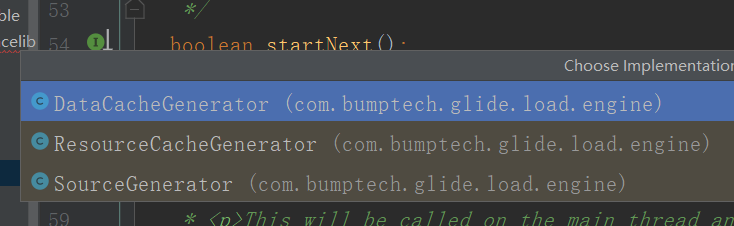
而我们的currentGenerator是哪一个呢?
回头看runWrapped
case INITIALIZE: stage = getNextStage(Stage.INITIALIZE); currentGenerator = getNextGenerator(); runGenerators();
点进去getNextGenerator,结合status的值便可以知道返回的是SourceGenerator。(我们讨论的是初次加载没有缓存的情况)
我们来到SourceGenerator的startNext()方法:
@Override public boolean startNext() { if (dataToCache != null) { Object data = dataToCache; dataToCache = null; cacheData(data); } if (sourceCacheGenerator != null && sourceCacheGenerator.startNext()) { return true; } sourceCacheGenerator = null; loadData = null; boolean started = false; while (!started && hasNextModelLoader()) { loadData = helper.getLoadData().get(loadDataListIndex++); if (loadData != null && (helper.getDiskCacheStrategy().isDataCacheable(loadData.fetcher.getDataSource()) || helper.hasLoadPath(loadData.fetcher.getDataClass()))) { started = true; startNextLoad(loadData); } } return started; }
如果sourceCacheGenerator 不为null,就调用它的startNext,在里面去获取modelLoader,然后去加载资源,modelLoader即模型加载器,Glide初始化的时候注册了很多模型加载器。
registry .append(int.class, InputStream.class, resourceLoaderStreamFactory) .append(int.class, ParcelFileDescriptor.class, resourceLoaderFileDescriptorFactory) .append(Integer.class, InputStream.class, resourceLoaderStreamFactory) .append(Integer.class, ParcelFileDescriptor.class, resourceLoaderFileDescriptorFactory) .append(Integer.class, Uri.class, resourceLoaderUriFactory) .append(int.class, AssetFileDescriptor.class, resourceLoaderAssetFileDescriptorFactory) .append(Integer.class, AssetFileDescriptor.class, resourceLoaderAssetFileDescriptorFactory) .append(int.class, Uri.class, resourceLoaderUriFactory) .append(String.class, InputStream.class, new DataUrlLoader.StreamFactory<String>()) .append(Uri.class, InputStream.class, new DataUrlLoader.StreamFactory<Uri>())
如append(Uri.class, InputStream.class, new DataUrlLoader.StreamFactory<Uri>())
将Uri对象转换为InputStream,模型加载器为DataUrlLoader.StreamFactory,也就是说我们加载的时候如果传进来的是一个uri对象,那么最终会被转换为InputStream。
我们不进去看,直接看接下来的代码。
loadData = helper.getLoadData().get(loadDataListIndex++);
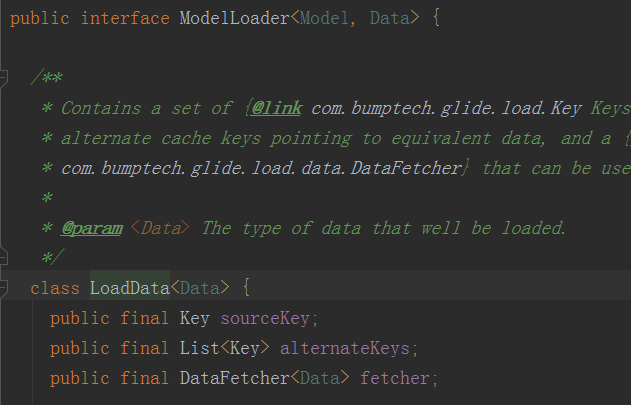
loadData里面包含着:
sourceKey:标识这个加载的原始资源的key
alternateKeys:备用的缓存key指向相同的数据
DataFetcher:用来获取没有在缓存中发现的数据(即需要去加载的,modelLoader中都包含着这个)
接下来看:
startNextLoad(loadData);
private void startNextLoad(final LoadData<?> toStart) { loadData.fetcher.loadData( helper.getPriority(), new DataCallback<Object>() { @Override public void onDataReady(@Nullable Object data) { if (isCurrentRequest(toStart)) { onDataReadyInternal(toStart, data); } } @Override public void onLoadFailed(@NonNull Exception e) { if (isCurrentRequest(toStart)) { onLoadFailedInternal(toStart, e); } } });}
loadData.fetcher.loadData:这里是我们真正去加载资源的地方。
点击进去loadeData,发现好多实现了该方法的类。那我们这里的Fetcher究竟是哪一个呢?
首先从名字来看,如果我们加载的是网络资源,那么就是:HttpUrlFetcher。

这个HttpUrlFetcher跟我们的modelLoader是什么关系呢
我们可以看出LoadData在ModelLoader类中。
查看HttpUrlFetcher的调用可以追溯到HttpGlideUrlLoader。

@Override public LoadData<InputStream> buildLoadData( @NonNull GlideUrl model, int width, int height, @NonNull Options options) { // GlideUrls memoize parsed URLs so caching them saves a few object instantiations and time // spent parsing urls. GlideUrl url = model; if (modelCache != null) { url = modelCache.get(model, 0, 0); if (url == null) { modelCache.put(model, 0, 0, model); url = model; } } int timeout = options.get(TIMEOUT); return new LoadData<>(url, new HttpUrlFetcher(url, timeout)); }
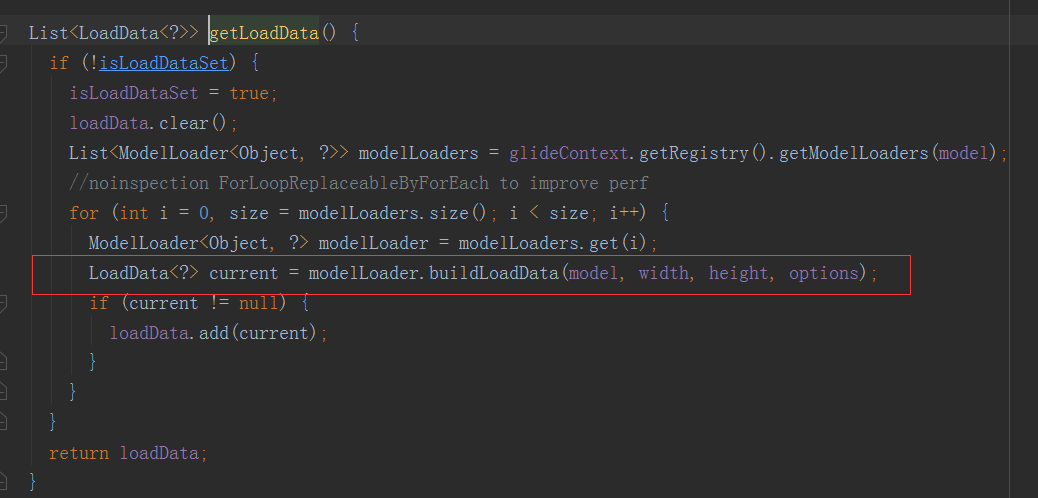
我们可以看出HttpGlideUrlLoader实现了ModelLoader的方法,buildLoadData,而在buildLoadData中返回了一个LoadData对象,这个对象传入的就是HttpUrlFetcher。
这个buildLoadData什么时候被调用的呢?
我们回到startNext方法,loadData = helper.getLoadData().get(loadDataListIndex++);的getLoadData()里面:
好,那么我们看HttpUrlFetcher的loadData();
@Override public void loadData( @NonNull Priority priority, @NonNull DataCallback<? super InputStream> callback) { long startTime = LogTime.getLogTime(); try { InputStream result = loadDataWithRedirects(glideUrl.toURL(), 0, null, glideUrl.getHeaders()); callback.onDataReady(result); } catch (IOException e) { if (Log.isLoggable(TAG, Log.DEBUG)) { Log.d(TAG, "Failed to load data for url", e); } callback.onLoadFailed(e); } finally { if (Log.isLoggable(TAG, Log.VERBOSE)) { Log.v(TAG, "Finished http url fetcher fetch in " + LogTime.getElapsedMillis(startTime)); } } }
loadDataWithRedirects返回了InputStream,然后callback回调。
我们进去loadDataWithRedirects看可以发现这个方法其实是去请求网络,我们就不细看了。
private void startNextLoad(final LoadData<?> toStart) { loadData.fetcher.loadData( helper.getPriority(), new DataCallback<Object>() { @Override public void onDataReady(@Nullable Object data) { if (isCurrentRequest(toStart)) { onDataReadyInternal(toStart, data); } } @Override public void onLoadFailed(@NonNull Exception e) { if (isCurrentRequest(toStart)) { onLoadFailedInternal(toStart, e); } } }); }
回调后调用onDataReadyInternal(toStart, data);
且看一下:
@SuppressWarnings("WeakerAccess")@Syntheticvoid onDataReadyInternal(LoadData<?> loadData, Object data) { DiskCacheStrategy diskCacheStrategy = helper.getDiskCacheStrategy(); if (data != null && diskCacheStrategy.isDataCacheable(loadData.fetcher.getDataSource())) { dataToCache = data; // We might be being called back on someone else's thread. Before doing anything, we should // reschedule to get back onto Glide's thread. cb.reschedule(); } else { cb.onDataFetcherReady( loadData.sourceKey, data, loadData.fetcher, loadData.fetcher.getDataSource(), originalKey); }}我们看这个方法:onDataFetcherReady
查看一下便可以知道会回调DecodeJob中的方法:
@Override public void onDataFetcherReady( Key sourceKey, Object data, DataFetcher<?> fetcher, DataSource dataSource, Key attemptedKey) { this.currentSourceKey = sourceKey; this.currentData = data; this.currentFetcher = fetcher; this.currentDataSource = dataSource; this.currentAttemptingKey = attemptedKey; if (Thread.currentThread() != currentThread) { runReason = RunReason.DECODE_DATA; callback.reschedule(this); } else { GlideTrace.beginSection("DecodeJob.decodeFromRetrievedData"); try { decodeFromRetrievedData(); } finally { GlideTrace.endSection(); } } }
到此我们就完成了加网络资源的过程,接下来就是解码等等的操作了。
我们看decodeFromRetrievedData:
里面有一句:
resource = decodeFromData(currentFetcher, currentData, currentDataSource);
将资源解码成Resource。
我们追踪进去:
decodeFromData -> decodeFromFetcher -> runLoadPath -> path.load -> loadWithExceptionList
loadWithExceptionList里面便开始进行我们的解码操作了。
private Resource<Transcode> loadWithExceptionList( DataRewinder<Data> rewinder, @NonNull Options options, int width, int height, DecodePath.DecodeCallback<ResourceType> decodeCallback, List<Throwable> exceptions) throws GlideException { Resource<Transcode> result = null; //noinspection ForLoopReplaceableByForEach to improve perf for (int i = 0, size = decodePaths.size(); i < size; i++) { DecodePath<Data, ResourceType, Transcode> path = decodePaths.get(i); try { result = path.decode(rewinder, width, height, options, decodeCallback); } catch (GlideException e) { exceptions.add(e); } if (result != null) { break; } }
我们看:
result = path.decode(rewinder, width, height, options, decodeCallback);
public Resource<Transcode> decode( DataRewinder<DataType> rewinder, int width, int height, @NonNull Options options, DecodeCallback<ResourceType> callback) throws GlideException { Resource<ResourceType> decoded = decodeResource(rewinder, width, height, options); Resource<ResourceType> transformed = callback.onResourceDecoded(decoded); return transcoder.transcode(transformed, options); }
我们看decodeResource -> decodeResourceWithList
@NonNull private Resource<ResourceType> decodeResourceWithList( DataRewinder<DataType> rewinder, int width, int height, @NonNull Options options, List<Throwable> exceptions) throws GlideException { Resource<ResourceType> result = null; //noinspection ForLoopReplaceableByForEach to improve perf //遍历获取解码器 for (int i = 0, size = decoders.size(); i < size; i++) { ResourceDecoder<DataType, ResourceType> decoder = decoders.get(i); try { DataType data = rewinder.rewindAndGet(); //该解码器是否可以解码该数据 if (decoder.handles(data, options)) { //获取数据 data = rewinder.rewindAndGet(); //解码 result = decoder.decode(data, width, height, options); } // Some decoders throw unexpectedly. If they do, we shouldn't fail the entire load path, but // instead log and continue. See #2406 for an example. } catch (IOException | RuntimeException | OutOfMemoryError e) { if (Log.isLoggable(TAG, Log.VERBOSE)) { Log.v(TAG, "Failed to decode data for " + decoder, e); } exceptions.add(e); } if (result != null) { break; } } if (result == null) { throw new GlideException(failureMessage, new ArrayList<>(exceptions)); } return result; }
获取对应的解码器后用decode方法进行解码。Glide初始化的时候便注册了一大堆解码器,如:
.append( Registry.BUCKET_GIF, InputStream.class, GifDrawable.class, new StreamGifDecoder(imageHeaderParsers, byteBufferGifDecoder, arrayPool))
对于Gif类型,将InputStream解码为GifDrawable,解码器为StreamGifDecoder
接下来我们回到这个方法:
public Resource<Transcode> decode( DataRewinder<DataType> rewinder, int width, int height, @NonNull Options options, DecodeCallback<ResourceType> callback) throws GlideException { Resource<ResourceType> decoded = decodeResource(rewinder, width, height, options); Resource<ResourceType> transformed = callback.onResourceDecoded(decoded); return transcoder.transcode(transformed, options); }
Resource<ResourceType> transformed = callback.onResourceDecoded(decoded);
这个方法里面便是对我们的资源进行了变换。
往下追溯到这个方法:
@Synthetic @NonNull <Z> Resource<Z> onResourceDecoded(DataSource dataSource, @NonNull Resource<Z> decoded) { @SuppressWarnings("unchecked") Class<Z> resourceSubClass = (Class<Z>) decoded.get().getClass(); Transformation<Z> appliedTransformation = null; Resource<Z> transformed = decoded; if (dataSource != DataSource.RESOURCE_DISK_CACHE) { appliedTransformation = decodeHelper.getTransformation(resourceSubClass); transformed = appliedTransformation.transform(glideContext, decoded, width, height); } // TODO: Make this the responsibility of the Transformation. if (!decoded.equals(transformed)) { decoded.recycle(); } final EncodeStrategy encodeStrategy; final ResourceEncoder<Z> encoder; if (decodeHelper.isResourceEncoderAvailable(transformed)) { encoder = decodeHelper.getResultEncoder(transformed); encodeStrategy = encoder.getEncodeStrategy(options); } else { encoder = null; encodeStrategy = EncodeStrategy.NONE; } Resource<Z> result = transformed; boolean isFromAlternateCacheKey = !decodeHelper.isSourceKey(currentSourceKey); if (diskCacheStrategy.isResourceCacheable( isFromAlternateCacheKey, dataSource, encodeStrategy)) { if (encoder == null) { throw new Registry.NoResultEncoderAvailableException(transformed.get().getClass()); } final Key key; switch (encodeStrategy) { case SOURCE: key = new DataCacheKey(currentSourceKey, signature); break; case TRANSFORMED: key = new ResourceCacheKey( decodeHelper.getArrayPool(), currentSourceKey, signature, width, height, appliedTransformation, resourceSubClass, options); break; default: throw new IllegalArgumentException("Unknown strategy: " + encodeStrategy); } LockedResource<Z> lockedResult = LockedResource.obtain(transformed); deferredEncodeManager.init(key, encoder, lockedResult); result = lockedResult; } return result; }
首先获取Transformation,然后调用transform方法进行变换处理。
返回resource之后回到decodeFromRetrievedData方法。
private void decodeFromRetrievedData() { if (Log.isLoggable(TAG, Log.VERBOSE)) { logWithTimeAndKey( "Retrieved data", startFetchTime, "data: " + currentData + ", cache key: " + currentSourceKey + ", fetcher: " + currentFetcher); } Resource<R> resource = null; try { resource = decodeFromData(currentFetcher, currentData, currentDataSource); } catch (GlideException e) { e.setLoggingDetails(currentAttemptingKey, currentDataSource); throwables.add(e); } if (resource != null) { notifyEncodeAndRelease(resource, currentDataSource); } else { runGenerators(); } }
我们沿着方法进入notifyEncodeAndRelease ---> notifyComplete ----> onResourceReady ------> notifyCallbacksOfResult
。。。。算了写的到这里好累,接下来不写了自己看,就是去设置资源。


