思维导图
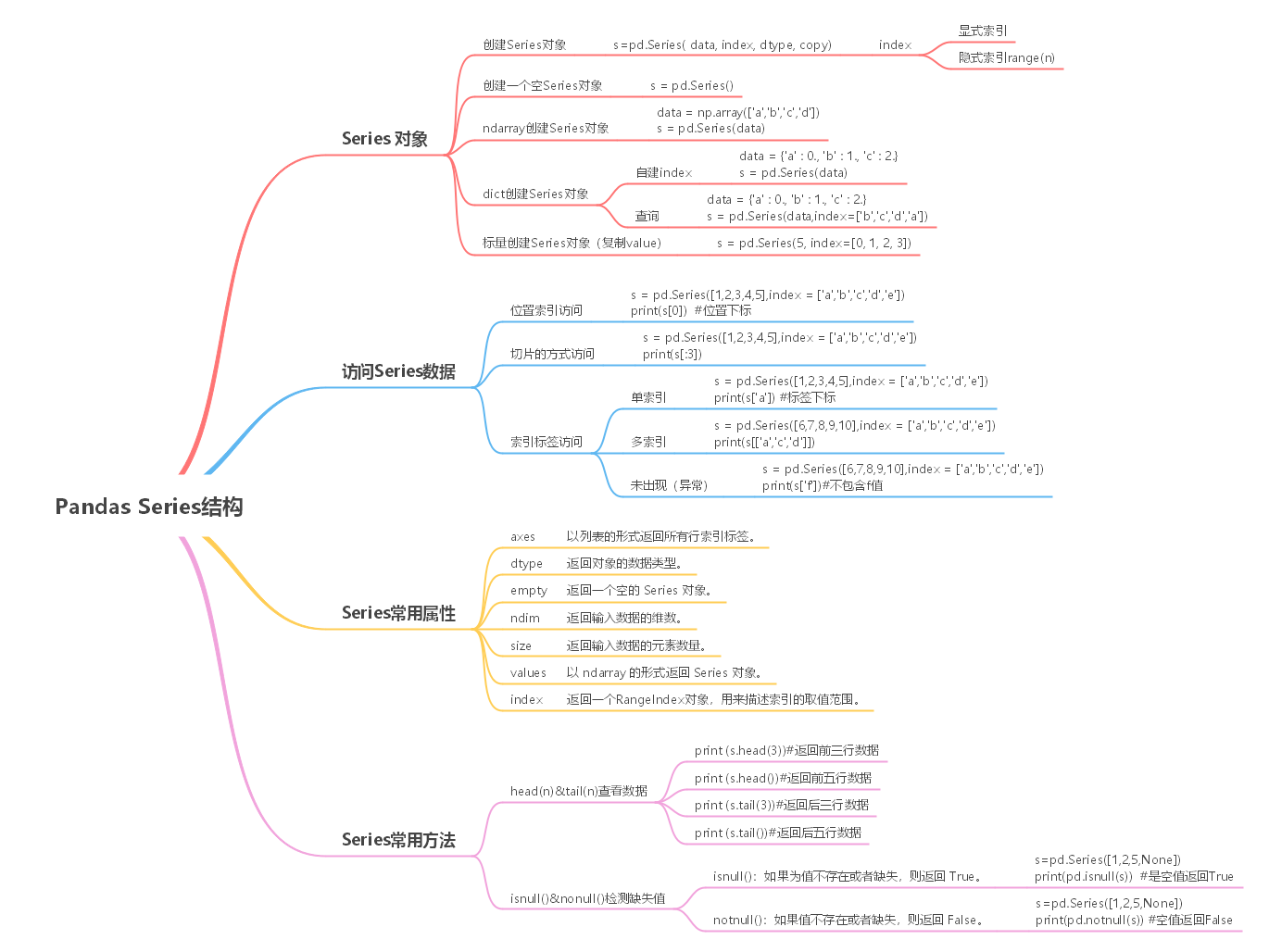
Series 结构,也称 Series 序列,是 Pandas 常用的数据结构之一,它是一种类似于一维数组的结构,由一组数据值(value)和一组标签组成,其中标签与数据值之间是一一对应的关系。
Series 可以保存任何数据类型,比如整数、字符串、浮点数、Python 对象等,它的标签默认为整数,从 0 开始依次递增。Series 的结构图,如下所示:
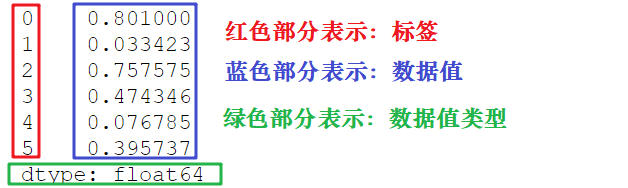
通过标签我们可以更加直观地查看数据所在的索引位置。
Pandas 使用 Series() 函数来创建 Series 对象,通过这个对象可以调用相应的方法和属性,从而达到处理数据的目的:
import pandas as pds=pd.Series( data, index, dtype, copy)参数说明如下所示:
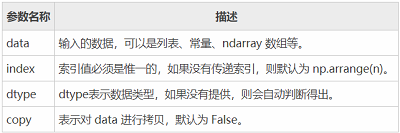
我们也可以使用数组、字典、标量值或者 Python 对象来创建 Series 对象。下面展示了创建 Series 对象的不同方法:
使用以下方法可以创建一个空的 Series 对象,如下所示:
import pandas as pd#输出数据为空s = pd.Series()print(s)输出结果如下:
Series([], dtype: float64)ndarray 是 NumPy 中的数组类型,当 data 是 ndarry 时,传递的索引必须具有与数组相同的长度。假如没有给 index 参数传参,在默认情况下,索引值将使用是 range(n) 生成,其中 n 代表数组长度,如下所示:
[0,1,2,3…. range(len(array))-1]使用默认索引,创建 Series 序列对象:
import pandas as pdimport numpy as npdata = np.array(['a','b','c','d'])s = pd.Series(data)print (s)输出结果如下:
0 a1 b2 c3 ddtype: object 上述示例中没有传递任何索引,所以索引默认从 0 开始分配 ,其索引范围为 0 到 len(data)-1,即 0 到 3。这种设置方式被称为“隐式索引”。
除了上述方法外,你也可以使用“显式索引”的方法定义索引标签,示例如下:
import pandas as pdimport numpy as npdata = np.array(['a','b','c','d'])#自定义索引标签(即显示索引)s = pd.Series(data,index=[100,101,102,103])print(s)输出结果:
100 a101 b102 c103 ddtype: object 您可以把 dict 作为输入数据。如果没有传入索引时会按照字典的键来构造索引;反之,当传递了索引时需要将索引标签与字典中的值一一对应。
下面两组示例分别对上述两种情况做了演示。
示例1,没有传递索引时:
import pandas as pdimport numpy as npdata = {'a' : 0., 'b' : 1., 'c' : 2.}s = pd.Series(data)print(s)输出结果:
a 0.0b 1.0c 2.0dtype: float64 示例 2,为index参数传递索引时:
import pandas as pdimport numpy as npdata = {'a' : 0., 'b' : 1., 'c' : 2.}s = pd.Series(data,index=['b','c','d','a'])print(s)输出结果:
b 1.0c 2.0d NaNa 0.0dtype: float64当传递的索引值无法找到与其对应的值时,使用 NaN(非数字)填充。
如果 data 是标量值,则必须提供索引,示例如下:
import pandas as pdimport numpy as nps = pd.Series(5, index=[0, 1, 2, 3])print(s)输出如下:
0 51 52 53 5dtype: int64标量值按照 index 的数量进行重复,并与其一一对应。
这种访问方式与 ndarray 和 list 相同,使用元素自身的下标进行访问。我们知道数组的索引计数从 0 开始,这表示第一个元素存储在第 0 个索引位置上,以此类推,就可以获得 Series 序列中的每个元素。下面看一组简单的示例:
import pandas as pds = pd.Series([1,2,3,4,5],index = ['a','b','c','d','e'])print(s[0]) #位置下标print(s['a']) #标签下标输出结果:
11通过切片的方式访问 Series 序列中的数据,示例如下:
import pandas as pds = pd.Series([1,2,3,4,5],index = ['a','b','c','d','e'])print(s[:3])输出结果:
a 1b 2c 3dtype: int64如果想要获取最后三个元素,也可以使用下面的方式:
import pandas as pds = pd.Series([1,2,3,4,5],index = ['a','b','c','d','e'])print(s[-3:])输出结果:
c 3d 4e 5dtype: int64import pandas as pds = pd.Series([6,7,8,9,10],index = ['a','b','c','d','e'])print(s['a'])输出结果:
6示例 2,使用索引标签访问多个元素值
import pandas as pds = pd.Series([6,7,8,9,10],index = ['a','b','c','d','e'])print(s[['a','c','d']])输出结果:
a 6c 8d 9dtype: int64示例3,如果使用了 index 中不包含的标签,则会触发异常:
import pandas as pds = pd.Series([6,7,8,9,10],index = ['a','b','c','d','e'])#不包含f值print(s['f'])输出结果:
......KeyError: 'f'下面我们介绍 Series 的常用属性和方法。在下表列出了 Series 对象的常用属性。
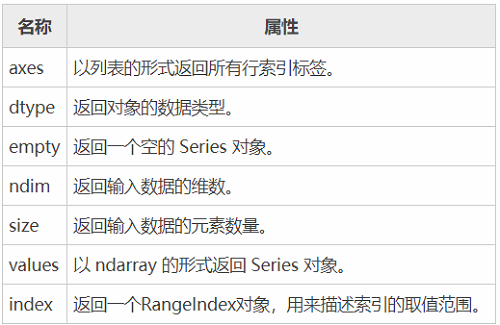
现在创建一个 Series 对象,并演示如何使用上述表格中的属性。如下所示:
import pandas as pdimport numpy as nps = pd.Series(np.random.randn(5))print(s)输出结果:
0 0.8980971 0.7302102 2.3074013 -1.7230654 0.346728dtype: float64上述示例的行索引标签是 [0,1,2,3,4]。
import pandas as pdimport numpy as nps = pd.Series(np.random.randn(5))print ("The axes are:")print(s.axes)输出结果
The axes are:[RangeIndex(start=0, stop=5, step=1)]import pandas as pdimport numpy as nps = pd.Series(np.random.randn(5))print ("The dtype is:")print(s.dtype)输出结果:
The dtype is:float64返回一个布尔值,用于判断数据对象是否为空。示例如下:
import pandas as pdimport numpy as nps = pd.Series(np.random.randn(5))print("是否为空对象?")print (s.empty)输出结果:
是否为空对象?False查看序列的维数。根据定义,Series 是一维数据结构,因此它始终返回 1。
import pandas as pdimport numpy as nps = pd.Series(np.random.randn(5))print (s)print (s.ndim)输出结果:
0 0.3114851 1.7488602 -0.0227213 -0.1292234 -0.489824dtype: float641返回 Series 对象的大小(长度)。
import pandas as pdimport numpy as nps = pd.Series(np.random.randn(3))print (s)#series的长度大小print(s.size)输出结果:
0 -1.8662611 -0.6367262 0.586037dtype: float643以数组的形式返回 Series 对象中的数据。
import pandas as pdimport numpy as nps = pd.Series(np.random.randn(6))print(s)print("输出series中数据")print(s.values)输出结果:
0 -0.5021001 0.6961942 -0.9820633 0.4164304 -1.3845145 0.444303dtype: float64输出series中数据[-0.50210028 0.69619407 -0.98206327 0.41642976 -1.38451433 0.44430257]该属性用来查看 Series 中索引的取值范围。示例如下:
#显示索引import pandas as pds=pd.Series([1,2,5,8],index=['a','b','c','d'])print(s.index)#隐式索引s1=pd.Series([1,2,5,8])print(s1.index)输出结果:
隐式索引:Index(['a', 'b', 'c', 'd'], dtype='object')显示索引:RangeIndex(start=0, stop=4, step=1)如果想要查看 Series 的某一部分数据,可以使用 head() 或者 tail() 方法。其中 head() 返回前 n 行数据,默认显示前 5 行数据。示例如下:
import pandas as pdimport numpy as nps = pd.Series(np.random.randn(5))print ("The original series is:")print (s)#返回前三行数据print (s.head(3))输出结果:
原系列输出结果:0 1.2496791 0.6364872 -0.9876213 0.9996134 1.607751head(3)输出:dtype: float640 1.2496791 0.6364872 -0.987621dtype: float64tail() 返回的是后 n 行数据,默认为后 5 行。示例如下:
import pandas as pdimport numpy as nps = pd.Series(np.random.randn(4))#原seriesprint(s)#输出后两行数据print (s.tail(2))输出结果:
原Series输出:0 0.0533401 2.1658362 -0.7191753 -0.035178输出后两行数据:dtype: float642 -0.7191753 -0.035178dtype: float64isnull() 和 nonull() 用于检测 Series 中的缺失值。所谓缺失值,顾名思义就是值不存在、丢失、缺少。
其实不难理解,在实际的数据分析任物中,数据的收集往往要经历一个繁琐的过程。在这个过程中难免会因为一些不可抗力,或者人为因素导致数据丢失的现象。这时,我们可以使用相应的方法对缺失值进行处理,比如均值插值、数据补齐等方法。上述两个方法就是帮助我们检测是否存在缺失值。示例如下:
import pandas as pd#None代表缺失数据s=pd.Series([1,2,5,None])print(pd.isnull(s)) #是空值返回Trueprint(pd.notnull(s)) #空值返回False输出结果:
0 False1 False2 False3 Truedtype: boolnotnull():0 True1 True2 True3 Falsedtype: bool
因上求缘,果上努力~~~~ 作者:cute_Learner,转载请注明原文链接:https://www.cnblogs.com/BlairGrowing/p/15865019.html

