常常遇到一些项目中多环境切换的问题。比如在开发过程中用到开发环境,在测试中使用测试环境,在生产中用生产环境的情况。springboot中提供了 spring.profile.active的方式来实现多环境的切换,通过设置环境变量和启动参数的方式。但是这样做终究不能一劳永逸,要么需要修改yml文件,要么需要记得启动的时候带上参数。而利用maven的profiles,可以减少很多工作。让我们通过几个例子一步步的掌握使用maven的profiles属性。
<profiles> <profile> <!--不同环境Profile的唯一id--> <id>dev</id> <properties> <!--profiles.active是自定义的字段(名字随便起),自定义字段可以有多个--> <profiles.active>dev</profiles.active> </properties> </profile> <profile> <id>prod</id> <properties> <profiles.active>prod</profiles.active> </properties> <activation> <activeByDefault>true</activeByDefault> </activation> </profile> <profile> <id>test</id> <properties> <profiles.active>test</profiles.active> </properties> </profile></profiles>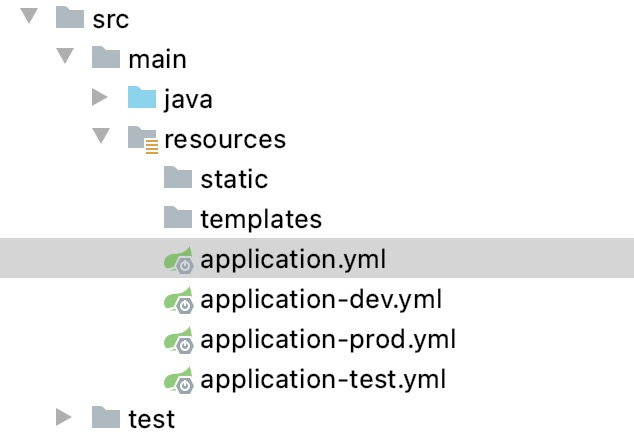
spring: profiles: active: @profiles.active@server: port: 7091其他几个文件我只是把端口号进行了修改,方便打包看不同的效果。
mvn clean package -Ptest然后启动jar包,可以看到jar包启动的是test的配置,如果换成-Pdev启动的就是dev包的端口。
如果不带-Ptest,启动的是 prod的端口。因为在profiles中我们看到有配置默认的选项。
<activation> <activeByDefault>true</activeByDefault></activation><activeProfiles> <activeProfile>profileTest1</activeProfile> </activeProfiles> 当然如果使用IDEA工具进行开发,还可以使用可视化的方式进行打包。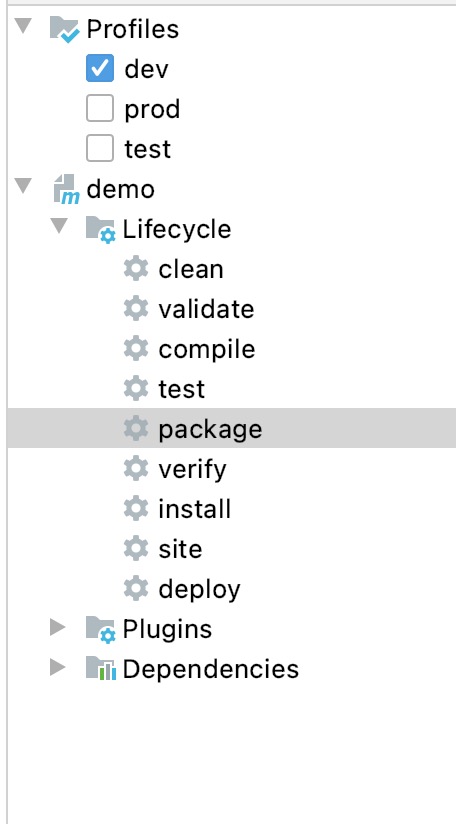
如果我们希望通过docker-maven-plugin插件,把编译好的jar打包成docker并且传入相应的开发、测试、生产的服务器中去。这个时候,我们就需要根据不同的条件去传入不同的服务器。
在profiles中我们可以做以下定义
<profiles> <profile> <id>dev</id> <properties> <profile.id>dev</profile.id> <docker.host>http://dev.demo.com:2375</docker.host> </properties> <activation> <activeByDefault>true</activeByDefault> </activation> </profile> <profile> <id>test</id> <properties> <profile.id>test</profile.id> <docker.host>http://test.demo.com375</docker.host> </properties> </profile> <profile> <id>prod</id> <properties> <profile.id>prod</profile.id> <docker.host>http://prod.demo.com:2375</docker.host> </properties> </profile> </profiles>而在build控件中我们可以使用以下配置
<build> <plugins> <plugin> <groupId>com.spotify</groupId> <artifactId>docker-maven-plugin</artifactId> <version>1.1.0</version> <executions> <execution> <id>build-image</id> <phase>package</phase> <goals> <goal>build</goal> </goals> </execution> </executions> <configuration> <imageName>demo/${project.artifactId}</imageName> <imageTags> <imageTag>${project.version}-${current.time}</imageTag> <imageTag>latest</imageTag> </imageTags> <forceTags>true</forceTags> <dockerHost>${docker.host}</dockerHost> <forceTags>true</forceTags> <baseImage>java:8</baseImage> <entryPoint>["java", "-jar", "/${project.build.finalName}.jar"]</entryPoint> <resources> <resource> <targetPath>/</targetPath> <directory>${project.build.directory}</directory> <include>${project.build.finalName}.jar</include> </resource> </resources> </configuration> </plugin> </plugins></build>其中 ${project.artifactId} 和${project.version}是关于
${docker.host}则是我们在profiles中定义的,可以随着我们选择不同的profile,把jar包build成不同的docker镜像,并传入指定服务器。
除了可以在pom中设置动态参数,使得其根据profile的不同选择不同的参数。还可以通过设置不同的profile,让yml选择不同的参数。这点和快速上手的例子有点相似。具体如下:
设置profiles
<profiles> <profile> <id>dev</id> <properties> <profile.id>dev</profile.id> <eureka.url>http://127.0.0.1:8001/eureka</eureka.url> </properties> <activation> <activeByDefault>true</activeByDefault> </activation> </profile> <profile> <id>test</id> <properties> <profile.id>test</profile.id> <eureka.url>http://base-registry:8001/eureka</eureka.url> </properties> </profile> <profile> <id>prod</id> <properties> <profile.id>prod</profile.id> <eureka.url>http://base-registry:8001/eureka</eureka.url> </properties> </profile> <profile> <id>new</id> <properties> <profile.id>new</profile.id> <eureka.url>http://base-registry:8001/eureka</eureka.url> </properties> </profile> </profiles>我们在profile中设置了一个eureka.url的属性,就可以在yml中直接调用。
eureka: client: service-url: defaultZone: @eureka.url@ registry-fetch-interval-seconds: 10 instance: prefer-ip-address: true在IDEA调试和启动的时候,一般会报错如下:
org.yaml.snakeyaml.scanner.ScannerException: while scanning for the next tokenfound character ‘@’ that cannot start any token.解决方法就是引入yaml.sankeyaml的jar包
<dependency> <groupId>org.yaml</groupId> <artifactId>snakeyaml</artifactId></dependency>在profile打包yml文件的时候,如果我们解压了jar包,会发现还是把所有的application-profile.yml文件给打包进去了。这个可以通过设置打包参数,只打包需要的application文件。
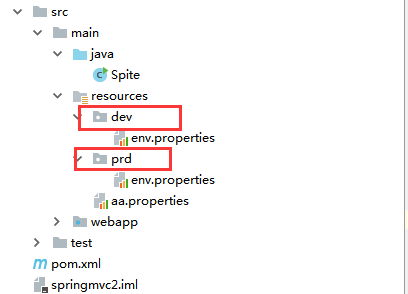
<profiles> <profile> <id>dev</id> <properties> <env>dev</env> </properties> <activation> <activeByDefault>true</activeByDefault> </activation> </profile> <profile> <id>prd</id> <properties> <env>prd</env> </properties> </profile> </profiles> <build> <finalName>springmvc</finalName> <resources> <resource> <directory>src/main/java</directory> <includes> <include>*.xml</include> </includes> </resource> <resource> <directory>src/main/resources</directory> <excludes> <exclude>dev/*</exclude> <exclude>prd/*</exclude> </excludes> </resource> <resource> <directory>src/main/resources/${env}</directory> </resource> </resources> </build>目录结构如下: