原文地址:Android 实现开机自启APP - Stars-One的杂货小窝
公司有个项目,需要实现自启动的功能,本来想着是设置桌面启动器的方式去实现,但是设备是华为平板(EMUI系统),不允许设置第三方桌面
且监听开机广播也无效,本来以为没法实现了,没想到公司的另一款APP确实支持,于是便是研究了下,发现监听开机广播的方式,还需要加上个悬浮窗权限即可实现功能
然后也是趁着机会来总结下
在AndroidMainfest中,将首页的Activity设置一下属性即可
<activity android:name=".MainActivity" android:exported="true"> <intent-filter> <category android:name="android.intent.category.HOME" /> <action android:name="android.intent.action.MAIN" /> <category android:name="android.intent.category.LAUNCHER" /> <category android:name="android.intent.category.DEFAULT" /> </intent-filter></activity>使用静态广播实现自启功能
AndroidManifest文件中声明权限:
<!-- 开机监听--><uses-permission android:name="android.permission.RECEIVE_BOOT_COMPLETED" /><!-- 悬浮窗--><uses-permission android:name="android.permission.SYSTEM_ALERT_WINDOW" />声明广播:
<receiver android:name=".AutoStartReceiver" android:enabled="true" android:exported="true"> <intent-filter android:priority="1000"> <action android:name="android.intent.action.BOOT_COMPLETED" /> </intent-filter></receiver>AutoStartReceiver类代码实现:
public class AutoStartReceiver extends BroadcastReceiver { @Override public void onReceive(Context context, Intent intent) { //开机启动 if (intent.getAction().equals(Intent.ACTION_BOOT_COMPLETED)) { Intent thisIntent = new Intent(context, MainActivity.class);//设置要启动的app thisIntent.setFlags(Intent.FLAG_ACTIVITY_NEW_TASK); context.startActivity(thisIntent); } }}在主Activity里申请悬浮窗权限
//检查是否已经授予权限,大于6.0的系统适用,小于6.0系统默认打开,无需理会if (Build.VERSION.SDK_INT >= Build.VERSION_CODES.M && !Settings.canDrawOverlays(this)) { //没有权限,须要申请权限,由于是打开一个受权页面,因此拿不到返回状态的,因此建议是在onResume方法中重新执行一次校验 Intent intent = new Intent(Settings.ACTION_MANAGE_OVERLAY_PERMISSION); intent.setData(Uri.parse("package:" + getPackageName())); startActivity(intent);}测试时候需要注意,使用这种方法,都是需要启动一次APP,之后自启才会实现
手中有台Android11的设备,测试发现不加悬浮窗,也是无法在开机后启动APP
而华为平板里的系统是Android10,所以断定Android 10以上估计都要申请悬浮窗权限才能实现
同事的手机是鸿蒙系统,加了悬浮窗还是无法自启
注意:
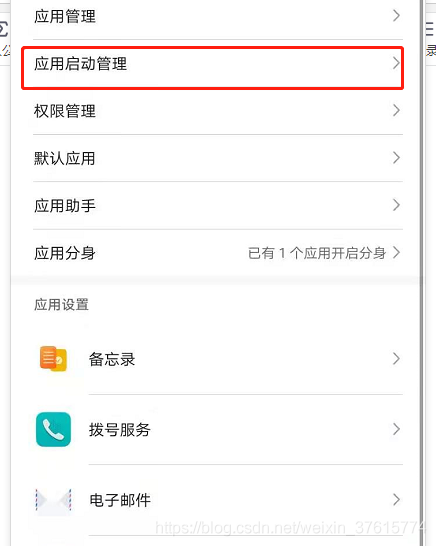
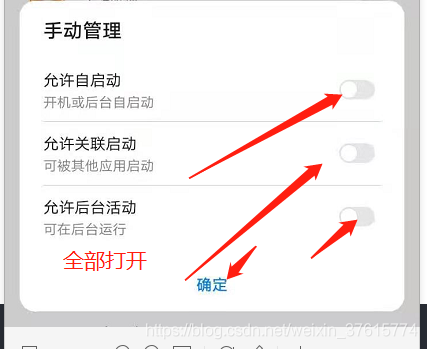
华为手机或平板都需要去设置应用的启动管理,其他系统可参考此设置
 TornadoFx学习交流群:1071184701