前不久看到了几个二进制文件可视化的项目,做了一些了解,通过可视化可以看出加壳或者加密文件,在纹理结构上和正常文件还是有较大区别。
而且可视化对文件格式不敏感,任何文件都可以查看其可视化结果。
可视化数据源可分为以下两类:
二进制文件可视化
二进制熵可视化
对绘图的方式有几种方法:
这两种方法其实都是空间填充曲线的子类,有兴趣可以了解。

对绘图的色彩也可分为以下
灰度图,直接生成就是灰度图
彩色图,不同区域设定不同颜色,如portex【1】中的分了以下五种色类
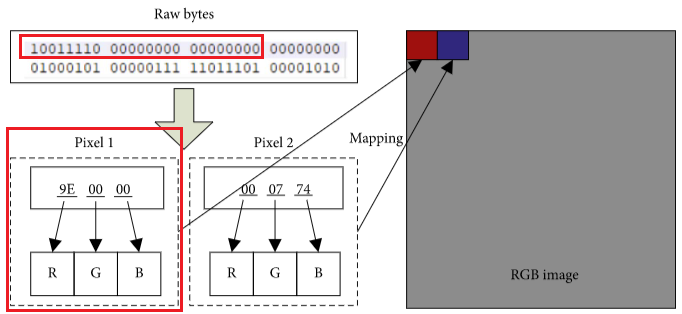
# 分别对应不同的颜色0xff, 0x00, 可见ASCII码, 不可及ascii码,非ascii码 彩色图,直接使用多通道,即每三个连续的字节作为一个通道的值,源自【2】
? 
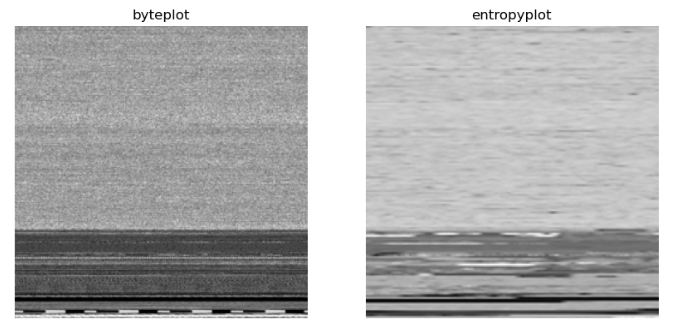
分别将原始二进制文件可视化,熵可视化,这里使用了最简单的可视化方法。
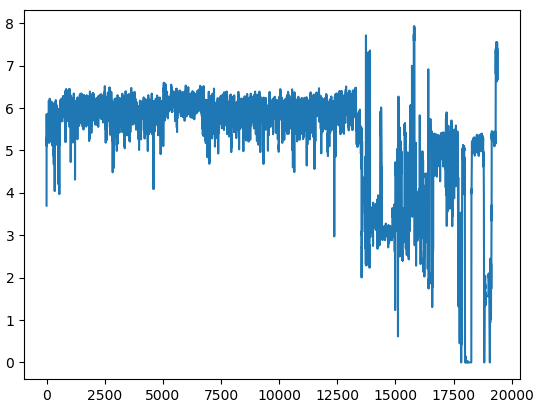
def bin2image(content, resize=True): """ binary to gray image """ width = imagesize(len(content)) fh = np.frombuffer(content, dtype=np.uint8) rn = len(fh)/width fh = np.reshape(fh[:int(rn)*width],(int(rn),width)) im = Image.fromarray(fh) if resize: im = im.resize((244,244)) return imdef H(data): ''' Calculate the entropy of a given data block ''' c = np.bincount(data, minlength=256) p = c.astype(np.float32) / len(data) wh = np.where(c)[0] H = np.sum(-p[wh] * np.log2( p[wh])) return Hdef block_entropy(data, window=1024, step=256): Hbins = [] if data.shape[0] < window: Hbin = H(data) Hbins.append(Hbin) else: shape = data.shape[:-1] + (data.shape[-1] - window + 1, window) strides = data.strides + (data.strides[-1],) blocks = np.lib.stride_tricks.as_strided(data, shape=shape, strides=strides)[::step, :] for block in blocks: Hbin = H(block) Hbins.append(Hbin) return Hbinsdef bin2entropy(content, block_size=1024, step=256, resize=True): """ following resources: https://github.com/gcmartinelli/entroPy/blob/master/entropy.py but fatser 6x time """ data = np.frombuffer(content, dtype=np.uint8) entropy_list = block_entropy(data, block_size, step) width = imagesize(len(entropy_list))*2 rn = len(entropy_list)/width matrix = np.reshape(entropy_list[:int(rn)*width],(int(rn),width)) im = Image.fromarray(matrix * 255/8) if resize: im = im.resize((244,244)) return im结果如下图所示。可视化之后就可以作进一步分析了,比如对比加壳和正常文件;使用可视化图进行恶意识别。
另外,此处的二进制熵可视化主要参考【3】,但是进行了改进,比【3】中原始的方法计算熵图快了6倍以上。
源码见 github: https://github.com/Aida-yy/binai/blob/main/binai/feature_extraction/image.py
【1】https://github.com/struppigel/PortEx
【2】Binary File’s Visualization and Entropy Features Analysis Combined with Multiple Deep Learning Networks for Malware Classification
【3】https://github.com/gcmartinelli/entroPy

