题外话
刚刚开始着笔写作这篇文章时,正好看电视在采访一位92岁的考古学家,在他的日记中有这样一句话,写在这里与君共勉“不要等待幸运的降临,要去努力的掌握知识”。如此朴实的一句话,此时此刻,正适合我们。
// create the native surfacesp<SurfaceControl> surfaceControl = surfaceComposerClient->createSurface(mName, resolution.getWidth(), resolution.getHeight(), PIXEL_FORMAT_RGBA_8888, ISurfaceComposerClient::eFXSurfaceBufferState, /*parent*/ nullptr);注:本片涉及的代码
/frameworks/native/libs/gui/SurfaceComposerClient.cpp
/frameworks/native/services/surfaceflinger/SurfaceFlinger.cpp
/frameworks/native/services/surfaceflinger/Client.cpp
/frameworks/native/libs/gui/ISurfaceComposer.cpp

代码如下,比较简单,使用时需要传递一个名字(name),指定宽高信息,指定格式(format)等,返回一个SurfaceControl的指针,这个方法中调用了createSurfaceChecked
* /frameworks/native/libs/gui/SurfaceComposerClient.cppsp<SurfaceControl> SurfaceComposerClient::createSurface(const String8& name, uint32_t w, uint32_t h, PixelFormat format, uint32_t flags, const sp<IBinder>& parentHandle, LayerMetadata metadata, uint32_t* outTransformHint) { sp<SurfaceControl> s; createSurfaceChecked(name, w, h, format, &s, flags, parentHandle, std::move(metadata), outTransformHint); return s;}这个方法的核心是 mClient->createSurface ,前面讲过(sp<ISurfaceComposerClient> mClient)是Client的代理客户端,最终调用到服务端 Client::createSurface
这个方法中还有两个变量:
sp<IBinder> handle == 这个代表什么? ==> SurfaceFlinger中创建的Layer的句柄或标识
sp<IGraphicBufferProducer> gbp == 他又是谁?==>这个gbp貌似已经没有实际用途了,BLASTBufferQueue分担了任务
* /frameworks/native/libs/gui/SurfaceComposerClient.cppstatus_t SurfaceComposerClient::createSurfaceChecked(const String8& name, uint32_t w, uint32_t h, PixelFormat format, sp<SurfaceControl>* outSurface, uint32_t flags, const sp<IBinder>& parentHandle, LayerMetadata metadata, uint32_t* outTransformHint) { sp<SurfaceControl> sur; status_t err = mStatus; if (mStatus == NO_ERROR) { sp<IBinder> handle; sp<IGraphicBufferProducer> gbp; uint32_t transformHint = 0; int32_t id = -1; err = mClient->createSurface(name, w, h, format, flags, parentHandle, std::move(metadata), &handle, &gbp, &id, &transformHint); if (outTransformHint) { *outTransformHint = transformHint; } ALOGE_IF(err, "SurfaceComposerClient::createSurface error %s", strerror(-err)); if (err == NO_ERROR) { *outSurface = new SurfaceControl(this, handle, gbp, id, w, h, format, transformHint, flags); } } return err;}* /frameworks/native/services/surfaceflinger/Client.cppstatus_t Client::createSurface(const String8& name, uint32_t w, uint32_t h, PixelFormat format, uint32_t flags, const sp<IBinder>& parentHandle, LayerMetadata metadata, sp<IBinder>* handle, sp<IGraphicBufferProducer>* gbp, int32_t* outLayerId, uint32_t* outTransformHint) { // We rely on createLayer to check permissions. return mFlinger->createLayer(name, this, w, h, format, flags, std::move(metadata), handle, gbp, parentHandle, outLayerId, nullptr, outTransformHint);}* /frameworks/native/services/surfaceflinger/SurfaceFlinger.cppstatus_t SurfaceFlinger::createLayer(const String8& name, const sp<Client>& client, uint32_t w, uint32_t h, PixelFormat format, uint32_t flags, LayerMetadata metadata, sp<IBinder>* handle, sp<IGraphicBufferProducer>* gbp, const sp<IBinder>& parentHandle, int32_t* outLayerId, const sp<Layer>& parentLayer, uint32_t* outTransformHint) { if (int32_t(w|h) < 0) { ALOGE("createLayer() failed, w or h is negative (w=%d, h=%d)", int(w), int(h)); return BAD_VALUE; } ALOG_ASSERT(parentLayer == nullptr || parentHandle == nullptr, "Expected only one of parentLayer or parentHandle to be non-null. " "Programmer error?"); status_t result = NO_ERROR; sp<Layer> layer; std::string uniqueName = getUniqueLayerName(name.string()); switch (flags & ISurfaceComposerClient::eFXSurfaceMask) { case ISurfaceComposerClient::eFXSurfaceBufferQueue: case ISurfaceComposerClient::eFXSurfaceBufferState: { result = createBufferStateLayer(client, std::move(uniqueName), w, h, flags, std::move(metadata), handle, &layer); std::atomic<int32_t>* pendingBufferCounter = layer->getPendingBufferCounter(); if (pendingBufferCounter) { std::string counterName = layer->getPendingBufferCounterName(); mBufferCountTracker.add((*handle)->localBinder(), counterName, pendingBufferCounter); } } break; case ISurfaceComposerClient::eFXSurfaceEffect: // check if buffer size is set for color layer. if (w > 0 || h > 0) { ALOGE("createLayer() failed, w or h cannot be set for color layer (w=%d, h=%d)", int(w), int(h)); return BAD_VALUE; } result = createEffectLayer(client, std::move(uniqueName), w, h, flags, std::move(metadata), handle, &layer); break; case ISurfaceComposerClient::eFXSurfaceContainer: // check if buffer size is set for container layer. if (w > 0 || h > 0) { ALOGE("createLayer() failed, w or h cannot be set for container layer (w=%d, h=%d)", int(w), int(h)); return BAD_VALUE; } result = createContainerLayer(client, std::move(uniqueName), w, h, flags, std::move(metadata), handle, &layer); break; default: result = BAD_VALUE; break; } if (result != NO_ERROR) { return result; } bool addToRoot = callingThreadHasUnscopedSurfaceFlingerAccess(); result = addClientLayer(client, *handle, *gbp, layer, parentHandle, parentLayer, addToRoot, outTransformHint); if (result != NO_ERROR) { return result; } mInterceptor->saveSurfaceCreation(layer); setTransactionFlags(eTransactionNeeded); *outLayerId = layer->sequence; return result;}1. 检查宽高数值是否合法,宽/高不应为负值;
2. 检查parentLayer/parentHandle,对于我们的应用来说,没有parent,两者都为 null;
3. 获取一个独一无二的Layer name,即不能有重名的Layer;
4. 根据flags去创建对应类型的Layer ? createBufferStateLayer or createEffectLayer or createContainerLayer
| Surface创建标志 | SurfaceFlinger方法 | Layer实例 | 简单说明 |
| eFXSurfaceBufferQueue | createBufferStateLayer | BufferStateLayer | Creates a normal surface. 标准的Surface |
| eFXSurfaceBufferState | |||
| eFXSurfaceEffect | createEffectLayer | EffectLayer | Creates a effect surface which represents a solid color and or shadows. 纯色或阴影的显示效果的Surface |
| eFXSurfaceContainer | createContainerLayer | ContainerLayer | Creates a container surface. This surface will have no buffers and will only be used as a container for other surfaces, or for its InputInfo. 创建surface容器。此surface没有缓冲区,仅用作其他surfaces或InputInfo的容器。 |
Tips:
有意思的一点是 BufferQueueLayer 貌似不再有实际用途了
感觉这里讲解的还是迷迷糊糊,云里雾里,其实我自己也很多疑惑
回过头再瞅一眼 SurfaceComposerClient::createSurfaceChecked 这个函数的代码,客户端主要获取到以下几个信息:
sp<IBinder> handle;sp<IGraphicBufferProducer> gbp;uint32_t transformHint = 0;int32_t id = -1;这个handle是在创建Layer时赋值的
status_t SurfaceFlinger::createBufferStateLayer(const sp<Client>& client, std::string name, uint32_t w, uint32_t h, uint32_t flags, LayerMetadata metadata, sp<IBinder>* handle, sp<Layer>* outLayer) { LayerCreationArgs args(this, client, std::move(name), w, h, flags, std::move(metadata)); args.textureName = getNewTexture(); sp<BufferStateLayer> layer = getFactory().createBufferStateLayer(args); *handle = layer->getHandle(); *outLayer = layer; return NO_ERROR;}sp<IBinder> Layer::getHandle() { Mutex::Autolock _l(mLock); if (mGetHandleCalled) { ALOGE("Get handle called twice" ); return nullptr; } mGetHandleCalled = true; return new Handle(mFlinger, this);} /* * The layer handle is just a BBinder object passed to the client * (remote process) -- we don't keep any reference on our side such that * the dtor is called when the remote side let go of its reference. * * LayerCleaner ensures that mFlinger->onLayerDestroyed() is called for * this layer when the handle is destroyed. */ class Handle : public BBinder, public LayerCleaner { public: Handle(const sp<SurfaceFlinger>& flinger, const sp<Layer>& layer) : LayerCleaner(flinger, layer), owner(layer) {} wp<Layer> owner; };if (err == NO_ERROR) { *outSurface = new SurfaceControl(this, handle, gbp, id, w, h, format, transformHint, flags);}SurfaceComposerClient::Transaction{} .setLayer(surfaceControl, std::numeric_limits<int32_t>::max()) .show(surfaceControl) .apply();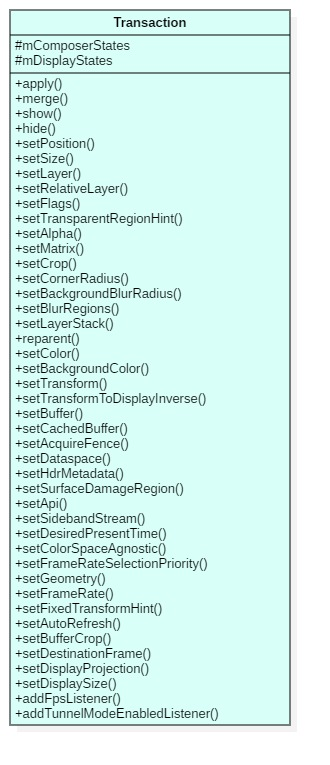
* /frameworks/native/libs/gui/include/gui/LayerState.hstruct ComposerState { layer_state_t state; status_t write(Parcel& output) const; status_t read(const Parcel& input);}; enum { ePositionChanged = 0x00000001, eLayerChanged = 0x00000002, eSizeChanged = 0x00000004, eAlphaChanged = 0x00000008, eMatrixChanged = 0x00000010, eTransparentRegionChanged = 0x00000020, eFlagsChanged = 0x00000040, eLayerStackChanged = 0x00000080, eReleaseBufferListenerChanged = 0x00000400, eShadowRadiusChanged = 0x00000800, eLayerCreated = 0x00001000, eBufferCropChanged = 0x00002000, eRelativeLayerChanged = 0x00004000, eReparent = 0x00008000, eColorChanged = 0x00010000, eDestroySurface = 0x00020000, eTransformChanged = 0x00040000, eTransformToDisplayInverseChanged = 0x00080000, eCropChanged = 0x00100000, eBufferChanged = 0x00200000, eAcquireFenceChanged = 0x00400000, eDataspaceChanged = 0x00800000, eHdrMetadataChanged = 0x01000000, eSurfaceDamageRegionChanged = 0x02000000, eApiChanged = 0x04000000, eSidebandStreamChanged = 0x08000000, eColorTransformChanged = 0x10000000, eHasListenerCallbacksChanged = 0x20000000, eInputInfoChanged = 0x40000000, eCornerRadiusChanged = 0x80000000, eDestinationFrameChanged = 0x1'00000000, eCachedBufferChanged = 0x2'00000000, eBackgroundColorChanged = 0x4'00000000, eMetadataChanged = 0x8'00000000, eColorSpaceAgnosticChanged = 0x10'00000000, eFrameRateSelectionPriority = 0x20'00000000, eFrameRateChanged = 0x40'00000000, eBackgroundBlurRadiusChanged = 0x80'00000000, eProducerDisconnect = 0x100'00000000, eFixedTransformHintChanged = 0x200'00000000, eFrameNumberChanged = 0x400'00000000, eBlurRegionsChanged = 0x800'00000000, eAutoRefreshChanged = 0x1000'00000000, eStretchChanged = 0x2000'00000000, eTrustedOverlayChanged = 0x4000'00000000, };SurfaceComposerClient::Transaction& SurfaceComposerClient::Transaction::setBuffer(...) { layer_state_t* s = getLayerState(sc); ... s->what |= layer_state_t::eBufferChanged; ...}struct DisplayState { enum { eSurfaceChanged = 0x01, eLayerStackChanged = 0x02, eDisplayProjectionChanged = 0x04, eDisplaySizeChanged = 0x08 }; DisplayState(); void merge(const DisplayState& other); uint32_t what; sp<IBinder> token; sp<IGraphicBufferProducer> surface; uint32_t layerStack; // These states define how layers are projected onto the physical display. // // Layers are first clipped to `layerStackSpaceRect'. They are then translated and // scaled from `layerStackSpaceRect' to `orientedDisplaySpaceRect'. Finally, they are rotated // according to `orientation', `width', and `height'. // // For example, assume layerStackSpaceRect is Rect(0, 0, 200, 100), orientedDisplaySpaceRect is // Rect(20, 10, 420, 210), and the size of the display is WxH. When orientation is 0, layers // will be scaled by a factor of 2 and translated by (20, 10). When orientation is 1, layers // will be additionally rotated by 90 degrees around the origin clockwise and translated by (W, // 0). ui::Rotation orientation = ui::ROTATION_0; Rect layerStackSpaceRect; Rect orientedDisplaySpaceRect; uint32_t width, height; status_t write(Parcel& output) const; status_t read(const Parcel& input);}; enum { eSurfaceChanged = 0x01, // surface改变了 eLayerStackChanged = 0x02, // layer stack改变了 eDisplayProjectionChanged = 0x04, // display projecttion改变了 eDisplaySizeChanged = 0x08 // display size改变了 };void SurfaceComposerClient::Transaction::setDisplaySize(const sp<IBinder>& token, uint32_t width, uint32_t height) { DisplayState& s(getDisplayState(token)); s.width = width; s.height = height; s.what |= DisplayState::eDisplaySizeChanged;}
在我们的应用中,调用了setLayer/show/apply,我们看看Transaction是如何把状态/属性信息传递给SurfaceFlinger的.
setLayer,设置Layer的z-order
SurfaceComposerClient::Transaction& SurfaceComposerClient::Transaction::setLayer( const sp<SurfaceControl>& sc, int32_t z) { layer_state_t* s = getLayerState(sc); if (!s) { mStatus = BAD_INDEX; return *this; } s->what |= layer_state_t::eLayerChanged; s->what &= ~layer_state_t::eRelativeLayerChanged; s->z = z; registerSurfaceControlForCallback(sc); return *this;}getLayerState,就是根据SurfaceCotrol对象去找对应的layer_state_t。
layer_state_t* SurfaceComposerClient::Transaction::getLayerState(const sp<SurfaceControl>& sc) { auto handle = sc->getLayerStateHandle(); if (mComposerStates.count(handle) == 0) { // we don't have it, add an initialized layer_state to our list ComposerState s; s.state.surface = handle; s.state.layerId = sc->getLayerId(); mComposerStates[handle] = s; } return &(mComposerStates[handle].state);}文章前面讲解SurfaceComposerClient::createSurface时,我们知晓SurfaceFlinger创建好Layer后返回给客户端Layer handle和id,这些Layer信息都被封装到一个SurfaceControl对象,SurfaceControl::getLayerStateHandle返回的就是这个Layer handle
sp<IBinder> SurfaceControl::getLayerStateHandle() const{ return mHandle;}然后判断这个layer hanlde是否在mComposerStates中,如果没有则创建对应的ComposerState并加入
我们看,setLayer时,增加标识what是layer_state_t::eLayerChanged,而对应的值保存到layer_state_t 中。你应该注意到了设置看起来没有立即生效,
同样,show时,也是将对应的标识加到what中,而是否显示的标识存放在layer_state_t的flag中。
SurfaceComposerClient::Transaction& SurfaceComposerClient::Transaction::show( const sp<SurfaceControl>& sc) { return setFlags(sc, 0, layer_state_t::eLayerHidden);}SurfaceComposerClient::Transaction& SurfaceComposerClient::Transaction::setFlags( const sp<SurfaceControl>& sc, uint32_t flags, uint32_t mask) { layer_state_t* s = getLayerState(sc); if (!s) { mStatus = BAD_INDEX; return *this; } if ((mask & layer_state_t::eLayerOpaque) || (mask & layer_state_t::eLayerHidden) || (mask & layer_state_t::eLayerSecure) || (mask & layer_state_t::eLayerSkipScreenshot) || (mask & layer_state_t::eEnableBackpressure)) { s->what |= layer_state_t::eFlagsChanged; } s->flags &= ~mask; s->flags |= (flags & mask); s->mask |= mask; registerSurfaceControlForCallback(sc); return *this;}
最后调用apply,使得设置生效
status_t SurfaceComposerClient::Transaction::apply(bool synchronous) { ... sp<ISurfaceComposer> sf(ComposerService::getComposerService()); ... cacheBuffers(); Vector<ComposerState> composerStates; Vector<DisplayState> displayStates; for (auto const& kv : mComposerStates){ composerStates.add(kv.second); } displayStates = std::move(mDisplayStates); ... sf->setTransactionState(mFrameTimelineInfo, composerStates, displayStates, flags, applyToken, mInputWindowCommands, mDesiredPresentTime, mIsAutoTimestamp, {} /*uncacheBuffer - only set in doUncacheBufferTransaction*/, hasListenerCallbacks, listenerCallbacks, mId); mId = generateId(); // Clear the current states and flags clear(); ...}
apply时,最重要的就是调用sf->setTransactionState,Binder IPC一路飞奔到了SurfaceFlinger::setTransactionState
status_t SurfaceFlinger::setTransactionState(...) { ATRACE_CALL(); ...... IPCThreadState* ipc = IPCThreadState::self(); const int originPid = ipc->getCallingPid(); const int originUid = ipc->getCallingUid(); TransactionState state{frameTimelineInfo, states, displays, flags, applyToken, inputWindowCommands, desiredPresentTime, isAutoTimestamp, uncacheBuffer, postTime, permissions, hasListenerCallbacks, listenerCallbacks, originPid, originUid, transactionId}; // Check for incoming buffer updates and increment the pending buffer count. state.traverseStatesWithBuffers([&](const layer_state_t& state) { mBufferCountTracker.increment(state.surface->localBinder()); }); queueTransaction(state); // Check the pending state to make sure the transaction is synchronous. if (state.transactionCommittedSignal) { waitForSynchronousTransaction(*state.transactionCommittedSignal); } return NO_ERROR;}SurfaceFlinger把信息封装到一个TransactionState变量中:
TransactionState state{frameTimelineInfo, states, displays, flags, applyToken, inputWindowCommands, desiredPresentTime, isAutoTimestamp, uncacheBuffer, postTime, permissions, hasListenerCallbacks, listenerCallbacks, originPid, originUid, transactionId};然后放置到待处理的Transaction队列中: SurfaceFlinger::queueTransaction
void SurfaceFlinger::queueTransaction(TransactionState& state) { Mutex::Autolock _l(mQueueLock); ... mTransactionQueue.emplace(state); ATRACE_INT("TransactionQueue", mTransactionQueue.size()); setTransactionFlags(eTransactionFlushNeeded, schedule, state.applyToken);}SurfaceFlinger::setTransactionFlags中在 满足一定条件时 调用signalTransaction触发执行 invalidate 操作
uint32_t SurfaceFlinger::setTransactionFlags(uint32_t flags, TransactionSchedule schedule, const sp<IBinder>& token) { uint32_t old = mTransactionFlags.fetch_or(flags); modulateVsync(&VsyncModulator::setTransactionSchedule, schedule, token); if ((old & flags) == 0) signalTransaction(); return old;}void SurfaceFlinger::signalTransaction() { mScheduler->resetIdleTimer(); mPowerAdvisor.notifyDisplayUpdateImminent(); mEventQueue->invalidate();}上一篇文章 Android 12(S) 图形显示系统 - SurfaceFlinger的启动和消息队列处理机制(四)
我们分析消息处理机制时对 invalidate 的执行介绍过
// 第一步void SurfaceFlinger::onMessageReceived(int32_t what, int64_t vsyncId, nsecs_t expectedVSyncTime) { switch (what) { case MessageQueue::INVALIDATE: { onMessageInvalidate(vsyncId, expectedVSyncTime); break; } }}// 第二步void SurfaceFlinger::onMessageInvalidate(int64_t vsyncId, nsecs_t expectedVSyncTime) { ... refreshNeeded = handleMessageTransaction(); ...}// 第三步bool SurfaceFlinger::handleMessageTransaction() { ATRACE_CALL(); if (getTransactionFlags(eTransactionFlushNeeded)) { flushTransactionQueues(); } ...}// 第四步void SurfaceFlinger::flushTransactionQueues() { ... // Now apply all transactions. for (const auto& transaction : transactions) { applyTransactionState(transaction.frameTimelineInfo, transaction.states, transaction.displays, transaction.flags, transaction.inputWindowCommands, transaction.desiredPresentTime, transaction.isAutoTimestamp, transaction.buffer, transaction.postTime, transaction.permissions, transaction.hasListenerCallbacks, transaction.listenerCallbacks, transaction.originPid, transaction.originUid, transaction.id); if (transaction.transactionCommittedSignal) { mTransactionCommittedSignals.emplace_back( std::move(transaction.transactionCommittedSignal)); } } ...}// 第五步void SurfaceFlinger::applyTransactionState(...) { ... for (const DisplayState& display : displays) { transactionFlags |= setDisplayStateLocked(display); } for (const ComposerState& state : states) { clientStateFlags |= setClientStateLocked(frameTimelineInfo, state, desiredPresentTime, isAutoTimestamp, postTime, permissions, listenerCallbacksWithSurfaces); } ...}// 第六步 uint32_t SurfaceFlinger::setDisplayStateLocked(const DisplayState& s) {}uint32_t SurfaceFlinger::setClientStateLocked(){}跋山涉水,走到了setClientStateLocked/setDisplayStateLocked
setDisplayStateLocked
uint32_t SurfaceFlinger::setDisplayStateLocked(const DisplayState& s) { const ssize_t index = mCurrentState.displays.indexOfKey(s.token); if (index < 0) return 0; uint32_t flags = 0; DisplayDeviceState& state = mCurrentState.displays.editValueAt(index); const uint32_t what = s.what; if (what & DisplayState::eSurfaceChanged) { if (IInterface::asBinder(state.surface) != IInterface::asBinder(s.surface)) { state.surface = s.surface; flags |= eDisplayTransactionNeeded; } } ....}setDisplayStateLocked中会把我们在客户端设置的标志为信息解析出来存储到mCurrentState中
setClientStateLocked
uint32_t SurfaceFlinger::setClientStateLocked(){ .... if (what & layer_state_t::eLayerChanged) { // NOTE: index needs to be calculated before we update the state const auto& p = layer->getParent(); if (p == nullptr) { ssize_t idx = mCurrentState.layersSortedByZ.indexOf(layer); if (layer->setLayer(s.z) && idx >= 0) { // setLayer mCurrentState.layersSortedByZ.removeAt(idx); mCurrentState.layersSortedByZ.add(layer); // we need traversal (state changed) // AND transaction (list changed) flags |= eTransactionNeeded|eTraversalNeeded; } } else { if (p->setChildLayer(layer, s.z)) { flags |= eTransactionNeeded|eTraversalNeeded; } } } ....}setClientStateLocked中同样会把我们在客户端设置的标志为信息解析出来,然后设置到对应的Layer中去,这里就是调用了layer->setLayer,z-order信息存储到了layer的mDrawingState中
bool Layer::setLayer(int32_t z) { if (mDrawingState.z == z && !usingRelativeZ(LayerVector::StateSet::Current)) return false; mDrawingState.sequence++; mDrawingState.z = z; mDrawingState.modified = true; mFlinger->mSomeChildrenChanged = true; // Discard all relative layering. if (mDrawingState.zOrderRelativeOf != nullptr) { sp<Layer> strongRelative = mDrawingState.zOrderRelativeOf.promote(); if (strongRelative != nullptr) { strongRelative->removeZOrderRelative(this); } setZOrderRelativeOf(nullptr); } setTransactionFlags(eTransactionNeeded); return true;}
至此createSurface的流程基本就讲完了。
隐隐约约,迷迷糊糊感觉还是很多事情没讲透彻,比如设置下来的信息 存储到 mDrawingState or mCurrentState 后,这些信息又是什么时候确实被利用的呢?走了怎么样的流程?
哈哈,我现在只能说下次绘制图形时就会用了(嘻嘻)