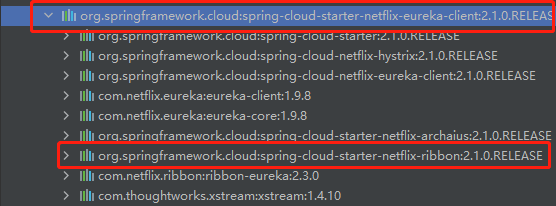
Ribbon 是 Netflix 提供的一个基于 Http 和 TCP 的客户端负载均衡工具,且已集成在 Eureka 依赖中。
1)客户端负载均衡:
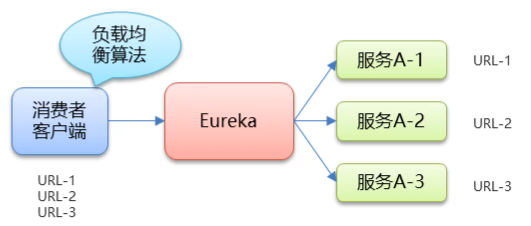
负载均衡算法在客户端
客户端维护服务地址列表
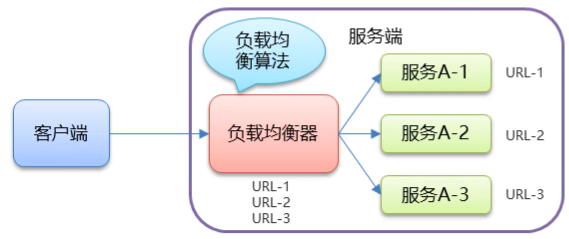
2)服务端负载均衡:
1)在服务调用者的 RestTemplate 配置类上添加注解:
@Configurationpublic class RestTemplateConfig { @Bean @LoadBalanced // 开启客户端负载均衡(默认轮询策略) public RestTemplate restTemplate(){ return new RestTemplate(); }}2)在调用时指定服务名:
package com.controller;import com.domain.Goods;import org.springframework.beans.factory.annotation.Autowired;import org.springframework.web.bind.annotation.GetMapping;import org.springframework.web.bind.annotation.PathVariable;import org.springframework.web.bind.annotation.RequestMapping;import org.springframework.web.bind.annotation.RestController;import org.springframework.web.client.RestTemplate;/** * 服务调用方 */@RestController@RequestMapping("/order")public class OrderController { @Autowired private RestTemplate restTemplate; @GetMapping("/goods/{id}") public Goods findOrderByGoodsId(@PathVariable("id") int id) { String url = String.format("http://eureka-provider/goods/findOne/%d", id); Goods goods = restTemplate.getForObject(url, Goods.class); return goods; }}负载均衡策略:
使用负载均衡:
方式一:使用 bean 的方式
package com.config;import com.netflix.loadbalancer.IRule;import com.netflix.loadbalancer.RandomRule;import org.springframework.context.annotation.Bean;public class MyRule { @Bean public IRule rule() { return new RandomRule(); // 随机策略 }}package com;import com.config.MyRule;import org.springframework.boot.SpringApplication;import org.springframework.boot.autoconfigure.SpringBootApplication;import org.springframework.cloud.client.discovery.EnableDiscoveryClient;import org.springframework.cloud.netflix.eureka.EnableEurekaClient;import org.springframework.cloud.netflix.ribbon.RibbonClient;@EnableDiscoveryClient // 激活DiscoveryClient@EnableEurekaClient@SpringBootApplication@RibbonClient(name="eureka-provider", configuration= MyRule.class) // 指定服务提供方并配置负载均衡策略public class ConsumerApp { public static void main(String[] args) { SpringApplication.run(ConsumerApp.class, args); }}方式二:使用配置文件
server: port: 9000eureka: instance: hostname: localhost client: service-url: defaultZone: http://localhost:8761/eurekaspring: application: name: eureka-consumer# 设置 Ribbon 的负载均衡策略:随机策略EUREKA-PROVIDER: ribbon: NFloadBalancerRuleClassName: com.netflix.loadbalancer.RandomRule.RandomRule
