本章概览:
异常处理简介
程序运行时,环境、操作等可能出现各种错误、故障,我们希望程序具有容错能力,给出错误信息。面向对象的程序设计里有异常处理机制,即,将程序的主要逻辑和容错处理逻辑分开,发现异常的地方不一定是处理异常的地方。
输入/输出流的概念
流:Java将信息的输入输出看作程序的流动,输出流就是将数据从程序空间输出到别的空间的通道;输入流同理。
文件读写
异常处理就是程序的一种容错机制,在程序运行过程中。如果遇到用户或环境的错误,程序要有能力处理这些错误,并且从错误中恢复出来继续执行,或者至少告诉用户发生了什么样的错误,并且在程序结束之前做好善后工作。
在Java中出现异常时,处理异常的办法有两种:一种是本Java程序不处理异常,但需要声明一下不处理异常但是将异常抛出,如果整个程序不处理,就会抛出到运行环境,即Java虚拟机,然后会给出一些信息并终止程序;第二种办法是在自己的程序中捕获异常并处理异常。一般而言,第二种方式会多一些。
根据错误的严重程度不同,可以分为两类:
Error类是所有错误类的父类。Exception类是所有异常类的父类。RuntimeException。RuntimeException的操作在Java应用程序中会频繁出现。例如:若每次使用对象时,都必须编写异常处理代码来检查null引用,则整个应用程序很快将变成庞大的try-catch块;它们表示的问题不一定作为异常处理,如:可以在除法运算时检查\(0\)值,而不使用ArithmeticException&&可以在引用前测试控值等。E的检查型异常,那么调用者必须捕获E或者也声明抛出E(或者E的一个父类),对此,编译器要进行检查。ArithmeticException:整数除法中除数为\(0\)。NullPointerException:访问的对象还没有实例化。NegativeArraySzieException:创建数组时元素个数是负数。ArrayIndexOutOfBoundsException:访问数组元素时,数组下标越界。ArrayStoreException:程序试图向数组中存取错误类型的数据。FileNoteFoundException:试图存取一个并不存在的文件。IOException:通常的I/O错误。public class HelloWorld { public static void main(String[] args) { int i = 0; String greetings[] = { "HelloWorld!", "No,I mean it!", "HeELLO WORLD!!" }; while (i < 4) { System.out.println(greetings[i]); i++; } }}在上述代码中,我们故意制造了数组越界,greetings[]数组只有三个元素但我们却访问到了第四个,以下是eclipse IDE运行结果:
HelloWorld!No,I mean it!HELLO WORLD!!Exception in thread "main" java.lang.ArrayIndexOutOfBoundsException: Index 3 out of bounds for length 3 at HelloWorld.main(HelloWorld.java:6)可以注意到,主方法中没有声明抛出这种异常,也没有捕获这种异常,编译器也没有进行强制性检查,即,并不要求处理/抛出这个异常。
throws子句声明将异常抛出到调用方法中。JVM(Java虚拟机)将捕获它,输出相关的错误信息,并且终止程序的运行。try{}catch{}块,捕获所发生的异常,并进行相应的处理。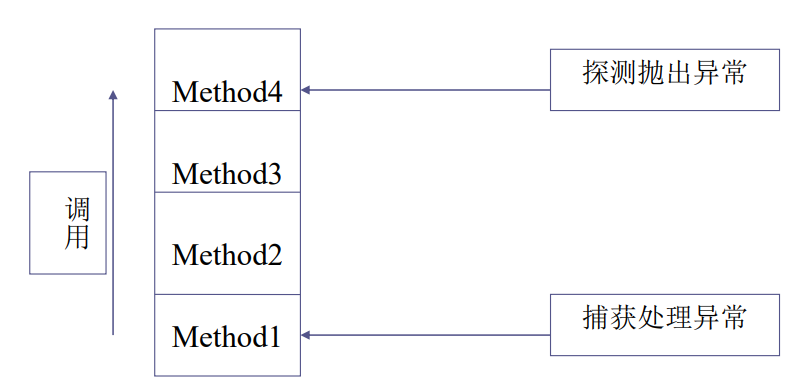
如上图,Method1调用了Method2,Method2调用Method3,Method3再调用Method4。如果在Method4中探测到了异常发生,不去处理这个异常,就会沿着栈的方向向上抛出,即抛给Method4的调用者Method3;Method3如果继续不处理这个异常就会抛给Method2;如果Method2不处理,则会继续抛给Method1。如果Method1打算处理,则应当捕获异常并且处理。
public void openThisFile(String fileName) throws java.io.FileNotFoundException{ //code for method}public void getCustomerInfo()throws java.io.FileNotFoundException{ //do something this.openThisFile("customer.txt"); //do something}如果在openThisFile中抛出了FileNotFoundException异常,getCustomerInfo将停止执行,并将此异常传送给它的调用者。
try{ statement(s)}catch(exceptiontype name){ statement(s)}finally{ statement(s)}try语句,其后跟有可能产生异常的代码块。
catch语句,其后跟随异常处理语句,通常都要用到两个方法:
getMessage():返回一个字符串,对发生的异常进行描述。
printStackTrace():给出方法的调用序列,一直到异常的产生位置。
finally()语句:不论在try代码段是否产生异常,finally后的程序代码段都会被执行,通常在这里释放内存以外的其他资源。
如果并列有多个catch语句捕获多个异常,则一般的异常类型放在后面,特殊的放在前面。比如说我们需要捕获的异常,其中有超类有子类的话,那我们应该首先捕获子类类的异常,再捕获超类类型的异常。
抛出异常对象都是通过throw语句来实现,异常对象必须是Throwable或其子类的实例:
throw new ThrowableObject();
ArithmeticException e = new ArithmeticException();throw e;class ThrowTest{ public static void main(String[] args){ try{ throw new ArithmeticException(); }catch(ArithmeticException ae){ System.out.println(ae); } try{ throw new ArrayIndexOutOfBoundsException(); }catch(ArrayIndexOutOfBoundsException ai){ System.out.println(ai); } try{ throw StringIndexOutOfBoundsException(); }catch(StringIndexOutOfBoundsException si){ System.out.println(si); } }}以上可见,我们可以主动生成异常对象,然后抛出。
运行结果:
java.lang.ArithmeticExceptionjava.lang.ArrayIndexOutOfBoundsExceptionjava.lang.StringIndexOutOfBoundsException自定义的所有异常类都必须是Exception的子类。
声明语法如下:
public class MyExceptionName extends SuperclassOfMyException{ public MyExceptionName(){ super("Some string explaining exception");//调用超类生成方法 }}在Java中,将信息的输入输出抽象为信息的流动,输入流是信息从程序空间之外的地方流入程序空间内的“通道”;输出流是将信息从程序空间输送到程序空间之外。
I/O流类java.io包的顶级层次结构)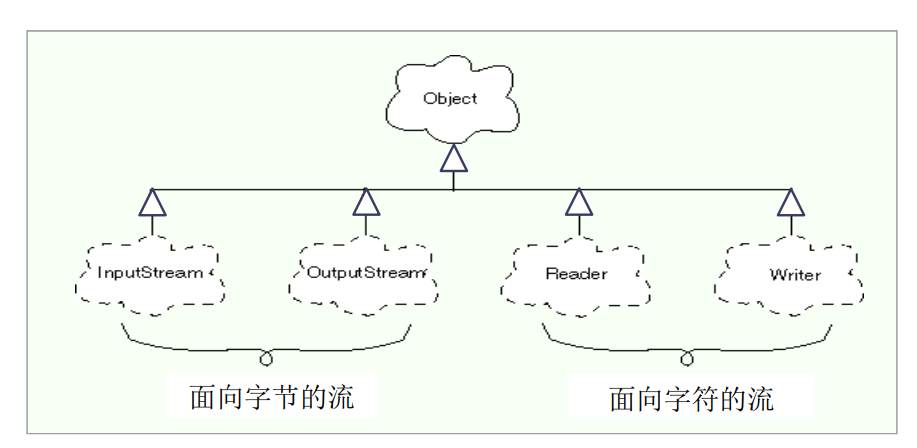
我们用于读写的流都要继承自这四个超类。
面向字符的流针对字符数据的特点专门进行了优化,提供专门针对字符的处理。
源或目标通常是文本文件。
实现内部格式和文本文件中的外部格式之间的转换。
内部格式:16-bit char数据类型
外部格式:UTF(Universal character set Transformation Format),被很多人称为Universal Text Format;包括ASCII码和非ASCII码,比如,斯拉夫(\(Cyrillic\))字符,希腊字符,亚洲字符等。
Reader和Writerjava.io包中所有字符流的抽象超类。
Reader提供了输入字符的API。
Writer提供了输出字符的API。
它们的子类又可以分为两大类
节点流:从数据源读入数据或往目的地写出数据。
处理流:对数据执行某种处理。
多数程序使用这两个抽象类的一系列子类来读入/写出文本信息
例如:FileReader/FileWriter用来读/写文本文件。
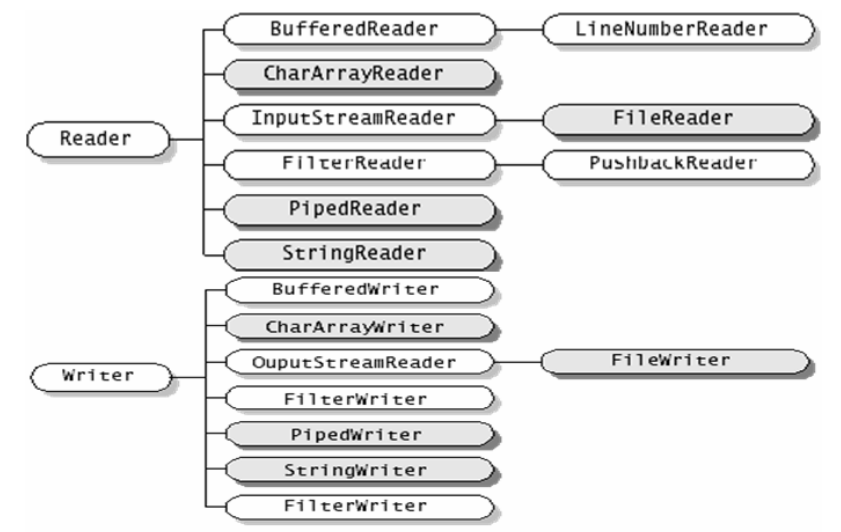
阴影部分为节点流,其他为处理流
InputStream和OutputStream面向字节的流是用来处理非文本文件的输入输出的。事实上,大多数文件都不是文本文件,如声音、视频等等。即使有一些数据既可以存储为文本,又可以存储为二进制,存储为二进制都要节省空间很多,而且,传输二进制文件时间上也会节省。因此,当我们的数据不是给人读的或者要进行进一步处理,我们往往会选择以二进制形式输出,这样比较节省时间,在存储介质上也比较节省空间。
是用来处理字节流的抽象基类,程序使用这两个类的子类来读写字节信息。
分为两部分
节点流
处理流
System类的静态成员变量。
包括
System.in:InputStream类型的,代表标准输入流,默认状态对应于键盘输入。
System.out:PrintStream类型的,代表标准输出流,默认状态对应于显示器输出。
System.err:PrintStream类型的,代表标准错误信息输出流,默认状态对应于显示器输出。
printf方法
System.out.printf("%-12s is %2d long",name,l);
System.out.printf("value = %2.2F",value);
%n是平台无关的换行标志。
Scanner
如果我们知道二进制文件中存放了一些数值类的数据,并且知道依次存放了什么数据,就可以用Scanner对象按照类型读取。
Scanner s = new Scanner(System.in);:构造Scanner对象时,需要用另一个输入流做参数,因为Scanner不是直接访问磁盘文件进行输出的,实际上是一个处理流,对输入流读取的信息进行转换,赋予类型特征的流。
int n = s.nextInt();:调用对象的方法。
还有下列方法:nextByte()、nextDouble()、nextFloat()、nextLine()、nextLong、nextShort()。
import java.io.BufferedInputStream;import java.io.BufferedOutputStream;import java.io.BufferedReader;import java.io.FileInputStream;import java.io.FileOutputStream;import java.io.IOException;import java.io.InputStreamReader;import java.io.PrintStream;public class Redirecting { public static void main(String[] args) throws IOException { BufferedInputStream in = new BufferedInputStream(new FileInputStream("Redirecting.java"));// 构造一个输入流备用,这个输入流直接关联到磁盘文件,此处使用java源代码 PrintStream out = new PrintStream(new BufferedOutputStream(new FileOutputStream("test.out")));// 构造一个输出流对象,这个输出流对象直接关联到磁盘文件,此处随便起一个名字,text.out自然也是文本文件 System.setIn(in);// 调用setIn方法,将标准输入流重新定向到in System.setOut(out);// 调用setOut方法,将标准输出流重新定向到out System.setErr(out);// 关联标准输出错误流 BufferedReader br = new BufferedReader(new InputStreamReader(System.in));// 构造有缓冲的输入流,可以使输入的效率更高一些,但是BufferedReader本身并不执行读磁盘文件的操作,只是一个处理流,因此我们需要一个真正读取文件信息的节点流作为参数来构造缓冲的BufferedReader,因此将System.in作为参数传给InputStreamReader,InputStreamReader是面向字节的流和面向字符的流的桥梁。此处的System.in已经是重定向到磁盘文件的输入流了 String s; while ((s = br.readLine()) != null) { System.out.println(s);//out经过了重定向,所以输出到磁盘文件 } in.close(); out.close(); }}import java.io.*;public class FileWriterTester { public static void main(String[] args) throws IOException { // main 方法中声明抛出IO异常 String fileName = "Hello.txt";//相对路径名,在当前工作文件夹下的文件 FileWriter writer = new FileWriter(fileName);//创建FileWriter输出流对象writer writer.write("Hello!\n"); writer.write("This is my first text file,\n"); writer.write("You can see how this is done.\n"); writer.write("输入一行中文也可以\n"); writer.close();//关闭文件 }}两个注意点:
\n不具有跨平台的性质,在不同平台下可能有不同的解释import java.io.FileWriter;import java.io.IOException;public class FileWriterTester { public static void main(String[] args) { String fileName = "Hello.txt"; try { FileWriter writer = new FileWriter(fileName, true); writer.write("Hello!\n"); writer.write("This is my first text file,\n"); writer.write("You can see how this is done"); writer.write("输入一行中文也可以\n"); writer.close(); } catch (IOException iox) { System.out.println("Problem writing" + fileName); } }}FileWriter类,参考自菜鸟教程
FileWriter(File file)构造一个FileWriter对象。
FileWriter(File file, boolean append)参数file:要写入数据的file对象;参数append:如果append为append,则将字节写入文件末尾处,相当于追加信息,如果append为false,则写入文件开始处。
BufferedWriter类FileWriter和BufferedWriter类都用用于输出字符流,包含的方法几乎完全一样,但是BufferedWriter多提供了一个newLine()方法用于换行。
newLine()方法可以输出在当前计算机上正确的换行符。BufferedWriter为缓冲输出流,可以起到缓冲作用,提高输出效率。BufferedWriterimport java.io.BufferedWriter;import java.io.FileWriter;import java.io.IOException;public class FileWriterTester { public static void main(String[] args) throws IOException { String fileName = "Hello.txt"; BufferedWriter out = new BufferedWriter(new FileWriter(fileName)); out.write("Hello!"); out.newLine(); out.write("This is another text file using BufferedWriter"); out.newLine(); out.write("So I can us a common way to start a new line"); out.close(); }}FileReader类Reader抽象类的子类InputStreamReaderBufferedReader类readLine()方法,可以对换行符进行鉴别,一行一行地读取输入流中的内容Readerimport java.io.BufferedReader;import java.io.FileReader;import java.io.IOException;public class BuffereddReaderTester { public static void main(String[] args) { String fileName = "Hello.txt", line; //文本访问操作有可能产生异常,因此用try-catch块 try { BufferedReader in = new BufferedReader(new FileReader(fileName)); line = in.readLine(); while (line != null) { System.out.println(line); line = in.readLine(); } in.close(); } catch (IOException iox) { System.out.println("Problem reading " + fileName); } }}运行该程序,屏幕上将逐行显示Hello.txt文件中的内容。
FileReader对象:创建后将打开文件,如果文件不存在,会抛出一个IOException
FileReader类的readLine()方法:从一个面向字符的输入流中读取一行文本。如果其中不再有数据,返回null。
Reader类的read()方法:也可以用来判别文件结束。该方法返回的一个表示某字符的int型整数,如果读到文件末尾,返回-1。据此,可修改本例中的读文件部分:
int c;while((c = in.read()) != -1){ System.out.print((char)c);}close()方法:为了操作系统可以更为有效地利用有限的资源,应该在读取完毕后,调用该方法。
指定源文件和目标文件名,将源文件的内容复制到目标文件。调用方式为(命令行操作):
java copy sourceFile destinationFile
共包括两个类
CopyMaker 以下返回值均为boolean类型,成功为true,不成功为false
private boolean openFiles() 打开文件private boolean copyFiles() 真正拷贝复制文件private boolean closeFiles() 关闭文件public boolean copy(String src, String dst) 对外的方法,其余三个方法均辅助本方法实现而不对外可见FileCopy
main()
CopyMaker类构造import java.io.BufferedReader;import java.io.BufferedWriter;import java.io.FileReader;import java.io.FileWriter;import java.io.IOException;public class CopyMaker { String sourceName, destName; // 以下两个引用将要指向读写 BufferedReader source; BufferedWriter dest; String line; private boolean openFiles() { // try-catch捕获异常 try { source = new BufferedReader(new FileReader(sourceName)); } catch (IOException iox) { System.out.println("Problem opening " + sourceName); return false; } try { dest = new BufferedWriter(new FileWriter(destName)); } catch (IOException iox) { System.out.println("Problem opening " + destName); return false; } return true; } private boolean copyFiles() { try { line = source.readLine(); while (line != null) { dest.write(line); dest.newLine();// 跨平台换行符 line = source.readLine(); } } catch (IOException iox) { System.out.println("Problem reading or writing"); return false; } return true; } private boolean closeFiles() { boolean retVal = true;// 满足但出口,符合结构化程序设计思想 try { source.close(); } catch (IOException iox) { System.out.println("Problem closing " + sourceName); retVal = false; } try { dest.close(); } catch (IOException iox) { System.out.println("Problem closing " + destName); retVal = false; } return retVal; } public boolean copy(String src, String dst) { sourceName = src; destName = dst; // 若返回值结果为真说明三个操作都正确完成了,否则说明出现了错误 return openFiles() && copyFiles() && closeFiles(); }}FileCopy类构造public class FileCopy { public static void main(String[] args) { if (args.length == 2) {// 参数个数正确 new CopyMaker().copy(args[0], args[1]); } else { System.out.println("Please Enter File Names"); } // eclipse输入命令行参数的方法可以参考https://blog.csdn.net/weixin_43896318/article/details/101846956 }}二进制文件的写比文本文件的写快很多;同样的信息以二进制文本存储通常比文本文件小很多;有些时候我们的数据本身不是纯文本,无法存储为文本文件,因此需要以二进制形式存储到二进制文件中。
OutputStreamFileOutputStreamDataOutputStreamsize方法可以作为计数器,统计写入的字节数DataOutputStream类的成员
| 名称 | 说明 |
|---|---|
public DataOutputStream(OutputStream out) | 构造函数,参数为一个OutputStream对象作为其底层的输出对象 |
protected int written | 私有属性,代表当前已写出的字节数 |
public void fulsh() | 冲刷此数据流,使流内的数据都被写出 |
public final int size() | 返回私有变量written的值,即已经写出的字节数 |
public void write(int b) | 向底层输出流输出int变量的低8位,执行后,记录写入字节数的计数器+1 |
public final void writeBoolean(boolean b) | 写出一个布尔数,true为1,false为0,执行后计数器增加1 |
public final void writeByte(int b) | public final void writeByte(int b)将int参数的低8位写入,舍弃高24位,计数器增加1 |
public void writeBytes(String s) | 字符串中的每个字符被丢掉高8位写入流中,计数器增加写入的字节数,即字符个数 |
public final void writeChar(int c) | 将16-bit字符写入流中,高位在前,计数器增加2 |
public void writeDouble(double v) | 写双精度数,计数器增加8 |
public void writeFloat(float f) | 写单精度数,计数器增加4 |
public void writeInt(int I) | 写整数,计数器增加4 |
public void writeLong(long I) | 写长整数,计数器增加8 |
public final void writeShort(int s) | 写短整数,计数器增加2 |
int写入文件import java.io.DataOutputStream;import java.io.FileOutputStream;import java.io.IOException;//将三个int型数字255/0/-1写入数据文件data1.datpublic class FileOutputstreamTester { public static void main(String[] args) { String fileName = "data1.dat"; int value0 = 255; int value1 = 0; int value2 = -1; try { // FileOutputStream是原生字节流,只能识别写出的是字节,不能识别int,double // DataOutputStream可以将字节处理成某种类型的数据 DataOutputStream out = new DataOutputStream(new FileOutputStream(fileName)); out.writeInt(value0); out.writeInt(value1); out.writeInt(value2); out.close(); System.out.println("Finished writing"); } catch (IOException iox) { System.out.println("Problem writing " + fileName); } }}BufferedOutputStream类用法示例:
DataOutputStream out = new DataOutputStream(new BufferedOutputStream(new FileOutputStream(fileName)));说明:
BufferedOutputStream是处理流,用于缓冲,构造BufferedOutputStream需要输出流,在本例中是FileOutputStream,以其为参数构造BufferedOutputStream;本例中继续以BufferedOutputStream为对象构造DataOutputStream对象,既可以缓冲又可以写入。import java.io.BufferedOutputStream;import java.io.DataOutputStream;import java.io.FileOutputStream;import java.io.IOException;public class BufferedOutputStreamTester { // 没有捕获异常所以声明抛出了异常 public static void main(String[] args) throws IOException { String fileName = "mixedTypes.dat"; // 原生字节输出流->缓冲 DataOutputStream dataOut = new DataOutputStream(new BufferedOutputStream(new FileOutputStream(fileName))); dataOut.writeInt(0); // dataOut.size()返回的是一共写了多少字节而非当前 System.out.println(dataOut.size() + "bytes have been written."); dataOut.writeDouble(31.2); System.out.println(dataOut.size() + "bytes have been written."); dataOut.writeBytes("JAVA"); System.out.println(dataOut.size() + "bytes have been written."); dataOut.close(); }}输出:
4bytes have been written.12bytes have been written.16bytes have been written.public class FileOutputStreamTester2 { public static void main(String[] args) throws IOException { DataOutputStream out = new DataOutputStream(new FileOutputStream("trytry.dat")); out.writeByte(-1);// 应该写入2个F(8个1) out.close(); DataInputStream in = new DataInputStream(new FileInputStream("trytry.dat")); int a = in.readByte(); System.out.println(Integer.toHexString(a)); System.out.println(a); in.skip(-1);// 往后一个位置,以便下面重新读出 a = in.readUnsignedByte(); System.out.println(Integer.toHexString(a)); System.out.println(a); in.close(); }}输出:
ffffffff-1ff255int型数字并相加import java.io.BufferedInputStream;import java.io.DataInputStream;import java.io.FileInputStream;import java.io.IOException;public class DataInputStreamTester { public static void main(String[] args) { String fileName = "data1.dat"; int sum = 0; try { DataInputStream instr = new DataInputStream(new BufferedInputStream(new FileInputStream(fileName))); sum += instr.readInt(); sum += instr.readInt(); sum += instr.readInt(); System.out.println("The sum is: " + sum); instr.close(); } catch (IOException iox) { System.out.println("Problem reading " + fileName); } }}输出:
254说明:
try-catch读取未知个数的数public class DataInputStreamTester { public static void main(String[] args) { String fileName = "data1.dat"; long sum = 0; try { DataInputStream instr = new DataInputStream(new BufferedInputStream(new FileInputStream(fileName))); try { while (true) { sum += instr.readInt(); } } catch (EOFException eof) { System.out.println("The sum is:" + sum); instr.close(); } } catch (IOException iox) { System.out.println("IO Problems with " + fileName); } }}//使用了嵌套try-catch块import java.io.FileInputStream;import java.io.IOException;public class InputStreamTester { public static void main(String[] args) throws IOException { FileInputStream s = new FileInputStream("Hello.txt"); int c; while ((c = s.read()) != -1) { System.out.write(c); } s.close(); }}//说明:read()方法读取一个字节,转化为[0,255]间的一个整数,返回一个int。如果读到了文件末尾,则返回-1.//write(int)方法写一个字节的低8位,忽略高24位(高低需要看大端小端)DataOutputStream的writeByte方法
public final void writeByte(int b) throws IOExceptionint的最不重要字节写入输出流DataInputStream的readUnsignedByte方法
public final int readUnsignedFile()Throws IOExceptionint的最不重要字节。import java.io.BufferedInputStream;import java.io.BufferedOutputStream;import java.io.DataInputStream;import java.io.DataOutputStream;import java.io.EOFException;import java.io.FileInputStream;import java.io.FileNotFoundException;import java.io.FileOutputStream;import java.io.IOException;public class CopyBytes { public static void main(String[] args) { DataInputStream instr; DataOutputStream outstr; if (args.length != 2) { System.out.println("Please enter file names"); return; } try { instr = new DataInputStream(new BufferedInputStream(new FileInputStream(args[0]))); outstr = new DataOutputStream(new BufferedOutputStream(new FileOutputStream(args[1]))); try { int data; while (true) { data = instr.readUnsignedByte(); outstr.writeByte(data); } } catch (EOFException eof) { outstr.close(); instr.close(); return; } } catch (FileNotFoundException nfx) {//先捕获比较具体的文件未找到异常 System.out.println("Problem opening files"); } catch (IOException iox) {//再捕获比较一般的异常 System.out.println("IO Problems"); } }}File类在File类中存储一些文件相关的信息,并提供了管理文件的一些操作
File类的作用File类的对象作为参数File类举例//创建文件Hello.txt,如果存在则删除旧文件,不存在则直接创建新的import java.io.File;public class FileTester { public static void main(String[] args) { File f = new File("Hello.txt"); if (f.exists()) { f.delete(); } else { try { f.createNewFile(); } catch (Exception e) { System.out.println(e.getMessage()); } } }}File类的isFile方法来确定File对象是否代表一个文件而非目录exists方法判断同名文件或路径是否存在,进而采取正确的方法,以免造成误操作之前的复制文件例子中,有以下几个问题没有考虑
import java.io.BufferedInputStream;import java.io.BufferedOutputStream;import java.io.DataInputStream;import java.io.DataOutputStream;import java.io.EOFException;import java.io.File;import java.io.FileInputStream;import java.io.FileNotFoundException;import java.io.FileOutputStream;import java.io.IOException;public class NewCopyBytes { public static void main(String[] args) { DataInputStream instr; DataOutputStream outstr; if (args.length != 2) { System.out.println("Please enter file names"); return; } // 确定文件都存在,否则给用户提示 File inFile = new File(args[0]); File outFile = new File(args[1]); if (outFile.exists()) { System.out.println(args[1] + " already exists"); return; } if (!inFile.exists()) { System.out.println(args[0] + " does not exist"); return; } try { instr = new DataInputStream(new BufferedInputStream(new FileInputStream(args[0]))); outstr = new DataOutputStream(new BufferedOutputStream(new FileOutputStream(args[1]))); try { int data; while (true) { data = instr.readUnsignedByte(); outstr.writeByte(data); } } catch (EOFException eof) { outstr.close(); instr.close(); return; } } catch (FileNotFoundException nfx) { System.out.println("Problem opening files"); } catch (IOException iox) { System.out.println("IO Problems"); } }}GZIPOutputStream和ZipOutputStream可分别把数据压缩成GZIP格式和ZIP格式
GZIPInputStream和ZipInputStream可分别把压缩成GZIP格式和ZIP格式的数据解压缩恢复原状
Gzip文件//将文本文件Hello.txt压缩为文件test.gz,再解压该文件,显示其中内容,并另存为newHello.txtimport java.io.BufferedReader;import java.io.FileInputStream;import java.io.FileOutputStream;import java.io.IOException;import java.io.InputStreamReader;import java.util.zip.GZIPInputStream;import java.util.zip.GZIPOutputStream;public class GZIPTester { public static void main(String[] args) throws IOException { // 构建原生字节文件输入流对象 FileInputStream in = new FileInputStream("Hello.txt"); // 在普通输入流外接GZIPOutputStream对象 GZIPOutputStream out = new GZIPOutputStream(new FileOutputStream("test.gz")); System.out.println("Writing compressing file from Hello.txt to test.gz"); // 以下实现文件复制 int c; while ((c = in.read()) != -1) { out.write(c);// 写压缩文件 } in.close(); out.close(); System.out.println("Reading file from test.gz to monitor"); // InputStreamReader:面向字节的流和面向字符的流的桥梁 BufferedReader实现按行读 BufferedReader in2 = new BufferedReader( new InputStreamReader(new GZIPInputStream(new FileInputStream("test.gz")))); String s; while ((s = in2.readLine()) != null) { System.out.println(s); } in2.close(); System.out.println("Writing decompression to newHello.txt"); GZIPInputStream in3 = new GZIPInputStream(new FileInputStream("test.gz")); FileOutputStream out2 = new FileOutputStream("newHello.txt"); while ((c = in3.read()) != -1) { out2.write(c); } in3.close(); out2.close(); }}test.gzHello.txt中的内容完全一样newHello.txt和Hello.txt中的内容也完全相同read()方法读取一个字节,转化为\([0,255]\)之间的一个整数,返回一个int。如果读到了文件末尾,则返回\(-1\)write(int)方法写一个字节的低\(8\)位,忽略了高\(24\)位Zip文件压缩与解压缩//从命令行输入若干个文件名,将所有文件压缩为"test.zip",再从此压缩文件中解压并显示import java.io.BufferedInputStream;import java.io.BufferedOutputStream;import java.io.FileInputStream;import java.io.FileOutputStream;import java.io.IOException;import java.util.zip.ZipEntry;import java.util.zip.ZipInputStream;import java.util.zip.ZipOutputStream;public class ZipOutputStreamTester { public static void main(String[] args) throws IOException { ZipOutputStream out = new ZipOutputStream(new BufferedOutputStream(new FileOutputStream("test.zip"))); int len = args.length; for (int i = 0; i < len; i++) { System.out.println("Writing file " + args[i]); BufferedInputStream in = new BufferedInputStream(new FileInputStream(args[i])); out.putNextEntry(new ZipEntry(args[i])); int c; while ((c = in.read()) != -1) { out.write(c); } in.close(); } out.close(); System.out.println("Reading File"); // 解压缩流<-缓冲流<-二进制流 ZipInputStream in2 = new ZipInputStream(new BufferedInputStream(new FileInputStream("test.zip"))); ZipEntry ze; // 逐个文件判断 while ((ze = in2.getNextEntry()) != null) { System.out.println("Reading File " + ze.getName()); int x; // 读的同时解压缩了 while ((x = in2.read()) != -1) { System.out.write(x); } System.out.println(); } in2.close(); }}test.zip文件test.zip后可以看到被压缩的两个文件console里可以看到解压后每个文件的内容test.zip,可以恢复出和原来文件相同的两个文本文件Zip文件,并恢复其原来的路径更多的情况,我们希望解压文件并恢复其原来的目录结构
import java.io.File;import java.io.FileInputStream;import java.io.FileOutputStream;import java.io.IOException;import java.util.zip.ZipEntry;import java.util.zip.ZipInputStream;public class Unzip { byte doc[] = null;// 存储解压缩数据的缓冲字节数组 String Filename = null;// 压缩文件名字字符串 String UnZipPath = null;// 解压缩路径字符串 public Unzip(String filename, String unZipPath) { this.Filename = filename; this.UnZipPath = unZipPath; this.setUnZipPath(this.UnZipPath); } public Unzip(String filename) { this.Filename = new String(filename); this.UnZipPath = null; this.setUnZipPath(this.UnZipPath); } private void setUnZipPath(String unZipPath) { if (unZipPath.endsWith("\\")) { this.UnZipPath = new String(unZipPath); } else { this.UnZipPath = new String(unZipPath + "\\"); } } public void doUnZip() { try { ZipInputStream zipis = new ZipInputStream(new FileInputStream(Filename)); ZipEntry fEntry = null; while ((fEntry = zipis.getNextEntry()) != null) { if (fEntry.isDirectory()) {// 是路径则创建路径 checkFilePath(UnZipPath + fEntry.getName());// 判断路径是否存在 } else {// 是文件则解压缩文件 String fname = new String(UnZipPath + fEntry.getName()); try { FileOutputStream out = new FileOutputStream(fname); doc = new byte[512];// 一次多读一些字节 int n; while ((n = zipis.read(doc, 0, 512)) != -1) {// 返回值是实际读到的字符数,文件末尾即-1 out.write(doc, 0, n); } out.close(); out = null; doc = null; } catch (Exception ex) { } } } zipis.close(); } catch (IOException ioe) { System.out.println(ioe); } } private void checkFilePath(String dirName) throws IOException { File dir = new File(dirName); if (!dir.exists()) { dir.mkdirs();// 创建所有缺失的目录 } }}public class UnZipTester { public static void main(String[] args) { String zipFile = args[0];// 第一个参数为zip文件名 String unZipPath = args[1] + "\\";// 第二个参数为指定解压缩路径 Unzip myZip = new Unzip(zipFile, unZipPath); myZip.doUnZip(); }}如果有需要永久保留的信息,则需要对象的序列化,即将对象整体写入,再整体读出。
ObjectInputStream/ObjectOutputStream类ObjectOutputStream把对象写入磁盘文件ObjectInputStream把对象读入程序transient和static类型的变量transient修饰的变量不被保存static修饰的变量不属于任何一个对象,因此也不被保存Serializable接口(为了安全考虑)ObjectOutputStream必须通过另一个流构造OutputSteeam(也为处理流,不直接执行写操作):
// 首先构造一个FileOutputStream对象,直接和文件打交道FileOutputStream out = new FileOutputStream("theTime");// 再以其为参数,构造ObjectOutputStream对象,再用其对对象存盘ObjectOutputStream s = new ObjectOutputStream(out);s.writeObject("Today");s.writeObject(new Date());// 注:以上两个对象已经实现Serializable接口s.flush();ObjectInputStream必须通过另一个流构造ObjectInputStream
// 首先构造一个FileInputStream对象,直接和文件打交道FileInputStream in = new FileInputStream("theTime");// 再以其为参数,构造ObjectInputStream对象,再用其对对象存盘ObjectInputStream s = new ObjectInputStream(in);String today = (String)s.readObject();Date date = (Date)s.readObject();SeriealizableSerizable接口的定义
package java.io;public interface Serializable{ // there's nothing here!}事实上是一个空接口
实现Serializable接口的语句
// 事实上只要implements这个接口即可,表明允许对象可以整体存入磁盘public class MyClass implements Serializable{ //...}使用关键字transient可以阻止对象的某些成员被自动写入文件
import java.io.Serializable;// 创建一个书籍对象,并把它输出到一个文件book.dat中,然后再把该对象读出来,在屏幕上显示对象信息public class Book implements Serializable { // Serializable接口知识标志对象可以被序列化,事实上里面是空的 int id; String name; String author; double price; public Book(int id, String name, String author, double price) { this.id = id; this.name = name; this.author = author; this.price = price; }}import java.io.FileInputStream;import java.io.FileOutputStream;import java.io.IOException;import java.io.ObjectInputStream;import java.io.ObjectOutputStream;public class SerializableTester { public static void main(String[] args) throws IOException, ClassNotFoundException { Book book = new Book(100032, "Java Programming Skills", "Wang Sir", 30.0); // 在普通的输出流之外加一个ObjectOutputStream,以便可以写出对象 ObjectOutputStream oos = new ObjectOutputStream(new FileOutputStream("book.dat")); oos.writeObject(book); oos.close(); book = null; ObjectInputStream ois = new ObjectInputStream(new FileInputStream("book.dat")); // 需要额外的文档记录我们究竟写入了什么对象 book = (Book) ois.readObject(); ois.close(); System.out.println("ID is:" + book.id); System.out.println("name is:" + book.name); System.out.println("author is:" + book.author); System.out.println("price is:" + book.price); }}ID is:100032name is:Java Programming Skillsauthor is:Wang Sirprice is:30.0Externalizable接口API中的说明为
public interface Externalizable extends Serializable
如果实现了Externalizable接口,就不必实现Serializable接口,因为Externalizable接口已经是Serializable的超接口
其中有两个方法writeExternal()和readExternal(),因此实现该接口类必须实现这两个方法;可以在这两个方法中按照我们自己的设计实现如何将对象写入文件以及从文件中读取对象,比如可以设计一些加密算法来提高数据安全性
ObjectInputStream的readObject()方法调用对象所属类的readExternal(),此时readObject()只作为标志
Java将数据的输入输出都看作字节流,因此对文件的随机读写支持得并不很好,但是Java依然提供了文件读写有关的类,因此依旧可以实现随机文件读写,只是略麻烦。
RandomAccessFile类可跳转到文件的任意位置读/写数据
可在随机文件中插入数据,而不破坏该文件的其他数据
实现了DataInput和DataOutput接口,可使用普通的读写方法
有位置指示器,指向当前读写处的位置。刚打开文件时,文件指示器指向文件的开头处。对文件指针显示操作的方法有:
int skipBytes(int n):把文件指针向前移动指定的n个字节void seek(long):移动文件指针到指定的位置long getFilePointer:得到当前的文件指针在登场记录格式文件的随机读取时有很大的优势,但仅限于操作文件,不能访问五年其他IO设备,如网络、内存映像等
构造方法
public RandomAccessFile(File file,String mode) throws FileNotFoundExceptionpublic RandomAccessFile(String name,String name) throws FileNotFoundException构造RandomAccessFile对象时,要指出操作:仅读,还是读写
new RandomAccessFile("farrago.txt","r");new RandomAccessFile("farrago.txt","rw");RandomAccessFile类常用API可以查看Java官方文档
public class Employee { char[] name = { '\u0000', '\u0000', '\u0000', '\u0000', '\u0000', '\u0000', '\u0000', '\u0000' }; int age; public Employee(String name, int age) throws IOException { if (name.toCharArray().length > 8) { System.arraycopy(name.toCharArray(), 0, this.name, 0, 8); } else { System.arraycopy(name.toCharArray(), 0, this.name, 0, name.toCharArray().length); } this.age = age; }}import java.io.RandomAccessFile;public class RandomAccessFileTester { String Filename; public RandomAccessFileTester(String Filename) { this.Filename = Filename; } public void writeEmployee(Employee e, int n) throws Exception { RandomAccessFile ra = new RandomAccessFile(Filename, "rw"); ra.seek(n * 20); for (int i = 0; i < 8; i++) { ra.writeChar(e.name[i]); } ra.writeInt(e.age); ra.close(); } public void readEmployee(int n) throws Exception { char buf[] = new char[8]; RandomAccessFile ra = new RandomAccessFile(Filename, "r"); ra.seek(n * 20); for (int i = 0; i < 8; i++) { buf[i] = ra.readChar(); } System.out.println("name:"); System.out.println(buf); System.out.println("age:" + ra.readInt()); ra.close(); } public static void main(String[] args) throws Exception { RandomAccessFileTester t = new RandomAccessFileTester("temp/1.txt"); Employee e1 = new Employee("zhangSantt", 23); Employee e2 = new Employee("李晓珊", 33); Employee e3 = new Employee("王华", 19); t.writeEmployee(e1, 0); t.writeEmployee(e3, 2); System.out.println("第一个雇员信息:"); t.readEmployee(0); System.out.println("第三个雇员信息:"); t.readEmployee(2); System.out.println("第二个雇员信息:"); t.readEmployee(1); }}
