说到mybatis的collection标签,我们肯定不陌生,可以通过它解决一对多的映射问题,举个例子一个用户对应多个系统权限,通过对用户表和权限表的关联查询我们可以得到好多条记录,但是用户信息这部分在多条记录中是重复的,只有权限不同,我们需要把这多条权限记录映射到这个用户之中,这个时候可以通过collection标签/association标签来解决(虽然assocation标签一般是解决一对一问题的,但它实际上也能实现我们的需求,可以通过后面的源码看出来)
@Datapublic class UserDO { private Integer userId; private String username; private String password; private String nickname; // 将用户的权限信息映射到用户中 private List<PermitDO> permitDOList; public UserDO() {} public UserDO(@Param("userId") Integer userId, @Param("username") String username, @Param("password") String password, @Param("nickname") String nickname) { this.userId = userId; this.username = username; this.password = password; this.nickname = nickname; }}@Datapublic class PermitDO { private Integer id; private String code; private String name; private NodeTypeEnum type; private Integer pid;}// mybatis代码 public interface UserMapper { UserDO getByUserId(@Param("userId") Integer userId);}<mapper namespace="org.apache.ibatis.study.mapper.UserMapper"> <cache readOnly="false" flushInterval="5000" size="100" blocking="false"> </cache> <resultMap id="BaseMap" type="org.apache.ibatis.study.entity.UserDO" autoMapping="true"> <!-- user_id列用<id>标签,因为对一个用户来说,user_id肯定是唯一的 --> <id column="user_id" jdbcType="INTEGER" property="userId" /> <result column="username" jdbcType="VARCHAR" property="username" /> <result column="password" jdbcType="VARCHAR" property="password" /> <result column="nickname" jdbcType="VARCHAR" property="nickname"/> <!-- <collection> 映射多条权限记录 --> <collection property="permitDOList" resultMap="PermitBaseMap"> </collection> </resultMap> <resultMap id="PermitBaseMap" type="org.apache.ibatis.study.entity.PermitDO"> <id column="id" jdbcType="INTEGER" property="id"/> <result column="code" jdbcType="VARCHAR" property="code"/> <result column="name" jdbcType="VARCHAR" property="name"/> <result column="type" jdbcType="TINYINT" property="type"/> <result column="pid" jdbcType="INTEGER" property="pid"/> </resultMap> <resultMap id="BaseMap1" type="org.apache.ibatis.study.entity.UserDO" autoMapping="false"> <constructor> <idArg column="user_id" name="userId" jdbcType="INTEGER" /> <arg column="username" name="username" jdbcType="VARCHAR" /> <arg column="password" name="password" jdbcType="VARCHAR" /> <arg column="nickname" name="nickname" jdbcType="VARCHAR" /> </constructor> </resultMap> <sql id="BaseFields"> user_id, username, password, nickname </sql> <select id="getByUserId" resultMap="BaseMap" resultOrdered="true"> select u.*, p.* from user u inner join user_permit up on u.user_id = up.user_id inner join permit p on up.permit_id = p.id <trim prefix="where" prefixOverrides="and | or"> and u.user_id = #{userId, jdbcType=INTEGER} </trim> </select></mapper>
public class Test { public static void main(String[] args) throws IOException { try (InputStream inputStream = Resources.getResourceAsStream("mybatis-config.xml")) { // 构建session工厂 DefaultSqlSessionFactory SqlSessionFactory sqlSessionFactory = new SqlSessionFactoryBuilder().build(inputStream); SqlSession sqlSession = sqlSessionFactory.openSession(); UserMapper userMapper = sqlSession.getMapper(UserMapper.class); UserDO userDO = userMapper.getByUserId(1); System.out.println(userDO); } }}运行结果如下,可以看到权限记录映射到属性permitDOList 的list列表了

通过PreparedStatement查询完之后得到ResultSet结果集,之后需要将结果集解析为java的pojo类中,下面通过源码简单讲下是如何解析的
public void handleRowValues(ResultSetWrapper rsw, ResultMap resultMap, ResultHandler<?> resultHandler, RowBounds rowBounds, ResultMapping parentMapping) throws SQLException { // 是否有嵌套的resultMaps if (resultMap.hasNestedResultMaps()) { ensureNoRowBounds(); checkResultHandler(); handleRowValuesForNestedResultMap(rsw, resultMap, resultHandler, rowBounds, parentMapping); } else { // 无嵌套 handleRowValuesForSimpleResultMap(rsw, resultMap, resultHandler, rowBounds, parentMapping); } }根据有无嵌套分成两层逻辑,有嵌套resultMaps就是指<resultMap>标签下有子标签<collection>或<association>,分析下第一层
private void handleRowValuesForNestedResultMap(ResultSetWrapper rsw, ResultMap resultMap, ResultHandler<?> resultHandler, RowBounds rowBounds, ResultMapping parentMapping) throws SQLException { final DefaultResultContext<Object> resultContext = new DefaultResultContext<>(); ResultSet resultSet = rsw.getResultSet(); // 跳过offset行 skipRows(resultSet, rowBounds); // 上一次获取的数据 Object rowValue = previousRowValue; // 已获取记录数量小于limit while (shouldProcessMoreRows(resultContext, rowBounds) && !resultSet.isClosed() && resultSet.next()) { // 鉴别器解析 final ResultMap discriminatedResultMap = resolveDiscriminatedResultMap(resultSet, resultMap, null); // 创建缓存key resultMapId + (columnName + columnValue).... final CacheKey rowKey = createRowKey(discriminatedResultMap, rsw, null); // 部分对象(可能存在对象内容缺失未完全合并) Object partialObject = nestedResultObjects.get(rowKey); // issue #577 && #542 // 关于resultOrdered的理解,举例若查询得到四条记录a,a,b,a , 相同可以合并。 // 那么当resultOrdered=true时,最后可以得到三条记录,第一条和第二条合并成一条、第三条单独一条、第四条也是单独一条记录 // resultOrdered=false时,最后可以得到两条记录,第一条、第二条和第四条会合并成一条,第三条单独一条记录 // 另外存储到resultHandler的时机也不一样,resultOrdered=true是等遇到不可合并的记录的时候才把之前已经合并的记录存储, // 而resultOrdered=false是直接存储的后续有合并的记录再处理添加到集合属性中 if (mappedStatement.isResultOrdered()) { // partialObject为null,说明这一条记录不可与上一条记录进行合并了,那么清空nestedResultObjects防止之后出现有可合并的记录的时候继续合并 // 然后将记录存储到resultHandler里面 if (partialObject == null && rowValue != null) { nestedResultObjects.clear(); storeObject(resultHandler, resultContext, rowValue, parentMapping, resultSet); } rowValue = getRowValue(rsw, discriminatedResultMap, rowKey, null, partialObject); } else { // 处理resultSet的当前这一条记录 rowValue = getRowValue(rsw, discriminatedResultMap, rowKey, null, partialObject); if (partialObject == null) { // 将记录存储到resultHandler里面 storeObject(resultHandler, resultContext, rowValue, parentMapping, resultSet); } } }这段代码主要是创建了一个缓存key,主要是根据resultMapId和<id>标签的column和对应的columvalue来创建的(若没有<id>标签,则会使用所有的<result>标签的column和columnValue来创建),以此缓存键来区分记录是否可合并。nestedResultObjects是一个储存结果的map,以缓存键为key,实体类(本例中为UserDO)为value,若能以cacheKey取到值,则说明本条记录可合并。
private Object getRowValue(ResultSetWrapper rsw, ResultMap resultMap, CacheKey combinedKey, String columnPrefix, Object partialObject) throws SQLException { final String resultMapId = resultMap.getId(); Object rowValue = partialObject; // rowValue不等于null时,说明此条记录可合并 if (rowValue != null) { final MetaObject metaObject = configuration.newMetaObject(rowValue); putAncestor(rowValue, resultMapId); applyNestedResultMappings(rsw, resultMap, metaObject, columnPrefix, combinedKey, false); ancestorObjects.remove(resultMapId); } else { final ResultLoaderMap lazyLoader = new ResultLoaderMap(); // 创建result接收对象,本例中是UserDO对象 rowValue = createResultObject(rsw, resultMap, lazyLoader, columnPrefix); if (rowValue != null && !hasTypeHandlerForResultObject(rsw, resultMap.getType())) { final MetaObject metaObject = configuration.newMetaObject(rowValue); boolean foundValues = this.useConstructorMappings; // 是否将查询出来的字段全部映射 默认false if (shouldApplyAutomaticMappings(resultMap, true)) { foundValues = applyAutomaticMappings(rsw, resultMap, metaObject, columnPrefix) || foundValues; } // 设置需要映射的属性值,不管有嵌套ResultMap的 foundValues = applyPropertyMappings(rsw, resultMap, metaObject, lazyLoader, columnPrefix) || foundValues; // 存放第一条数据 putAncestor(rowValue, resultMapId); // 处理有嵌套的resultMapping foundValues = applyNestedResultMappings(rsw, resultMap, metaObject, columnPrefix, combinedKey, true) || foundValues; ancestorObjects.remove(resultMapId); foundValues = lazyLoader.size() > 0 || foundValues; rowValue = foundValues || configuration.isReturnInstanceForEmptyRow() ? rowValue : null; } // 将最终结果放入到nestedResultObjects中 if (combinedKey != CacheKey.NULL_CACHE_KEY) { nestedResultObjects.put(combinedKey, rowValue); } } return rowValue; }getRowValue方法主要是将ResultSet解析为实体类对象,applyPropertyMappings填充<id><result>标签的实体属性值
private boolean applyNestedResultMappings(ResultSetWrapper rsw, ResultMap resultMap, MetaObject metaObject, String parentPrefix, CacheKey parentRowKey, boolean newObject) { boolean foundValues = false; for (ResultMapping resultMapping : resultMap.getPropertyResultMappings()) { // 嵌套id final String nestedResultMapId = resultMapping.getNestedResultMapId(); // resultMapping有嵌套的map才继续 <association> <collection> if (nestedResultMapId != null && resultMapping.getResultSet() == null) { try { final String columnPrefix = getColumnPrefix(parentPrefix, resultMapping); // 获取嵌套(经过一次鉴权)的ResultMap final ResultMap nestedResultMap = getNestedResultMap(rsw.getResultSet(), nestedResultMapId, columnPrefix); if (resultMapping.getColumnPrefix() == null) { // try to fill circular reference only when columnPrefix // is not specified for the nested result map (issue #215) Object ancestorObject = ancestorObjects.get(nestedResultMapId); if (ancestorObject != null) { if (newObject) { linkObjects(metaObject, resultMapping, ancestorObject); // issue #385 } continue; } } // 构建嵌套map的key final CacheKey rowKey = createRowKey(nestedResultMap, rsw, columnPrefix); // 合并cacheKey final CacheKey combinedKey = combineKeys(rowKey, parentRowKey); // 尝试获取之前是否已经创建过 Object rowValue = nestedResultObjects.get(combinedKey); boolean knownValue = rowValue != null; // 实例化集合属性 list复制为空列表 instantiateCollectionPropertyIfAppropriate(resultMapping, metaObject); // mandatory // 存在指定的非空列存在空值则返回false if (anyNotNullColumnHasValue(resultMapping, columnPrefix, rsw)) { rowValue = getRowValue(rsw, nestedResultMap, combinedKey, columnPrefix, rowValue); if (rowValue != null && !knownValue) { // 合并记录,设置对象-association或将对象添加到集合属性中-collection linkObjects(metaObject, resultMapping, rowValue); foundValues = true; } } } catch (SQLException e) { throw new ExecutorException("Error getting nested result map values for '" + resultMapping.getProperty() + "'. Cause: " + e, e); } } } return foundValues; }处理嵌套的结果映射,其实就是<collection><association>标签。同时调用getRowValue方法根据<collection>指定的resultMap获取实体对象(这里是PermitDO对象),然后调用linkObjects方法将permitDO对象调用add方法添加到permitDOList中
private void linkObjects(MetaObject metaObject, ResultMapping resultMapping, Object rowValue) { final Object collectionProperty = instantiateCollectionPropertyIfAppropriate(resultMapping, metaObject); // 属性是集合进行添加 <collection> if (collectionProperty != null) { final MetaObject targetMetaObject = configuration.newMetaObject(collectionProperty); targetMetaObject.add(rowValue); } else { // 否则是对象 直接进行setter设置 <association> metaObject.setValue(resultMapping.getProperty(), rowValue); } }最后就把能合并的记录都合并在一起了,不同的权限映射到permitDOList这个集合中了
从上面的代码看来,关于<collection>和<association>标签都属于嵌套结果集了,处理逻辑也是基本相同的没啥区分,换句话来说,把上面的<collection>替换成<association>标签其实也能得到相同的结果,关键还是pojo类中javaType的属性,若属性为List则会创建空的list并将嵌套结果映射添加到list中(即使是一对一的那么list中就只有一条记录),若属性为普通对象则直接进行setter设置。
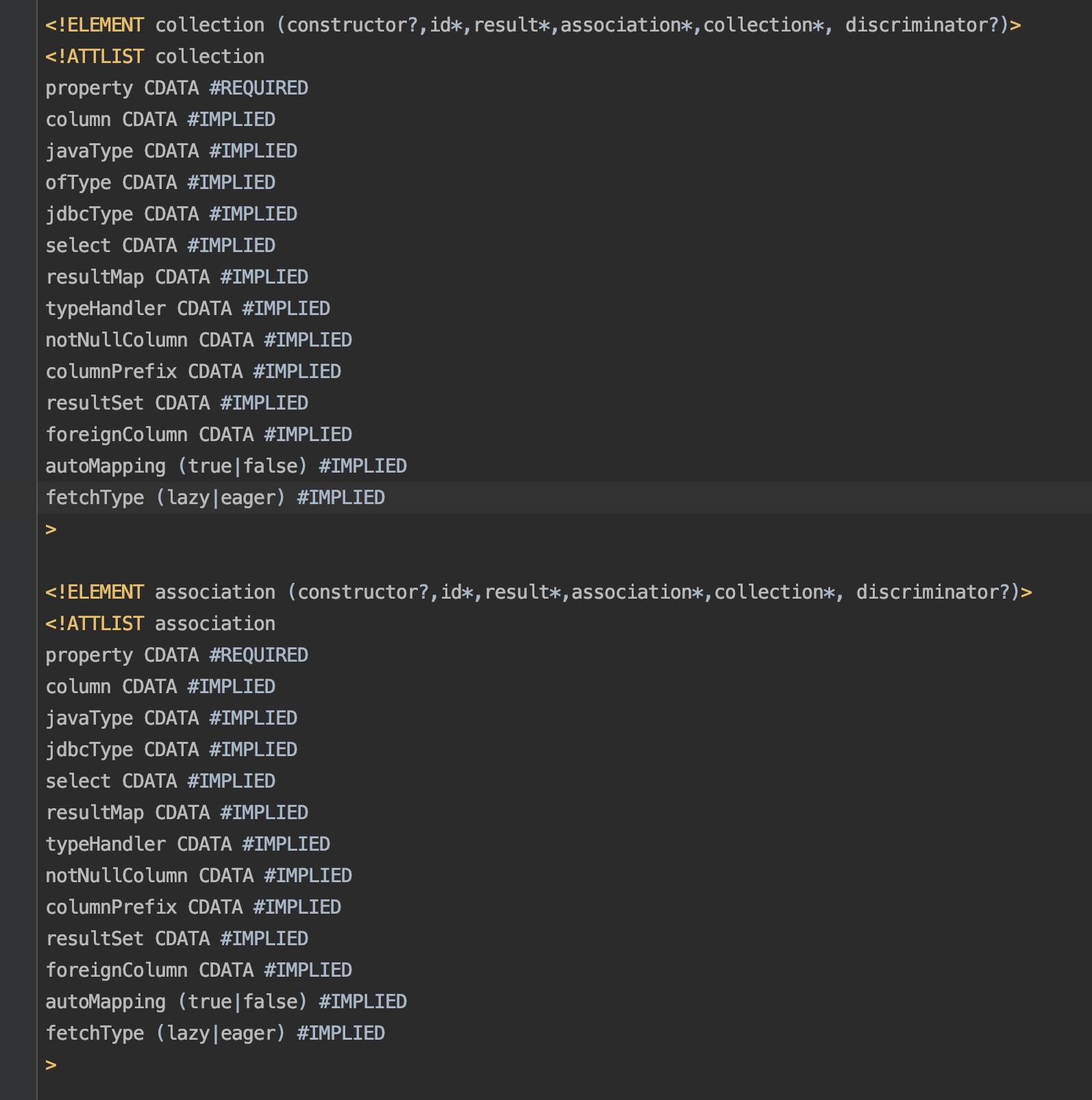
从上面的图中我们可以看到<collection>和<association>标签属性基本相同,<collection>比<association>多了一个ofType属性,这个ofType属性其实就是collection集合中单个元素的javaType属性,<collection>的javaType属性是继承了Collection接口的list或set等java集合属性。
另外在使用习惯上因为我们能确认表和表之间的关系是一对一还是一对多的,能够确认pojo类中的属性javaType是使用list还是普通对象,所以一般情况下一对一使用<association>标签,一对多使用<collection>标签,语义上更清晰更好理解。
如果说的有问题欢迎提出指正讨论,代码提交在gitee上,感兴趣的同学可以下载看看