在日常开发与数据库打交道的时候,常有以Json格式的字符串存储到数据库的情况,当在Java程序中获取到对应的Json格式的String字符串后,如何才能转换为我们想要的数据格式(比如转换成Java中的自定义类等),就需要做出对Json数据解析的,而我最近写的接口就遇到了这样的需求,我借助阿里的Fastjson api实现json转化为Java POJO,现在进行简单的总结,记录一下。
分别引入三个依赖,分别是fastjson、lombok、commons工具包。
<dependencies> <!-- https://mvnrepository.com/artifact/com.alibaba/fastjson --> <dependency> <groupId>com.alibaba</groupId> <artifactId>fastjson</artifactId> <version>1.2.78</version> </dependency> <dependency> <groupId>org.projectlombok</groupId> <artifactId>lombok</artifactId> <version>1.18.22</version> <scope>compile</scope> </dependency> <!-- https://mvnrepository.com/artifact/org.apache.commons/commons-lang3 --> <dependency> <groupId>org.apache.commons</groupId> <artifactId>commons-lang3</artifactId> <version>3.12.0</version> </dependency></dependencies>其中版本号我已经写上了,如有需要请使用特定版本,建议使用最新版。
下面就简单构造一点数据,对数据解析的要求:整个json转化为一个POJO,其中 code、name类型为String,schedule类型为List<String>表示计划清单,completion类型为Map<String,String>表示完成情况一一映射。
构建周一到周日的 计划&完成情况 的json数据:
[ { "code":"monday", "name":"周一", "schedule":"get_up_9am,exercise_one_hour,study_one_hour,goto_bed_before_12pm", "completion":"get_up_9am=y,exercise_one_hour=n,study_one_hour=y,goto_bed_before_12pm=n" },{ "code":"tuesday", "name":"周二", "schedule":"exercise_one_hour,study_one_hour,goto_bed_before_12pm", "completion":"exercise_one_hour=y,study_one_hour=y,goto_bed_before_12pm=y" },{ "code":"wednesday", "name":"周三", "schedule":"get_up_9am,exercise_one_hour,goto_bed_before_12pm", "completion":"get_up_9am=n,exercise_one_hour=n,goto_bed_before_12pm=n" },{ "code":"thursday", "name":"周四", "schedule":"", "completion":"" },{ "code":"friday", "name":"周五", "schedule":"study_one_hour,goto_bed_before_12pm", "completion":"study_one_hour=n,goto_bed_before_12pm=n" },{ "code":"saturday", "name":"周六", "schedule":"goto_bed_before_12pm", "completion":"goto_bed_before_12pm=n" },{ "code":"sunday", "name":"周日", "schedule":"", "completion":"" }]下面就是直接贴代码
DO是全部为String类型的数据,DTO是其中的schedule为List,completion为Map格式的
WeekScheduleDO
package com.xxx;import lombok.Data;@Datapublic class WeekScheduleDO { private String code; private String name; private String schedule; private String completion;}WeekScheduleDTO
package com.fast;import lombok.Data;import java.util.List;import java.util.Map;@Datapublic class WeekScheduleDTO { private String code; private String name; private List<String> schedule; private Map<String,String> completion;}把解析需要用到的方法自定义封装一下
package com.xxx;import com.alibaba.fastjson.JSON;import com.alibaba.fastjson.TypeReference;import org.apache.commons.lang3.StringUtils;import java.util.*;import java.util.stream.Collectors;public class SelfJSONUtils { public static List<WeekScheduleDTO> toWeekScheduleDOs(String str){ // String->List<WeekScheduleDO> List<WeekScheduleDO> weekScheduleDOs = JSON.parseObject(str, new TypeReference<List<WeekScheduleDO>>() {}); List<WeekScheduleDTO> result = new ArrayList<>(); for (WeekScheduleDO item:weekScheduleDOs) { result.add(toWeekScheduleDTO(item)); } return result; } private static WeekScheduleDTO toWeekScheduleDTO(WeekScheduleDO item){ WeekScheduleDTO weekScheduleDTO = new WeekScheduleDTO(); weekScheduleDTO.setCode(item.getCode()); weekScheduleDTO.setName(item.getName()); // "schedule":"get_up_9am,..." 转换成lsit String[] schedule = item.getSchedule().split(","); weekScheduleDTO.setSchedule(Arrays.stream(schedule).filter(e -> StringUtils.isNoneBlank(e)).collect(Collectors.toList())); // "completion":"get_up_9am=y,..." 转换成map weekScheduleDTO.setCompletion(toMap(item.getCompletion().split(","))); return weekScheduleDTO; } private static Map<String,String> toMap(String[] args){ Map<String,String> map = new HashMap<>(); for(String arg : args){ if(!arg.isEmpty()) { String[] split1 = arg.split("="); map.put(split1[0], split1[1]); } } return map; }}package com.xxx;import java.util.List;public class Demo { public static void main(String[] args) { String json = "[{\"code\":\"monday\",\"name\":\"周一\",\"schedule\":\"get_up_9am,exercise_one_hour,study_one_hour,goto_bed_before_12pm\",\"completion\":\"get_up_9am=y,exercise_one_hour=n,study_one_hour=y,goto_bed_before_12pm=n\"},{\"code\":\"tuesday\",\"name\":\"周二\",\"schedule\":\"exercise_one_hour,study_one_hour,goto_bed_before_12pm\",\"completion\":\"exercise_one_hour=y,study_one_hour=y,goto_bed_before_12pm=y\"},{\"code\":\"wednesday\",\"name\":\"周三\",\"schedule\":\"get_up_9am,exercise_one_hour,goto_bed_before_12pm\",\"completion\":\"get_up_9am=n,exercise_one_hour=n,goto_bed_before_12pm=n\"},{\"code\":\"thursday\",\"name\":\"周四\",\"schedule\":\"\",\"completion\":\"\"},{\"code\":\"friday\",\"name\":\"周五\",\"schedule\":\"study_one_hour,goto_bed_before_12pm\",\"completion\":\"study_one_hour=n,goto_bed_before_12pm=n\"},{\"code\":\"saturday\",\"name\":\"周六\",\"schedule\":\"goto_bed_before_12pm\",\"completion\":\"goto_bed_before_12pm=n\"},{\"code\":\"sunday\",\"name\":\"周日\",\"schedule\":\"\",\"completion\":\"\"}]"; List<WeekScheduleDTO> weekScheduleDTOS = SelfJSONUtils.toWeekScheduleDOs(json); System.out.println(weekScheduleDTOS); }}现在就可以直接运行或debug查看解析情况
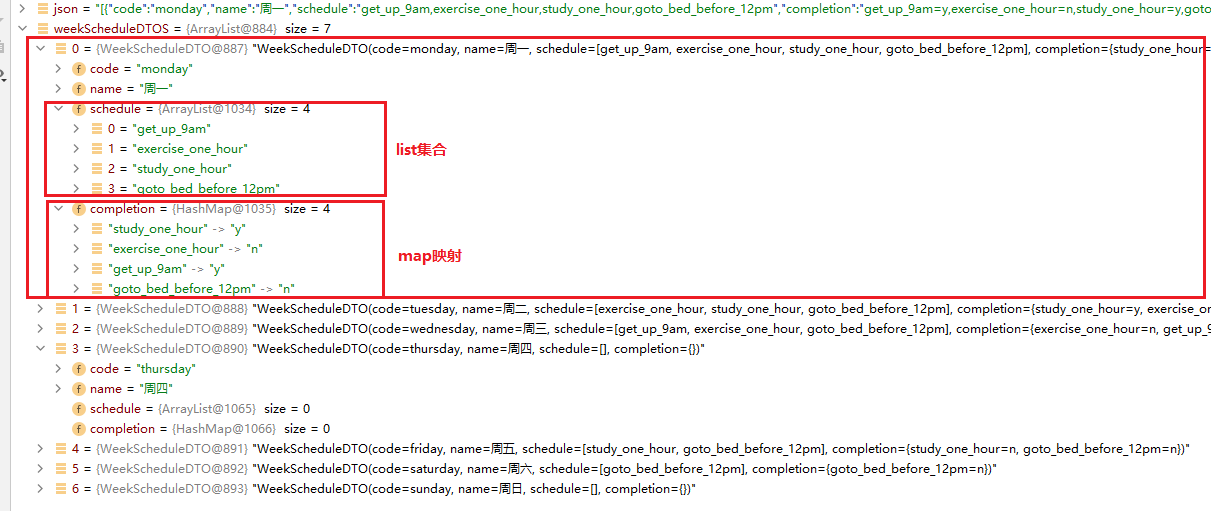
这一个需求应该算常规复杂的情况,如果还有更为复杂的情况,转换形式也可以依葫芦画瓢整出来~
如果你细心的话,你就会发现我的代码有一处做出了冗余的操作,它位于SelfJSONUtils#toBatchItemDTO的转换为List那里的Stream流处:
weekScheduleDTO.setSchedule(Arrays.stream(schedule).filter(e -> StringUtils.isNoneBlank(e)).collect(Collectors.toList()));fastjson转换的时候,默认会把空的数据剔除掉,根据这一特性,我直接使用下面代码就行了(没有filter):
weekScheduleDTO.setSchedule(Arrays.stream(schedule).collect(Collectors.toList()));其实不加 filter(e -> StringUtils.isNoneBlank(e)) 是不行的。在代码中的map转换的时候,确实是把空的数据剔除掉了,转map出来以后确实size=0(如下图),在转List的时候,不过来空数据的话,该数据就会以""的形式存储在List中(这个坑我半天!!)
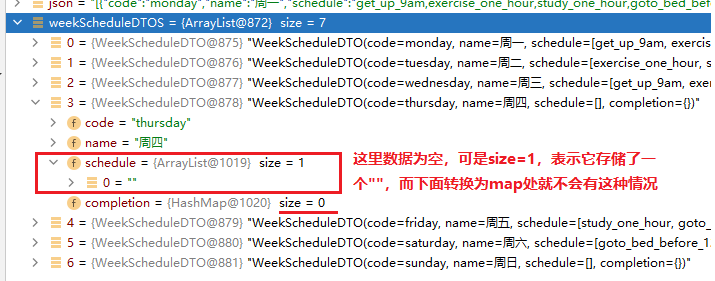
除了上面使用 StringUtils#isNoneBlank 除空以外,还可以使用 e.hashCode()!=0 来解决,当然这是在没有StringUtils可用的情况下使用的策略
weekScheduleDTO.setSchedule(Arrays.stream(schedule).filter(e -> e.hashCode()!=0).collect(Collectors.toList()));简单分析一下出现这种情况产生的原因:
fastjosn解析josn为POJO的时候,先会创建一个pojo空对象,之后通过实体类的set方法对参数进行赋值,由于fastjson解析时默认把为null的数据剔除掉了,所以fastjson没保留下的字段就不会进行set操作,而pojo类这个字段自始至终都没有被谁赋值,作为String类型就默认为"",而在转换为List的时候,就会直接存储进一个""(List
这一个问题也许并不大,但是当业务需求就是因为这一个小点不能按照我们的思路去执行的时候,就很难找出这一个微小的问题。
另外,JSON数据反序列化为Java对象时,必须要有默认无参的构造函数,否则会报如下异常
com.alibaba.fastjson.JSONException: default constructor not found.Fastjson被公认为Java与json交互最快的库!简单看了一下Fastjson的api设计,对于序列化和发序列化json数据很多的可选操作,比如 @JSONField 、BeanToArray、ContextValueFilter 配置 JSON 转换、NameFilter 和 SerializeConfig等等。具体使用查阅官方API即可。
参考:
JSON一文通透,Java、JS与JSON互转
Fastjson 简明教程 | 菜鸟教程 (runoob.com)