@
提示:本文仅供学习交流,请勿用于非法活动!
本文大概内容:
例如:随着ElementUI前后端交互的技术的更新,用户的的体验越来越好。本文主要针对用户在保持原页面结构,再添加另一个页面,并可以按需要调整两个页面之间的比例大小.
示例:如下图,我们在原来页面增删查改及基础上,选中某一行,点击该公司后,直接在该页面展示关联的所有企业客户的页面,并且实现查询、批量删除、分页等功能。(注意:弹框也可以实现,但是我们希望可以少去打开及关闭弹框的操作步骤,而且同一页面显示更直接、方便)
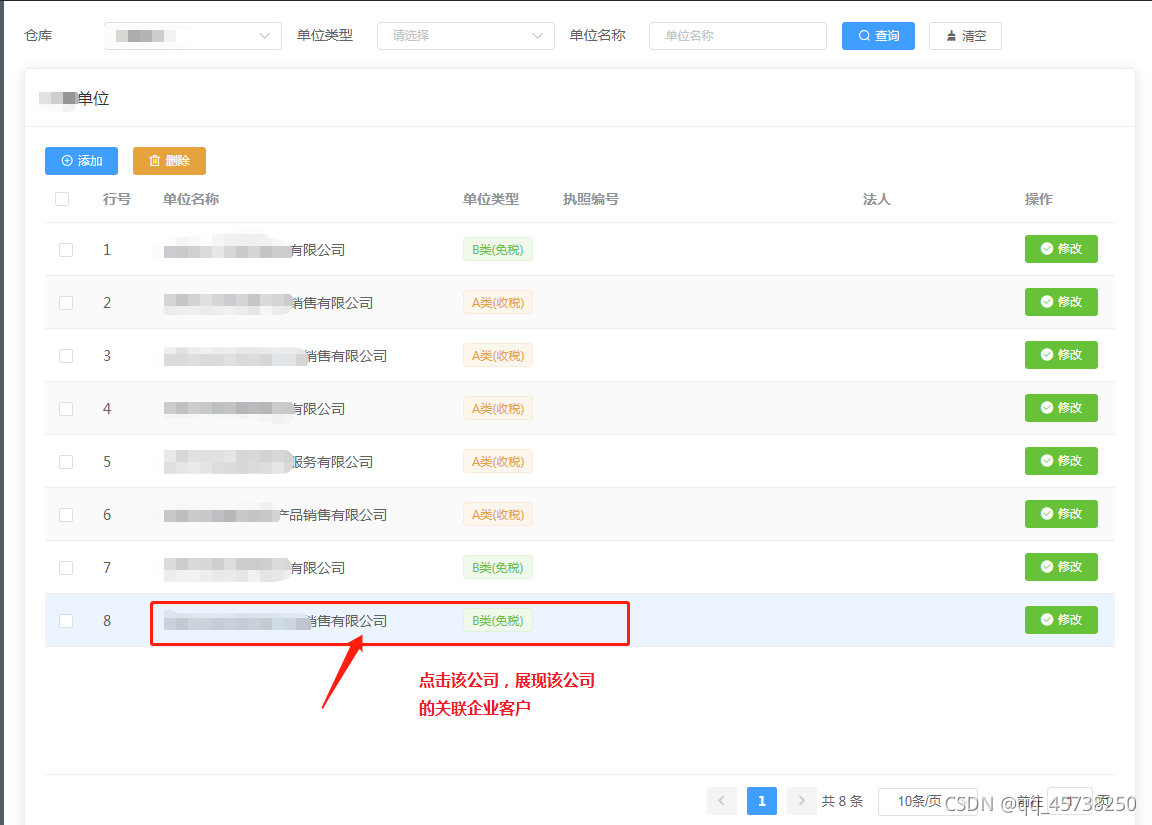
如:要展示的页面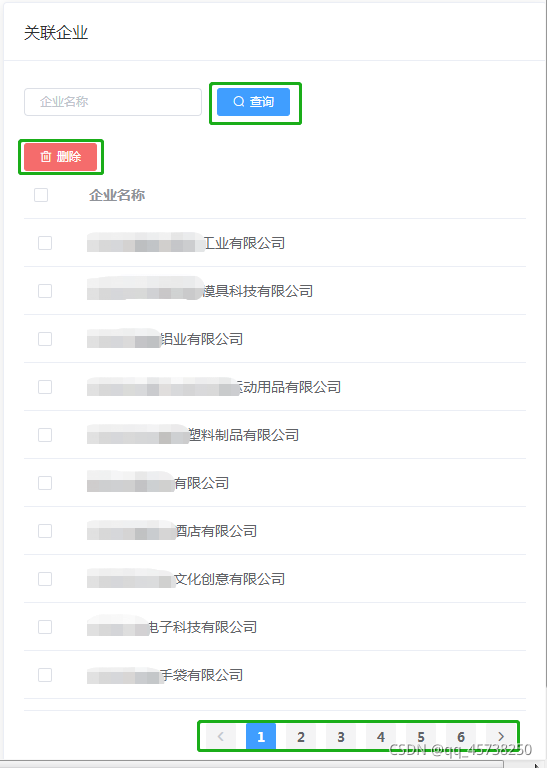
第1页面的代码如下(示例):
// 前面搜索框的代码省略....<el-table stripe ref="table" :data="tableData" :default-sort="defaultSort" height="600px" row-key="id" highlight-current-row @row-click="companyClick" @selection-change="handleSelection" @sort-change="handleSort"> <el-table-column prop="id" label="ID" type="selection"></el-table-column> <el-table-column type="index" width="60px" label="行号"></el-table-column> <el-table-column prop="name" label="单位名称" width="300"></el-table-column> <el-table-column prop="type" label="单位类型" width="100"> <template slot-scope="scope"> <el-tag v-if="scope.row.type === 'A'" size="small" type="warning">A类(收税)</el-tag> <el-tag v-else size="small" type="success">B类(免税)</el-tag> </template> </el-table-column>// 中间省略若干.... <el-table-column fixed="right" label="操作" width="100"> <template slot-scope="scope"> <el-button size="mini" type="success" icon="icon iconfont icon-jihuopeizhi" @click="handleInvCo(scope.row)">修改 </el-button> </template> </el-table-column> </el-table> <el-pagination background highlight-current-row @size-change="handleSizeChange" @current-change="handleCurChange" :current-page="curPage" :page-size="pageSize" :page-sizes="pageSizes" :total="total" layout="prev, pager, next, total, sizes, jumper"> </el-pagination>第2页面的代码如下(示例):
<span slot="header">关联企业</span> <el-form ref="companySearchForm" :model="filterParams" :inline="true" > <el-form-item > <el-input v-model="filterParams.companyName" placeholder="企业名称" size="mini"></el-input> </el-form-item> <el-form-item> <el-button type="primary" icon="el-icon-search" @click="getPageCompany" size="mini">查询</el-button> </el-form-item> </el-form> <el-button type="danger" icon="el-icon-delete" @click="deleteAll" size="mini">删除</el-button> <el-table ref="table" :data="companyTableData" height="540px" @selection-change="handleSelection"> <el-table-column prop="companyid" label="companyid" type="selection" width="55"></el-table-column> <el-table-column prop="companyName" label="企业名称"></el-table-column> </el-table> <el-pagination background layout="prev, pager, next" :total="pageTotal" @current-change="currentChange" > </el-pagination> <el-row :gutter="24"> <el-col :span="16"> <el-card> <span slot="header">开票单位</span> <div> <el-row> <el-button size="mini" type="primary" icon="el-icon-circle-plus-outline" @click="addInvCo()">添加</el-button> <el-button type="warning" icon="el-icon-delete" size="mini" @click="handleDeletes()">删除</el-button> </el-row> <el-table stripe ref="table" :data="tableData" :default-sort="defaultSort" height="600px" row-key="id" highlight-current-row @row-click="companyClick" @selection-change="handleSelection" @sort-change="handleSort"> <el-table-column prop="id" label="ID" type="selection"></el-table-column> <el-table-column type="index" width="60px" label="行号"></el-table-column> <el-table-column prop="name" label="单位名称" width="300"></el-table-column> <el-table-column prop="type" label="单位类型" width="100"> <template slot-scope="scope"> <el-tag v-if="scope.row.type === 'A'" size="small" type="warning">A类(收税)</el-tag> <el-tag v-else size="small" type="success">B类(免税)</el-tag> </template> </el-table-column> <el-table-column prop="license" label="执照编号" width="300"></el-table-column> <el-table-column prop="legalPerson" label="法人" width="150"></el-table-column> <el-table-column fixed="right" label="操作" width="100"> <template slot-scope="scope"> <el-button size="mini" type="success" icon="icon iconfont icon-jihuopeizhi" @click="handleInvCo(scope.row)">修改 </el-button> </template> </el-table-column> </el-table> <el-row > <el-pagination background highlight-current-row @size-change="handleSizeChange" @current-change="handleCurChange" :current-page="curPage" :page-size="pageSize" :page-sizes="pageSizes" :total="total" layout="prev, pager, next, total, sizes, jumper"> </el-pagination> </el-row> </div> </el-card> </el-col> <el-col :span="8"> <el-card> <span slot="header">关联企业</span> <div> <el-form ref="companySearchForm" :model="filterParams" :inline="true" > <el-form-item > <el-input v-model="filterParams.companyName" placeholder="企业名称" size="mini"></el-input> </el-form-item> <el-form-item> <el-button type="primary" icon="el-icon-search" @click="getPageCompany" size="mini">查询</el-button> </el-form-item> </el-form> <el-row> <el-button type="danger" icon="el-icon-delete" @click="deleteAll" size="mini">删除</el-button> </el-row> <el-table ref="table" :data="companyTableData" height="540px" @selection-change="handleSelection"> <el-table-column prop="companyid" label="companyid" type="selection" width="55"></el-table-column> <el-table-column prop="companyName" label="企业名称"></el-table-column> </el-table> <el-row > <el-pagination background layout="prev, pager, next" :total="pageTotal" @current-change="currentChange" > </el-pagination> </el-row> </div> </el-card> </el-col> </el-row>上述方法代码如下:
// 点击开票单位获取相关公司客户 companyClick: function(row){ var _this = this; _this.filterParams.current = 1; _this.filterParams.invoiceCompanyid = row.id; _this.getPageCompany(); }, // 第2页面根据不同页面查询结果 currentChange: function (current) { this.filterParams.current = current; this.getPageCompany(); }, // 第2页面查询公司客户的方法(上述点击查询方法也是这个) getPageCompany: function(){ var _this = this; _this.doGetData(_this.companyBindListUrl,_this.filterParams,function (r) { if(r.success){ _this.companyTableData = r.data; _this.pageTotal = r.total; } }) }, 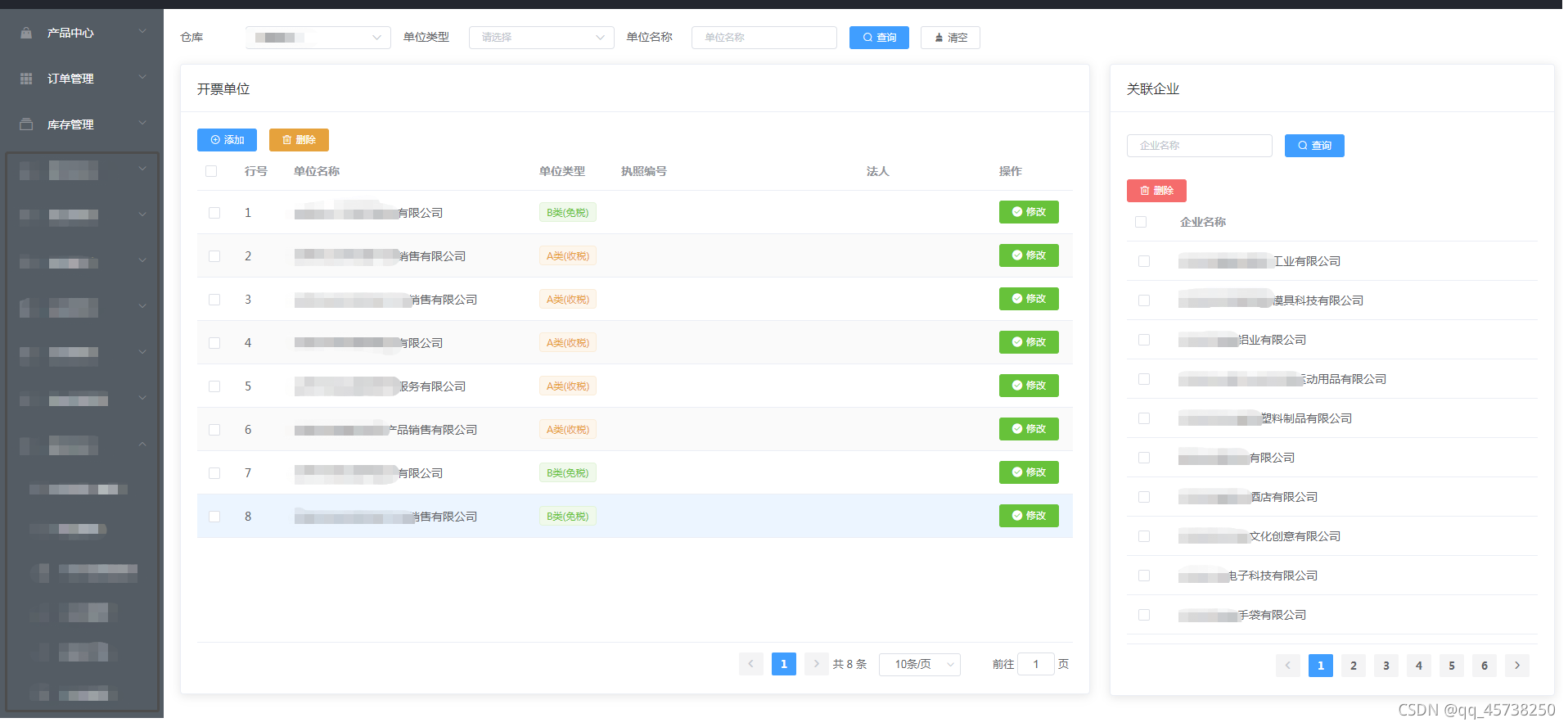
随心所往,看见未来。Follow your heart,see night!
欢迎点赞、关注、留言,一起学习、交流!